
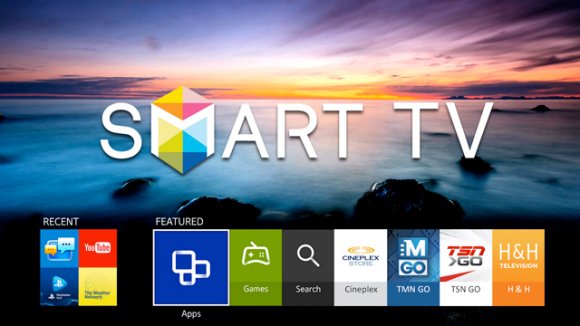
A Smart TV is a television set with built-in internet and interactive features. Samsung Smart TV is one of the most popular TV products. The Samsung Smart TV has a number of useful apps to use and today in this post I have listed the Smart TV apps from Samsung’s Smart Hub that are available in the US and UK.
The Samsung Smart Hub hosts a large collection of apps ranging from entertainment, sports, streaming, kids, music, gaming, and much more. Samsung does not publish one master list, and what you see depends on your country, TV model year, and software version. Few apps may not be available for older TV series while few may not be available for newer series.
This list was updated in November 2026, and it only includes apps that the services themselves list as supported on Samsung TVs.
Most Popular Samsung Smart TV Apps
YouTube
YouTube for Samsung TV is one of the most popular TV apps. The app interface is simple and it lets you sign in with your Google Account to sync your YouTube data.
Netflix
Netflix allows you to stream videos from the web directly to our TV screen without an external gadget.
The Netflix app is usually pre-installed or can be downloaded in almost all Samsung Smart TVs. In this case, all you need is to search for Netflix from the installed app list, sign in and start enjoying.
Amazon Prime Video
Amazon Prime Video is an Internet video-on-demand service that is developed, owned, and operated by Amazon. Amazon offers some great exclusive content.
Prime Video is available in countries like the USA, UK, India, and many other countries.
Disney Plus
Disney+ is a subscription-based video-on-demand service that is dubbed as the biggest rival to Netflix. You get some of the hard-to-find movies on Disney Plus like the Star Wars series and the very popular Marvel movies.
Disney+ supports Samsung Smart TVs (most 2016 models or newer) that use the Tizen operating system. If it is not pre-installed, you can download it from the Samsung App Store.
Hulu
Hulu is another popular American subscription video-on-demand service offering some of the most popular and exclusive content to its users.
Disney has announced that the standalone Hulu app is being folded into the Disney+ app during 2026. If the Hulu app disappears from your Smart Hub, open Disney+ instead. I could not confirm the exact date the Samsung app is switched off.
HBO Max
HBO Max is the streaming service for HBO programs like Game of Thrones, and it replaced the older HBO Now and HBO Go apps. HBO Max supports Samsung TVs from 2016 models and later.
To install it, sign in to your Samsung account on the TV, open Apps, search for HBO Max, and choose Install.
YouTube TV
YT TV is an over-the-top content (OTT) streaming subscription service available in the United States. It includes ABC, CBS, Fox, NBC, and other networks, and the channel lineup changes from time to time.
YouTube TV supports Samsung smart TVs (2017 and newer models only).
Sling
The Sling TV is a pretty decent Live TV Streaming service available in the US. The ease of customization, number of channels, and flexible plans make it a favorable platform for all the supported devices.
Sling lists Samsung smart TVs as supported. Plans and prices change often, so check Sling’s site for the current ones.
Spotify
Are you a music lover? If yes then Spotify can turn your TV into a small music theatre. You can stream songs, playlists, and podcasts, and sing along with on-screen lyrics where available.
With Spotify Premium you can also start a Jam and let friends queue music from their phones, and you can control playback with the TV remote or Spotify Connect.
Plex
One of the most popular media players to access the content remotely over the server. You can stream any media stored on your PC or Phone on the Samsung TV with the Plex Media Center. You can even access the movies and content from authorized distributors.
The Plex app is available on 2016 and newer Tizen-based Samsung sets.
Pluto TV
PlutoTV is a TV platform with hundreds of live channels and thousands of movies and shows which can be watched for free. Pluto TV generates revenue from video advertisements between programming. Apart from Live TV they also have On-Demand Movies which you can select right away.
Pluto TV works on Samsung Smart TVs from 2016 models running Tizen.
Fandango at Home (Vudu)
Fandango at Home is a video-on-demand service that lets you rent or buy movies and TV shows and pay as you go. Vudu was renamed Fandango at Home in February 2024, so search for the new name in your Smart Hub.
Your existing Vudu library and login carry over to the renamed app.
Samsung Gaming Hub
Samsung Gaming Hub replaces the old PlayStation Now app that used to be listed here. PlayStation Now was merged into PlayStation Plus in 2022, and the cloud streaming that came out of that is not a Samsung TV app.
Gaming Hub is available on 2022 and newer Samsung Smart TVs and lets you play games from cloud services like Xbox and NVIDIA GeForce NOW with a Bluetooth or USB controller. Most of those services need their own subscription, and the full list is in the gaming table below.
Web Browser
Many Samsung Smart TVs include a built-in web browser. You can search for your query and visit websites right on the TV.
BBC iPlayer (UK)
iPlayer is the internet streaming and VOD service by BBC. You can watch live shows or catch-up content with the iPlayer on your Samsung TV. It is quite popular and has area restrictions as it is only available to the UK. It has a large collection of videos from the BBC network.
Samsung says the iPlayer app comes pre-installed on all current Samsung TVs. The BBC can stop supporting a TV’s older Smart platform, so very old models may lose it.
Click on Smart Hub Button → Apps → Search for the app → Download the App & open it
To check your favorite Apps, you can press Ctrl+F and type the App name in the search box.
Read about: How to quickly search and install Smart TV App?
Note: Apps availability may vary subject to country and TV series, few many apps listed below may not be available as it all depends on your region and TV Model.
More Video and Live TV Apps for Samsung Smart TV (US)
Below is the tabular data of the other video streaming and live TV apps available on Samsung Smart TV in the US, with the TV years the services list.
| # | App | What it is | Samsung TV support |
| 1 | Peacock | NBCUniversal streaming with NBC and Bravo shows, movies, and live sports | Models from 2017 or later |
| 2 | Paramount+ | Subscription streaming for TV shows, movies, and live content | Tizen models from 2017 and newer |
| 3 | Apple TV | Apple’s app for streaming, buying, and renting shows and movies | Select models. If it does not appear in Apps, it is not compatible with your TV |
| 4 | Fubo | Sports-first live TV streaming | 2017 and newer models |
| 5 | Philo | Live TV streaming service | Native app for 2018 and newer models |
| 6 | Tubi | Free ad-supported movies and TV shows, no subscription needed | Samsung Smart TVs (install from Smart Hub, then Apps) |
| 7 | Samsung TV Plus | Samsung’s own free service with live channels and on-demand shows and movies | Built into Samsung Smart TVs |
| 8 | ESPN | Live sports, highlights, and ESPN originals (sign-in or subscription needed for most live content) | Samsung Tizen smart TVs |
| 9 | DAZN | Live and on-demand sports, mainly boxing, soccer, and MMA | Samsung Tizen TVs from 2015 |
| 10 | Crunchyroll | Anime streaming | Models from 2017 (Tizen 3.0 and newer) |
| 11 | Starz | Subscription streaming for Starz originals and movies | Select 2018 and newer models with Smart Hub |
| 12 | The Roku Channel | Free movies, TV shows, and live channels | Compatible Samsung Smart TVs (premium subscriptions are not offered on Samsung) |
| 13 | AMC+ | Subscription streaming for AMC, BBC America, Shudder, and Sundance Now | Samsung Smart TVs from 2018 or newer |
UK Apps for Samsung Smart TV
These are the main UK catch-up apps besides BBC iPlayer above. Availability can differ by model, so check your Smart Hub.
| # | App | What it is | Samsung TV support |
| 1 | ITVX | ITV’s streaming and catch-up app | Samsung Smart TVs from 2017 onwards (2016 models only offer ITV’s on-demand service) |
| 2 | My5 | Channel 5’s catch-up app | Available on Samsung TVs, but no longer supported on 2012 models |
| 3 | Channel 4 | Channel 4’s streaming and catch-up app | Samsung Tizen models from mid-2015 onwards |
| 4 | UKTV Play | Catch-up for Dave, Drama, Really, and Yesterday | Launched on Samsung TVs sold from 2015 onwards, so check your Smart Hub |
| 5 | BritBox UK | Subscription service for British TV, from the BBC and ITV | Tizen models from 2016 onwards, per its UK launch details |
| 6 | NOW | Sky’s streaming service for entertainment, movies, and sport | 2016 models and later with Tizen 2.4 or higher (not supported on the Serif range) |
| 7 | STV Player | STV’s catch-up and live streaming app | Tizen 2.4 or above (2015 and early 2016 models are no longer supported) |
| 8 | TNT Sports (via HBO Max) | Live Premier League, Champions League, and other sport, streamed in the HBO Max app | Samsung is a listed platform for HBO Max in the UK, so check Smart Hub for your model |
Music Apps for Samsung Smart TV
Spotify is listed above. These are the other music apps.
| # | App | Region | Samsung TV support |
| 1 | Apple Music | US, UK | Select models from 2018. You need an Apple Music subscription |
| 2 | Pandora | US | Listed by Samsung alongside Spotify as a music streaming app |
Cloud Gaming Apps on Samsung Gaming Hub
These apps live inside Gaming Hub, which is available on 2022 and newer Samsung Smart TVs. Most need their own subscription, and you need a compatible controller.
| # | App | # | App |
| 1 | Xbox Cloud Gaming | 5 | Antstream Arcade |
| 2 | NVIDIA GeForce NOW | 6 | Blacknut |
| 3 | Amazon Luna | 7 | Boosteroid |
| 4 | Utomik |
Note & Conclusion: The post above tries to give a compelling list of the apps available on the Samsung Smart TV in the US and UK. The Apps availability may be subjected to the region restriction and the year of your TV.
I hope the post was helpful. I will continuously update the data so I request you to follow us and subscribe to us and do comment below for any assistance or support.
Meanwhile, you can also check out the latest beginner manual on setting up Samsung Smart TV today! This guide also contains the video demos and feature details that weren’t aware of.

can I get mchart on my hisencesmart tv
Thanks for the information.
If the App isn’t available in my SmarTv is it possible to install it using SDK? If positive where can I download the .TPK file?
SDK process is quite technical. And there is not way you can install 3rd part .TPK directly
Just purchased a smart Samsung tv, would like to have acorn channel, how do I acquire it?
I had my old home movies (1990–1995) digitized and now need to figure out what form to have them put in so I can show them on my smart tv. How do you recommend ? I would appreciate some help with this as I have little knowledge about these things .
Hi Doris, If you have had your movies put on an external hard drive then plug that into the USB Socket at the back of TV, Then press your Home button on remote scroll to the left till you see Source then press up arrow and scroll across till you find your hard drive, press Enter. Enjoy your movies 🙂
big demand from all user of Telia Play, need the Telia Play app, for Norway. Then we can rule out the decoder from Telia tv.
There are so much pre-installed apps, which I don’t want. How can I delete it?
Long Press the OK button on remote to get more options and delete the app.
Recently started using Direct TV Stream but can’t download app on my Samsung Tv
how can i tell which amazon movies i am being charged for that i never watched
Can i install Apple TV+ on my Samsung smart tv? My cable provider (Xfinity) dies not offer it
How do I eliminate an app, like the weather app?
It constantly updates. Would like to be rid of it.
Can I get the BVN app, now that they no longer show it in South Africa. I will be installing an VPN router
How do I get the Paramount plus app on my Samsung TV
Makes no sense that app availability is so limited. I should be able to download any app that I can download to my phone. I can’t get Dish Anywhere. I can’t get major news channels (CNN, Fox News, etc). I can’t get WPSN. I can’t get Daily Wire. Etc etc etc.
Paramount app will not load , sometimes no apps will load
Why is Blaze tv not available?
Looks like Apps availability is subject to political and ideological preferences: Newsmax App briefly appeared on Samsung (but never worked), then disappeared for good.
Is My Family Cinema App available for Samsung Smart TV?
I just bought paramount prime and don’t have an app for it. How can I watch it?
Why is there no RUMBLE App, I hope to see that soon!
Rumble is available now on my Samsung QLED TV. It works very well. I have to use my phone app to unsubscribe and change channel notifications though.
When is Global TV and CBC Gem apps going to be available for download? Still not a part of my Samsung apps and I really miss them.
I’m trying to find The Chosen app or Angel Studio app. Samsung doesn’t find it anywhere.???
You will need to download the app on your iPhone and then airplay it on the tv
TMDB, Tv Movie Data Base looks like a good app to add
Is there anyway to add FoxNews and ESPN to the Samsung TV App?
STILL WAITING for update news on a refreshed Curzon Home Cinema app for Samsung smart tv. I really miss the convenience of having this service. Previous app was withdrawn in April 2021, and a new app promised “soon”. Still nothing in August 2023. Very disappointing
We got a samsung smart TV, has RUKU, How do we get a channel for football.
Just why cant i load the apps i want on what is MY tv and as cost me a fair bit of cash
I have a Samsung 2014 Model# UN32H5203AF Smart TV. I enjoy watching American classic TV programs.Which TV streaming apps that are available for this TV are glood for this type of TV programs?
Can I stream to the tv from my laptop or tablet without having to use Google Cast or Fire tv.
The app availability is so limited. I’m glad I bought an Android TV for my bedroom!
Hello,
Why I didn’t find ATP WTA TV to load streaming on my SAMSUNG TV?
Thank by advance for your answer