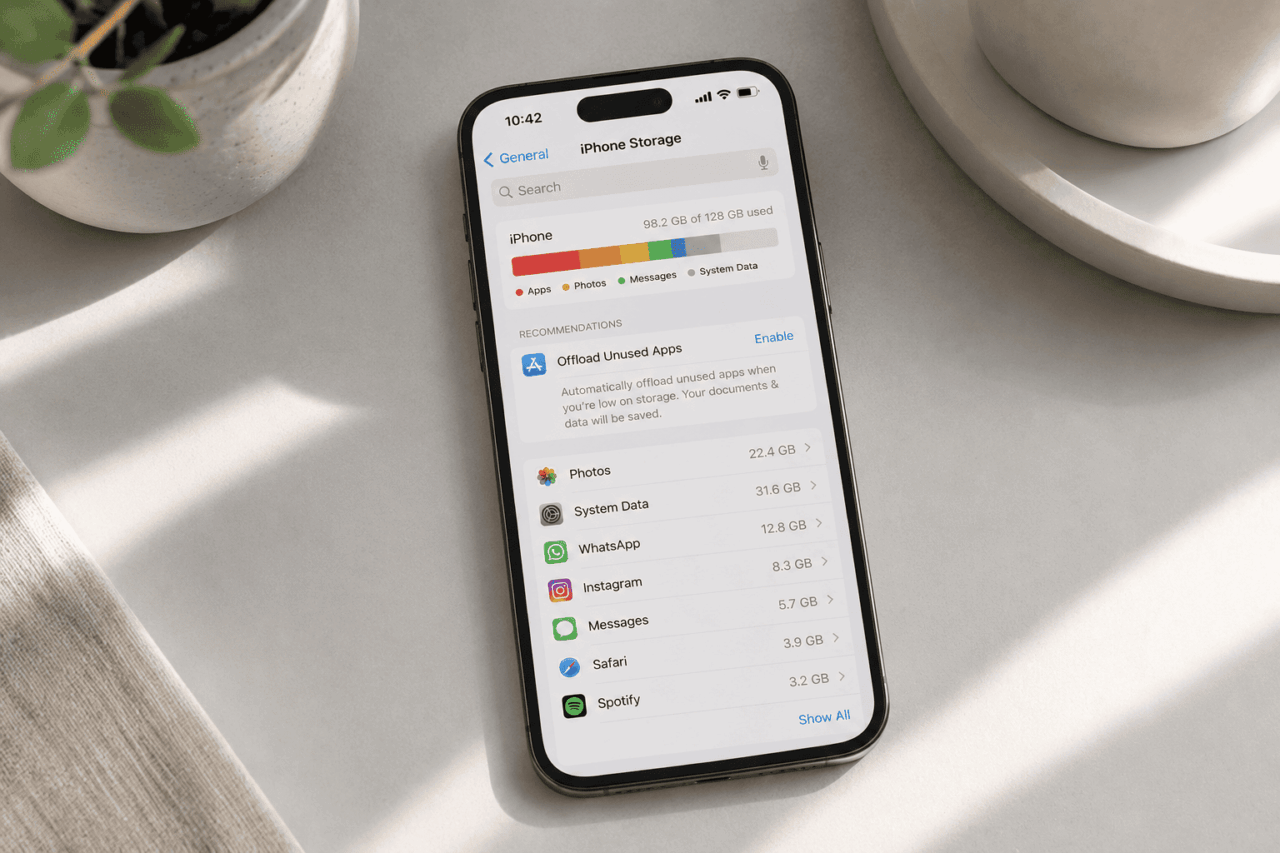
You glance at iPhone Storage expecting Photos to be the villain. Somehow it is not. A category called System Data is sitting on 30GB and you can barely remember installing anything new. The bar graph fills like quiet rent you never agreed to pay.
The frustrating part is that iOS rarely explains what is using the space. Storage fills slowly through invisible buildup. App caches, streaming leftovers, Safari data, offline downloads, logs, and update files. None of it announces itself.
Most people only notice when the camera refuses to take a photo, or an iOS update will not install. WhatsApp crashes mid send. Apps reload from scratch. The phone runs a little warm.
TL;DR: Your iPhone storage fills up because iOS quietly caches almost everything you touch. Apps preload videos, Safari hoards web data, Messages hangs onto years of media, and System Data absorbs whatever is left. Apple Intelligence adds another 7GB on supported phones. Most of it is recoverable but iOS will not clean up on its own until storage is genuinely critical.
Your iPhone storage is constantly being eaten by app caches
Open Instagram. Scroll for ten seconds. Close it.
You just downloaded a few hundred megabytes of video previews you will never watch again. Multiply that across TikTok, YouTube, Spotify, Reddit, and Maps and the math gets uncomfortable.
This is by design. Apple built iOS around the feeling of instant. A warm cache means a feed loads before you finish swiping up. The trade is storage.
The bigger the cache, the smoother the app, and the harder it becomes to claw that space back without deleting the app outright. I noticed this on my own phone after a holiday. Instagram had quietly grown to nine gigabytes, and I had not posted anything in a month.
System Data is basically iOS’s hidden junk drawer
System Data is the catch-all bucket. Logs, Siri voices, browser caches, downloaded update files, temporary streaming buffers, and anything iOS cannot neatly attribute to a specific app.
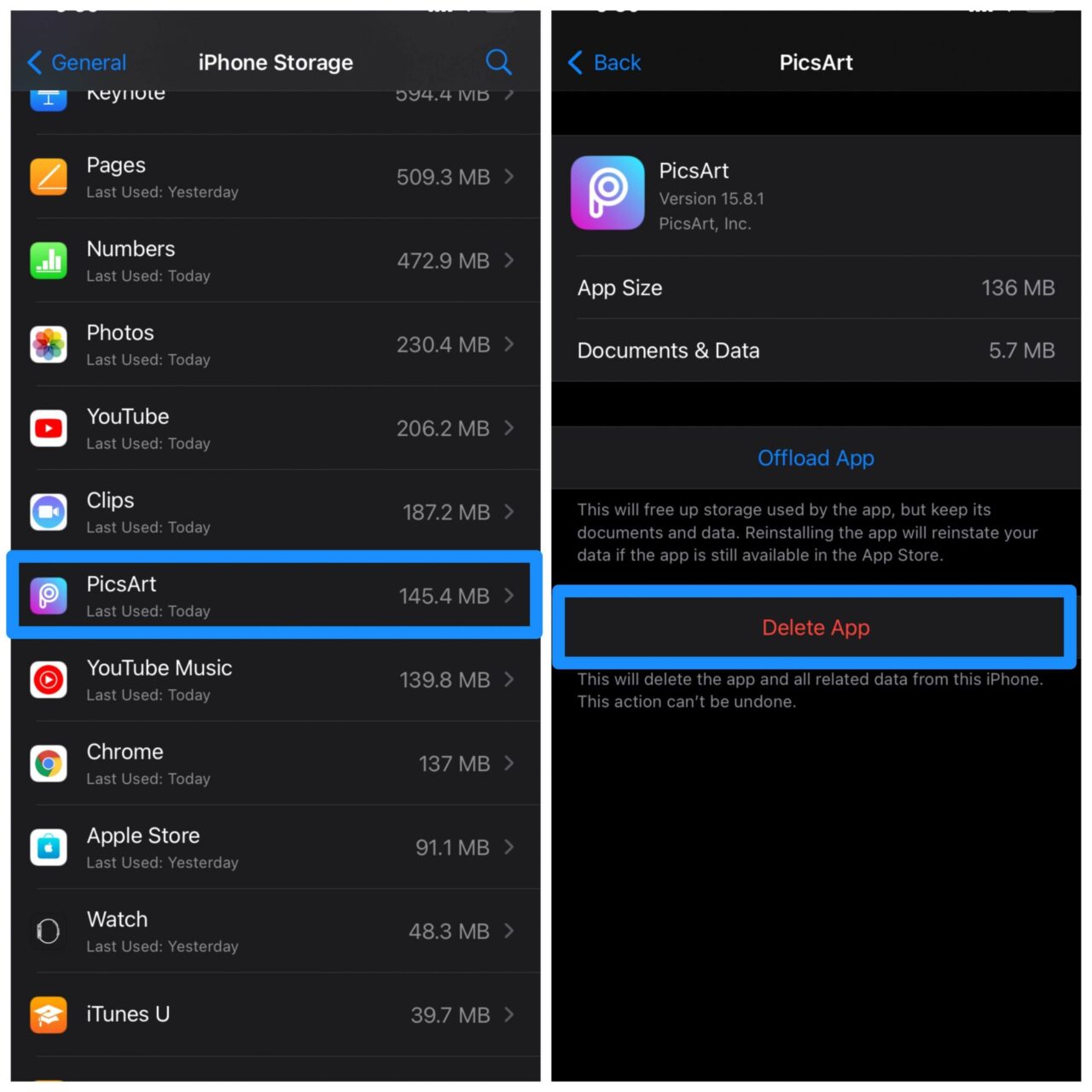
Apple’s own guidance is to check what is using space by going to Settings, General, then iPhone Storage. The official Apple iPhone User Guide walks through reviewing the bar graph and the recommendations iOS surfaces, but it does not include a way to clear System Data directly.
The frustrating thing is its lack of predictability. You delete a few apps, free up four gigabytes, and watch System Data swell to fill the gap overnight.
There is no setting to clear it. The closest workarounds involve restarting the phone, clearing Safari data, and using storage cleanup tricks that do not require uninstalling everything.
On iOS 26 in particular, users have widely reported System Data climbing past half their device storage with no clear cause, with reports surfacing across Apple’s official discussion forums on threads like this iOS 26 storage discussion on Apple Community.
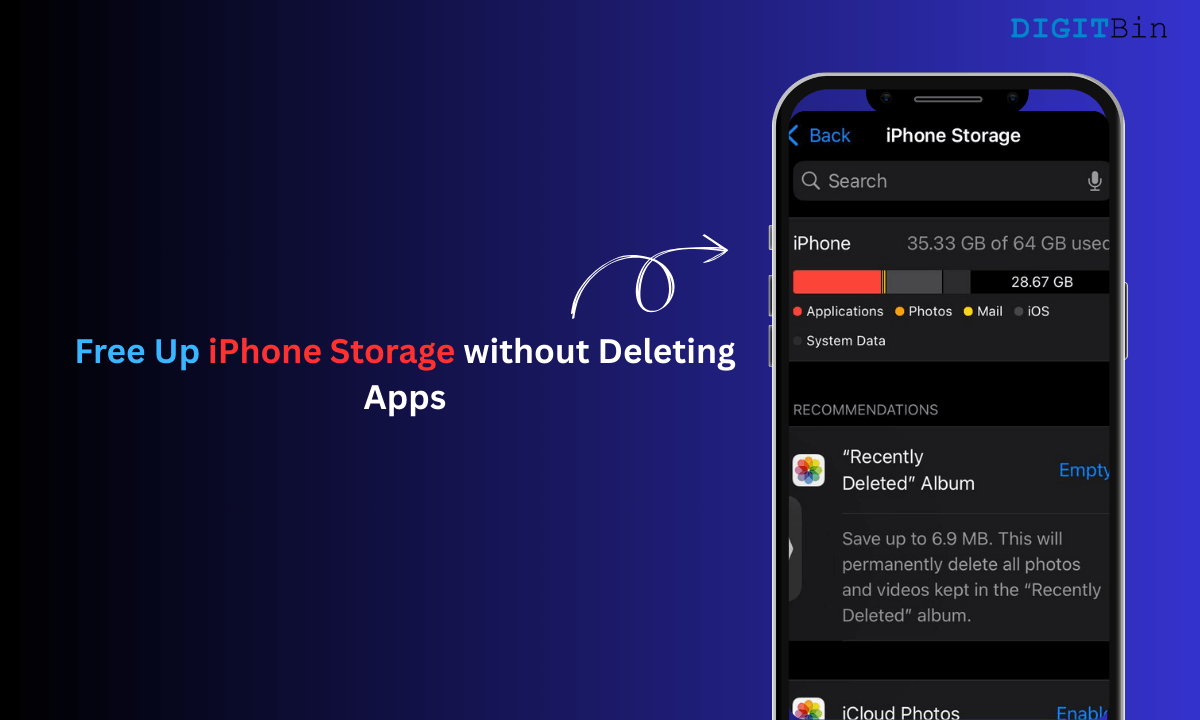
Social and messaging apps quietly become storage monsters
Video heavy apps are the worst offenders. TikTok keeps watched clips on hand, Snapchat saves media previews, and Reddit caches images aggressively.
None of this is malicious. It is just the same instant feel scaled up to apps you open thirty times a day.
WhatsApp deserves a paragraph of its own. Family groups with auto download enabled silently pull hundreds of megabytes a week.
Voice notes pile up. Forwarded videos sit there forever. After a year, the app can comfortably cross 15GB without anyone noticing. There is a way to clear app data on iPhone, but it usually means deleting and reinstalling.
I went six months without checking. WhatsApp had quietly become the second largest item on my phone, behind Photos and ahead of every other app combined. Most of it was videos from a single family group I almost never opened.
Apple Intelligence is now eating gigabytes you may not be using
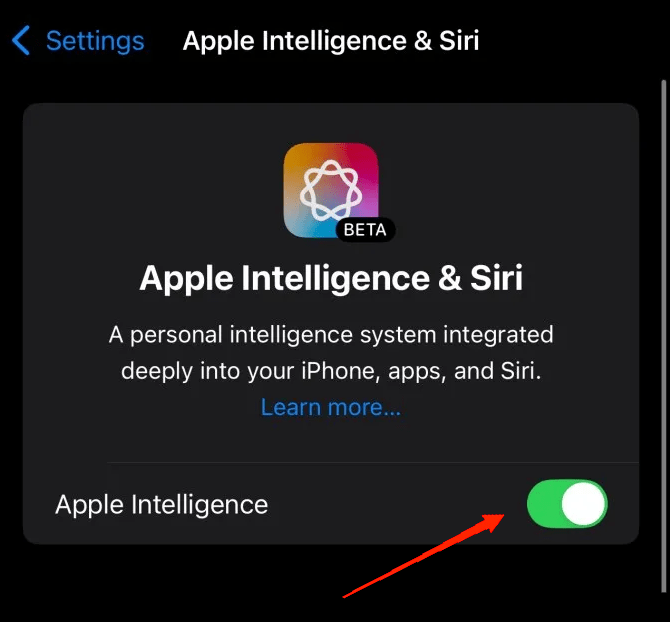
If you have an iPhone 15 Pro, iPhone 15 Pro Max, or any iPhone 16 or 17 model, Apple Intelligence may already be enabled. Per Apple’s own iOS and iPadOS 18.3 Release Notes, the feature has been switched on automatically during onboarding since iOS 18.3.
The on device models behind Writing Tools, Genmoji, and the redesigned Siri all live locally on the phone. They run without sending your prompts to a server, which is the privacy upside, but it means the model weights take up space whether you ask Siri anything or not.
Apple’s official How to get Apple Intelligence support page lists 7GB of on device storage as the current requirement, alongside the supported chip and language conditions.
The same page notes the requirement will increase as more on device features roll out. The footnote has been there since launch, mostly ignored.
If you almost never use the AI features, you can reclaim the space by going to Settings, Apple Intelligence and Siri, and toggling Apple Intelligence off.
I turned it off for a week to see what I would miss. Writing Tools mostly. Genmoji not at all. The phone felt the same.
Photos and videos fill space faster than your gut tells you
Modern iPhones produce surprisingly large files. A minute of 4K60 footage runs around 400MB. ProRAW images are 25 to 50MB each. Cinematic mode video, Live Photos, burst shots, and slow motion all compound quietly.
One wedding weekend. One concert. A trip with friends. Forty gigabytes can disappear in a single weekend, and you only notice when you try to install something else. I always think I am careful with video. Then I check and find three minutes of accidental floor footage from a concert because the record button stayed pressed in my pocket. That alone was 1.2GB.
Even when you delete photos, the storage does not free up immediately. Apple’s Apple Support documentation confirms that deleted photos and videos sit in the Recently Deleted album for 30 days before being permanently removed. Until you empty that album, the space is still gone.
Major iOS updates need extra room you might not have
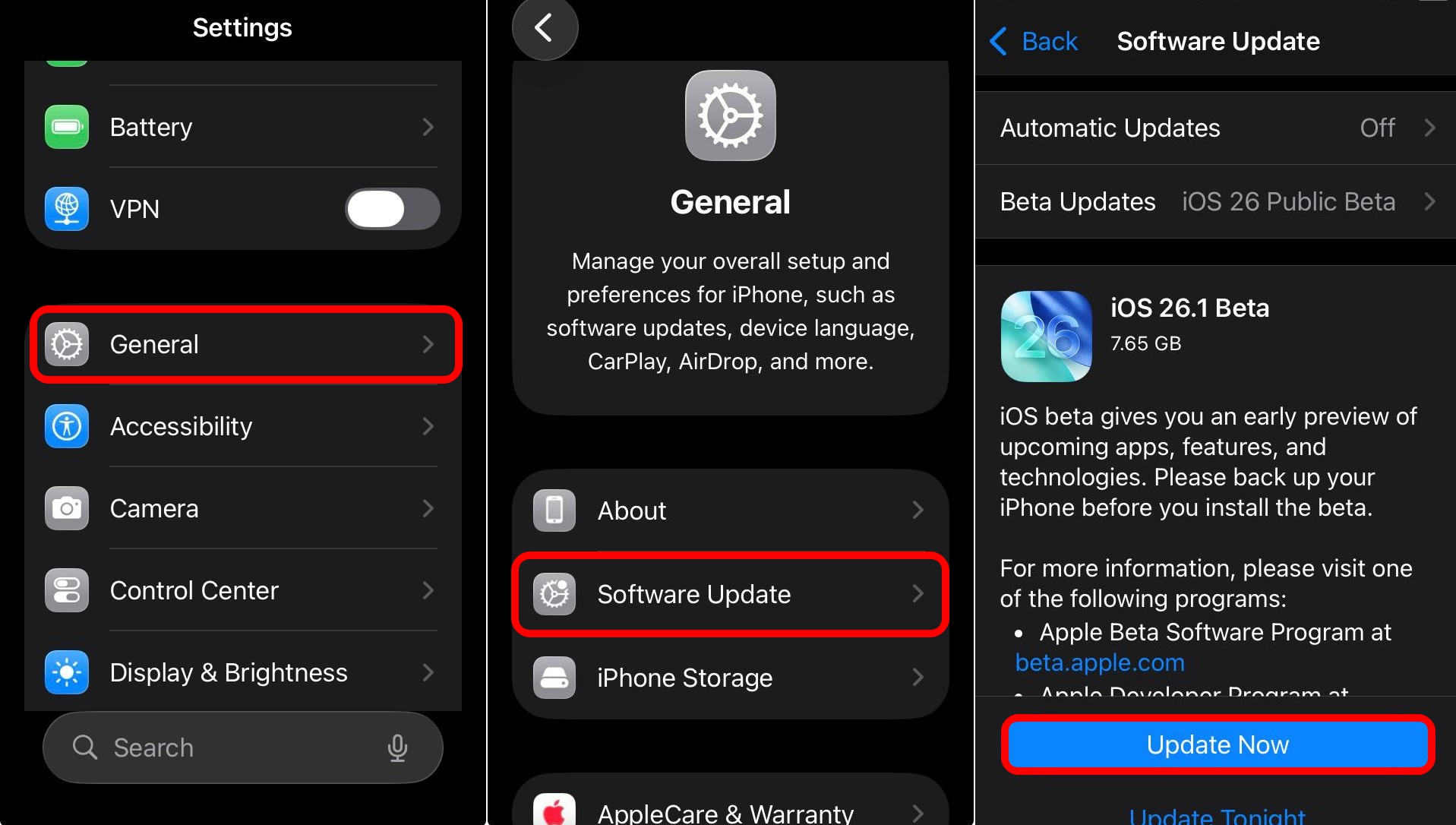
iOS updates are particularly cruel about storage. Even if the update file itself is, say, 6GB, iOS often asks for 10GB or more of free space. It needs scratch room to unpack and verify everything before installation finishes.
Apple’s own If your iPhone or iPad won’t update support page acknowledges this directly. The recommended path is to enable Offload Unused Apps, manually delete apps you do not need, or update via a computer to bypass the on device space requirement entirely.
This is why people end up doing the dance. Delete a few apps just to install the update, then reinstall them an hour later once the dust settles.
Or worse, get stuck in a loop. The update will not download because storage is full. Storage stays full because the device cannot run cleanup routines that depend on the update.
iOS does try to reclaim app data automatically when space is needed, per Apple’s documentation, but it can take a day or more. Sometimes restarting the phone twice is what actually frees the space, which is not the kind of thing you want to discover at 11pm.
iOS prioritises performance over storage transparency
This is the part that explains everything else. Apple has chosen, deliberately, to keep cached data around longer than strictly necessary.
Apps relaunch where you left them. Safari tabs reopen instantly. Music keeps streaming. The cost is that free space slowly disappears in the background. iOS will free up space when storage gets critical. The problem is that critical means almost full.
By the time iOS starts cleaning up, the camera is already failing and you cannot install the update anyway. The system is calm about storage right up until it cannot afford to be.
Some storage problems are genuine bugs Apple has not fixed
The Apple Maps situation is the clearest current example. Axel Metz at TechRadar documented a case where Apple Maps had ballooned to 13.93GB on an iPhone 14 Plus and refused to release the space.
That happened even after offline maps were cleared and Documents and Data was deleted. Reddit threads and Apple Community posts have shown the same app climbing past 20GB on other phones.
The supposed fix is to go to Settings, Privacy and Security, Location Services, System Services, Significant Locations and Routes, and tap Clear History.
It works for some users. For others, only a full restore actually clears the phantom storage. If your Maps entry looks unreasonably large, that is the bug. You did not download a country.
Frequently Asked Questions
Why does my iPhone say storage is full when I have barely anything on it?
Because most of the storage is being used by things you cannot easily see. App caches, Safari data, Messages history, offline downloads, and System Data can quietly take up tens of gigabytes between them.
Can I delete System Data on iPhone directly?
No, there is no setting to clear System Data manually. The closest you can do is clear Safari history and website data, delete and reinstall heavy apps, restart the phone a few times, and as a last resort back up and restore the iPhone via Finder or iTunes. A clean restore is the only method that reliably brings System Data back down.
How much storage does Apple Intelligence take up on my iPhone?
Around 7GB at the moment on each supported device, per Apple’s official How to get Apple Intelligence support page. Apple has confirmed this number will rise as more on device AI features roll out. You can switch it off in Settings under Apple Intelligence and Siri to reclaim that space.
Why do photos I deleted still take up space on my iPhone?
Deleted photos and videos sit in the Recently Deleted album for 30 days before iOS permanently removes them. Until that window passes or you manually empty the album, the storage is still occupied.
Is 128GB enough storage for an iPhone in 2026?
It depends on how you use it. Heavy 4K video, large messaging histories, many apps, and Apple Intelligence will fill 128GB quickly. For lighter users with iCloud Photos optimisation enabled it is still workable, but most people upgrading today are choosing 256GB or higher to give themselves room.
One thing worth keeping in mind
iPhone storage is not really leaking. It is filling on purpose, with files iOS thinks you might want again.
The trade between speed and space is mostly invisible until it goes wrong, and then it goes wrong all at once. Most of what you see in System Data is reclaimable, just not on demand.
The honest answer is that the cleanup tools Apple gives users are still not great.
Until that changes, the best habit is to check iPhone Storage every few weeks, clear the apps you know are heavy, and keep iCloud Photos in optimise mode. Not glamorous, but it stops the panic from showing up the moment you try to record a video.