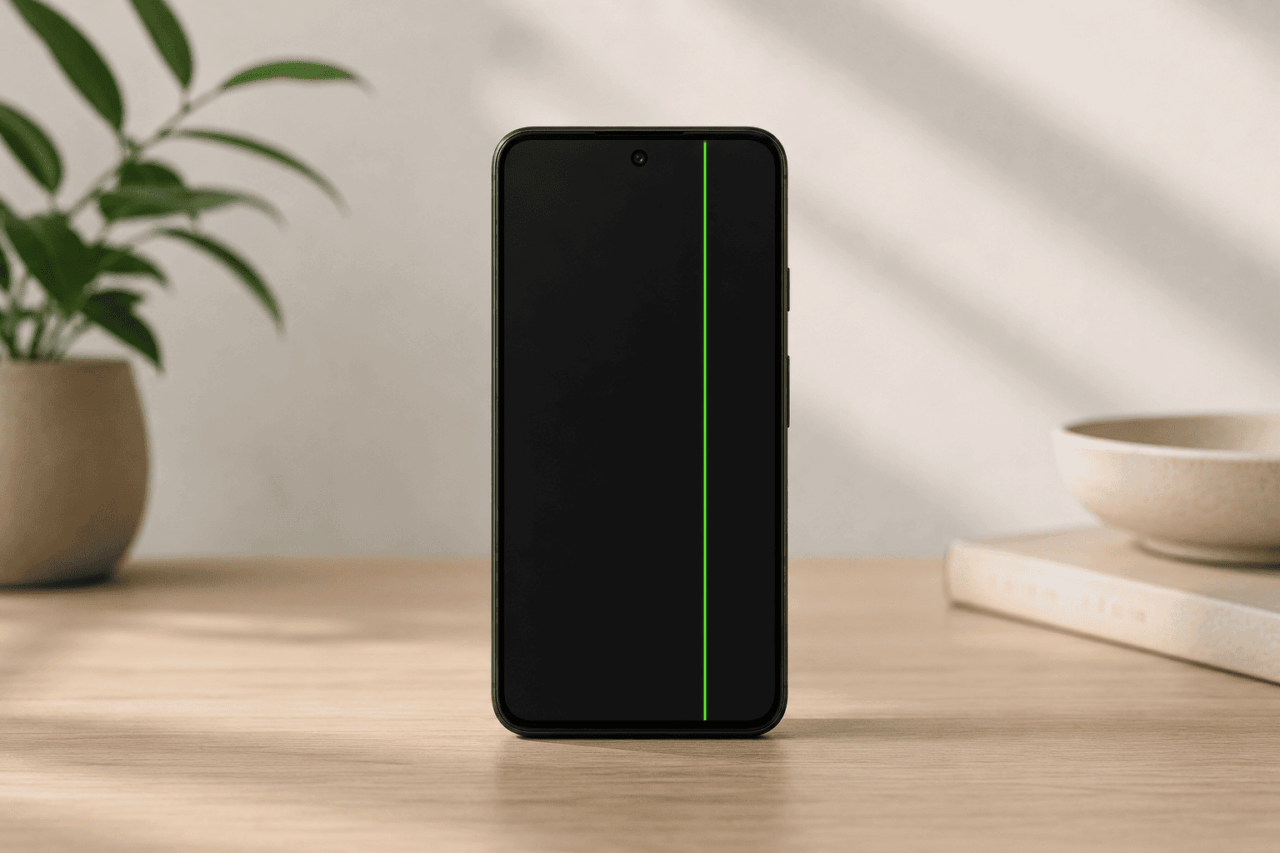
You pick up the phone to check a notification and there it is: a single bright green line running straight down the display, top to bottom, almost like the display cracked internally, even though the glass looks fine. The rest of the screen works.
Apps open, the camera works, texts come in. But that line does not move. It does not fade. It just sits there.
This is the Pixel green line problem, and it has been showing up across Pixel 7, 7 Pro, 8, and 8 Pro devices for the past couple of years. Sometimes it appears after a software update. Sometimes after a normal restart.
Sometimes people wake up and it is just there. For a phone that launched at $699, it is a genuinely deflating experience.
TL;DR: A persistent vertical green, pink, or white line on a Pixel display is a hardware failure affecting the OLED panel. It cannot be fixed through software. Google has an Extended Repair Program covering eligible Pixel 8 devices for three years from purchase. Other Pixel models are not covered by that program but may qualify under Google’s standard limited warranty depending on the purchase date.
Two different green problems, one confusing overlap
Before going further, it helps to separate two issues that often get discussed together. One is a software-triggered green tint or screen flash that appeared on Pixel 7, 7 Pro, 7a, 8, and 8 Pro devices after the Android 14 rollout in late 2023.
Google addressed that issue through a series of patches, with the March 2024 update providing a broader fix across affected models.
The other problem is a persistent vertical green line that runs from the top of the display to the bottom and does not disappear after a restart, a software update, or a factory reset.
That is a hardware failure, and it is what this article is about. The two look different but the timing overlap, since many users saw lines appear around the same update cycle, created lasting confusion about what was causing what.
The Pixel green line issue appears without warning and without obvious cause
One of the most consistent complaints across Reddit threads and Google’s support forums is that nothing happened. No drop, no water, no rough handling. The phone was sitting on a desk. Or charging overnight. Or just woke from sleep.
Some users report the line appearing immediately after installing a security or system update. That timing creates real confusion because the instinct is to wonder whether software somehow triggered a hardware failure.
In most cases, the update did not cause the damage. It may have exposed a pre-existing weakness in the OLED panel or display connector by increasing heat load during installation, but the underlying defect was already there.
The strange part is that the phone still works normally otherwise. Calls come in. Apps open. Which makes the line harder to ignore, not easier. You cannot convince yourself it is fine because you can see it.
But you also cannot fully stop using the phone because everything else still works. Many users keep using it for days before finally deciding whether to repair or replace it.”
Why this happens on OLED displays
OLED screens work differently from traditional LCD panels. Each pixel generates its own light. In Pixel OLED displays specifically, the green sub-pixels are arranged in vertical columns, with red and blue sub-pixels alternating in the adjacent columns.
When the electrical connection along one of those green columns breaks down, either at the panel itself or at the flex cable linking the display to the motherboard, you get a dead strip that shows as a solid green line from top to bottom.
Pink or white lines suggest a different failure pattern but the same root cause: the display panel or its connector has been damaged at a hardware level. Software cannot repair a broken electrical path.
Restarting the phone, clearing the cache, or performing a factory reset will not make the line go away. Some users try all of these steps before accepting that, which makes sense. The line comes back every time.
Google acknowledged the issue and launched a repair program for Pixel 8
Google confirmed that a limited number of Pixel 8 devices may develop vertical line and flickering display issues. In response, the company introduced an Extended Repair Program for eligible Pixel 8 units, covering display repairs for three years from the original date of purchase.
To qualify, the device must show a vertical line running from the bottom of the display to the top, or persistent screen flickering. Google and authorized repair partners verify eligibility using the device’s IMEI or serial number.
Not every Pixel 8 qualifies, which points toward a specific production batch or component run rather than a defect affecting the entire lineup.
The Pixel 8 Pro is not included in the Extended Repair Program. Some Pixel 8 Pro owners have reported identical symptoms, but those devices are not covered. They may still fall under Google’s standard one-year limited warranty if the issue surfaces within that window.
Complaints involving Pixel 7 and Pixel 7 Pro have continued appearing in support communities as well. Those models are also outside the Extended Repair Program, but warranty coverage may still apply depending on the purchase date and region.
What affected users actually go through
Reading through the Reddit threads, a pattern emerges that is less about the line itself and more about what comes after it.
Several users mention becoming anxious every time the phone restarted or updated, worried the line might spread or return after repair.
Others say they started second-guessing how they charged the phone, whether they used it too hard, whether they should avoid certain apps, as though changed behavior might somehow prevent further damage. It does not, but the instinct makes sense when the failure feels random.
A few people report that even after paying for a screen replacement, the fear did not go away. They kept waiting for another line to appear. Some eventually did get a second line, which compounded the frustration of having already paid for one repair.
These are phones that launched at $699 to $999, often bought on installment plans. A display failure in the first year or two does not just feel unfortunate. It feels like a betrayal of what a flagship phone is supposed to be.
The repair experience varies significantly
Getting the phone fixed is not always straightforward. The experience depends heavily on region and on whether the device qualifies for the Extended Repair Program.
Users who qualified for Google’s program generally report smoother outcomes, though wait times at authorized service centers have drawn complaints.
Some users say they were given inconsistent warranty information during initial visits and had to escalate or reference the program directly before the repair was honored.
For Pixel models not covered by the program, the situation is messier. Out-of-warranty screen replacements on Pixel devices are expensive, and third-party repair shops carry risks around parts quality and long-term reliability.
A few users report paying for repairs only to have the line return within months, though it is unclear in most cases whether that was a recurring panel failure or a repair that did not hold.
If you are dealing with this issue, the practical starting point is checking Google’s support page for the Extended Repair Program and verifying whether your device IMEI qualifies. If it does not, contacting Google support directly about standard limited warranty coverage is still worth doing before paying out of pocket.
OLED line issues are not unique to Pixel phones
This specific type of display failure has appeared on Samsung Galaxy devices, some OnePlus phones, and certain iPhone models over the years.
Samsung has offered free screen replacement programs for some affected Galaxy S series devices in select markets. Apple has handled some cases through goodwill replacements under AppleCare, though without a formal public program.
Pixel owners tend to react more strongly because Google markets these phones around software reliability and long-term support. Google markets Pixel phones heavily on clean Android software and long-term update support, and prices them in flagship territory.
When hardware fails visibly on a phone that is only months old, the reaction from owners tends to be sharper than it might be on a mid-range device where expectations are calibrated differently.
What to check before concluding the display needs replacement
Take a screenshot and look at it. If the green line appears inside the screenshot, the issue has a software component and a factory reset or software update may help. If the line is visible on the screen but absent from the screenshot, the display hardware has failed and software changes will not fix it.
Restart the phone and observe the line across a full reboot. In rare cases a software rendering glitch can mimic a hardware line, though this is uncommon. If the line disappears after a restart and does not return, monitor the phone over several days before drawing any conclusions.
Check the phone carefully for physical damage you may have missed, including micro-cracks along the bezel edge. Even very small impacts can cause OLED panel failures that present as vertical lines, and service centers will inspect for this during warranty evaluation.
Back up your data before visiting a service center. Display repairs often involve the phone being reset or exchanged for a refurbished unit, and arriving with a recent backup makes the process considerably less stressful.
For Pixel 8 owners, initiating a repair request through the Extended Repair Program is the most direct path. Bring your IMEI or serial number to speed up the eligibility check.
FAQ
Does the Pixel green line issue always require a screen replacement?
If the line does not appear in screenshots, it is a hardware failure and screen replacement is the only reliable fix. Laser repair is sometimes possible but rarely accessible or cost-effective for most users.
Which Pixel models are covered by Google’s Extended Repair Program?
The program covers eligible Pixel 8 devices only. Pixel 8 Pro, Pixel 7, and Pixel 7 Pro are not included, though they may qualify under Google’s standard one-year limited warranty depending on when the issue appeared.
Is the Pixel green line issue the same as the green screen tint from the Android 14 update?
No. The Android 14 green tint was a software display driver issue that Google patched with the March 2024 update. The vertical line issue is a permanent hardware failure that software updates cannot fix.
Can a software update cause the permanent green line to appear?
Software updates do not directly cause OLED panel failures. The heat generated during an update installation can stress a pre-existing hardware weakness, making a latent defect visible, but the underlying damage was already present.
How do I check if my Pixel 8 qualifies for the Extended Repair Program?
Visit Google’s Pixel Phone Help page for the Extended Repair Program and contact Google or an authorized repair partner with your device IMEI or serial number to confirm eligibility.
Will the green line come back after a screen replacement?
There is no guarantee it will not. A small number of users have reported recurring lines after repair. Using a Google-authorized service center gives the best chance of a lasting fix.