There is a moment that happens early in AI image generation when you type something that feels descriptive, like a woman standing in a field, and get back something that looks like a stock photo watermarked by a company that no longer exists.
The image is technically correct and aesthetically dead. The fix is usually one word: a style modifier that tells the model not just what to generate, but how to interpret the subject.
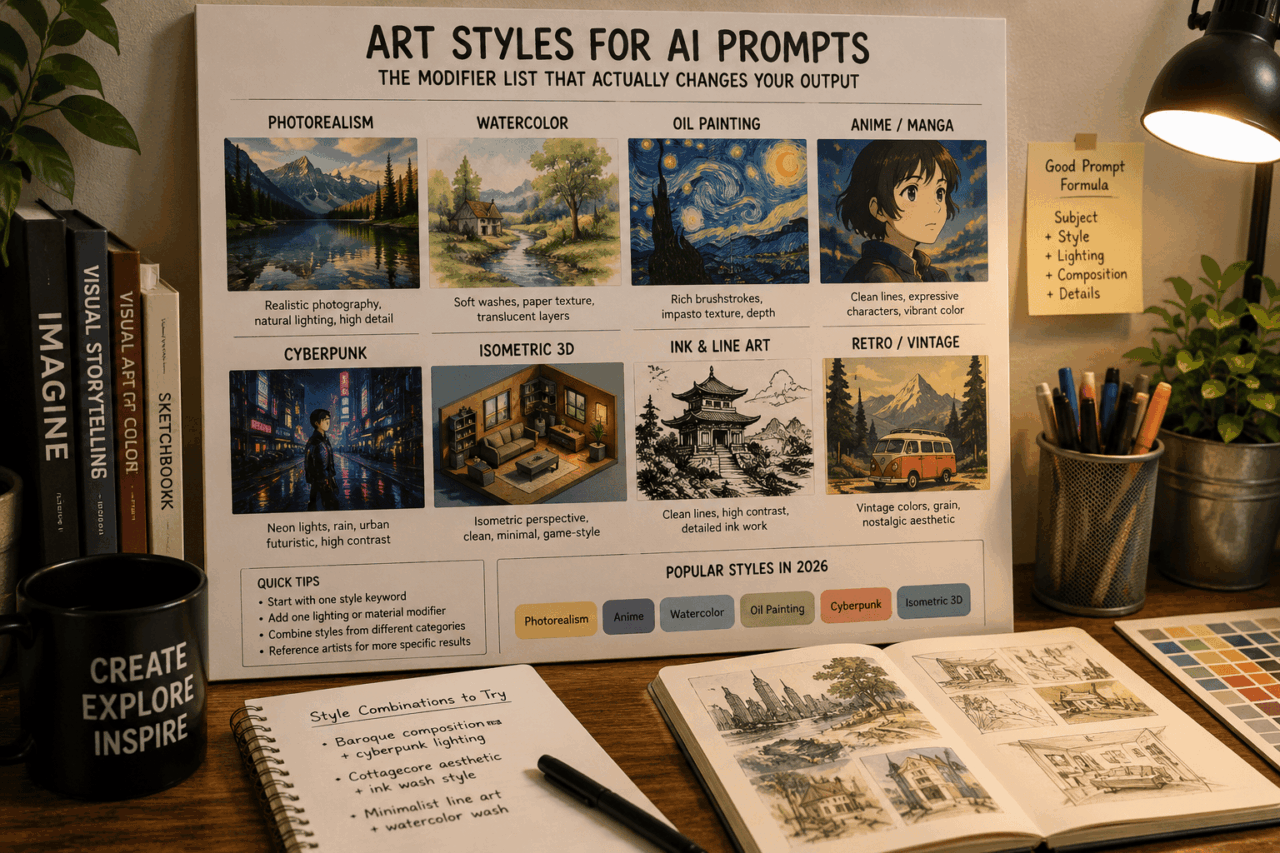
TL;DR: Art style keywords are the single most impactful modifier you can add to an AI image prompt. Changing one word from cinematic to watercolor transforms the entire output while keeping the subject intact. The eight major style categories are photorealism, illustration, painting, line-and-ink, 3D and game, retro and vintage, movement-based, and experimental. The most popular styles in 2026 are photorealism, anime, watercolor, oil painting, cyberpunk, and isometric 3D.
How style keywords work
AI image models like Midjourney, Flux, Stable Diffusion, and DALL-E 3 are trained on massive datasets of labeled images. As ZSky AI‘s 2026 style guide notes, the style keyword is often the single most impactful variable in the entire prompt.
When you add a style keyword, you are activating the model’s learned associations with how images in that style look: their composition, color palette, texture, line quality, and lighting. The model blends those learned patterns with your subject.
This is why a very specific subject with a very specific style modifier often produces more interesting output than a detailed description alone. “A cat in a garden, ukiyo-e style, Japanese woodblock print, flat perspective, wave patterns” gives the model a confident direction. “A detailed, beautifully rendered cat sitting among lush, vibrant garden flowers” leaves the interpretation entirely open.

The most reliable styles and what they produce
Photorealism produces images that look like high-quality photography. It works best for product mockups, editorial-style portraits, and anything where the goal is maximum visual credibility. Add modifiers like “shot with 50mm lens, soft natural light, shallow depth of field” to tighten the result.
Watercolor produces soft, translucent layers with visible paper texture and natural color bleeding at edges. It reads as warm and handmade. Works well for character illustration, nature scenes, and anything where a digital-but-human feeling is the goal.
Oil painting produces rich impasto texture, deep saturated colors, and visible brushstrokes. Combine with artist references like “Rembrandt lighting” or “Monet color palette” for more specific interpretations. Better for subjects where texture and surface quality matter.
Anime and manga styles vary more than most categories. Specify a sub-style: “modern shonen anime,” “80s retro anime,” “Studio Ghibli style” all produce distinctly different results. Ghibli-style references produce soft, natural-looking animation art with pastoral warmth. Modern shonen is higher contrast with more action-oriented framing.
Cyberpunk produces neon-lit urban environments, high-contrast shadows, and rain-slick surfaces. Works reliably for futuristic and dystopian concepts. Pair with “volumetric fog” and “neon signage” for the fullest effect.
Isometric 3D produces the game-like flat-angle view popular in app icons and diagram illustrations. Works especially well for architecture, room layouts, and objects that benefit from clear visual structure without photorealistic complexity.
How to combine styles for more original output
Single-style prompts are predictable in a useful way: you know roughly what you are getting. Combining two styles from different categories produces output that is harder to predict but often more striking. “Baroque composition, cyberpunk lighting” or “cottagecore aesthetic, ink wash style” forces the model to navigate between two different visual logic systems, and the results are often genuinely unusual.
The practical workflow: test each style alone first to understand its defaults. Then combine one style with one lighting modifier or one material modifier rather than stacking multiple complete styles at once. Stacking too many style keywords dilutes each one rather than blending them cleanly.
Style keywords worth adding to your workflow
Line art and ink styles (pen and ink, comic book inking, stipple, crosshatching) work well for diagrams, character sheets, and anything that needs to print clearly at small sizes. The flat, high-contrast nature of line art translates well across media.
Retro and vintage styles (vaporwave, 70s film grain, VHS aesthetic, Art Nouveau, Art Deco) are highly searchable and perform well on social media. They carry strong visual associations that most viewers immediately recognize.
Double exposure is a photography technique that AI models reproduce surprisingly well. “Double exposure photography, two images blended, silhouette filled with landscape” produces striking portrait-meets-nature composites that feel both modern and editorial.
Frequently Asked Questions
Which AI image generators support art style keywords best?
Midjourney, Flux, Stable Diffusion, and DALL-E 3 all support art style modifiers. Midjourney tends to produce the most stylistically consistent results with well-known art movements. Flux handles photorealism and fine detail particularly well.
Can I reference a specific artist’s style in my prompt?
Yes, and it works well for artists whose work was included in training data. Some generators have restrictions on living artists. Historically significant artists like Alphonse Mucha, Rembrandt, or Monet work reliably across most models.
What is the difference between art style and aesthetic?
Art style refers to a specific visual tradition or technique (watercolor, oil painting, ukiyo-e). Aesthetic refers to a mood or cultural sensibility (cottagecore, dark academia, vaporwave). Both work as modifiers, but aesthetics tend to affect color palette and mood more than technique.
How do I stop my AI images from looking generic?
Add a specific style modifier, a specific lighting condition, and a specific medium reference. Three targeted modifiers produce more distinctive output than a long description of the subject alone.
Where to start if you are new to style prompting
Pick one style from the list above, run it with a simple subject (a building, an animal, an object), and study what the model defaulted to within that style. That output tells you the model’s baseline for that style keyword, which is the starting point for every refinement from there. Most good prompts come from adjusting a known starting point, not from building complexity from scratch.