You get a link to a reel in WhatsApp. You tap it. Instagram opens. And instead of the reel, you are staring at the home feed. The link worked fine. The app just ignored it.
This has been happening on Android since at least February 2026, and a resurgence tied to the version 430.0.0.53.80 update has brought it back for a wide range of users in May 2026.
TL;DR: Instagram links are opening the home feed instead of the actual post on Android. This is a confirmed bug, most recently triggered by Instagram version 430.0.0.53.80. Clearing the Instagram cache fixes it temporarily. Sideloading an older Instagram version and disabling auto-updates is the most reliable workaround until Instagram releases a patch. The bug affects all Android brands and all link types, including reels, profiles, and stories.
What is actually happening
Instagram links use deep links, a mechanism that tells Android to open a specific piece of content inside the app rather than just launching the app’s home screen. When a deep link works correctly, tapping a reel URL goes directly to that reel. When deep link routing breaks, the app opens but drops you at the default landing page, usually the home feed.
The current wave of reports is tied specifically to Instagram version 430.0.0.53.80. The bug was not present in the build before it. Users across Samsung flagships, Xiaomi devices, and budget Android phones are all affected, which confirms this is an app-side issue rather than a phone-specific one. Reinstalling Instagram or signing out and back in does not fix it.
Fix 1: Clear Instagram cache
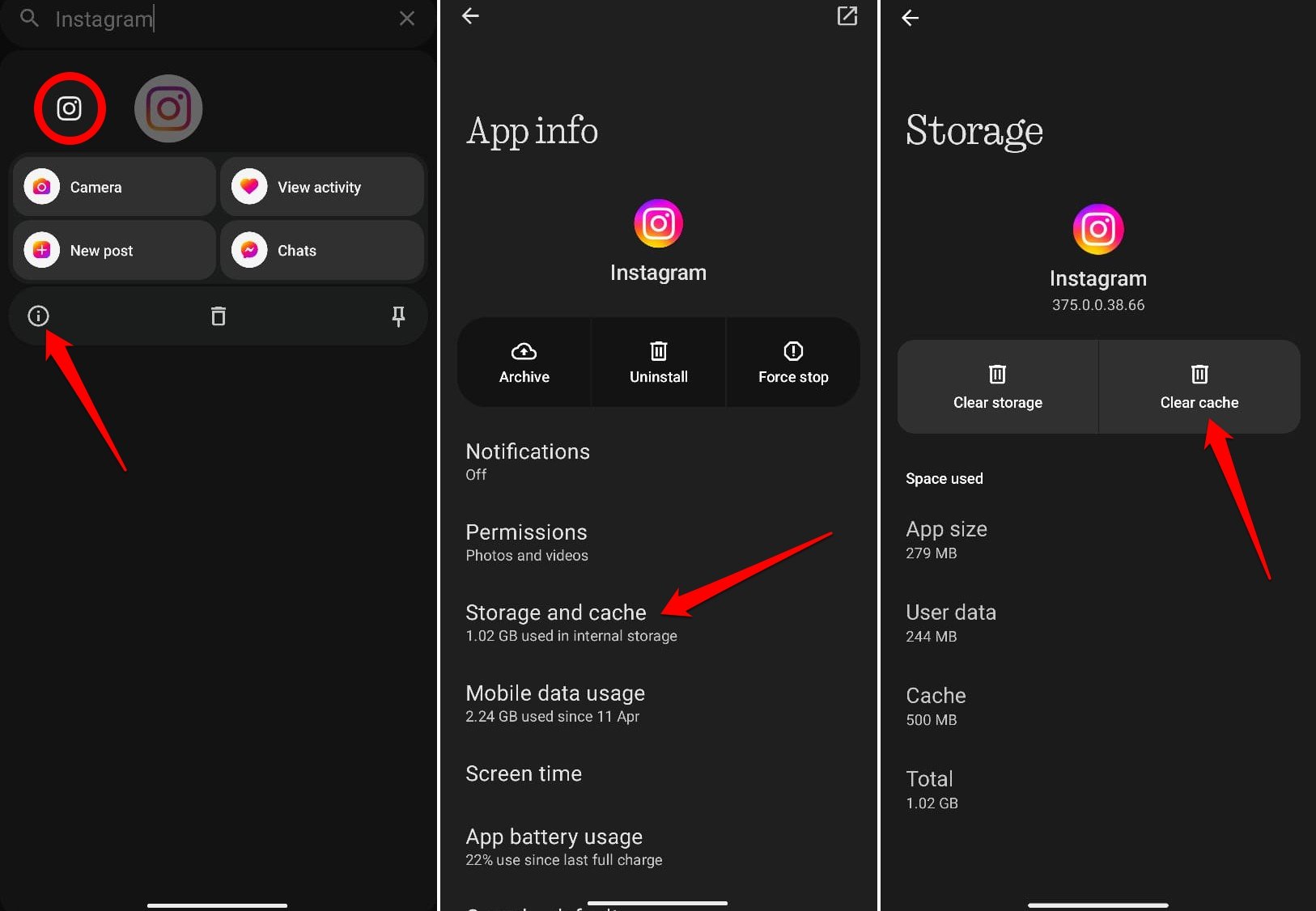
This is the quickest fix and works temporarily for most users.
- Open your Android settings,
- Ao to Apps, F
- Find Instagram, tap Storage, and hit Clear Cache.
This forces Instagram to rebuild its local data, which sometimes resets the broken deep link handling.
The downside is that this fix does not always hold. The next time Instagram syncs its internal configuration or receives a background update, the behavior can return. Think of it as a reset, not a permanent solution.
Fix 2: Check that Instagram is set to open supported links
Android lets you control which app handles Instagram URLs. If this setting is off, links will open in your browser instead of the app. Long-press the Instagram icon, tap the info icon, select Set as Default, and make sure Open Supported Links is enabled.
This does not fix the deep link bug itself, but it rules out a settings misconfiguration as the cause and confirms the problem is inside the app.
Fix 3: Clear Instagram in-app browser data
Open Instagram, tap any link to launch the in-app browser, tap the three-dot menu in the top-right corner, choose Browser Settings, and tap Clear next to Browsing Data. This clears cached web content separate from the app cache and can resolve cases where the in-app browser is corrupting link routing.
Fix 4: Disable VPN temporarily
VPN connections route traffic through external servers, and some configurations interfere with how Instagram validates and routes deep links. If you have a VPN active, try turning it off and retapping the link. This is not the cause of the current version 430 bug, but it can compound the problem.
Fix 5: Sideload an older Instagram version
If the bug appeared after Instagram updated to version 430.0.0.53.80, the most reliable fix is rolling back. Uninstall the current version, download the previous stable APK from a trusted source like APKMirror, install it, and then go to the Play Store to disable automatic updates for Instagram. This keeps you on a working build until Instagram patches the bug in a future version.
The tradeoff is that you miss any security updates bundled with newer versions. For most users, the temporary fix of clearing cache is preferable until Instagram releases a proper patch.
Fix 6: Update Instagram if a patch has shipped
Instagram patches break-level bugs relatively quickly. Before rolling back, check the Play Store to see if a newer version than 430.0.0.53.80 is available. If it is, update first and test. The bug may already be fixed in a later build.
Frequently Asked Questions
Why is Instagram opening my home feed instead of the post?
A deep link bug in Instagram version 430.0.0.53.80 is causing the app to ignore the specific content in the link and open the home feed instead. It affects all Android brands.
Does reinstalling Instagram fix the problem?
No. Reinstalling downloads the same broken version from the Play Store and does not resolve the deep link issue. Clearing the cache or rolling back to an older version are more effective.
Does this bug affect iPhone too?
Reports from May 2026 indicate the issue is primarily on Android. The version numbering for iOS is separate and the iOS build appears unaffected by this specific bug.
Why do my Instagram links work in Chrome but not the app?
The link itself is valid. The bug is inside Instagram’s deep link routing, not in the URL. Pasting the link into Chrome bypasses the broken routing and loads the content correctly.
What to do until Instagram fixes it
If the cache clear works for you, use it. It takes under a minute and gives you clean deep link behavior until the next time the bug resurfaces. If you are opening Instagram links frequently and the fix keeps reverting, the sideloaded older APK with auto-updates disabled is the more durable option.
The underlying issue is in Instagram’s app code. That is not something a settings change can permanently resolve. A patch from Meta is the only complete fix, and given how widely reported this is, it should arrive in a relatively short update cycle.