NAT type decides which players your console can connect to, and it has nothing to do with how fast your internet is. I only worked that out after a party chat kept dropping on a Friday night while my speed test looked perfectly fine.
The setting is buried one screen deep on PlayStation, Xbox, and Switch. Once I read the line properly, a month of random failed invites finally made sense.
TL;DR: NAT type is a label your console shows for how easily other players can reach it through your router. Open, Moderate, and Strict on Xbox, Type 1, 2, and 3 on PlayStation, and A to F on Switch. It affects matchmaking, party chat, and hosting, not speed or ping. Moderate is usually fine. Strict, Type 3, D, or F is the one worth fixing.
What NAT type actually means?
Your router hides your console behind one shared public address. NAT type describes how well other players can still get a message through to your console anyway.
Xbox calls the results Open, Moderate, and Strict. PlayStation uses Type 1, 2, and 3. Nintendo Switch uses letters from A to F.
The rule that matters is who can talk to whom.
- Open connects with anyone.
- Moderate connects with Moderate and Open.
- Strict only connects with Open players
Also, a Strict console generally cannot host a match.
| Platform | Where to find it | Fine | Worth fixing |
|---|---|---|---|
| PS5 | Settings > Network > Connection Status > Test Internet Connection | Type 1 or 2 | Type 3 |
| Xbox Series X|S | Settings > General > Network settings | Open or Moderate | Strict |
| Nintendo Switch | System Settings > Internet > Test Connection | A or B | D or F |
Where to find your NAT type on a console
On PS5, it appears at the end of the internet connection test, and on Xbox, it shows on the network settings screen under Current status. The Switch shows a letter on the test results page.
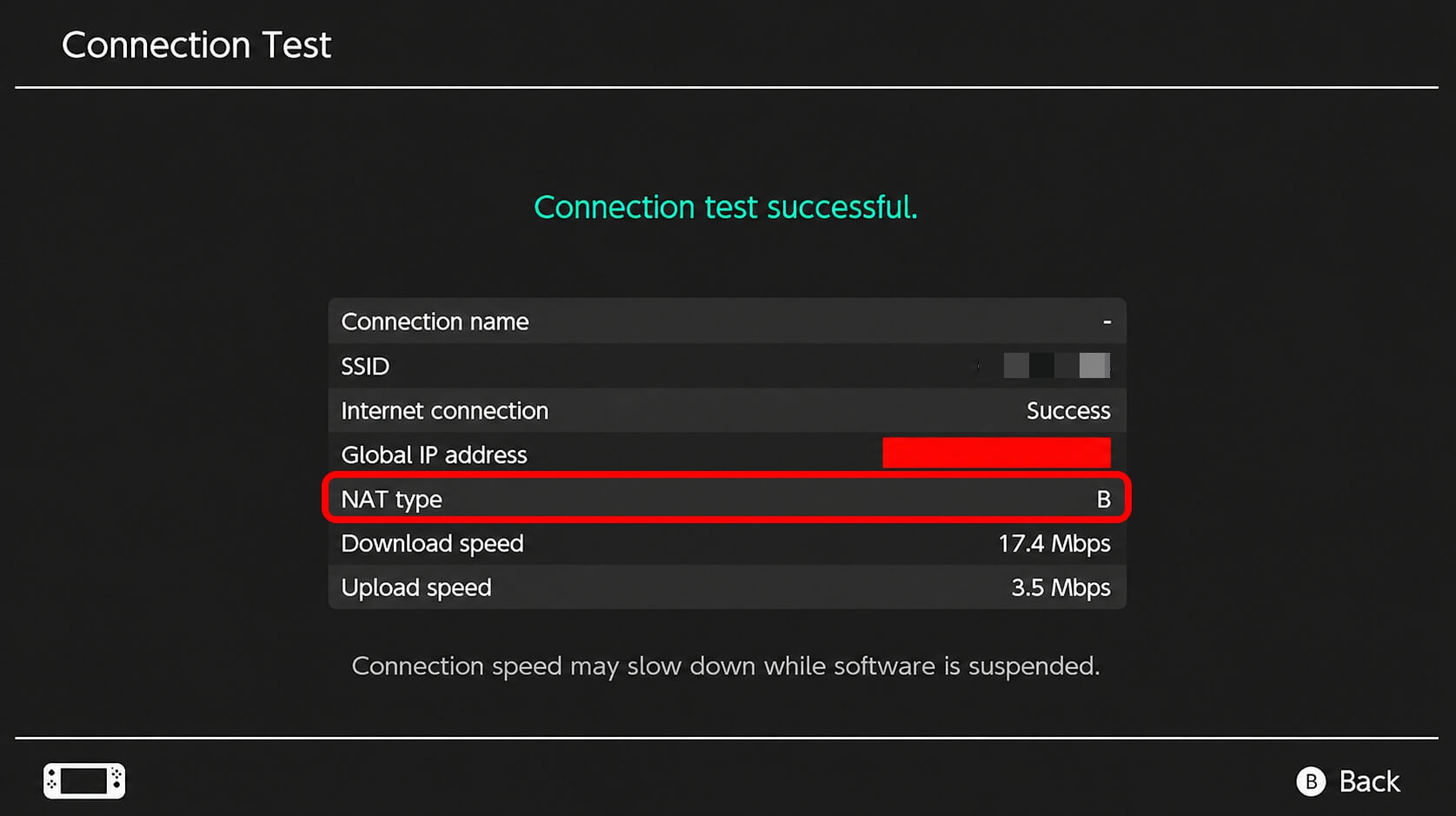
The first time I ran it, I read the result and then ran the test again to make sure it wasn’t a one-off. It said the same thing both times.
What caught me off guard was how little the screen explains. It gives you a label and a green tick for the connection itself, and no hint that the label is the reason your invites fail.

Why a Strict NAT type breaks multiplayer?
Online games that run on peer connections need other players to reach you directly. When your NAT type is Strict, only Open players can do that, so you get stuck in lobbies or never get picked as host.
It does not slow anything down. NAT type does not change your speed or ping, which is why a speed test tells you nothing here.
On the Nintendo Switch, a Type D console can generally only connect with Type A, and Type F means the network is blocking communication with other players. Type B works with most other types, so I stopped worrying about it.
What I changed on the router?
I started with the boring fixes. Restart the console and the router together, then switch on UPnP in the router settings so the console can ask for the ports it needs. After the router came back, I ran the test again. Moving from Strict to a usable result took two restarts, and it only stuck once UPnP was on.
If UPnP does not help, give the console a fixed address in the router and forward its ports by hand. That is the fix people jump to first, and I think it is the one to try last.
When the problem is not your router
Two situations can keep NAT Strict, whatever you change. One is double NAT, where an ISP modem and your own router both do the translating. The other is carrier-grade NAT, where your provider shares one public address across many homes.
In both cases, your own router settings cannot open anything. You can ask your provider for a public address or put the modem into bridge mode, and a spare old Wi-Fi router will not fix it either.
It is the same kind of network wall that makes cloud streaming sensitive to your setup, which I covered for GTA 6 on Xbox Cloud Gaming linked below.
Moderate is good enough
I spent an evening chasing Type 1 on the PS5 before I read that Type 2 is the normal result behind a home router. Type 2 or Moderate connected me to every friend I play with. Open and Type A are nice to have. They are not a score to chase if your games already work.
Frequently asked questions
Does NAT type affect ping or download speed?
No. It only affects who your console can connect to, so a faster plan will not change it.
Is Moderate NAT bad?
Usually not. Moderate connects with Moderate and Open players, which covers most lobbies.
What NAT type should I aim for on Switch?
A or B is fine. Nintendo says Type D generally only connects with Type A, and Type F restricts communication with other players.
Why does my NAT type say Strict with UPnP on?
Double NAT or carrier-grade NAT is the usual cause. Your own router cannot open ports through either one.
Test your NAT type before touching port forwarding
Run the test on your console, write down the label, and fix only what it shows. If it already reads Moderate or Type 2, leave the router alone and look elsewhere for the lag.