Snapchat has 932 million monthly active users as of late 2025. Most of them are doing the same three things: sending snaps, checking stories, and maintaining streaks.
The social media app opens more than 30 times a day on average. Sounds like intense usage, until you realize almost none of those sessions go any deeper than the camera and chat screens.
The Snapchat hidden features sitting one or two taps away from what most people do every day are the ones worth knowing.
Some of these Snapchat features genuinely change how the app feels. Others just save time. This article covers 21 Snapchat features that are easy to miss.
TL;DR: Snapchat has dozens of features that most daily users never find. The most useful ones in 2026 include Bounce playback for looping video, stacked filters for layered effects, Private Story Segments for exclusive audiences, the tap-to-reveal invisible text trick, and Snap Map heat maps that show what a neighborhood is actually talking about right now. None of these require Snapchat Plus except where noted.
Snapchat hidden features: Camera and video tricks you are probably skipping
| Trick | Where to find it | Requires Snapchat Plus |
|---|---|---|
| Bounce playback | Arrow icon after recording, choose Bounce | No |
| Hands-free recording | Hold record, drag to lock icon | No |
| Stacked filters | Apply filter, tap and hold, swipe again | No |
| AI Scene mode | Swipe left or right on the viewfinder | No |
| Color eyedropper | Tap and hold the color-slider left end | No |
| 3D Bitmoji in real space | Point the camera at the floor/wall to activate the Bitmoji lens | No |
| Tap-to-reveal text | Match text color to background using eyedropper | No |
| Snap Map heat maps | Zoom out fully on Snap Map | No |
| Ghost Mode layers | Settings, See My Location | No |
| Arrival notifications | Friend profile, tap map icon | No |
| Private Story Segments | Create Story, Custom | No |
| Save message silently | Hold message, Save in Chat | No |
| Multi-snap queue | Tap the plus icon before sending | No |
| Chat pinning (Android) | Hold chat, Chat Settings, Pin | No (was Plus only, now free) |
| Travel Mode | Settings, Additional Services, Manage | No |
| Snapchat Web | web.snapchat.com in browser | No |
| Lens sharing by link | Ask a friend to share the lens URL | No |
| Friend Solar System | Snapchat Plus, friend profile badge | Yes |
| Snap Modes (expiring snaps) | Snapchat Plus, camera settings | Yes |
| Story View Notifications | Snapchat Plus, story analytics | Yes |
| Custom Gen AI Stickers | Type in chat, tap sticker icon | Yes |
The first time someone sent me a Bounce video, I spent longer than I want to admit trying to figure out how they made it.
It looks like a Boomerang but smoother, and it loops both directions instead of just reversing.
To create a bounce video,
- After you record, hit the arrow icon to view the various options to edit the video.
- Tap on Loop.
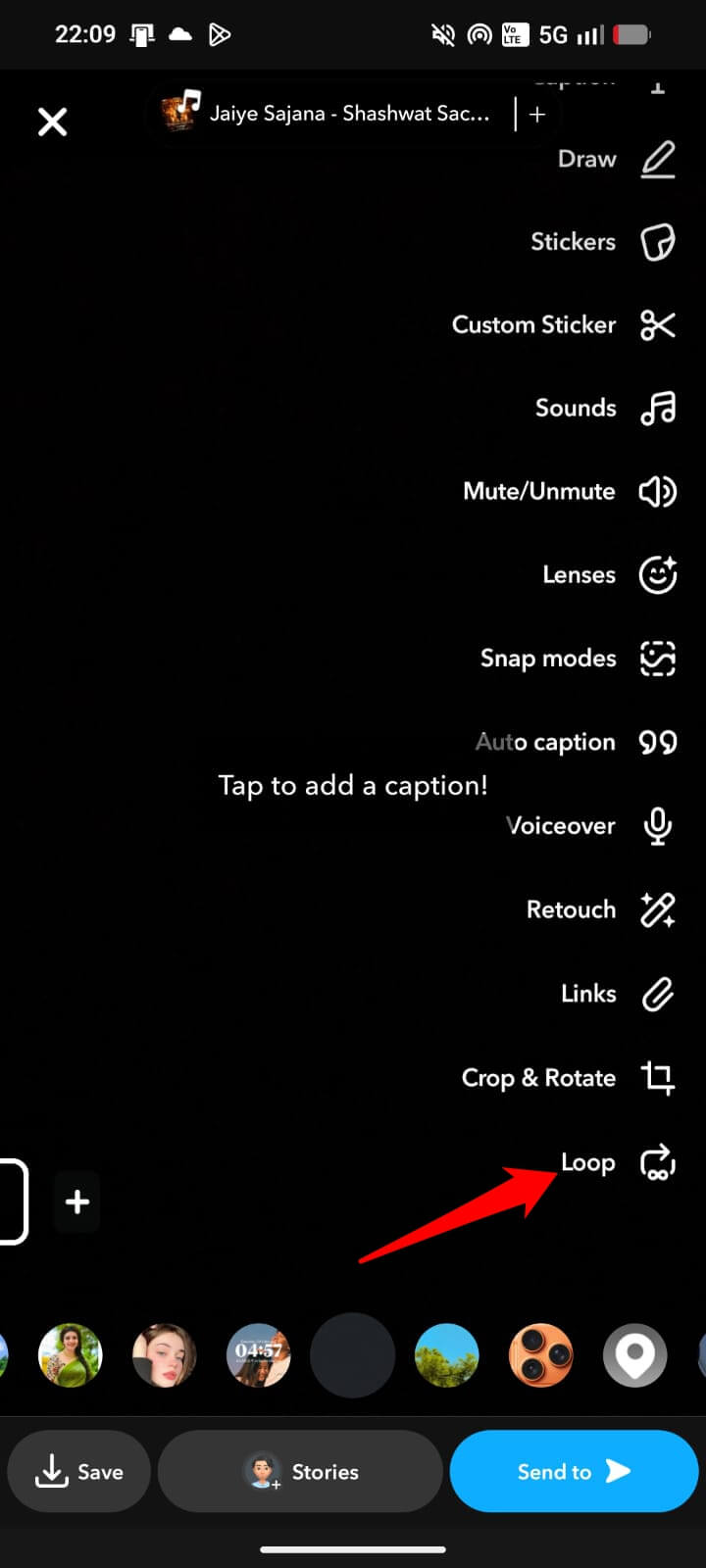

The clip plays forward, reverses, plays forward again, on a clean loop. It lands better than a regular video for reaction content and anything with a reveal moment.
Hands-free recording sounds obvious once you know it, but it is invisible until someone tells you. Here is how it works.
- Hold the record button and drag it to the lock icon. That’s it.
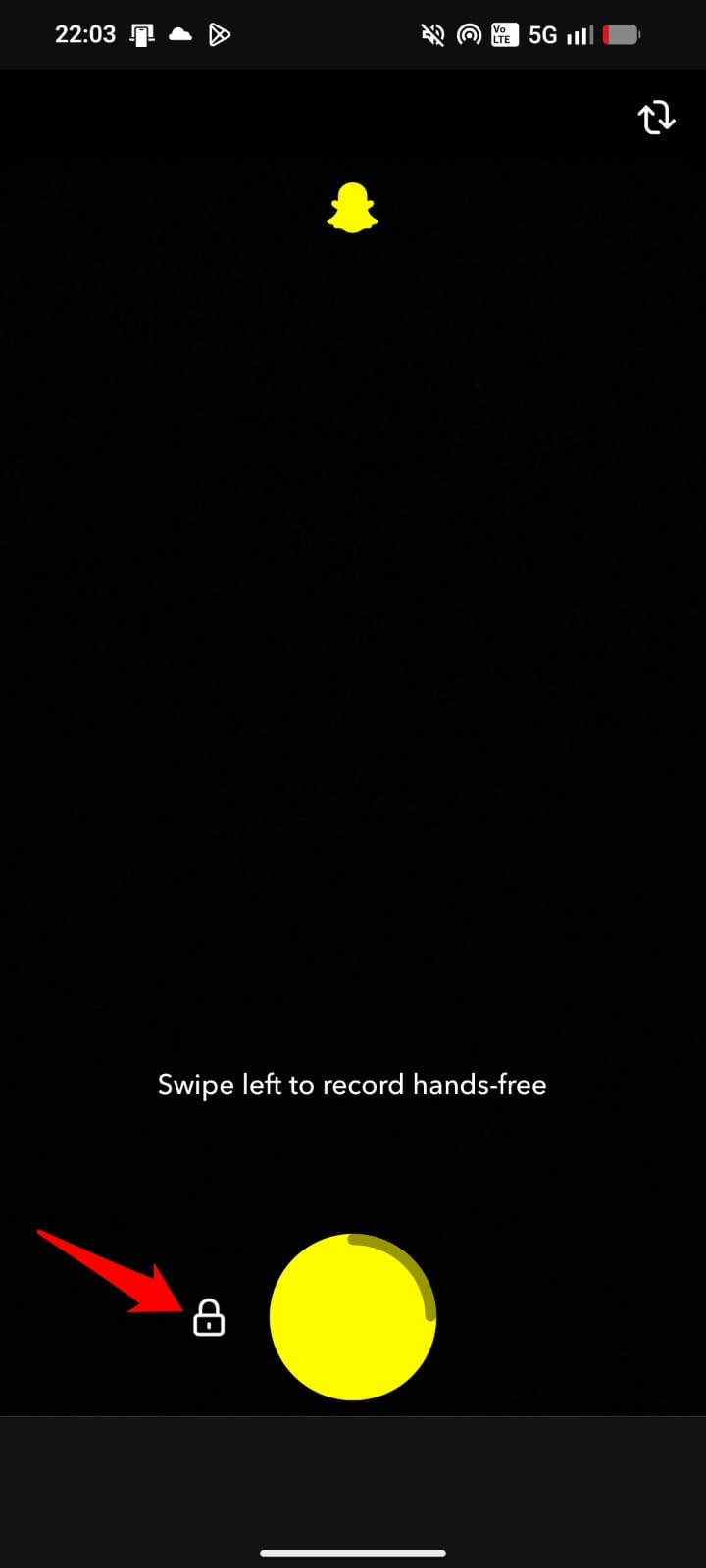
Your hands are free. No holding. This matters more than it sounds for food, exercises, or anything where you need both hands while recording.
Stacking filters is the one that gets the most visible reactions when people first try it. To do it,
- Snap one photo.
- Apply a color filter.
- Tap and hold the screen while swiping again to apply the second filter, which layers on top of the first.
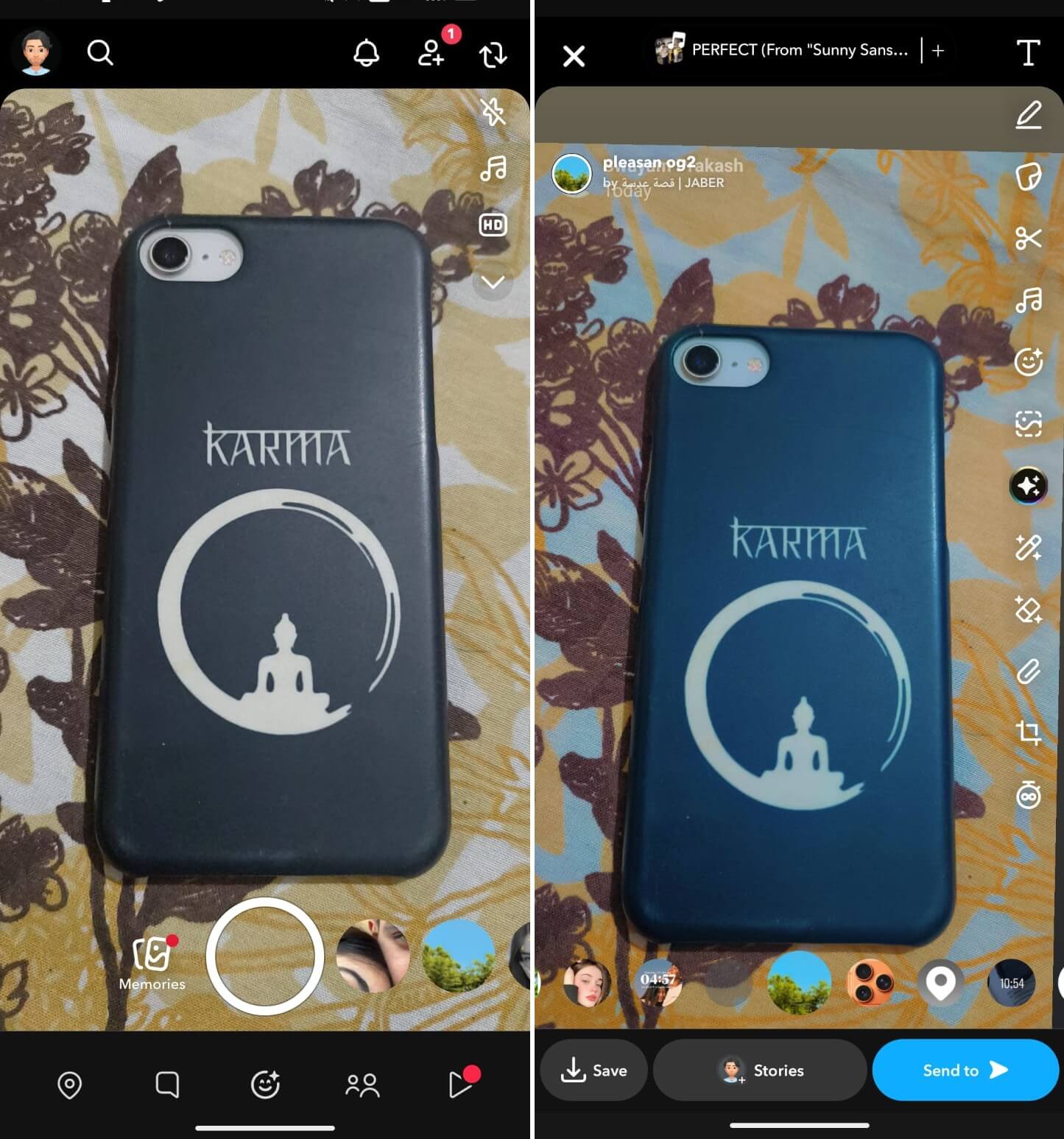

A geo-filter combined with a warm tone overlay or a timestamp creates something that does not look like a default Snapchat image.
AI Scene mode arrived in the 2025 update. Swipe left or right on the viewfinder to find it. The camera uses on-device processing to automatically adjust lighting and focus based on what the lens is pointed at. Low-light interiors look noticeably different with it on versus off.
At first, I kept forgetting to switch back after using it inside, which was mostly fine except that it flattens outdoor daylight shots a little too much.
Snap Map features that most users scroll past
The heat map layer on Snap Map is something the average user scrolls past without registering what it shows.
To use it,
- Zoom out fully on the map to view glowing orange and red zones that appear around areas with high Snap activity.
- Tap any of those zones to see live Stories posted from that location, not just friends, but anyone snapping publicly in that spot.
For a concert, a match, a neighborhood event, or a busy market on a Saturday, it shows what is happening in real time before you get there.
The Bitmoji reactions on the map are more informative than they look. When a friend has been active recently, their Bitmoji might be holding an umbrella (it is raining where they are), sitting with a coffee cup (early morning), or wearing a party hat (birthday).
Snapchat updates these contextually based on local weather and time of day. After a while, you stop reading it consciously and just absorb it the way you read someone’s facial expression.
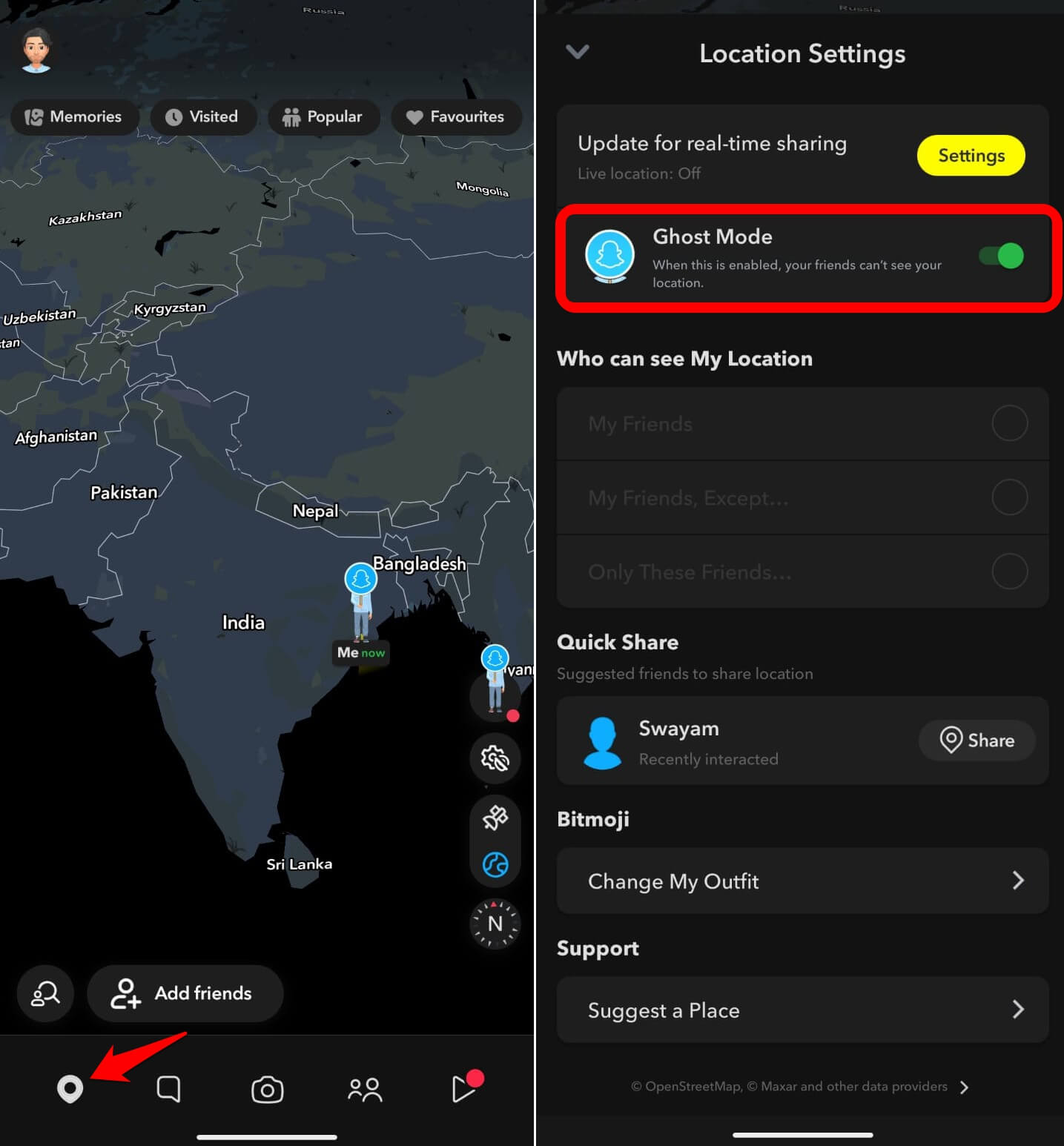
Ghost Mode gets talked about a lot, but most people set it once and forget it has layered options. You can go fully invisible to everyone, visible only to specific friends, or visible to all friends.
To enable ghost mode on Snapchat,
- Open Snapchat and tap the location pin icon at the bottom left to view the Snap Map.
- Press the Snap map settings icon.
- Tap the toggle beside Ghost Mode to enable it.

What fewer people know is that you can set arrival notifications for individual friends. To do it,
- Open a friend’s profile.
- Tap the map icon.
- Turn on location alerts.
Snapchat notifies you when they reach a saved location. Useful for coordinating without a chain of messages.
Story and messaging tricks hiding in plain sight
Private Story Segments work differently from a standard private story. You can run multiple separate private stories at the same time, each with a different custom audience. One for close friends, one for a specific group, one for people from a particular context.
All of these stay completely separate, and none of the audiences sees each other. To set it up, go to Create Story in the stories section > tap Custom.
The tap-to-reveal trick looks like it requires a separate app until you understand it.
- Type your text on a snap,
- Match the text color to the snap background using the color eyedropper.
The text disappears visually. Anyone viewing taps the screen, and the text appears because the viewing interface highlights it on touch.
The feature works best on a solid-color background snap. Once you see it done well, it is hard to unsee as a format for reveals, jokes, and questions.
Saving a message in chat without the other person knowing is more useful than it sounds. To do it,
- Press and hold any message, then choose Save in Chat.
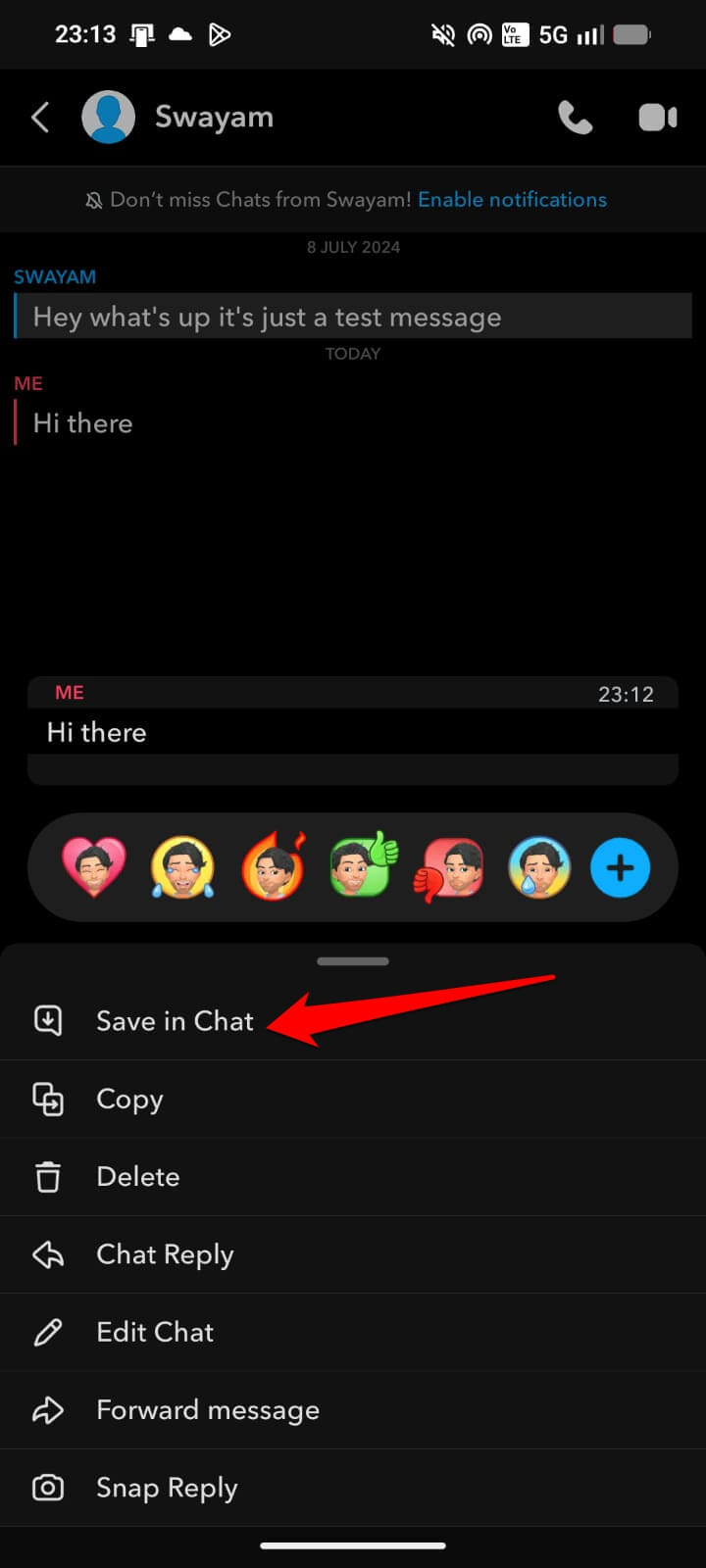
The message stays visible for you permanently, but the other person gets no notification. Chat messages otherwise disappear.
For addresses, plans, or information someone sent in passing, this is the difference between writing it down elsewhere and just having it stay where it was sent.
Multi-snap lets you queue several snaps before sending instead of firing them one at a time.
- Open Snapchat and tap the downward arrow on the right side of the screen to expand the Camera tools.
- Tap the Multi Snap icon.
- Tap or hold the Camera button repeatedly to take multiple photo and video Snaps.
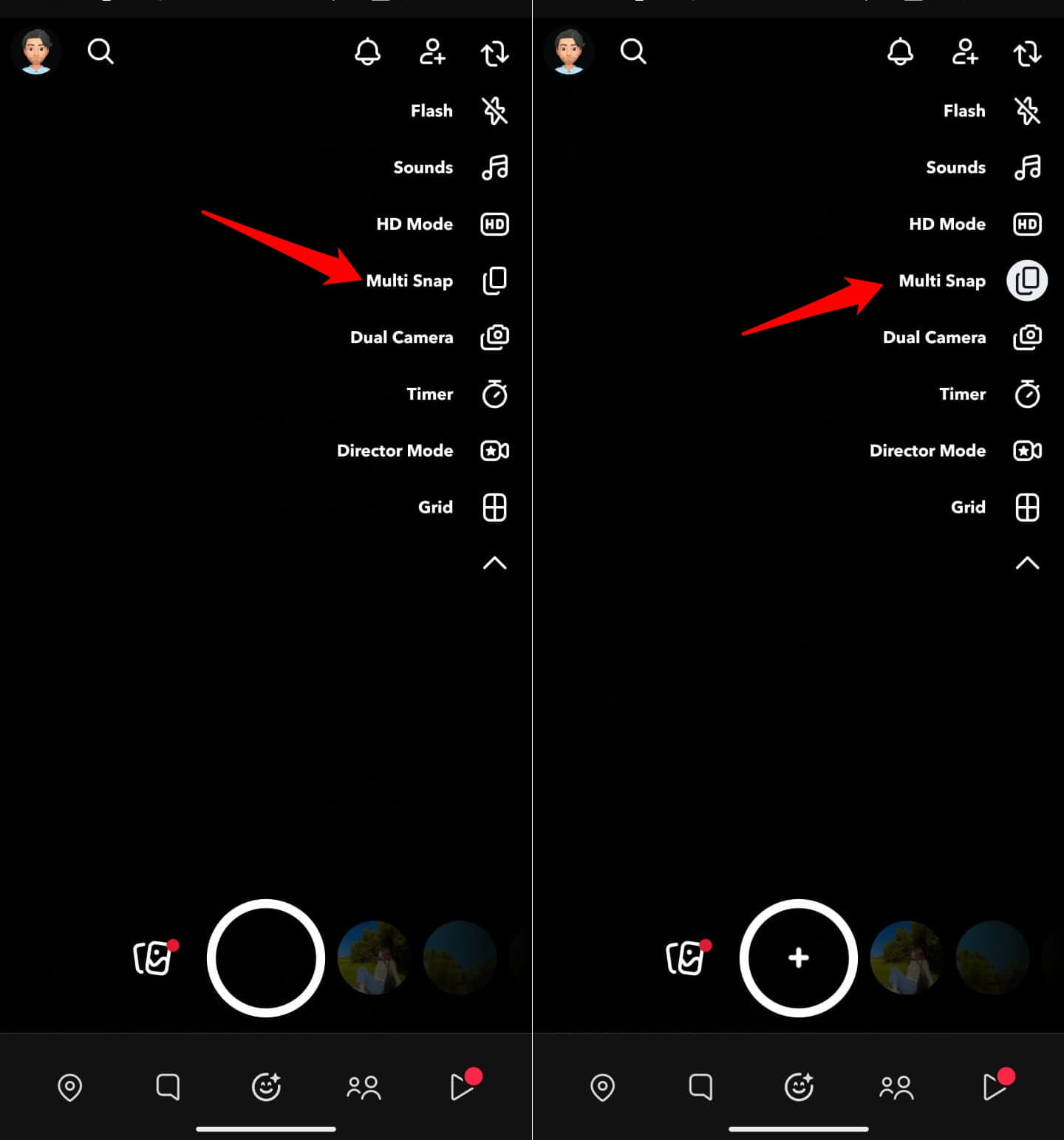

Friends receive them sequentially in one go. The rhythm of receiving a set of snaps instead of one feels more like a story and less like a notification flood.
3D Bitmoji and AR lens tricks
Most people use AR lenses on their own faces.
The 3D Bitmoji lenses work differently. Here’s how
- Point the camera at a blank wall or floor
- activate a Bitmoji lens from the carousel.
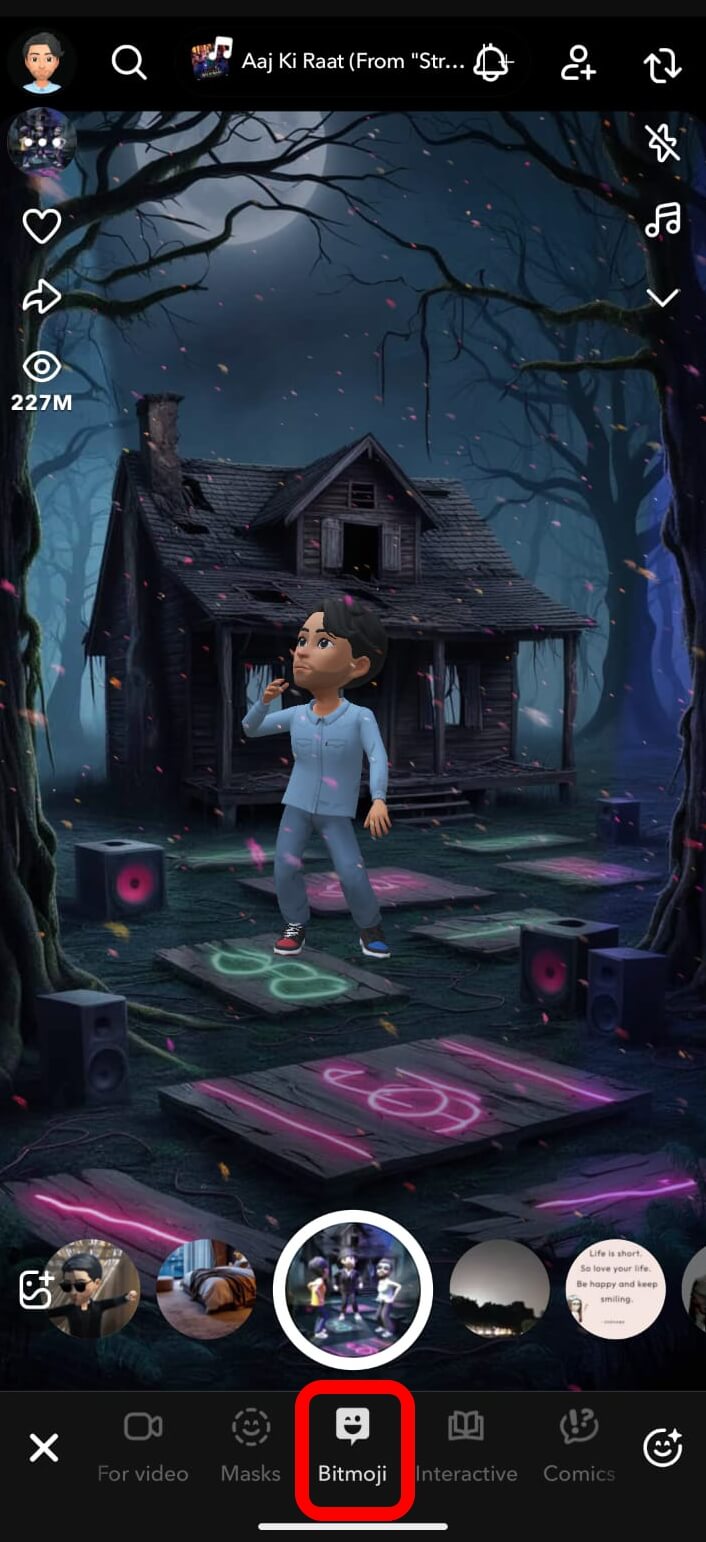

Now, your avatar appears as a 3D object in physical space. You can resize it, move it around the frame, and record it walking, dancing, or posing in the room.
The first time I tried this at a plain white desk, I spent about fifteen minutes just moving the avatar around. It looks significantly better on video than a flat sticker.
The color eyedropper in the text and drawing tools is consistently underused.
- When adding text or drawing, tap and hold the color slider all the way to the left to view a dropper tool.
- Point it at any color in the snap and the tool samples that shade exactly.
This is how people match text color precisely to a background detail. The invisible tap-to-reveal trick only works if you use it to get the same shade.
Lens sharing by link is faster than searching. Ask a friend who has a lens to open it and tap Share. They get a URL they can paste into chat. When you tap that link, the lens opens immediately in your camera without any searching. For niche or newly released lenses that have not surfaced in the main library yet, this is the only reliable way to get them quickly.
Snapchat Plus features worth knowing about
Snapchat Plus costs $3.99 per month. According to Snap’s newsroom, the subscription has crossed 25 million subscribers globally.
The most discussed feature is the Friend Solar System, which represents your eight closest friends as planets based on interaction frequency. Mercury is the friend you contact most. Neptune is the one you barely reach.
We have covered Snapchat Planets in detail, which you may check out. It all sounds gimmicky until you have it running for a week and start noticing how accurately it tracks who you actually talk to.
Snap Modes, introduced in early 2025, include expiring Snaps that vanish if not viewed within a set time window.
The mechanic is different from standard Snap deletion because the snap is flagged as time-sensitive before the recipient even opens it. People tend to open time-limited content faster, which changes the viewing behavior measurably.
Story View Notifications is another Plus feature that shows exactly who viewed a specific story and when, beyond the standard view count. It is useful if you are using stories for anything that benefits from knowing which friends are actually watching versus who is passively letting them auto-play.
Custom Gen AI Stickers arrived with the 2025 update for Plus subscribers. Start typing in any chat and tap the sticker search icon. Snapchat generates a sticker styled around the text of what you typed.
The results are inconsistent but occasionally produce something worth sending when the message is specific enough. The less generic the text, the more interesting the sticker.
Practical shortcuts most users never find
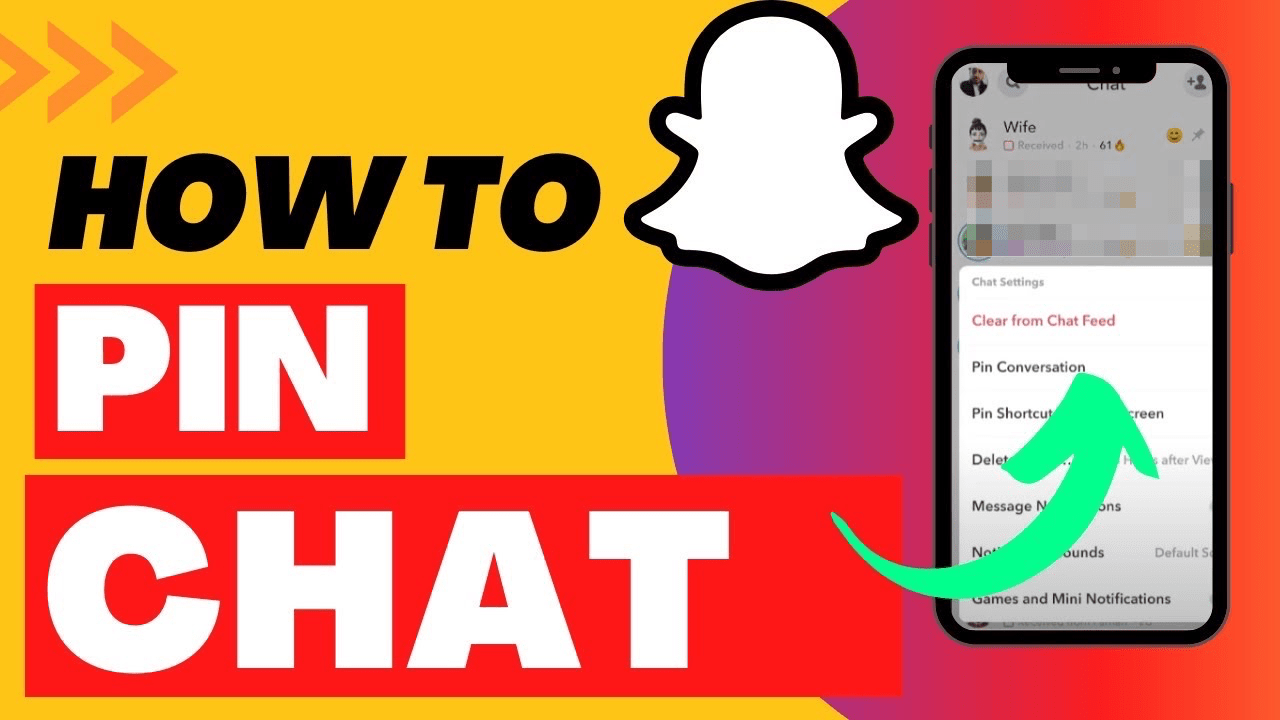
Chat pinning keeps up to three conversations fixed at the top of the chat list.
- Press and hold any conversation.
- Tap on Chat Settings > choose Pin “your friend” as your No 1 BFF.
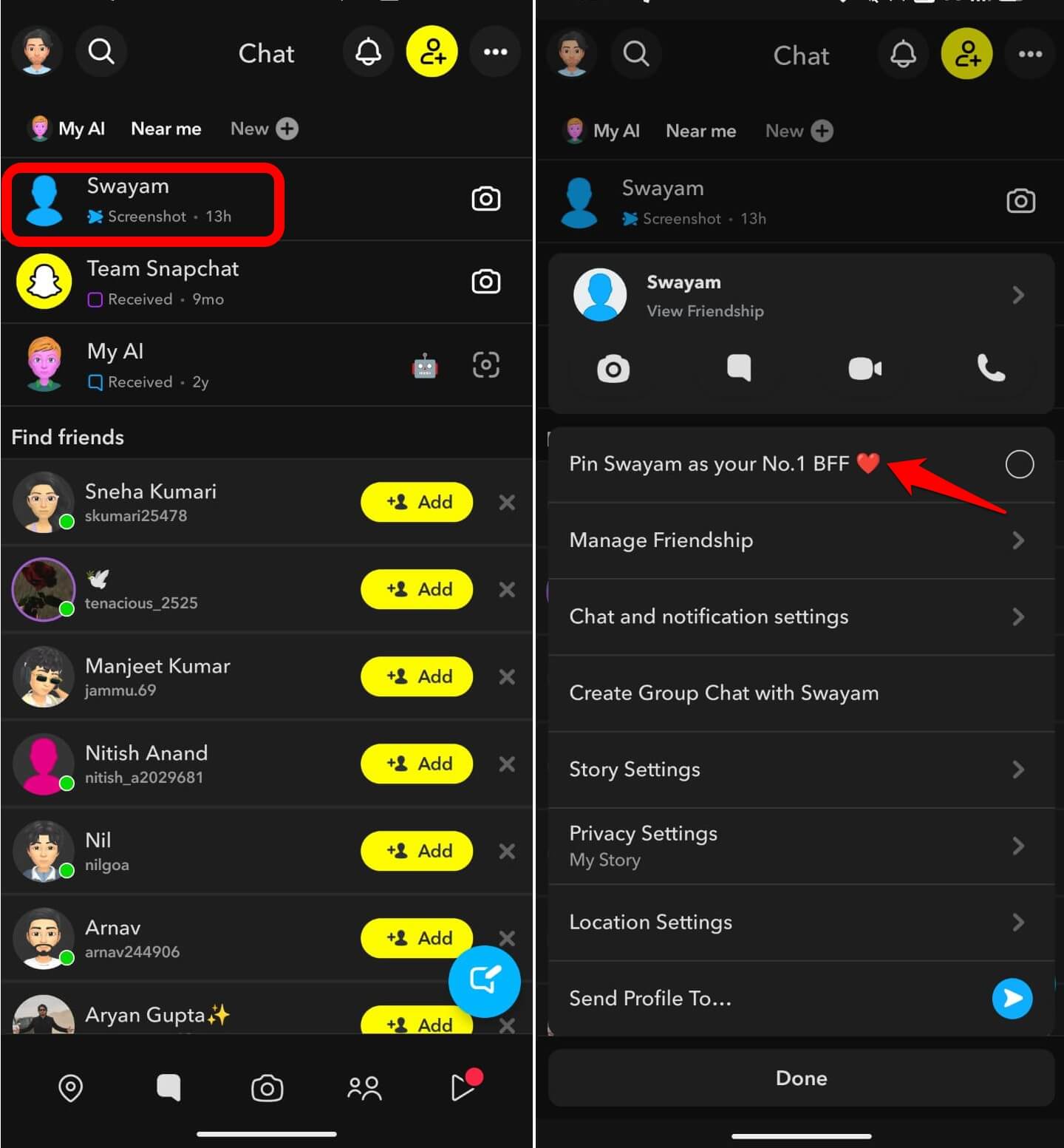

On Android, this previously required Snapchat Plus but has since rolled out to all users.
The emoji marker is customizable. So, you are not stuck with the default pin icon.
You can also change the pin emoji to any icon from the keyboard to keep things organized.
Snapchat Web lets you send messages and make video calls from a desktop browser. It is not a full mirror of the mobile app, but it is more functional than most people expect.
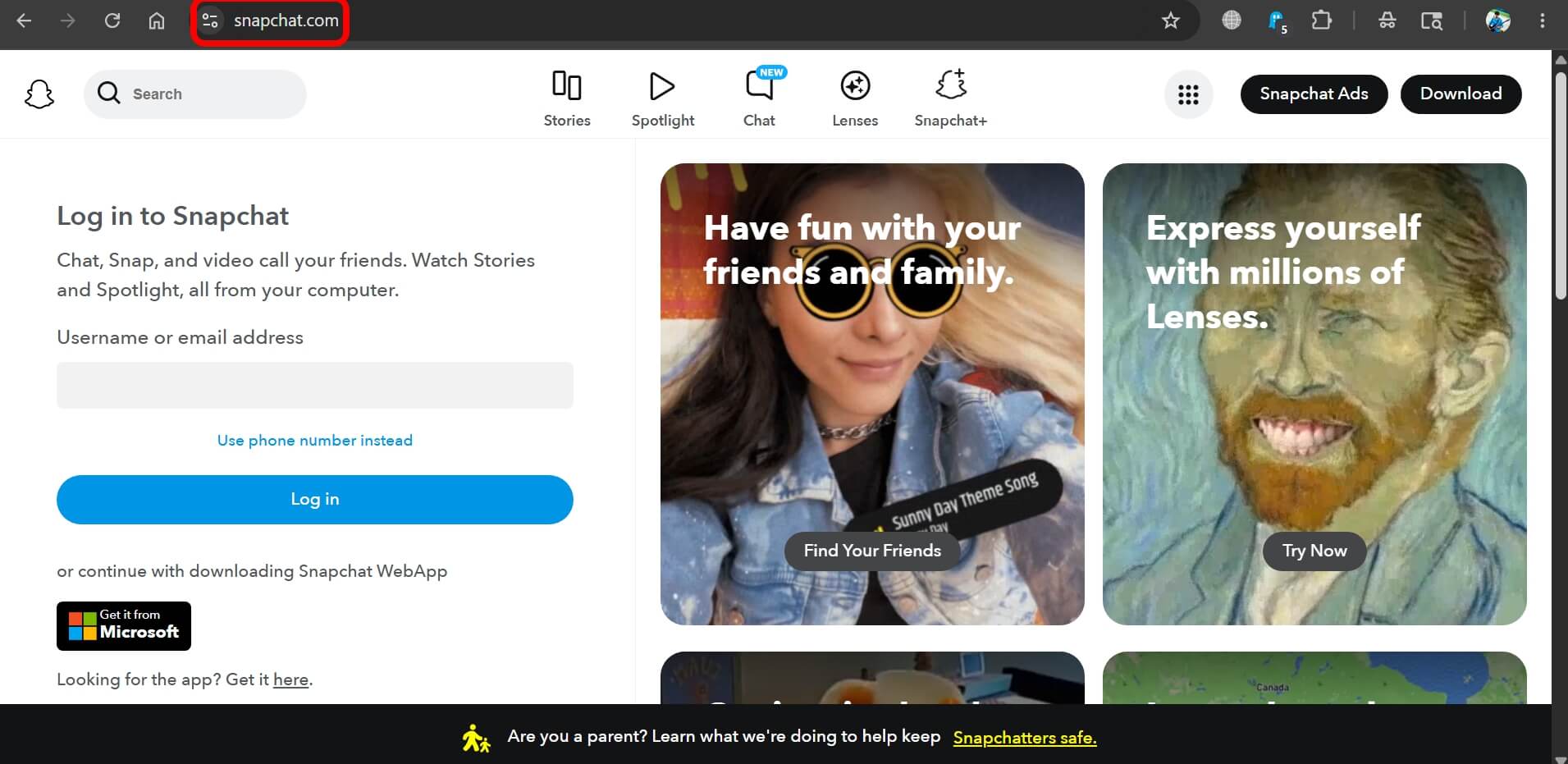
Chat, voice, and video work cleanly on the web version of Snapchat. You can enable web permissions for Snapchat on any browser.
The filter selection is limited on the web, and you cannot view received Snaps there, but the session stays active as long as the tab is open and you have used the mobile app recently.
Data saver mode significantly reduces background data usage.
- Go to Settings > Additional Services > Manage.
- Enable the checkbox next to Data Saver.
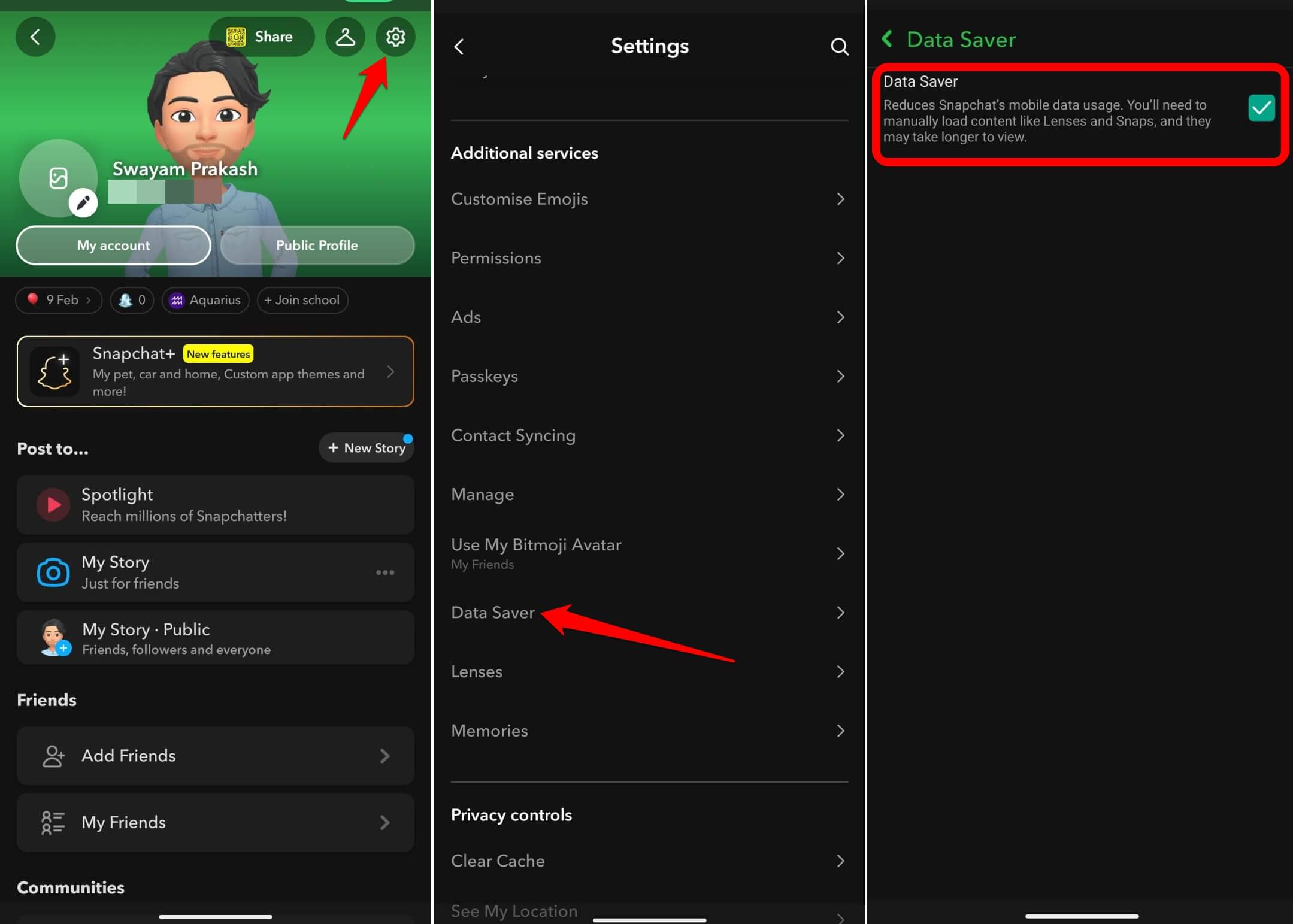

Snaps stop auto-downloading, and you choose which ones to load manually. It is the one setting worth switching on before a long flight or anywhere data is expensive or unreliable.
Frequently asked questions
What is Bounce on Snapchat?
Bounce is a Snapchat playback mode that loops your video forward and backward continuously. After recording a video, tap the arrow icon and select Bounce. It is available to all users for free.
How do I stack two filters on Snapchat?
Take your snap, apply the first filter by swiping, then tap and hold the screen while swiping again to layer a second filter on top. You can combine geo-filters, color overlays, and timestamps this way.
What are the heat maps on Snap Map?
Snap Map heat maps are glowing zones that appear when you zoom out fully on the map. They show areas with high public Snap activity. Tap any glowing zone to view live Stories posted from that location in real time.
Do I need Snapchat Plus for Private Story Segments?
No. Private Story Segments are free. Go to Create Story and choose Custom to build separate private stories for different audiences. Snapchat Plus is only required for features like the Friend Solar System, Snap Modes, and AI stickers.
How does the invisible tap-to-reveal text trick work?
Type text on a snap, then use the color eyedropper to match the text color exactly to the snap background. The text becomes invisible. When someone views the snap and taps the screen, the text highlights and becomes readable.
The one worth trying first
The Snap Map heat layer is the feature I would mention first to someone who thinks they already know the app. It changed how I use the map from a social locator into something that occasionally surfaces something worth going to.
The shift only happened after I stopped treating the feature as a gimmick and started opening it with an actual question in mind.
Most of the tricks I have mentioned here follow the same pattern. They look small, get used once out of curiosity, and then quietly become part of how the app feels to use.
The tap-to-reveal format started appearing in almost every story I sent within two weeks. Ghost Mode with selective sharing became the default setting rather than something I toggled deliberately. That is roughly what these features do when they actually fit the way you already use the app.

![[Snapchat Wicked iPA iOS 17] Download for iPhone](https://www.digitbin.com/wp-content/uploads/Snapchat-Wicked-iPA-iOS-17-Download-for-iPhone-400x220.png "Snapchat Wicked iPA on iOS 17: Download for iPhone")