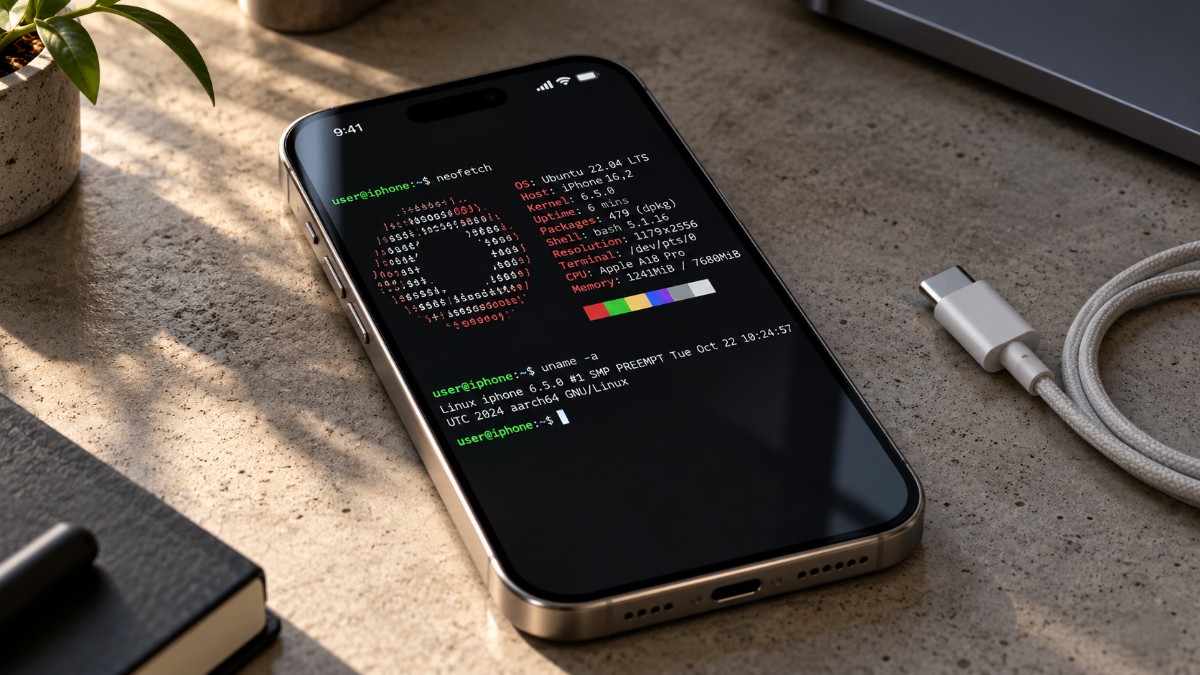
LinuxRunner on iPhone sounds like a stunt until you read what it does. It interprets ARM64 Linux programs inside an ordinary iOS app, so there is no jailbreak, no virtual machine, and no JIT.
The question most people ask next is a practical one. Can it really open Firefox, Telegram Desktop, and Blender on a phone?
Going by the project’s documentation, Telegram is the best documented, Firefox is hit and miss, and Blender looks like a stretch.
This guide covers the install, the setup, and the friction to expect. The short version is that LinuxRunner is more capable than it sounds and more fragile than a normal app.
TL;DR: LinuxRunner 1.0.1 installs by sideloading an unsigned IPA, then you pick Debian, Arch, or Alpine inside the app. Telegram Desktop on Arch is the best documented app, Firefox is listed but carries a warning, and Blender is a stretch because of memory limits. Keep the app in the foreground, since iOS can suspend it, and treat it as a capable terminal first.
What runs on LinuxRunner, and what the docs say
The LinuxRunner README names Firefox, Chromium, Dolphin, Konsole, and Blender. The 1.0.1 release notes add Telegram Desktop. Only Telegram has a tested workflow behind it.
Every app other than Telegram comes with a compatibility warning, which fits how the maintainer describes the project.
| Application | Distribution | What the documentation says |
|---|---|---|
| Telegram Desktop | Arch Linux ARM | Tested by the maintainer: login, sending messages and calls |
| Firefox | Not stated | Listed in the README. Screenshot shows example.com, browsers may hit unsupported features or memory limits |
| Chromium | Not stated | Listed in the README. Same browser warning applies |
| Blender | Not stated | README screenshot shows a viewport with a cube. Memory limits are warned about |
| Dolphin and Konsole | Debian with KDE Plasma (experimental) | Listed as running in the README |
Physical testing so far covers an iPad, plus the maintainer’s report of a graphical Arch desktop on an iPhone running build 897. Our earlier LinuxRunner report covers the launch and the version history.
How to install LinuxRunner on iPhone?
You install LinuxRunner on iPhone by downloading the unsigned IPA from GitHub Releases and signing it yourself with a sideloading tool. The 1.0.1 file is around 14.64 MB, per the release notes.
The configured minimum is iOS and iPadOS 15.0, so a phone on iOS 27.2 qualifies on paper. I tried LinuxRunner on my iPhone running iOS 27.0.1.
| Requirement | Status |
|---|---|
| Jailbreak | No |
| JIT or virtual machine | No |
| Minimum iOS or iPadOS | 15.0 |
| Signing with your own Apple ID | Yes |
| Sideloading tool | Sideloadly or AltStore Classic |
| IPA size (1.0.1) | 14,646,386 bytes |
| App architecture | ARM64 only |
- Download
LinuxRunner-1.0.1.ipafrom the latest release page on GitHub.
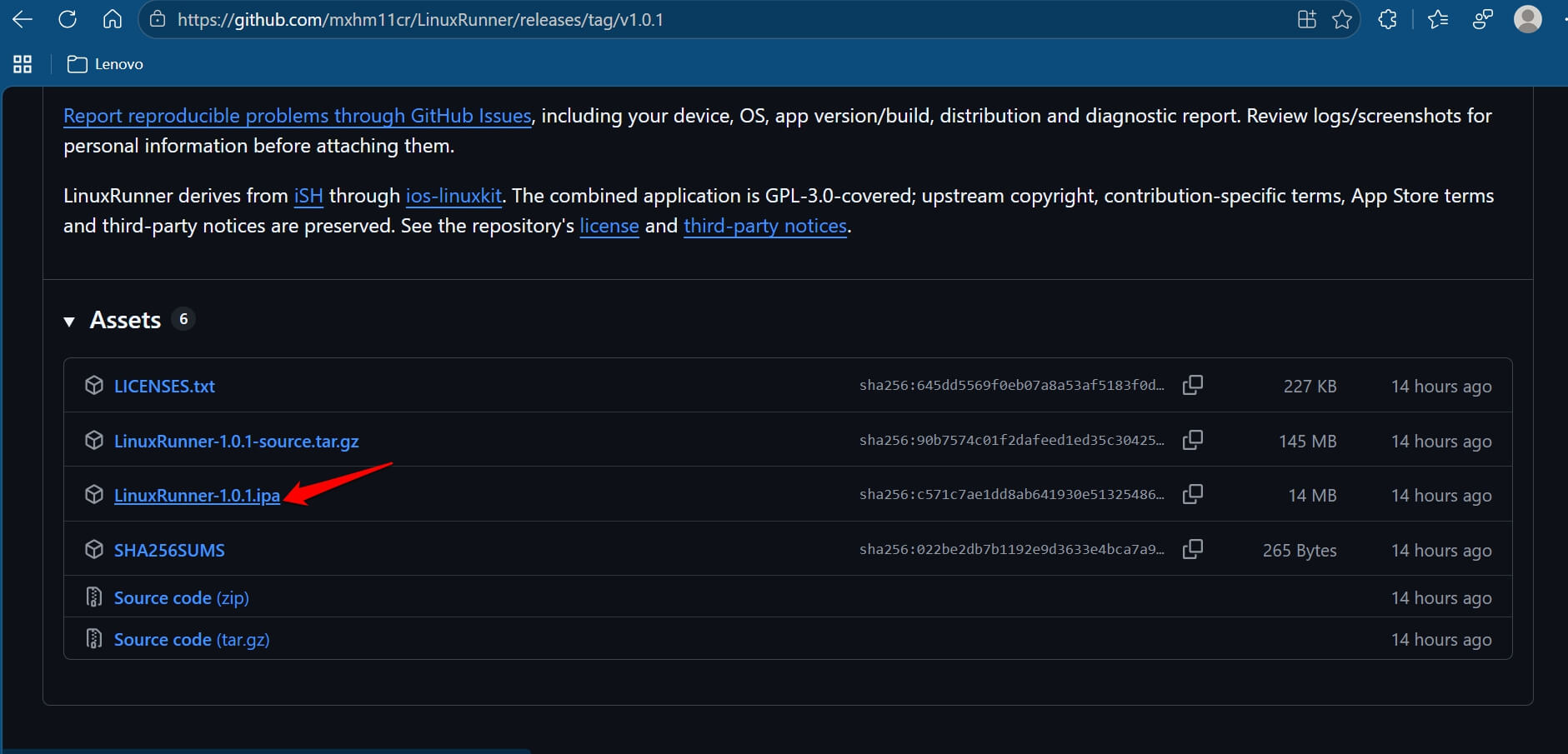

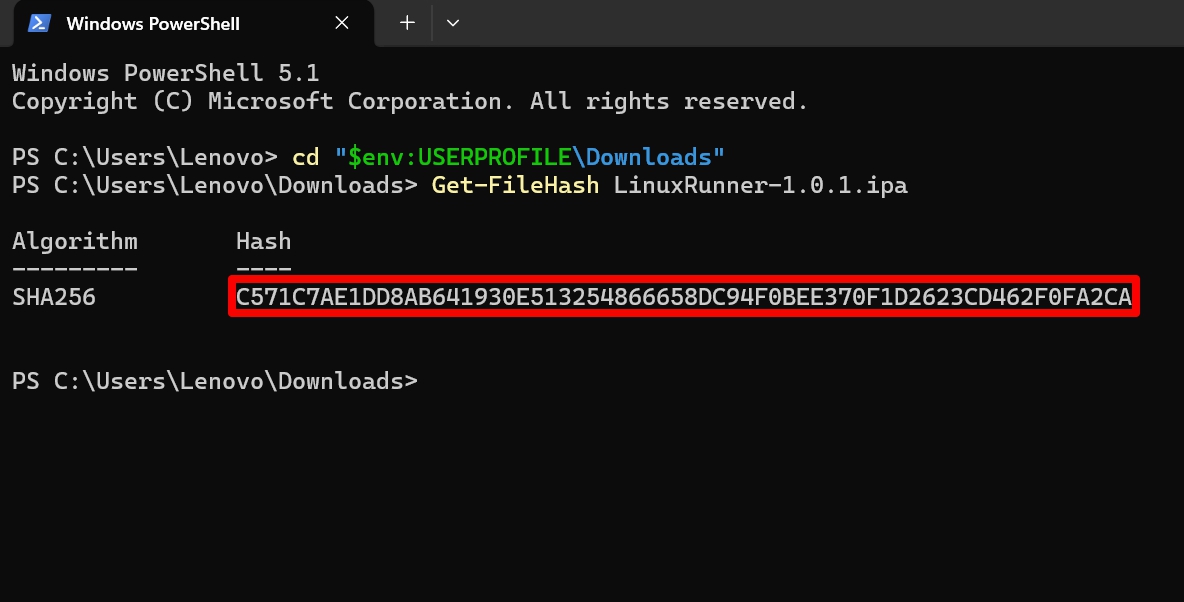
- Check the checksum before you sign anything.
- On a Mac, run
shasum -a 256 LinuxRunner-1.0.1.ipa, - If using Windows, run
Get-FileHash LinuxRunner-1.0.1.ipain PowerShell. - Compare the result with the SHA-256 on the release page, which starts with c571c7ae. Signing changes the file, so this has to come first.

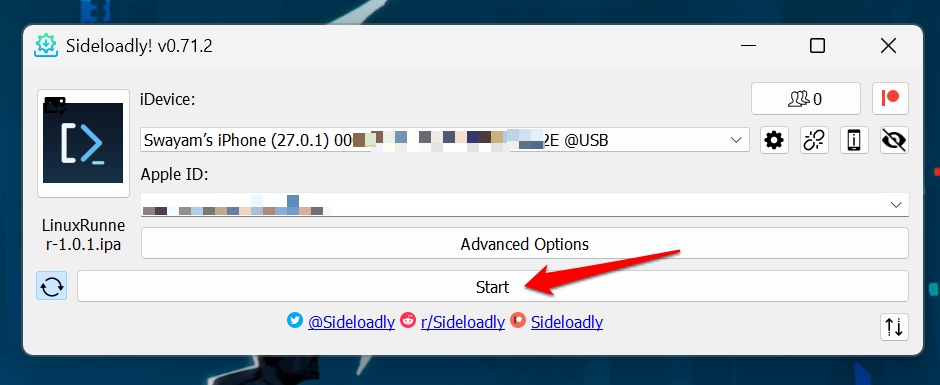
- First, install Sideloadly or AltStore on your PC [I’m installing it on my Windows 11 PC for this example]
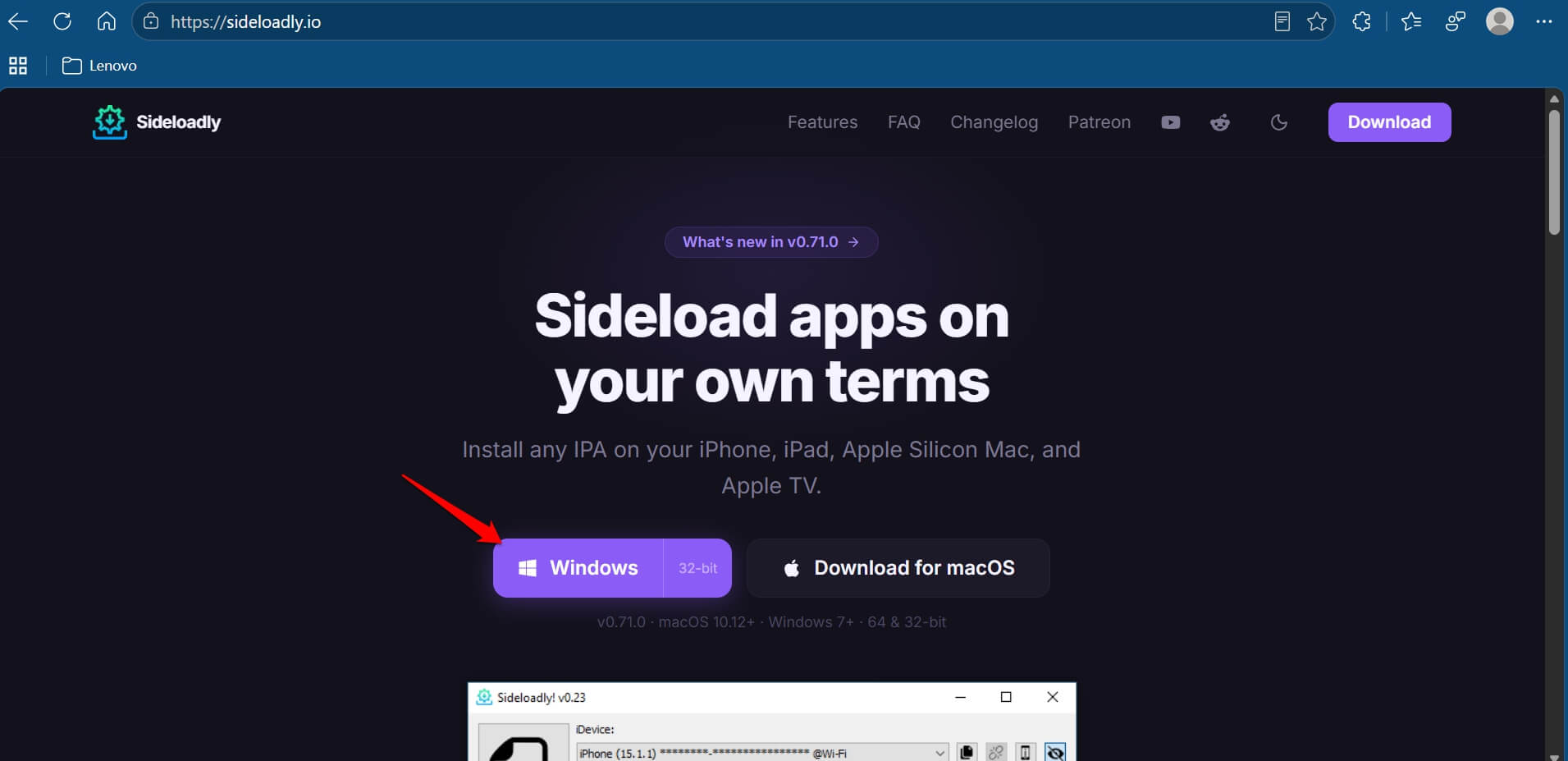

- Open Sideloadly or AltStore Classic on your computer, connect the iPhone, add the IPA, and sign in with your Apple ID. For this demo, I used Sideloadly to transfer the IPA to my iPhone.

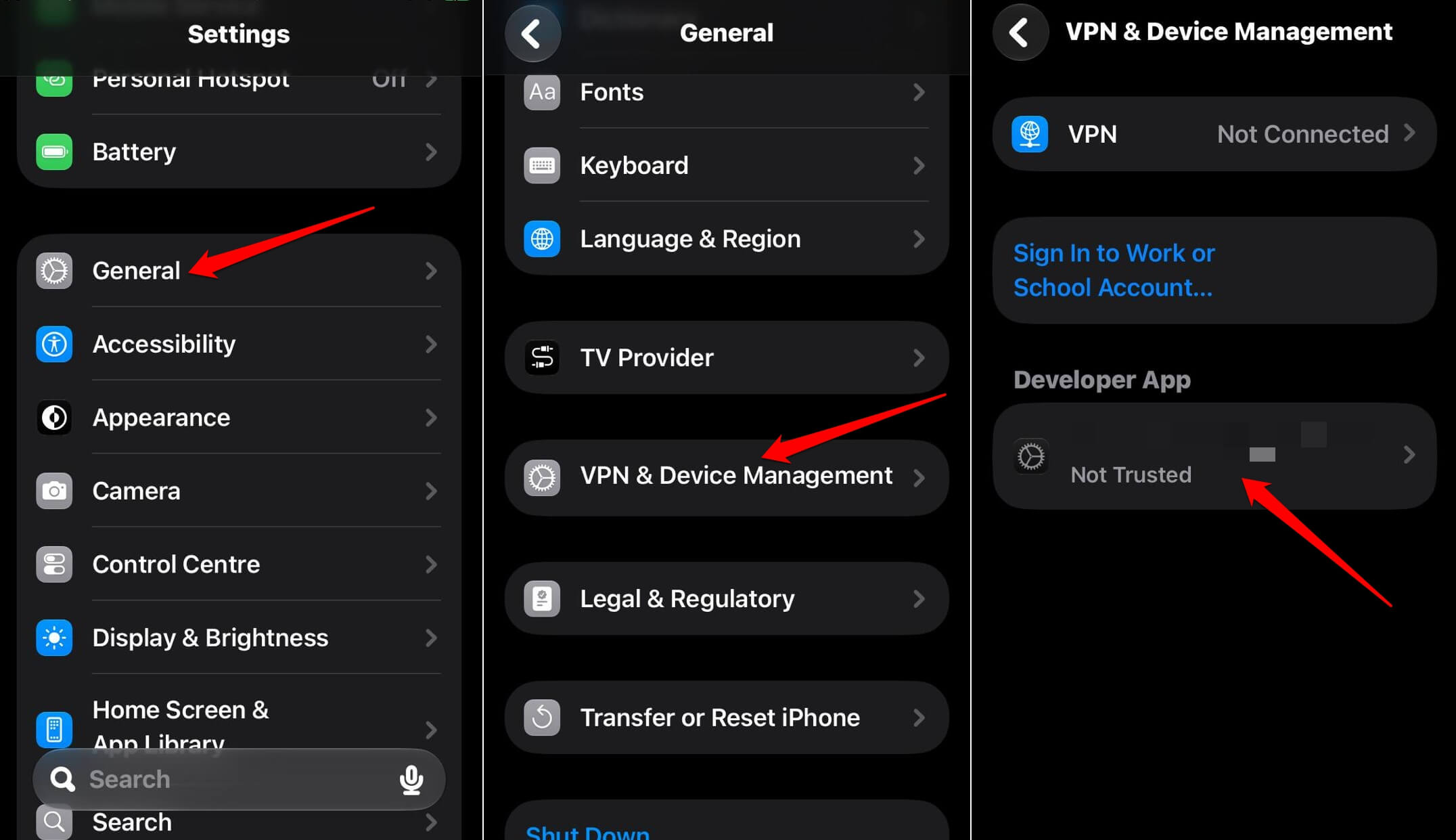
- Go to Settings > General > VPN and Device Management > Developer App.

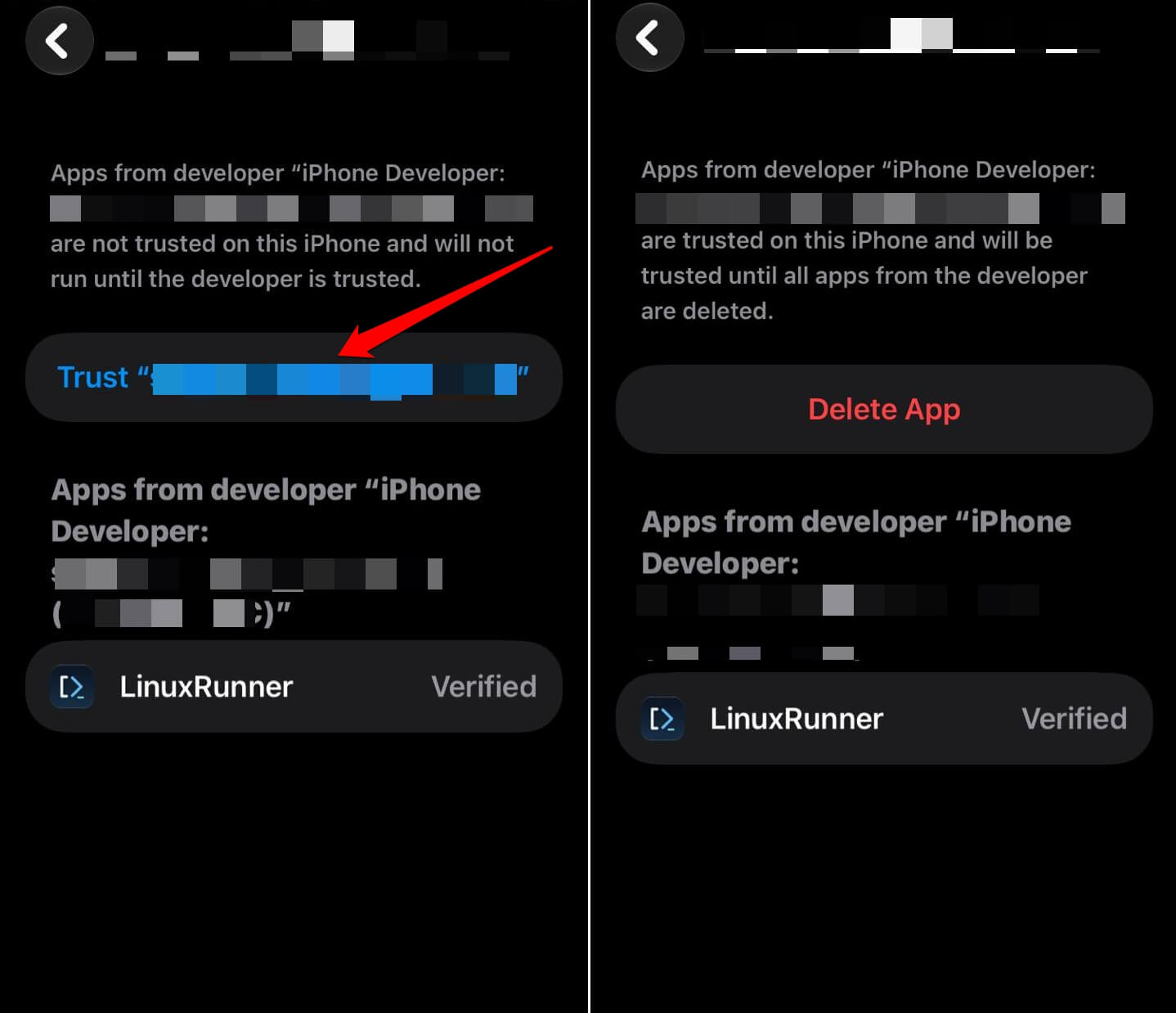
- When iOS asks you to trust the sideloaded app from the developer profile, approve it.

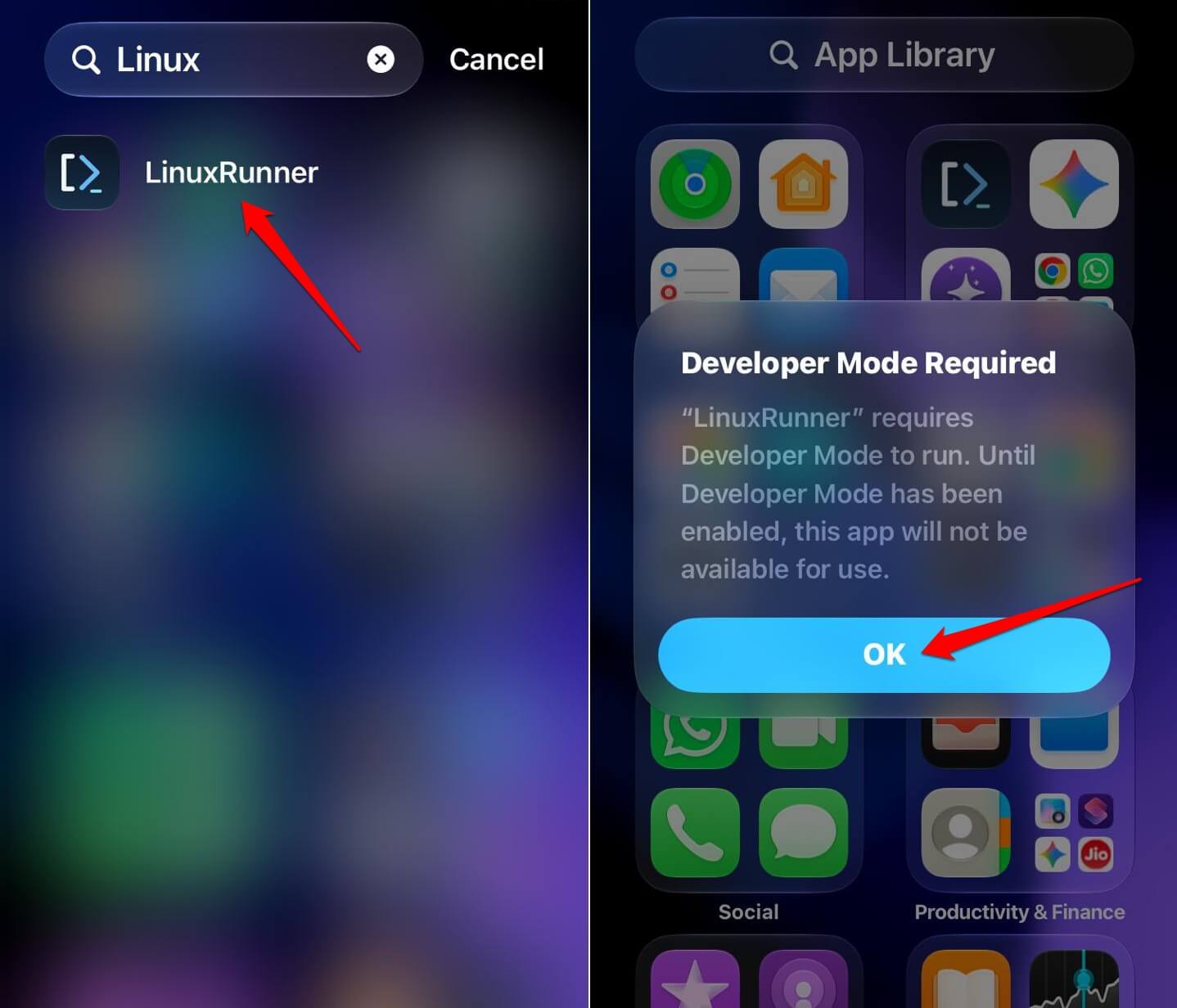
- Open LinuxRunner from the iPhone Home Screen or App Library.
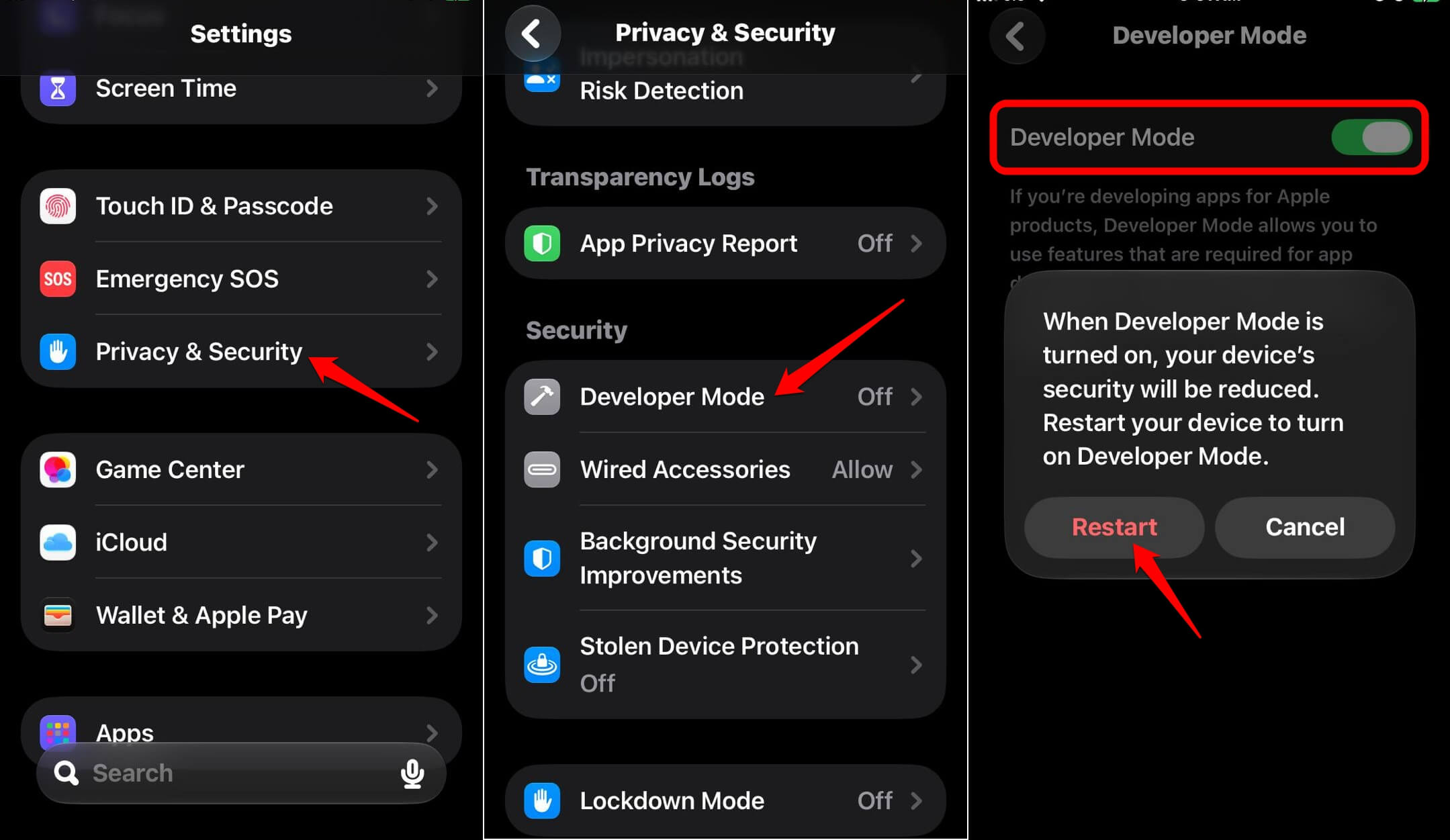
- You will see a notification that asks you to enable developer mode on your iPhone to use LinuxRunner. Tap OK.

- To enable developer mode on iPhone, go to Settings > Privacy and Security > Developer Mode. Tap the toggle to enable the feature.

The README does not guarantee any single sideloading service, and refresh periods depend on the tool and the account. On a free Apple ID, sideloaded apps commonly expire after seven days, so plan to refresh.
Setting up Debian and opening the desktop
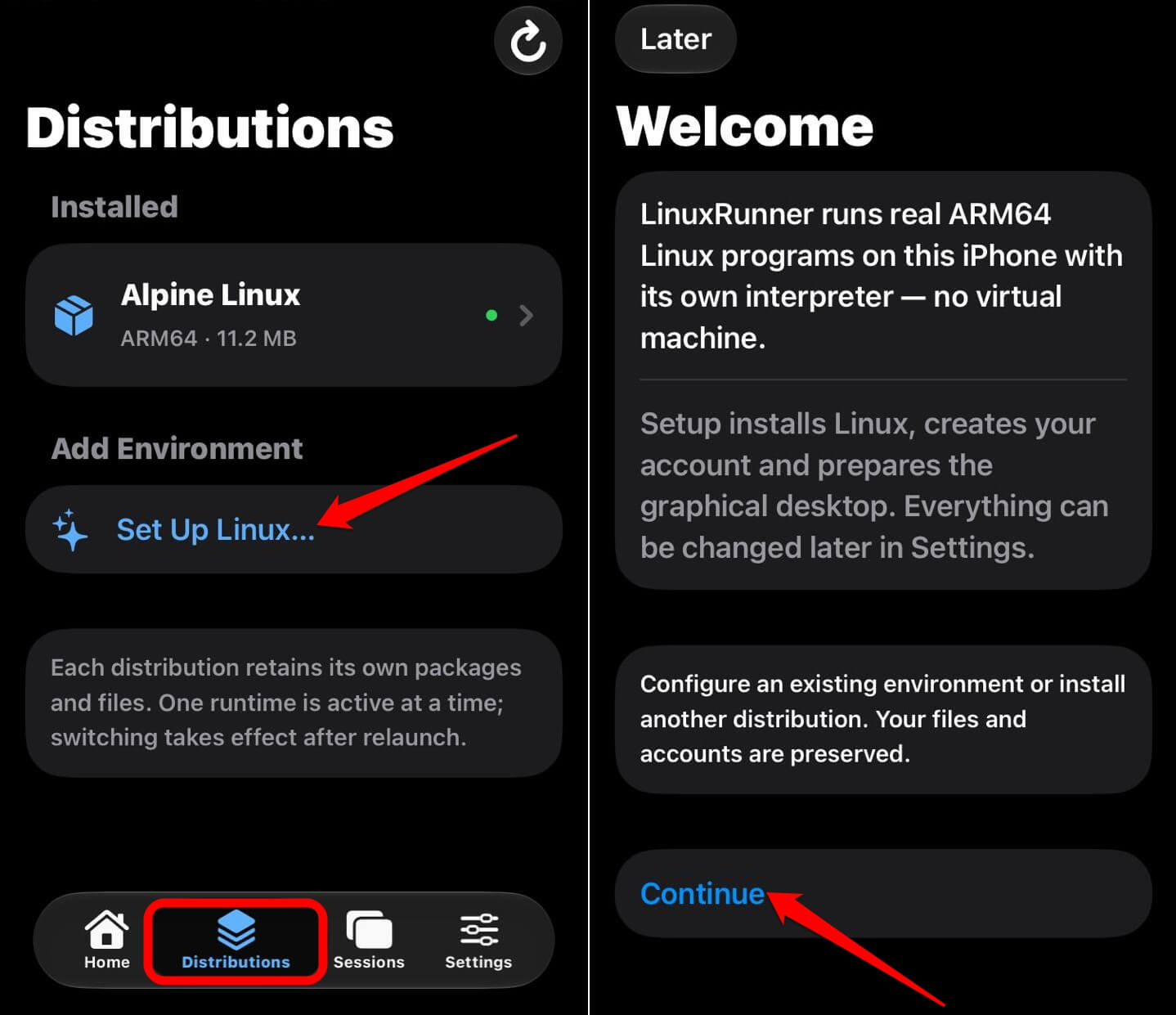
After the app opens, add Linux from the Distributions tab, and Debian 13 is the recommended choice for desktop apps. The app has four tabs: Home, Distributions, Sessions, and Settings.
- Tap Distributions, choose Set Up Linux… under Add Environment, then tap Continue.

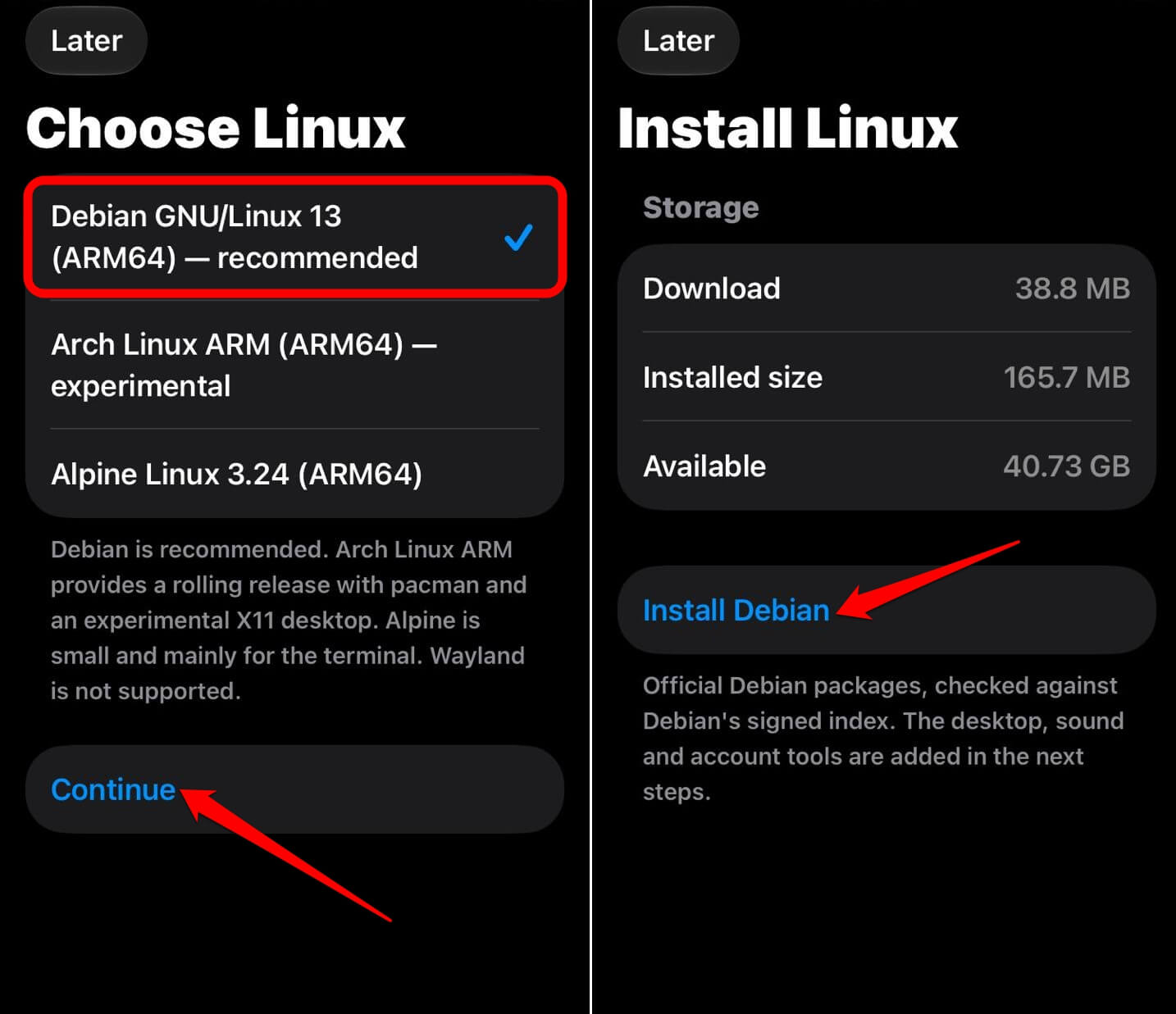
- On Choose Linux, pick Debian GNU/Linux 13 (ARM64). Alpine 3.24 is the smaller, terminal-first option, and Arch Linux ARM is marked experimental.
- Read the storage screen, tap Install Debian, and keep the app in the foreground.

- If Restart LinuxRunner appears, swipe the app away in the app switcher and open it again. Setup resumes where it stopped.
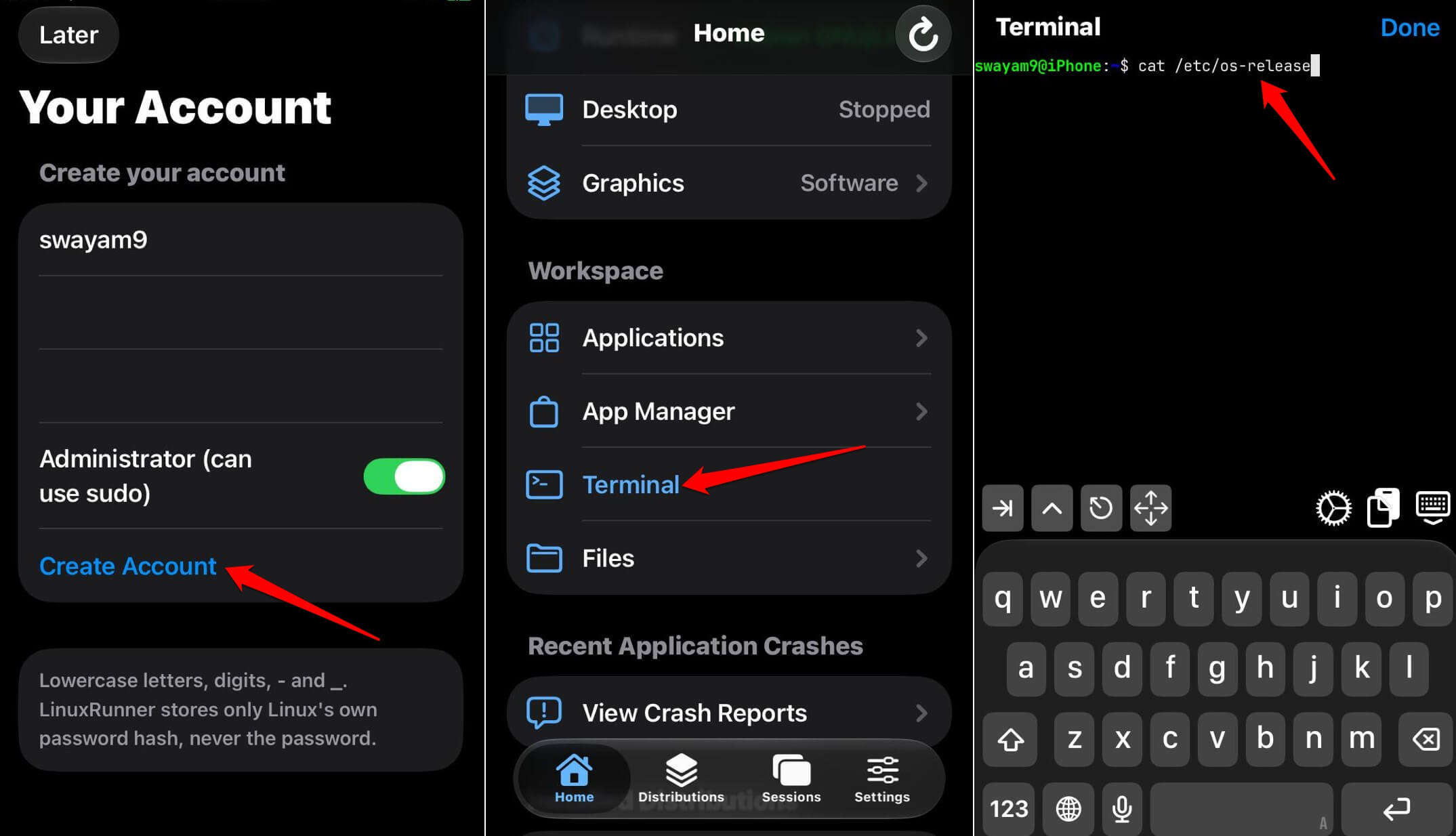
- On Your Account, enter a username and password and tap Create Account. Tick Administrator if you want sudo.
- From Home, open Terminal and run
cat /etc/os-releaseanduname -m. The architecture normally reads aarch64.

- For a graphical session, tap Install Desktop Components, then Open Desktop.
Setup is mostly a waiting exercise, because the downloads and the first package configuration happen with the app open in front of you. With an uninterrupted stable network, the setup and installing admin tools should take no more than a two/three minutes.
Inside the desktop, a tap is a left click and a long press is a right click. Pinch zooms, two fingers pan, and Done returns to the app while Stop Desktop ends the session and closes everything in it.
Firefox on iPhone through LinuxRunner
Firefox is listed in the README, but the 1.0.0 release notes warn that browsers may encounter unsupported features or memory limits. The maintainer’s own screenshot shows Firefox loading example.com, which is about the lightest page on the internet.
Install Firefox from LinuxRunner > Home > App Manager.
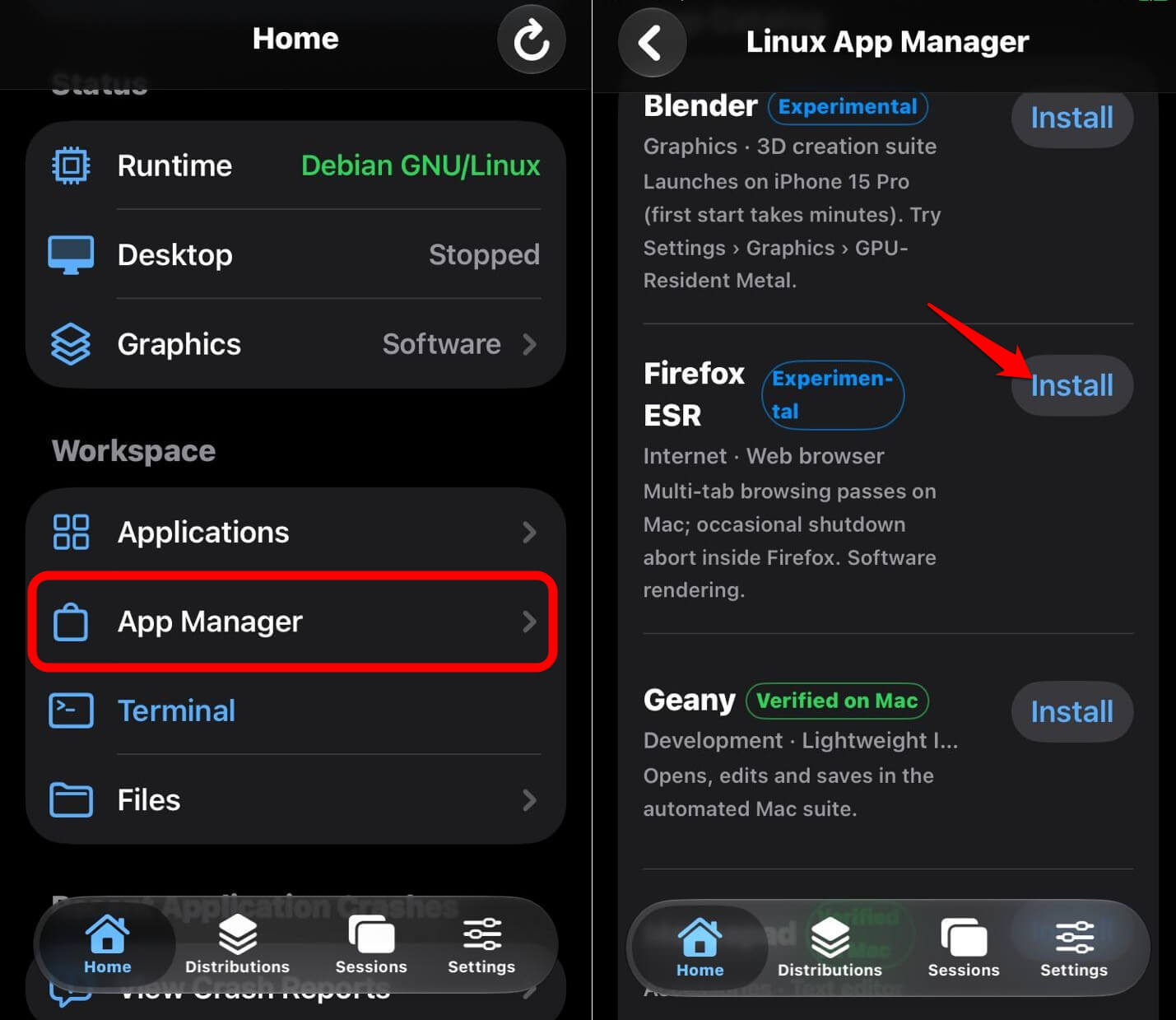
On Debian, the package is usually firefox-esr, so run apt search firefox first to confirm the name on your release.
Once you press Install, it will be done automatically. You need to close LinuxRunner from the Recent Apps and relaunch. You can open Firefox in LinuxRunner from the App Manager.
Firefox homepage opens all right. It could be slow depending on which iPhone model you are using. I tried launching the DigitBin site on Firefox through LinuxRunner. The homepage loaded, but it was sort of slow.
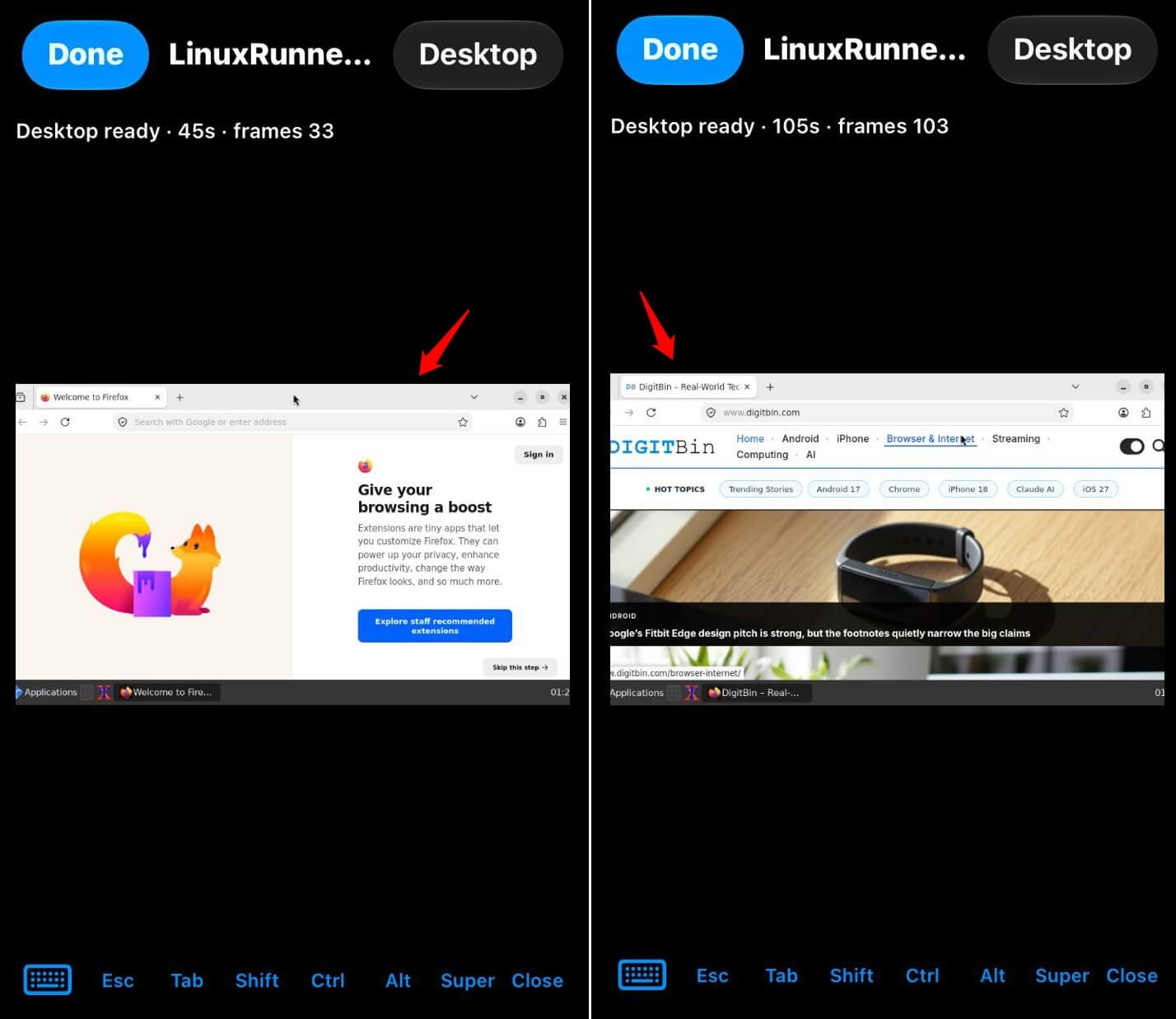
Not to mention, my iPhone(a few years older model)heated up as soon as I opened Firefox and continued heating as I tried loading a website(DigitBin). A few seconds later, LinuxRunner crashed and automatically closed. As I had mentioned at the start, Firefox seems like a hit-and-miss with LinuxRunner.
Telegram Desktop on Arch Linux ARM
Telegram Desktop is the one app with a described test, and the maintainer reports login, sending messages, and calls working on Arch Linux ARM. The supplied iPhone capture only shows its welcome screen.
To try it, you need the Arch setup, which is experimental and gives you an Openbox desktop with the LXQt panel and PCManFM-Qt. Arch Plasma needs Wayland, and Wayland sessions are not supported.
Arch is a rolling distribution, so use a full system upgrade using the command sudo pacman -Syu when you add packages, rather than syncing databases and installing against an old system.
The Arch setup also stores signed downloads for retry, which helps if a long install gets interrupted. One practical catch follows from the suspension warning. A chat client that iOS can freeze in the background is unlikely to ring your phone the way the normal Telegram app does.
Blender and the memory ceiling
Blender is the stretch, since the README shows a viewport with a cube and warns that demanding programs can exceed the memory available to the app. Rendering goes through Mesa software OpenGL, with an optional Metal bridge that the README calls experimental.
A cube is a fair demo. A scene with textures is another matter, and the documentation gives no figures for memory limits, so any number you hit is worth recording.
The friction to plan for before you start
The documented limits are the friction you will actually meet, and most of them come from iOS rather than from Linux. These are the ones worth knowing before you spend an evening on setup.
- iOS can suspend or terminate the app. Saved files persist, but running processes do not survive termination.
- Only ARM64 programs run. x86 and x86-64 applications, kernel modules, systemd as init, and containers are not supported.
- Some Arch GTK and glycin programs still hit write-seal compatibility problems.
- A black screen on launch was reported on an iPhone 11 running iOS 17, and it is unresolved.
- Large applications can be slow or exceed memory limits.
When you update the app, keep the same bundle identifier and App Group settings, and back up files first. Do not uninstall the app as a repair step, because that can take your environments with it.
Is LinuxRunner safe to sideload?
LinuxRunner treats the iOS sandbox as the security boundary, and the LinuxRunner security policy says Linux users and permissions do not isolate hostile programs from the app. Shared folders grant the file access you choose, and Linux programs can use the phone’s network.
So keep unfamiliar binaries off a phone full of personal data. Our look at iPhone security in 2026 gives the wider picture on sideloading.
The project is small and new. A second repository with a similar description exists under another account, and its relationship to the original is unconfirmed, so download only from the maintainer’s own releases page. Leave package signature checks switched on when you install anything inside Linux. The documentation is firm on that point.
Frequently asked questions
Does LinuxRunner need a jailbreak?
No. LinuxRunner installs as a sideloaded IPA and needs no jailbreak, virtual machine or JIT.
Which iPhones can run LinuxRunner?
The configured minimum is iOS and iPadOS 15.0, but compatibility is not universal. A black screen on an iPhone 11 running iOS 17 is still unresolved.
Can I run x86 or Windows apps in LinuxRunner?
No. LinuxRunner runs ARM64 Linux userspace only, and x86 and x86-64 applications are not supported.
Does LinuxRunner keep running when I switch apps?
Not reliably. iOS can suspend or terminate it, and running processes do not survive termination, although saved files persist.
Does Telegram Desktop work in LinuxRunner?
The maintainer reports login, sending messages, and calls working on Arch Linux ARM. It is the only app in the documentation with a described test.
What does the future hold for LinuxRunner?
The README lists compilers, Python, and Node.js, which makes LinuxRunner a pocket terminal before it is a pocket desktop. The graphical apps are where the project is honest about its edges.
LinuxRunner is also very young. Version 1.0.0 arrived on October 25, and 1.0.1 followed two days later, so anything you read today may be out of date in a month. However, if you like digging deep and testing the capabilities of your iPhone in a Linux environment, this is worth a try.