
WhatsApp claims to offer end-to-end encryption to safeguard your chats. Also, using the same WhatsApp number on two devices is impossible. However, your WhatsApp account can be spied upon using WhatsApp Web. All your chats could be read by an unauthorized person.
WhatsApp Web is a powerful feature released which lets users send or receive a message using any device by associating their WhatsApp Account using scanning a QR Code. The WhatsApp Web lets users simulate the WhatsApp account on any device with a fixed web browser. This can be used to spy or hack your WhatsApp.
I have found several ways to know if someone is spying on WhatsApp. Today in this post I will tell you how you can find which other phone or PC is accessing your WhatsApp. Also, I will explain how to keep yourself safe from breaches or getting hacked.
How to Know if Your WhatsApp is Being used on other Devices?
Often, people take an interest in your life. To sneak into your privacy, they can access your WhatsApp chats. All they need is a few seconds of your unlocked phone and WhatsApp Web Barcode. Boom!! They can now see an exact duplicate of your WhatsApp account with all the chat and media.
The WhatsApp on your cell phone will work normally. However, every WhatsApp you send or receive will be visible on the device of the person spying on your chats. WhatsApp Web will simulate your WhatsApp account on the unauthorized device with all the chat logs, access to media, view status, and even send messages.
How to Know if they Spy via Whatsapp Web?
In case you missed it, I want to let you know that the first evidence will appear on the cell phone itself in the form of a notification.
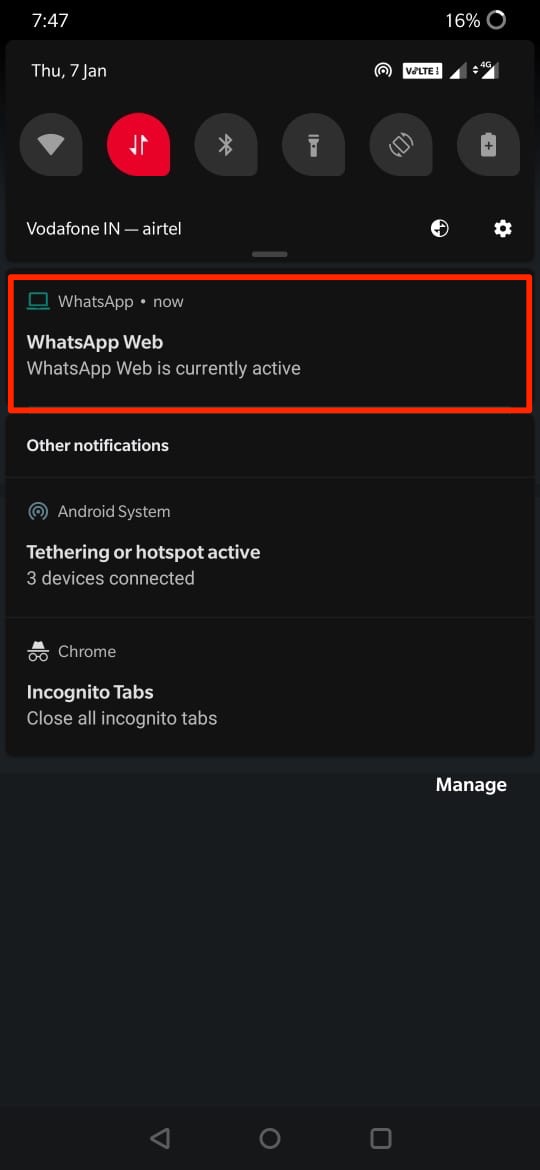
If you missed it then you can check the account usage by doing the following.
- Launch WhatsApp on your phone.
- Tap the overflow icon.
- Select Linked Devices from the menu.
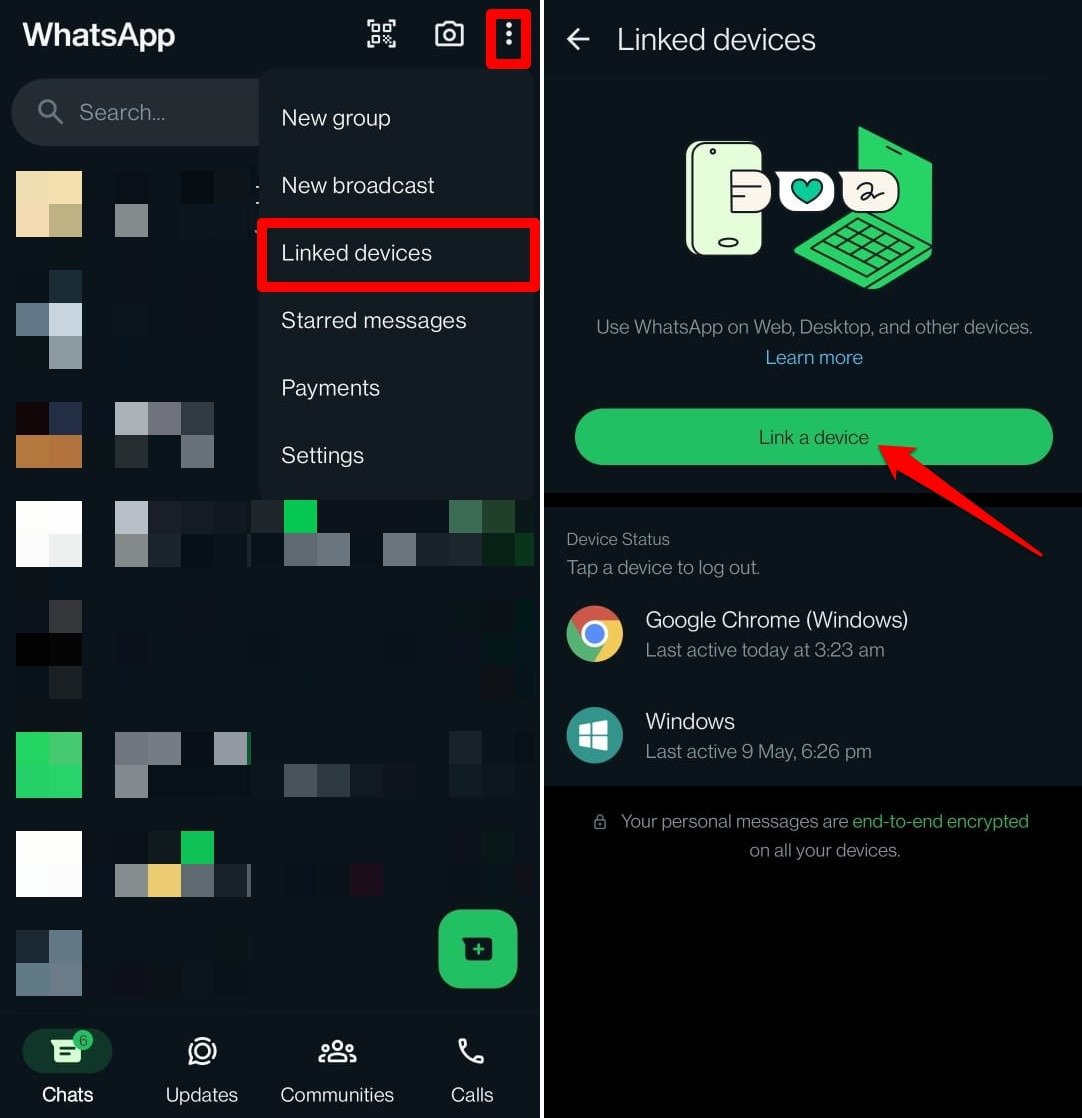

If one or several computers with open sessions appear which you have not given access to, then your WhatsApp account is compromised to another device. Your account is “intervened” and they are spying on you.
Notice any changes to the name, About section, or WhatsApp avatar that you never made. Any modification to these data may signify a hack resulting from a breach of your WhatsApp account.
What to do if WhatsApp is Open on Another Device?
To prevent WhatsApp from being hacked you can log out of all the sessions that are open and the person will lose access to your account immediately.
To avoid these things happening again, the most effective solution is to configure WhatsApp with App Lock. In this way, even if someone gets your phone, they can not access the WhatsApp application and connect it to a PC or other App via WhatsApp Web.
Know if WhatsApp is Open on Another Device
Another way in which persons can spy on WhatsApp is by activating the account on another device. They register your WhatsApp number in another mobile, and during their configuration, they recover all your chats or conversations saved in the application. Anyone can do this by taking their cell phone, to receive the verification code that WhatsApp sends.
If such a thing is done then on your phone you will be greeted with the message “This phone could not be verified” because the number is registered on another device.
You can re-verify your number to regain account access.
Protect Your WhatsApp Account from getting Activated on other Devices
There is a much-sophisticated method to protect your WhatsApp from getting active on another phone. All you need to do is enable two-step verification. To do so go to,
- Open WhatsApp.
- Tap the 3-dot icon and select Settings.
- Go to Account.
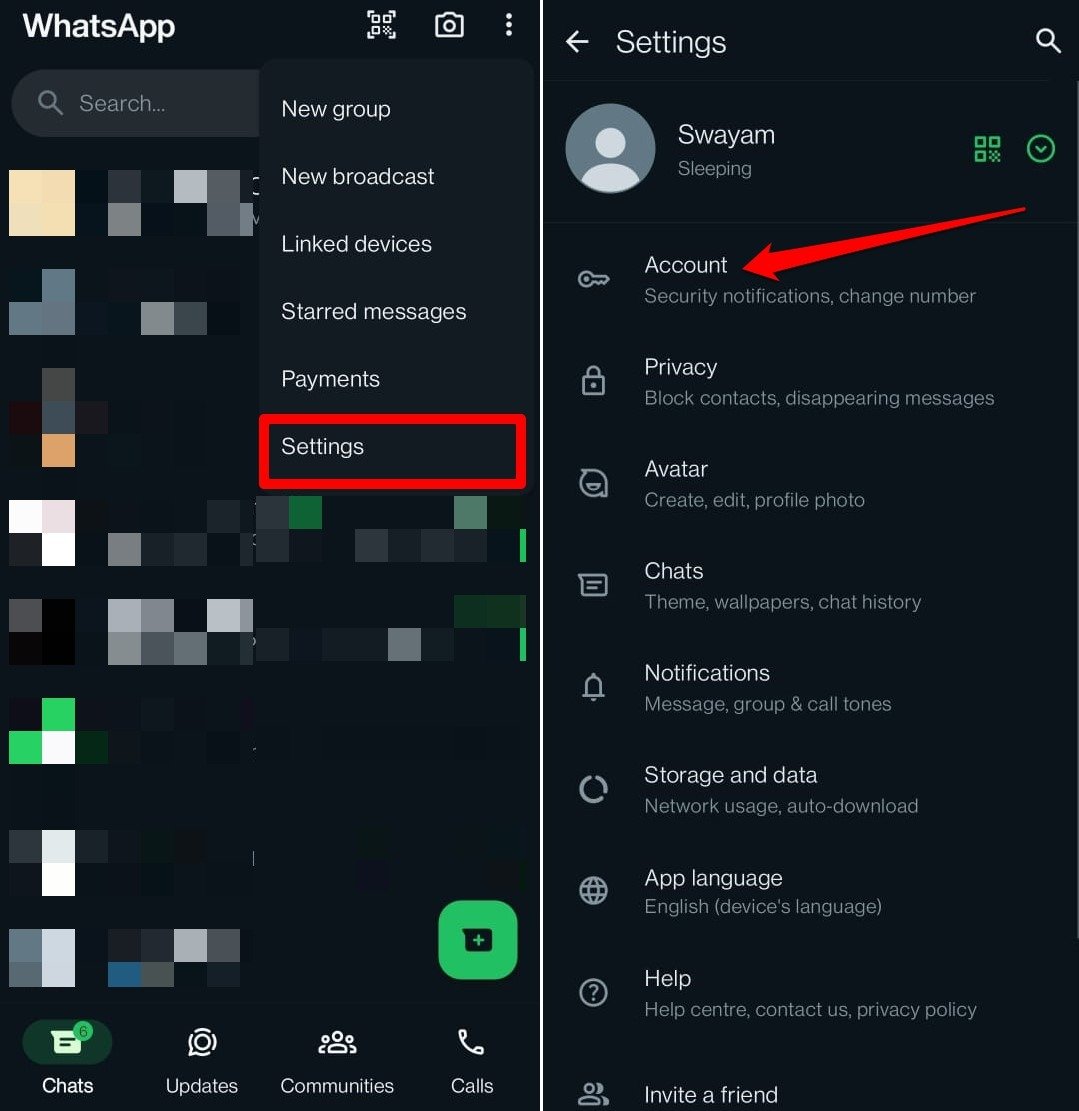

- Tap on Two-step verification.
- Press the button Turn On.
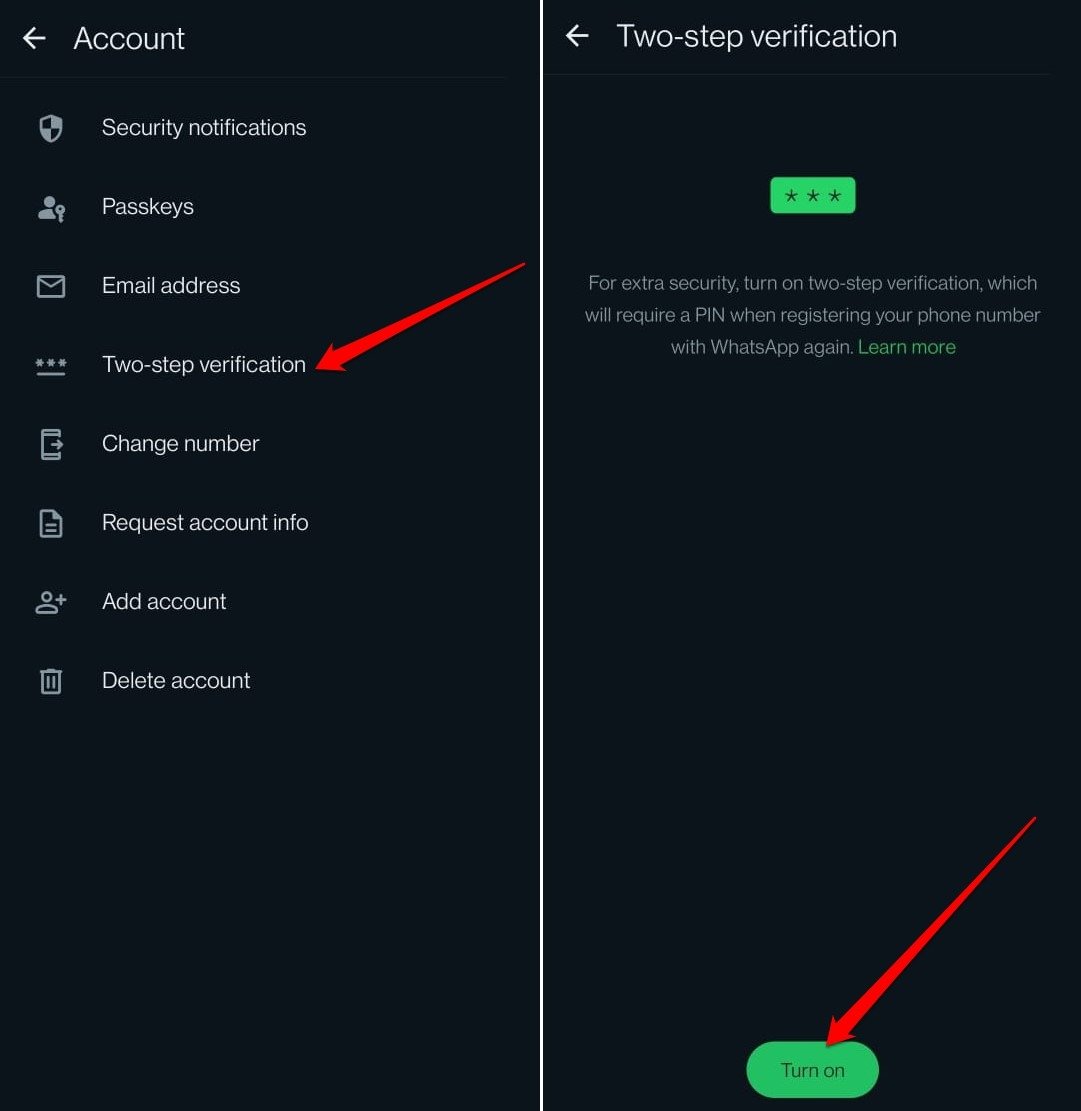

Follow the further instructions on the screen to complete setting up the two-step verification on the WhatsApp account.
When someone tries to activate your WhatsApp on another device, he will be asked for a security code that only you know. Without that code, it will be impossible for another person to register your WhatsApp on another computer.
Check if Your WhatsApp Profile Info was Changed
If some unauthorized person has access to your WhatsApp chats, they may have made changes to your contact info.
- Open WhatsApp.
- Press the 3-dot icon at the top and go to Settings.
- Tap on your avatar to visit your WhatsApp profile information.
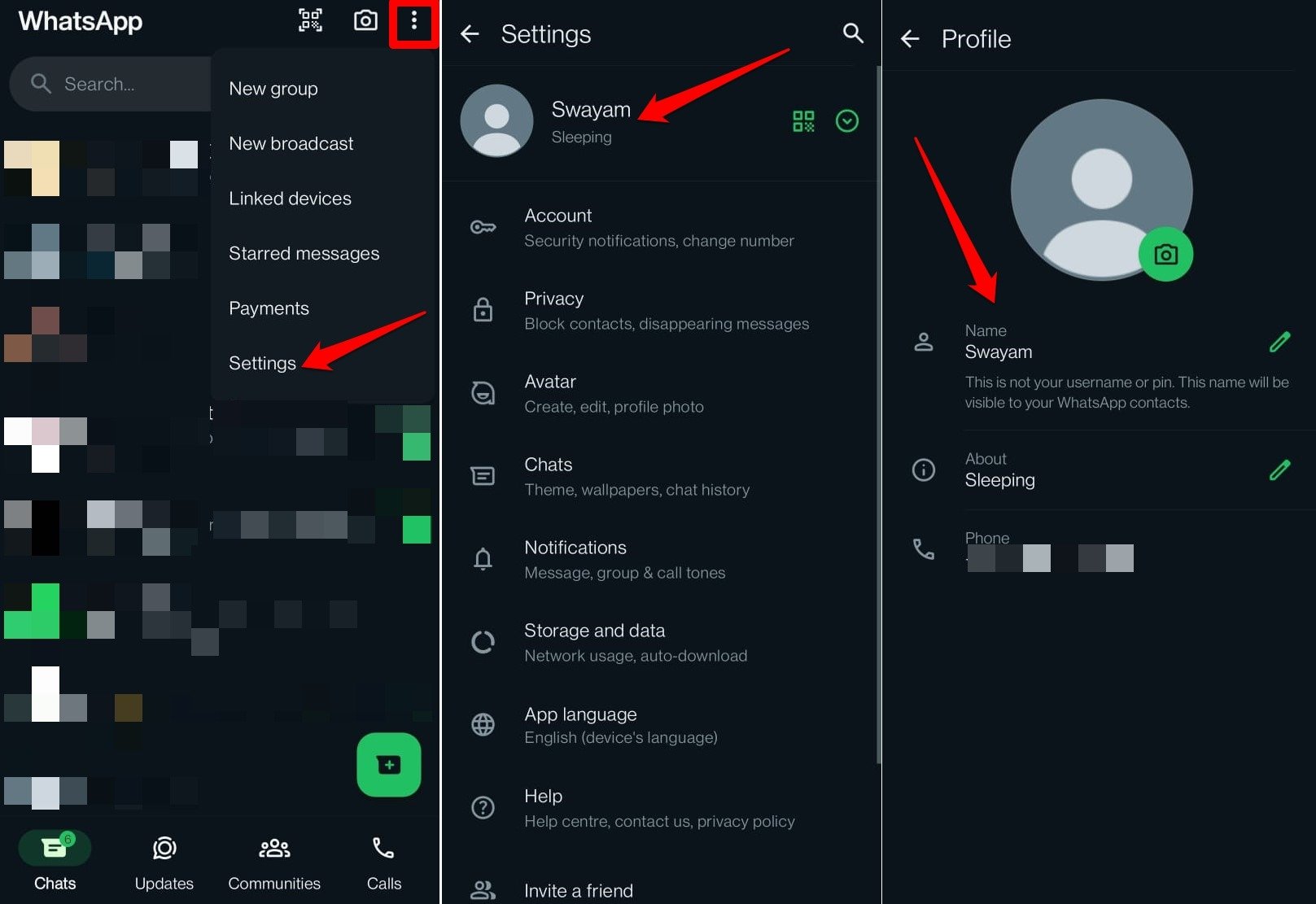

Notice any changes to the name, About section, or WhatsApp avatar that you never made. Any modification to these data may signify a hack resulting from a breach of your WhatsApp account.
Check WhatsApp Chats for Messages Exchanged with Unknown Contacts
When someone has remote access to your chats, they may have exchanged messages with some other person who is not in your contact list.
Usually, WhatsApp chat has so many messages from your contacts, groups, and businesses you follow that it is normal to overlook any message exchanged with an unknown person.
- Launch WhatsApp.
- Scroll through the chats.
If you see a message sent to a number or contact you never added on WhatsApp, block them immediately.
How to Know if Someone Hacked WhatsApp Files?
This is a complex method to gain access to the WhatsApp chat but it is an easy trick which can put your privacy at risk. A rogue can access the chat even with a locked WhatsApp account.
They will target the WA Chat log, images, videos, and other media in the File Manager. The cybercriminal can send the files to his/her device or they can use auto-backup apps like Backup Text for WhatsApp. Also, they can directly email all your WhatsApp conversations in plain text. This is a very serious type of threat and many WhatsApp users don’t know about it.
Keep Your WhatsApp Files Safe in File Manager
Update WhatsApp on your phone regularly to stay safe from getting your WhatsApp chat hacked or getting your media files shared on WhatsApp leaked. The updates consist of security patches with backup encryption. Also, it is better to have an App lock for File Manager if you think a person may go as far as to sneak into your personal life.
Note & Conclusion:
Although WhatsApp is end-to-end encrypted, make sure to check the Linked Devices to see if there’s some unauthorized device connected to your phone. Remove the connected devices from your WhatsApp account that you don’t recognize.
As of now, there is no other way to hack into someone’s WhatsApp, unless the hacker has your phone with all the apps unlocked. I hope the post was helpful. Comment below for any queries or support. Provide your valuable suggestions to improve this post.

WhatsApp Webb is not an option when I click the three vertical dots
Are you using a mod version?
I noticed that someone I was on WhatsApp call with was seeing other incoming calls alongside with their names, pls how can I stop that? Because when I click on WhatsApp web no option came out why.
Re-login to your WhatsApp and Enable 2 step verification.
Sir By Mistake I have give My Whatss app Code to another Person now he has been using my whatss app plz tell me how i prevent or blocked him to use my whatss app
Again register your number and change the code.
hlo nikhil i m a Soldier please contact me i need your help brother
How many time is the two step verification suppose to ask for the code
The WA will ask code randomly based on user WhatsApp behavoiur
hi, thank you for that information! I saw unknown device and logged it out immediately. Can i now get the login history to find out who was that? Thank you very much!
Very very interesting thank you so much
Please can the hacker number and attempt time be sent to me any time or even now pls
This is quite expository. Thanks a bunch. How do I update my WhatsApp regularly and also, where’s the applock located?
Latest Android OS has an inbuilt App lock. You can update the WhatsApp from Play Store.
I have shared my watsup barecode to take print out that browsing centre man asked me to open watsup and he scanned using “watsup web app” to his system barecode and he open my watsup in its computer and all my chats are visible to him after taking printout he said it will be logged out automatically but am really not sure whether he logged out or not how to check that whether my account is safe..please say me..
Go to WA Web in your WhatsApp and check for any logged devices. If present immediately Log out
Some scammers initially gained access to my WhatsApp application by asking me to give them the verification code sent to my phone. Thank God I immediately tried to access my WhatsApp and got notified my number had been changed. I re-verified my account and activated the two-step authentication which before now wasn’t activated. I hope now my account is safe?
I never gave my phone out to anyone or shared any barcode but my WhatsApp kept popping notification that someone either just logged in or logged out. How is that possible?
This is helpful thank u so much
I don’t have a PC to scan on the Watsapp web. What do i do? I know someone is spying my watsapp
Check WhatsApp Web Settings to know which device is logged in, if any and log out all the sessions
I found it very helpful, thank you.
Is it possible for WhatsApp web to be initiated for the first time without the person scanning the QR code on my phone. Also I am unable to see a history of devices that has accessed my WhatsApp web as I got a notification few times that my WhatsApp web was active but I do not recollect deactivating the device shown at the time as I did not know what it meant. Please help, thank you
No it is not possible to start access to WA Web without Barcode Scan, aslo no history is available once the device gets logged out the data vanishing
Hi, I found it useful and helpful and i need to know one more thing i want to send a picture of ss
Someone scanning something I don’t know but like he is scanning a code after 2days I noticed he knows what I’m discussing with my friends so I deleted my account .is it possible now for him to continue receiving my messages? Can I download it again or I should change numbers thank you
If someone is using Whats Web Scan app and we dont know password of it, can we somehow find its password without that person knowledge?
Nope. But you can log out of sessions
if i putt two step verification if someone had before my whatsapp now he will need a pasword for using again?
Is it safer NOT to have whatsapp web? I don’t . When I click on the 3 dots on my phone it tell me to go to whatsapp. com on my computer, pair my hone etc..
i received a message from WhatsApp saying they have received a large number of complaints about my account….I only chat with one person I know and trust…has the account been hacked??
Maybe you got a wrong email. Check if any Web access is available, if not then it is a fake email. Because WhatsApp doesn’t send any personel email as our email ID is not registered with the WhatsApp. So, relax someone maybe playing a prank on you.
My no number is using by some body as whtsp and emo how I delete that accounts bcs I am not using whtsp on thi no
Just register the number on your WhatsApp. The other will be auto deactivated
Someone is spying on me and she sees all my messages. How do I stop that bcoz when I go to WhatsApp web to logout from all devices it says I must scan qr code which is I don’t even know. What is the solution to this problem?
When it asks you to scan QR code it means you can register a device with WhatsApp Web. You can check for logged in devices below the WhatsApp Web QR Scan Option. If device is shown, then your account is safe.
Hi I have received a text from one of my friend number and same msg is been coming from her brother number… Wat she has msged me same as it is has come…and same replys also were there which I sent ….her s help fr this
sms forwarding may the issue. It should be fixed from senders side.
I think my mobile has been hacked
it happened twice .i was texting to my friend and i noticed another window opened above the my typing space has some weird name on it and what ever i was typing it typed in that window too.and after 20 or so second it disappeared.
what is that
How can I find out who hacked a whats app account
Thank you
My mother got a call from my whatsup at 4:00am when my phone was untouched by me…it was on charger n nobody touched it(100% sure about it)..I didn’t believe it so asked for the screen shot .. and was surprised to see my whatssup call? How is it possible.
Hi someone tried hacking my account and now it is blocked,how do I unblock it
Also wether they can login again after I returned