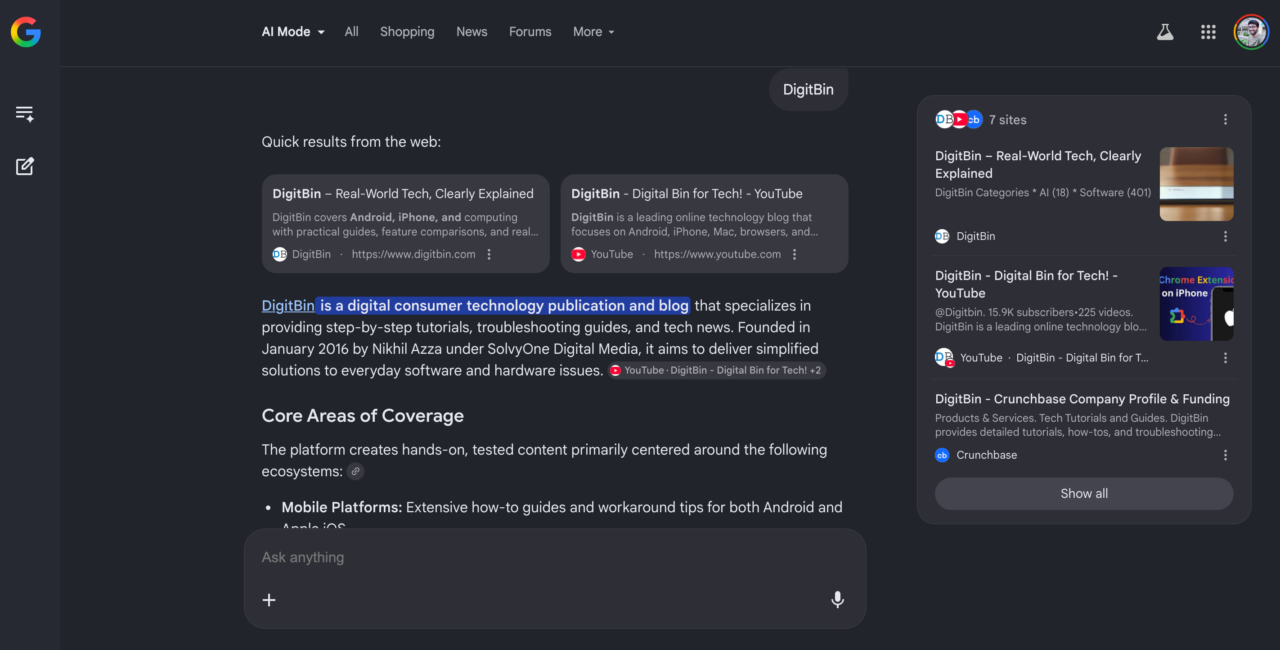
Most of my Google searches no longer end with one click. A simple question now usually means opening Reddit, skimming two SEO-heavy blogs, ignoring AI-generated filler sites, and comparing answers that contradict each other.
I recently searched whether uBlock Origin still works properly on Chrome in 2026. Three tabs, two contradictory Reddit threads, one article that was clearly paraphrasing another one. Another day I searched why Chrome was suddenly using nearly 5GB of RAM with barely a dozen tabs open. Ten minutes later I had a hypothesis, not an answer.
Google Search has gotten harder to use not because the index got worse, but because the results page got noisier. Ads, sponsored results, repetitive SEO intros, and AI-generated sites that technically answer the question while saying nothing. So when I noticed I could make Google AI Mode the default search engine directly from Chrome’s address bar, I stopped ignoring the idea.
I committed to it for several days. Every search from the address bar opened directly into AI Mode. Some of what happened surprised me. Some of it did not.
TL;DR: Making Google AI Mode the default search engine in Chrome takes about two minutes through chrome://settings/searchEngines. The experience genuinely changes browsing habits: fewer tabs, more conversational searches, and considerably less time bouncing between repetitive articles. But AI Mode also smooths over edge-case details, occasionally surfaces outdated information with total confidence, and makes traditional Google feel surprisingly slow when you return to it. This article covers both sides honestly.
How to make Google AI Mode your default search in Chrome
The setup takes under two minutes and feels more like a hidden Chrome trick than a published feature.
Open Chrome and paste chrome://settings/searchEngines into the address bar. Scroll down to the Site Search section and click Add. Fill in the fields exactly as follows.
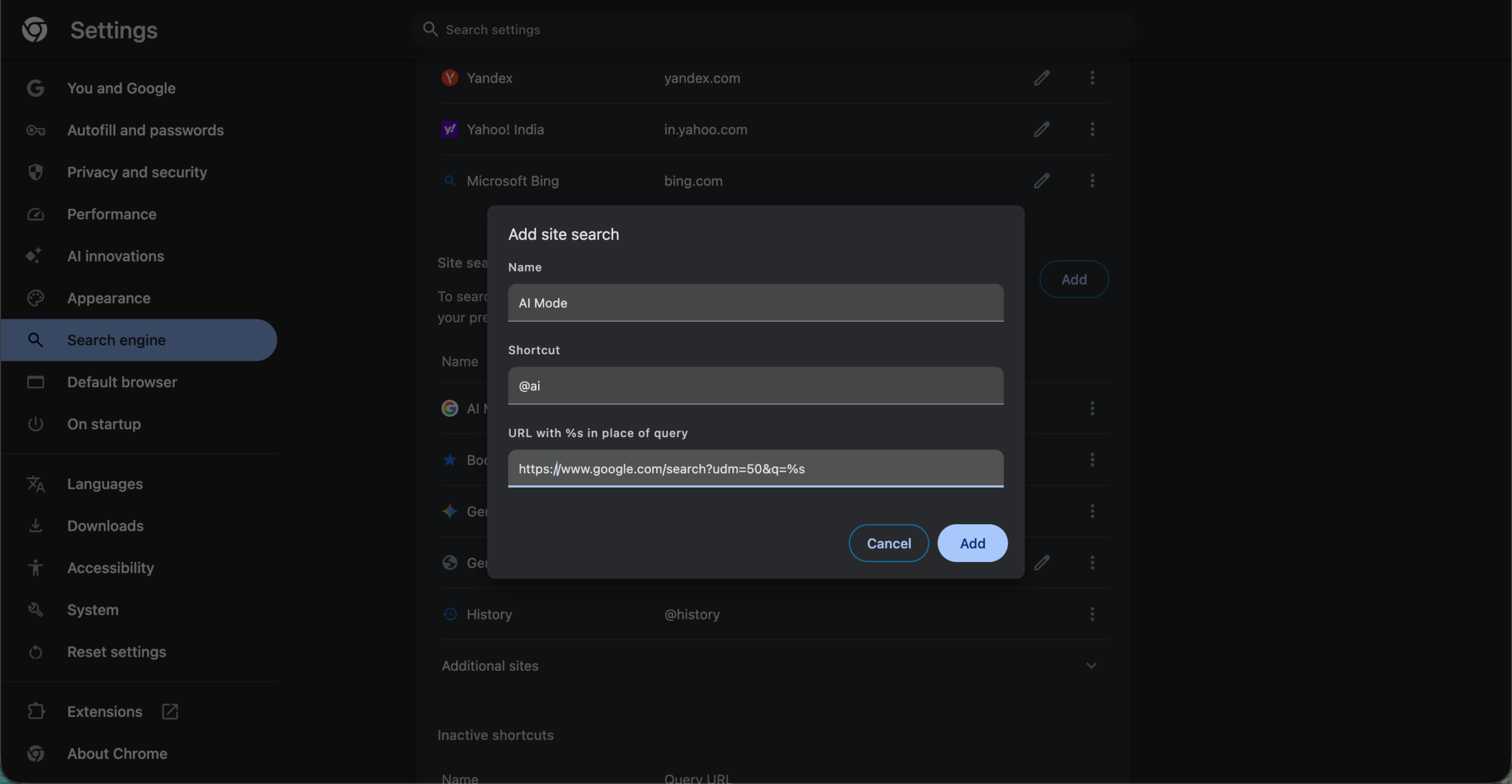
- Search engine: AI Mode
- Shortcut: @ai
- URL: https://www.google.com/search?udm=50&q=%s
Click Save. Then find the new AI Mode entry in your Site Search list, click the three dots next to it, and select Make default. From that point on, every search you type into the Chrome address bar opens directly into AI Mode.
The udm=50 parameter is Google’s URL flag for AI Mode, confirmed by multiple sources. AI Mode is available in a large number of countries and territories as of 2026 and is powered by Google’s Gemini models, with different model tiers depending on query complexity and account type.
If the AI Mode button does not appear on google.com for your account, your region or account type may not yet have access.
While it may look like a simple redesign of Google Search, technical analysis by Discovered Lab explains that AI Mode is not just a UI change but a separate rendering pipeline. It identifies core backend services like AimThreadsService (for conversation history) and folif (for streaming HTML responses).
The first thing I noticed was how quiet the search suddenly felt
For the first time in years, Google Search felt quiet.
There were no shopping links shoved above the fold. No SEO-optimised intro paragraph explaining what a search engine is before answering my question. No block of People Also Ask cards I had to scroll past to reach anything useful.
I stopped instinctively opening five results at once with Cmd+Click. My tab bar stopped looking like a compressed barcode. Within two days I noticed I was spending noticeably less time bouncing between Reddit threads and random blog posts, not because I was finding better blogs, but because I was not opening them at all.
The other thing that changed was how I typed. I stopped using robotic keyword strings and started writing actual questions. “Why does Chrome feel slower after staying open for several days?” instead of “chrome slow after long session fix”. “Does uBlock Origin still work on Chrome or only Lite?” instead of “uBlock Origin Chrome 2026”. The answers came back shaped around those natural questions rather than forcing me to decode which part of a listicle was actually relevant.
Searches that normally took me through four or five tabs sometimes ended in under a minute. Some troubleshooting questions that previously took ten minutes became summaries I could skim in thirty seconds.
AI Mode was genuinely good for everyday tech questions
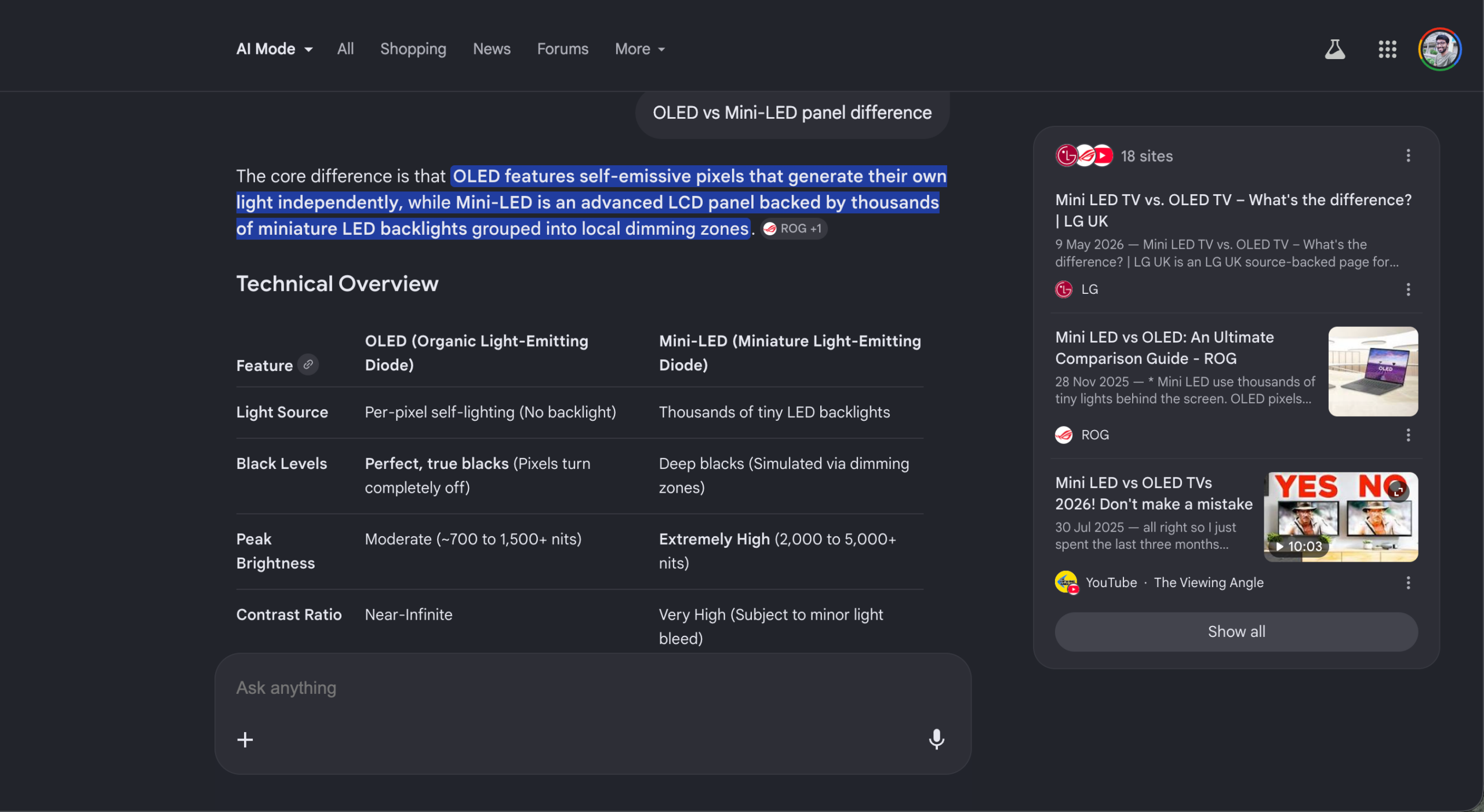
AI Mode works best where Google has always worked best: quick explainers, comparisons, beginner troubleshooting, and research overviews. The difference is that it compresses those results from several pages into one coherent answer.
Questions about Chrome flags, OLED versus Mini-LED panel differences, browser RAM usage, USB-C charging speed variations, Android background app killing, and smart TV panel types all came back with clear, structured summaries. Instead of forcing me through five repetitive articles that all opened with “In this guide, we will explain,” AI Mode usually surfaced the important parts immediately.
The experience also felt genuinely conversational. Asking a follow-up question felt natural rather than like starting a new search from scratch. When I asked about Chrome’s memory behavior and then followed up with “what about after a Chrome update,” the answer understood the context without me repeating myself. That alone removed a type of friction I had been absorbing from Google Search for years without really noticing it.
By the third day, I realized I was opening significantly fewer websites during work. That shift happened without any deliberate decision. I just stopped reaching for the keyboard shortcut to open another tab.
But the convenience started feeling slightly uncomfortable
At first the convenience felt like a genuine upgrade. Then I started noticing what was missing.
AI Mode often gave me just enough information to stop clicking links entirely, which was useful for casual questions and genuinely frustrating for anything with nuance. A Reddit thread about battery drain on a specific phone model feels very different when you read actual frustrated users arguing in the comments, each adding a detail the others missed.
AI summaries tend to resolve those disagreements into a single clean answer, which is often the right answer statistically but occasionally the wrong answer for your specific situation.
Forums give context. AI Mode gives conclusions. Sometimes the context matters more than the conclusion itself.
There is also something slightly flattening about the experience over time. Human disagreement is useful. Reading three people argue about whether a fix actually worked, then a fourth person clarifying that it only works on a specific Android version, tells you something that no summary captures cleanly. AI Mode occasionally made contested questions look more settled than they really are.
I also started catching small errors more often
The more technical my searches became, the less I trusted AI Mode completely.
One search about Chrome optimisation recommended enabling the #enable-gpu-rasterization flag to fix RAM usage, except that flag was already set to Default on my machine and had been for months.
AI Mode presented it like a discovery. Another pricing query for a monitor I was looking at returned figures that were noticeably lower than every retailer I checked, and not in a good way. The prices were just old.
A compatibility question about a USB hub produced an answer that blended a Reddit thread from 2024 with something more recent, with no indication of which advice still applied.
The problem was not that the answers looked obviously wrong. It was that they sounded polished enough to trust immediately. A wrong answer delivered confidently and clearly is more dangerous than a wrong answer that feels uncertain, because it removes the instinct to double-check.
Anyway. I caught myself verifying answers manually anyway, which pushed me back toward traditional links for anything where accuracy genuinely mattered. That pattern repeated more often than I expected.
Reddit still felt better for weird problems
I still found myself appending “Reddit” to plenty of searches, particularly for specific hardware issues and niche software bugs.
Random Android bugs. GPU driver crashes. Chrome memory leaks on specific chipsets. App battery drain that only appeared after a particular update.
Motherboard coil whine on certain boards under certain loads. Monitor flickering tied to a specific refresh rate setting. Windows sleep issues after a driver update.
AI Mode summarised these kinds of discussions reasonably well. But it consistently trimmed the edge-case details that actually solve the problem.
Real users explain the friction, the failed attempts, the almost-fixes, and the weird circumstance where the fix only works if you do it in a particular order. That texture disappears in a summary.
Sometimes I do not just want the answer. I want to know whether other people are equally frustrated, or whether I am missing something obvious that everyone else figured out six months ago. AI Mode does not give you that. It just gives you the resolution.
AI Mode quietly changed the way I search
By the end of the experiment, my search behavior had shifted in ways I had not planned for. I am not sure what I expected, honestly.
I was writing longer, more conversational queries. I had less patience for SEO filler when I did open traditional results. I was doing more scanning and less deep reading.
I opened fewer tabs per session by a significant margin. And regular Google Search started feeling slower and noisier in a way it had not before, simply because I had recalibrated to a different baseline.
That recalibration is the most honest outcome of the experiment. AI Mode did not replace the need for sources. But it changed what I expected from a search engine, and going back to ten blue links felt like a regression even when ten blue links was genuinely the better tool for the task.
Where AI Mode worked best, and where traditional search still won
After several days of using AI Mode as my default, the split became fairly clear.
AI Mode was better for quick explainers, comparisons between products or technologies, beginner-level tech questions, research overviews, brainstorming, casual troubleshooting, and shopping summaries where you want to understand the category before picking a specific item.
Traditional Google was still better for breaking news, medical topics, legal questions, specific coding problems, niche troubleshooting with a lot of edge cases, product reviews from real users, community experiences on forums, and anything where accuracy really mattered and I needed to trace claims back to a primary source.
The deciding factor was usually whether I needed the answer or the context around it. AI Mode reduced search friction significantly for the first category. It added a verification step for the second.
Worth trying, with realistic expectations
Making AI Mode the default search engine genuinely changed my browsing habits faster than I expected. Some days it felt like a meaningful improvement to how search works. Other days it felt like an extremely confident intern summarising the internet too aggressively.
The biggest surprise was not how accurate AI Mode was or was not. It was how quickly using it changed what I expected from Google Search itself. That shift happened in about three days and it has not fully reversed.
I still do not fully trust AI Mode for anything where being wrong has real consequences. But even now, whenever I open traditional Google and start working through ten blue links again, part of me misses the simplicity of getting a clear answer without the surrounding noise.
The setup takes two minutes. Try it for a week and decide for yourself whether the trade-off is worth it.
Frequently Asked Questions
Is Google AI Mode free to use?
Yes, AI Mode is available to users with a free Google account. Gemini 3.1 Pro access within AI Mode has higher usage limits for Google AI Pro and Ultra subscribers.
Can I still use regular Google Search after setting AI Mode as default?
Yes. Changing the default only affects searches typed into the Chrome address bar. You can still visit google.com directly and use traditional search results from there.
What if the udm=50 URL stops working after a Google update?
Google has been updating AI Mode parameters frequently. If searches stop routing to AI Mode, go back to chrome://settings/searchEngines and update the URL with the current AI Mode parameter, which you can find by manually opening a search in AI Mode and checking the URL in the address bar.
Does AI Mode work on Chrome for Android?
AI Mode itself is accessible on Android through the Google app and google.com, but setting a custom default search engine via chrome://settings/searchEngines is a desktop Chrome feature. On Android, you can access AI Mode directly from the Google app home screen.