
If you opened Claude extension recently and saw “Can’t access this page. This site is blocked by your organization’s policy,” you are not alone and you are not the problem. No employer is managing your browser. Nothing on your end changed.
The block is coming from the Claude for Chrome extension. Version 1.0.68, released around April 15, 2026, introduced a regression that causes the extension to intercept navigation and block common sites before they even load.
Version 1.0.69 shipped on April 22 but has not confirmed a fix for this specific behavior.
TL;DR: A bug in Claude for Chrome v1.0.68 causes the extension to block ordinary websites and show a misleading “organization policy” error. The block comes from Anthropic’s classification server, not Chrome or your machine. There is no built-in user override. The immediate fix is to disable the extension. As of April 23, 2026, no confirmed patch has shipped.
How Claude for Chrome Blocks Navigation
The extension is not sitting quietly in your toolbar. Before any page loads, it calls an Anthropic API endpoint to classify the URL. This behavior is confirmed through inspection of mcpPermissions-D7Rkh1yL.js in v1.0.68.
When the server returns org_policy: "block", the extension throws up its own blocked.html overlay and kills the navigation entirely. No request ever reaches the actual website.
Chrome then surfaces its generic blocked-site message, which is where the “organization policy” wording slips in.
Chrome isn’t enforcing anything here. As confirmed in GitHub issue #50157, that error is coming from the extension itself, not from Chrome or any enterprise policy.
Because the block is enforced server-side and the extension has no local whitelist, there is no built-in or user-facing way to override it. Reinstalling, clearing cache, or digging through Chrome settings will not change anything.
Why This Started in April 2026

The extension’s local storage includes a changelog entry labeled launch-20260415, which lines up exactly with when users started reporting blocked navigation.
Version 1.0.68 shipped with an overly aggressive URL classification. Sites including google.com, amazon.com, and even claude.ai itself were getting flagged.
A separate report in GitHub issue #41034 documents a Pro individual user whose entire Cowork project stopped working overnight. Every site, including Etsy and Printful, returned the blocked error with no admin or enterprise policy anywhere on the machine.
Multiple Pro users on personal Macs with no MDM enrollment have hit the same wall independently.
Why This Bug Actually Matters
This is not a minor inconvenience. The extension blocks navigation before any page loads, which means affected users cannot browse at all with it enabled. Sites you open a dozen times a day, google.com, amazon.com, become inaccessible through no fault of your own.
For users running browser automation through Claude Code, the damage is worse. Cowork sessions, agentic workflows, and any MCP-driven browser task fail completely.
The extension is the bridge between Claude Code and the browser, and when it returns a block on every URL, nothing runs.
The error message makes the whole thing harder to untangle. Calling it an “organization policy” sends users down entirely the wrong path: checking Chrome settings, contacting IT, reinstalling Chrome, none of which touch the actual cause. In some cases Claude can even throw errors like the Tool Result Could Not Be Submitted error.
According to the official Claude in Chrome troubleshooting guide, the extension’s default blocked categories cover financial services, banking, adult content, and piracy. Etsy and Google fall nowhere near any of those.
Claude for Chrome Blocking Websites: What To Do Right Now
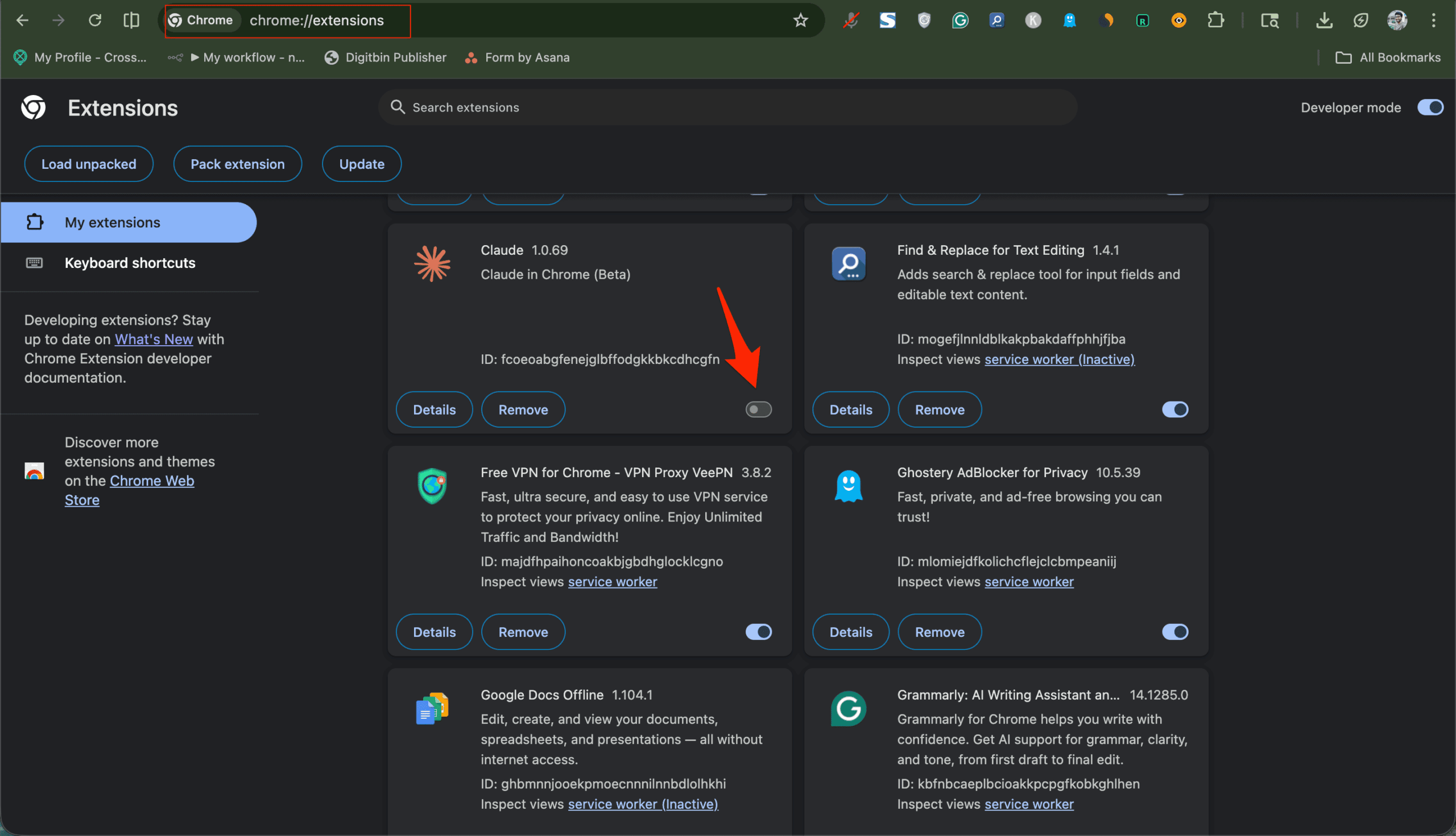
The cleanest fix is to disable the extension. Open chrome://extensions, find Claude, and toggle it off. Claude.ai works fine in a browser tab without the extension running at all.
If you rely on the extension for browser automation via Claude Code, the Claude in Chrome permissions guide explains how the permission system is structured, though it does not address this regression specifically.
There is a more advanced path: unpack the extension and edit the mcpPermissions logic to force every URL into the always-allow category. It works, but it snaps back to broken on the next update and is genuinely not worth the risk unless you are comfortable poking around extension internals.
For most people, turning the extension off is the right call until a real fix ships.
What Anthropic Still Needs to Fix
Three things need to happen. The server classification needs to stop catching ordinary domains in its net. Users need a local whitelist so they can unblock a site themselves without waiting on a server update.
And the error message needs to say clearly that the Claude extension is blocking the page, not some phantom organizational policy.
None of that has shipped as of April 23, 2026. The bug is open on GitHub. No timeline has been given. Until a patch lands, disabling the extension and using claude.ai directly in a tab is the most stable option you have right now.
If you have run into similar frustrations with AI extensions changing browser behavior without giving users a way out, this one fits the same pattern. Extensions that make server-driven decisions with no local override tend to break badly when something on the server goes wrong.
Frequently Asked Questions
Is this a Chrome or Google issue?
No, this isn’t coming from Chrome at all. The block is enforced by the Claude extension based on a response from Anthropic’s classification server.
Does this affect all Claude users?
It affects anyone with the Claude for Chrome extension installed. Pro, Max, Team, and Enterprise subscribers can all install it and are potentially affected.
Will disabling the extension affect my Claude account?
No. Turning off the extension has no effect on your account or your ability to use claude.ai in a regular browser tab.
Has v1.0.69 fixed the issue?
Version 1.0.69 was released on April 22, 2026, but no confirmed fix for the site-blocking regression appears in its release notes as of April 23, 2026.