I did not go into this expecting to be underwhelmed.
ChatGPT Atlas had been sitting in my dock for weeks before I actually committed to using it as my main browser. The idea sounded genuinely useful: a browser with ChatGPT built directly into every page, no tab switching, no copy-pasting, just ask and get an answer right where you are.
So I cleared out Chrome, set Atlas as my default on macOS, and used it as my default browser for 30 days: work, research, writing, everything.
What I found was a browser that has a genuinely interesting idea at its centre, with enough rough edges and real-world limitations that Chrome, a browser I have used for years without giving it much thought, started looking a lot more solid by comparison.
TL;DR:
- Atlas is an AI-first browser with ChatGPT built into every page
- Strong for research, summaries, and rewriting
- Limited to Apple Silicon Macs, no Windows or mobile support
- Chrome’s Ask Gemini handles most everyday tasks without switching browsers
- Memory usage is similar, with Atlas distributing it more evenly
What ChatGPT Atlas Actually Is
Atlas launched on October 21, 2025, built on Chromium, the same open-source engine that powers Chrome, Edge, and Brave.
It runs only on macOS, and only on Apple Silicon machines (M1 or newer) running macOS 14.2 Monterey or later. Windows, iOS, and Android versions were announced at launch but remain unavailable as of April 2026.
The browser is free to download. The headline feature is a ChatGPT sidebar baked into every page: open it, ask a question about what you are reading, get a summary, compare products, or rewrite a paragraph without leaving the tab.
Agent Mode, which lets ChatGPT handle multi-step tasks on websites, is available only on paid plans at $20 per month (Plus) or $200 per month (Pro).
In January 2026, OpenAI added an Auto search mode that switches between ChatGPT-generated answers and traditional Google Search results depending on the query. Also, Tab groups with AI-powered organisation arrived in the same update.
The First Impression is Deliberately Familiar
That is the thing about Atlas: it does not try to shock you.
You open it and it looks like Chrome. Same tab strip across the top, same address bar in the middle. The only real giveaway is a persistent chat box below the address bar on new tab pages, and a small sidebar icon sitting quietly on the right edge of the window.
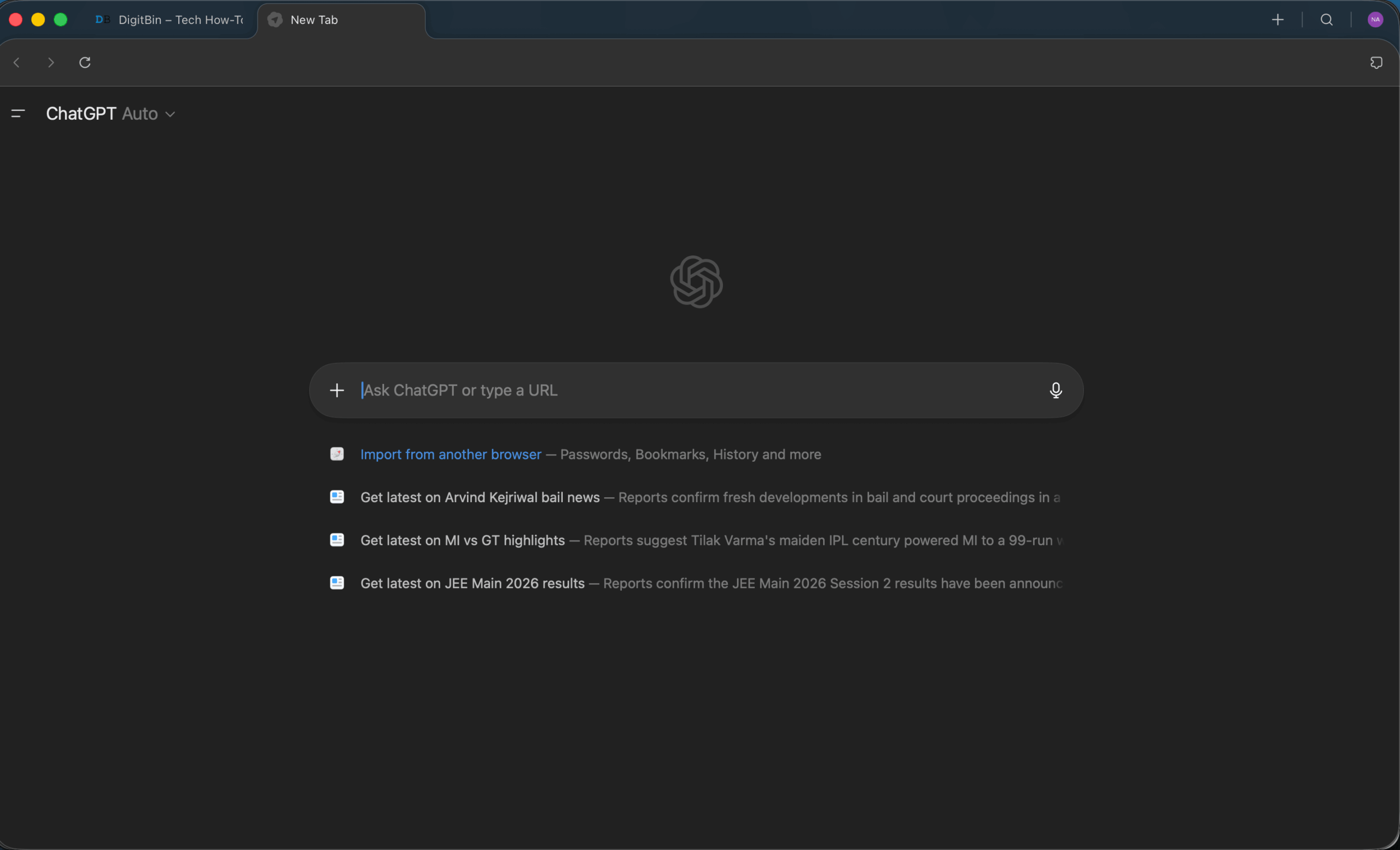
That familiarity is intentional. OpenAI is not asking you to rethink how you browse. It is asking you to keep browsing exactly the same way, just with ChatGPT already there when you need it.
The first time the sidebar earns its place, the feeling is real. I was reading a dense privacy policy, the kind of document that you know matters but that nobody actually reads.
I opened the sidebar, asked Atlas to summarise it and flag anything unusual. It pulled out three clauses worth paying attention to in about five seconds. That is the version of Atlas that the marketing materials are selling, and it is not fiction.
On Chrome, that would have meant skimming the entire document or copying it into ChatGPT manually.
How the AI Sidebars Actually Compare?
Atlas has Ask ChatGPT built in natively, while Chrome has Ask Gemini built in natively. Both sit in a sidebar. Both can read the current page, answer questions about it, and help you write or summarise. The difference is which AI is doing the work and how tightly it is woven into the browser.
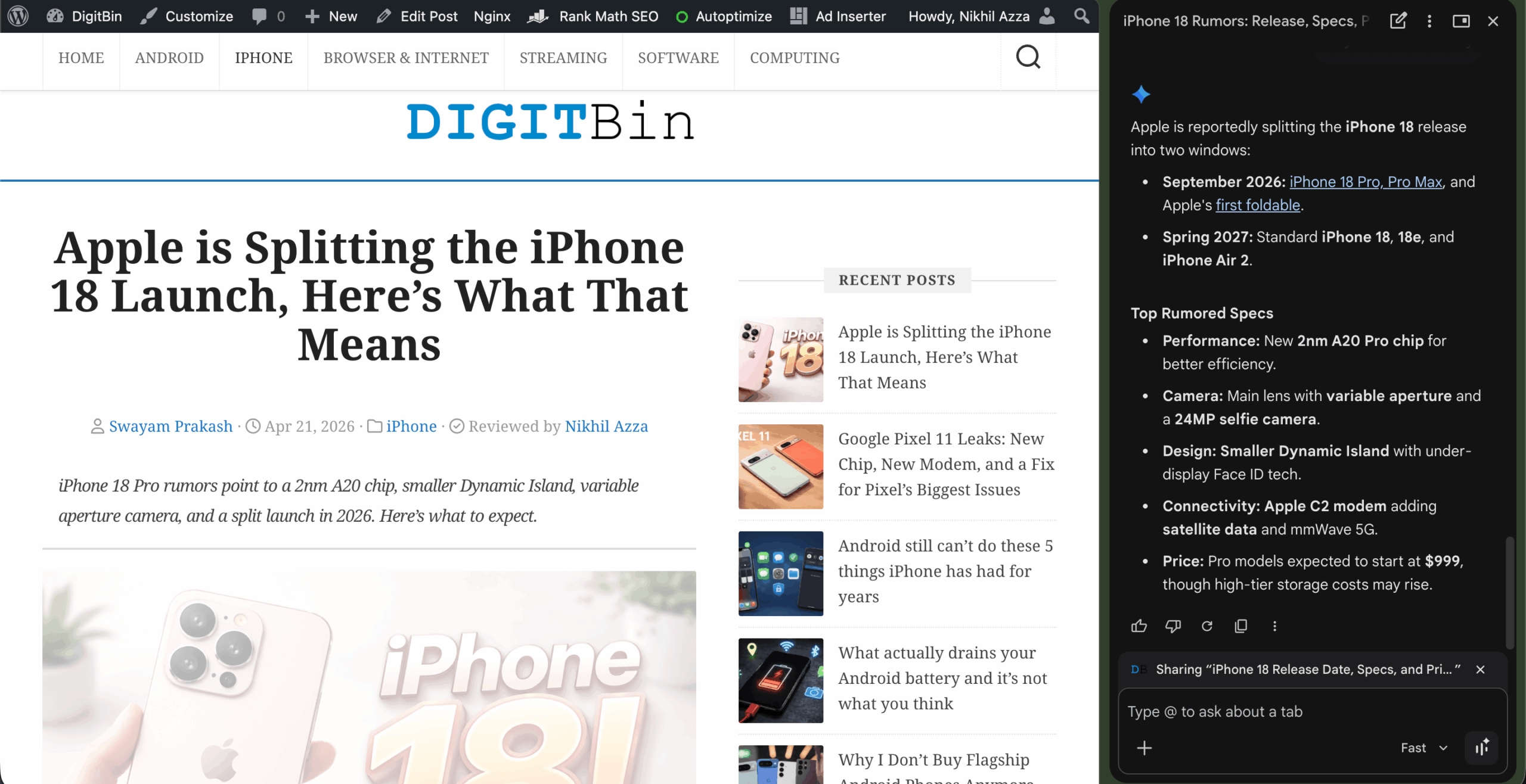
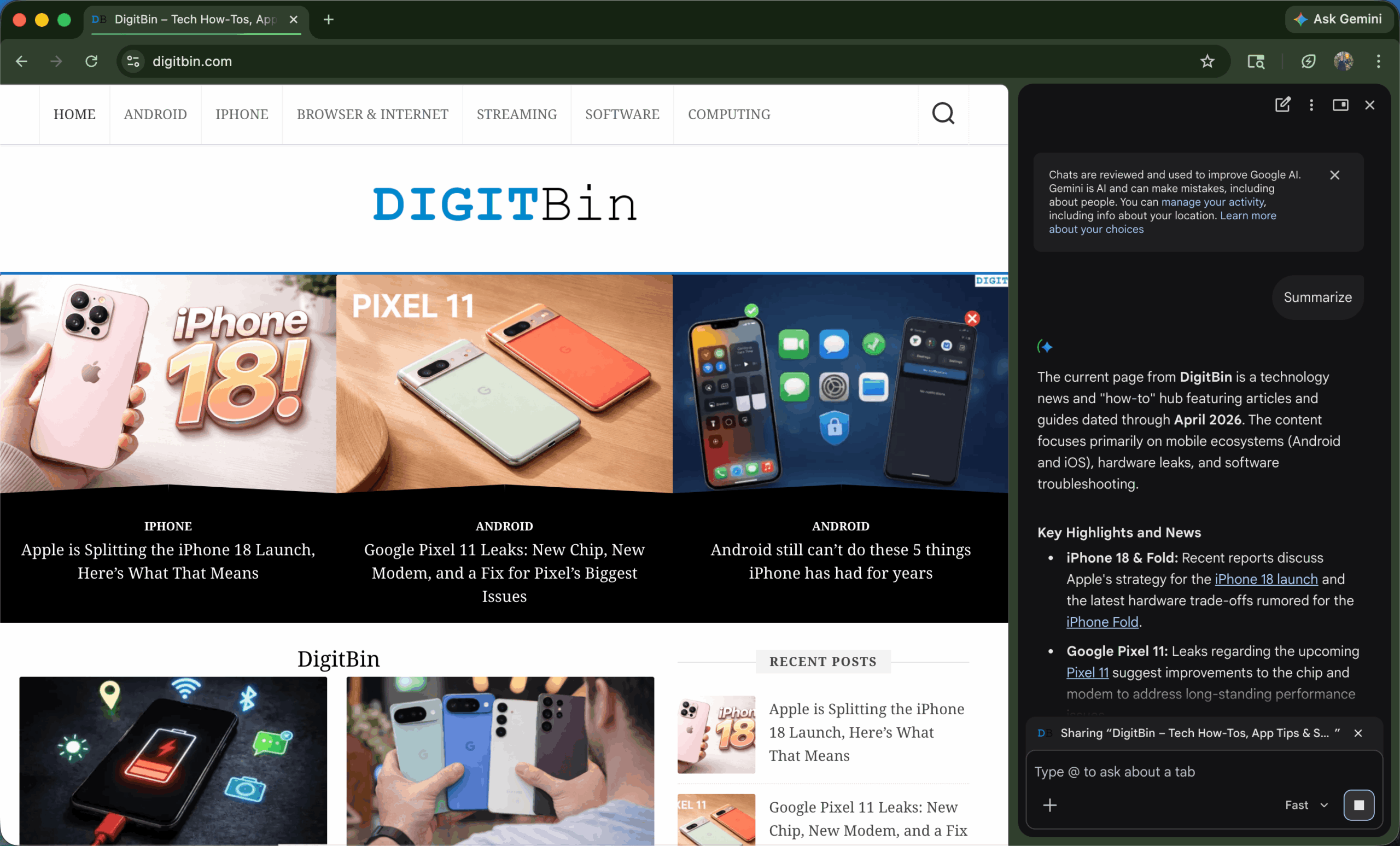
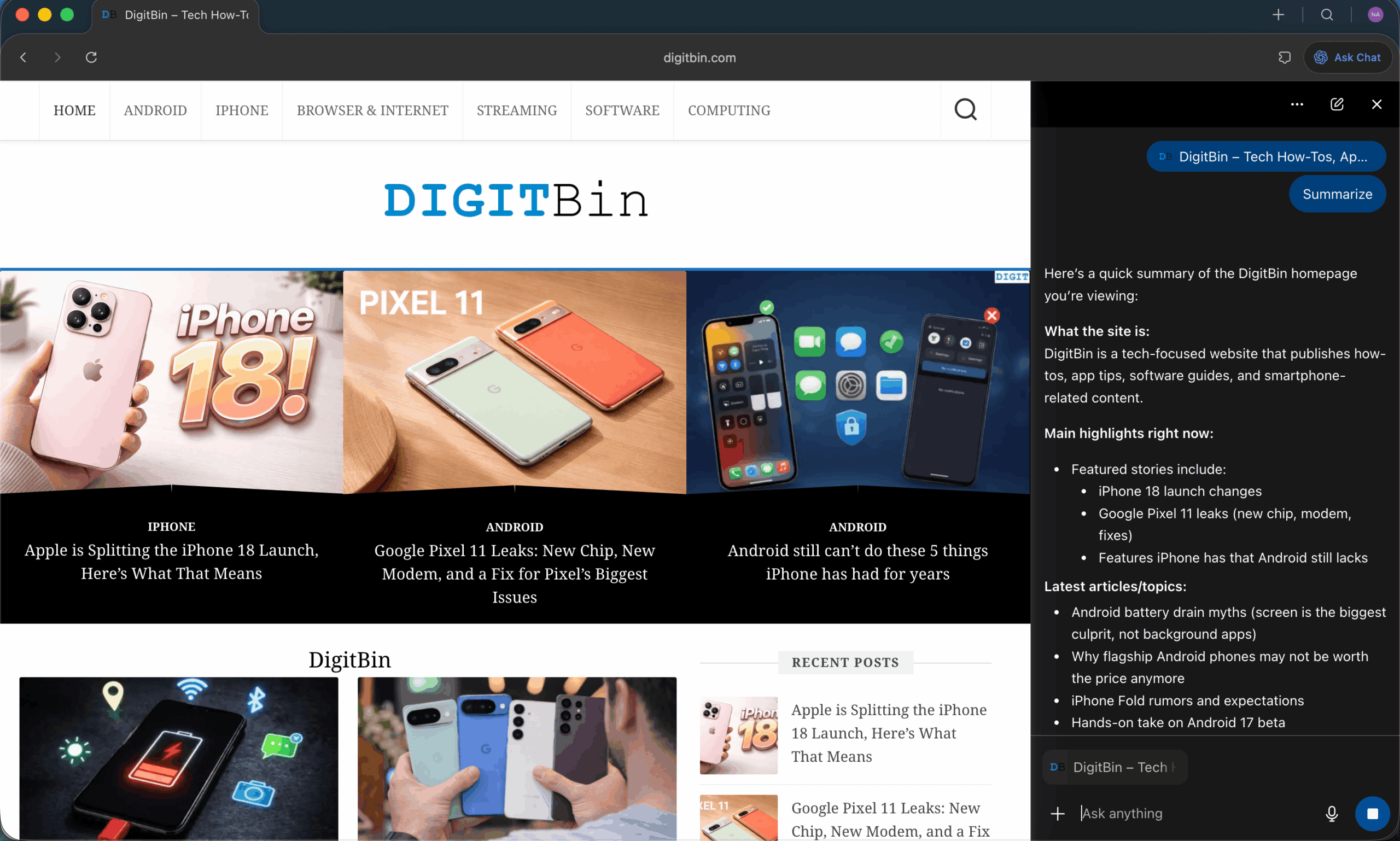
In straightforward page summaries, the gap between the two is smaller than you might expect. I tested both on the same DigitBin article covering a technical Android issue. Gemini in Chrome summarised the page cleanly and flagged the key steps.
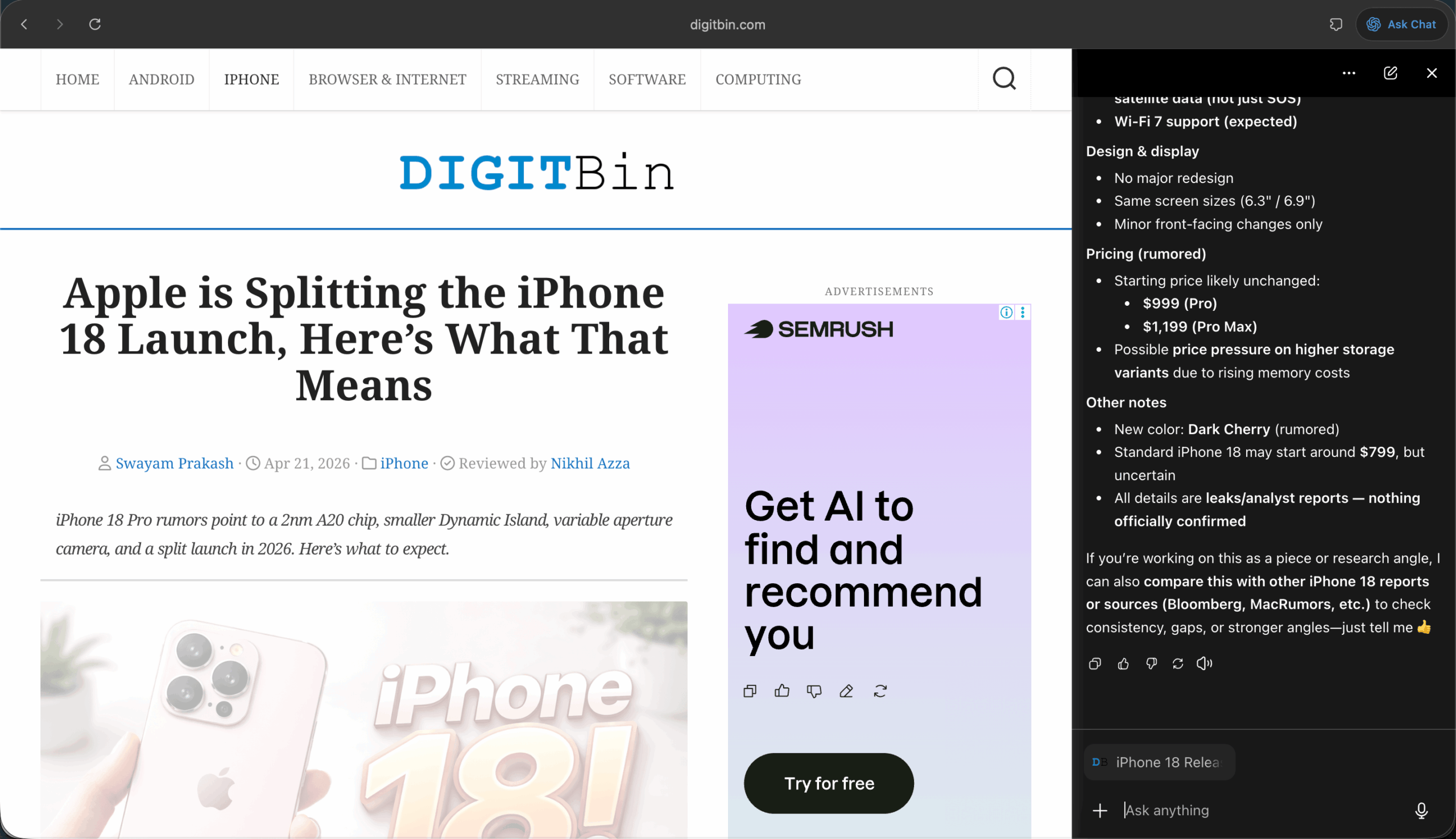
Atlas did the same, then offered to compare it with related sources without me opening another tab. That extra step, pulling in context from multiple sources without manual navigation, is where Atlas pulls ahead in research-heavy work.
In one case, it compared three product reviews and surfaced the common drawbacks in a single response, something that would normally require multiple tabs and notes.
But for a quick answer about a single page, Chrome with Gemini is faster. There is no new browser to open, no account to sign into, no setup.
It is just already there, in the browser you already use, across every platform you own. The direct comparison between Chrome Ask Gemini and ChatGPT Atlas on DigitBin found the same pattern: Chrome wins on speed and simplicity for single-page tasks, Atlas earns its keep when research spans multiple sources.
Where Atlas Genuinely Works
The sidebar is the real product here, and on a good day it changes your habits in ways you do not notice until you are back on Chrome wondering why you have eight tabs open.
I was researching a topic across four different articles. On Chrome, the pattern is open, read, open another tab, read, lose track of what I was comparing.
On Atlas, I asked the sidebar to track what I had read and surface a summary when I was ready. It did it without a complaint. The cognitive overhead dropped noticeably.
The inline rewriting also works well for anyone who writes in the browser. Highlight a sentence, click the ChatGPT logo that appears, and Atlas rewrites it in place. No switching to a separate window, no pasting back. For editing work, that friction reduction is real.
Browser memories, the feature that lets ChatGPT retain context from sites you visit across sessions, occasionally surfaces something useful. One afternoon it reminded me of a product page I had opened three days earlier when I asked a related question. That felt like genuine assistance, not a gimmick.
Where Atlas Uses Memory (The Real Picture)
The RAM story is more nuanced than most coverage suggests. Based on a side-by-side comparison in macOS Activity Monitor with similar tabs open on both browsers, Chrome and Atlas end up using roughly the same total memory, around 2.3 to 2.5 GB app memory each. The difference is in how that memory is distributed.
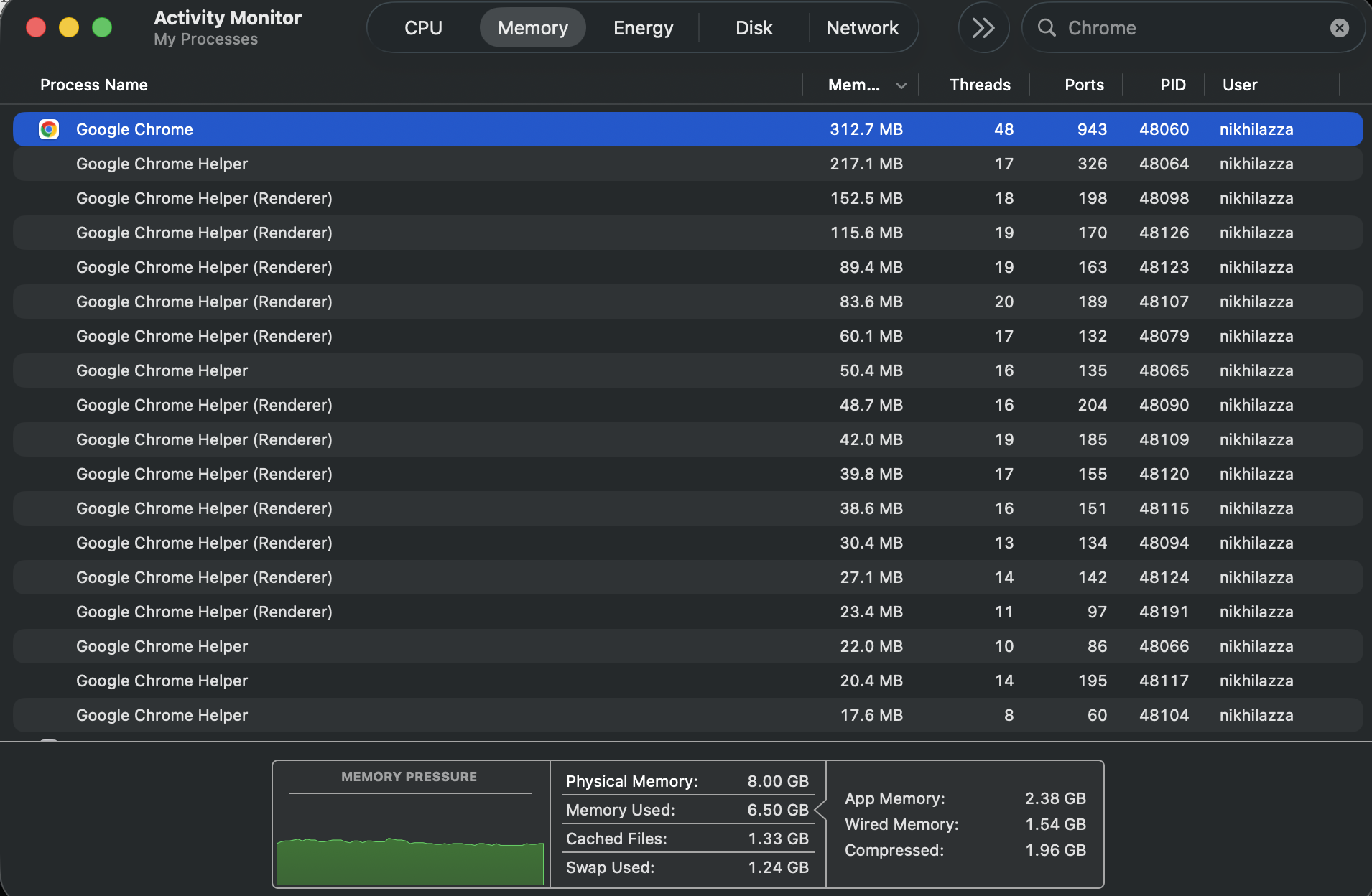
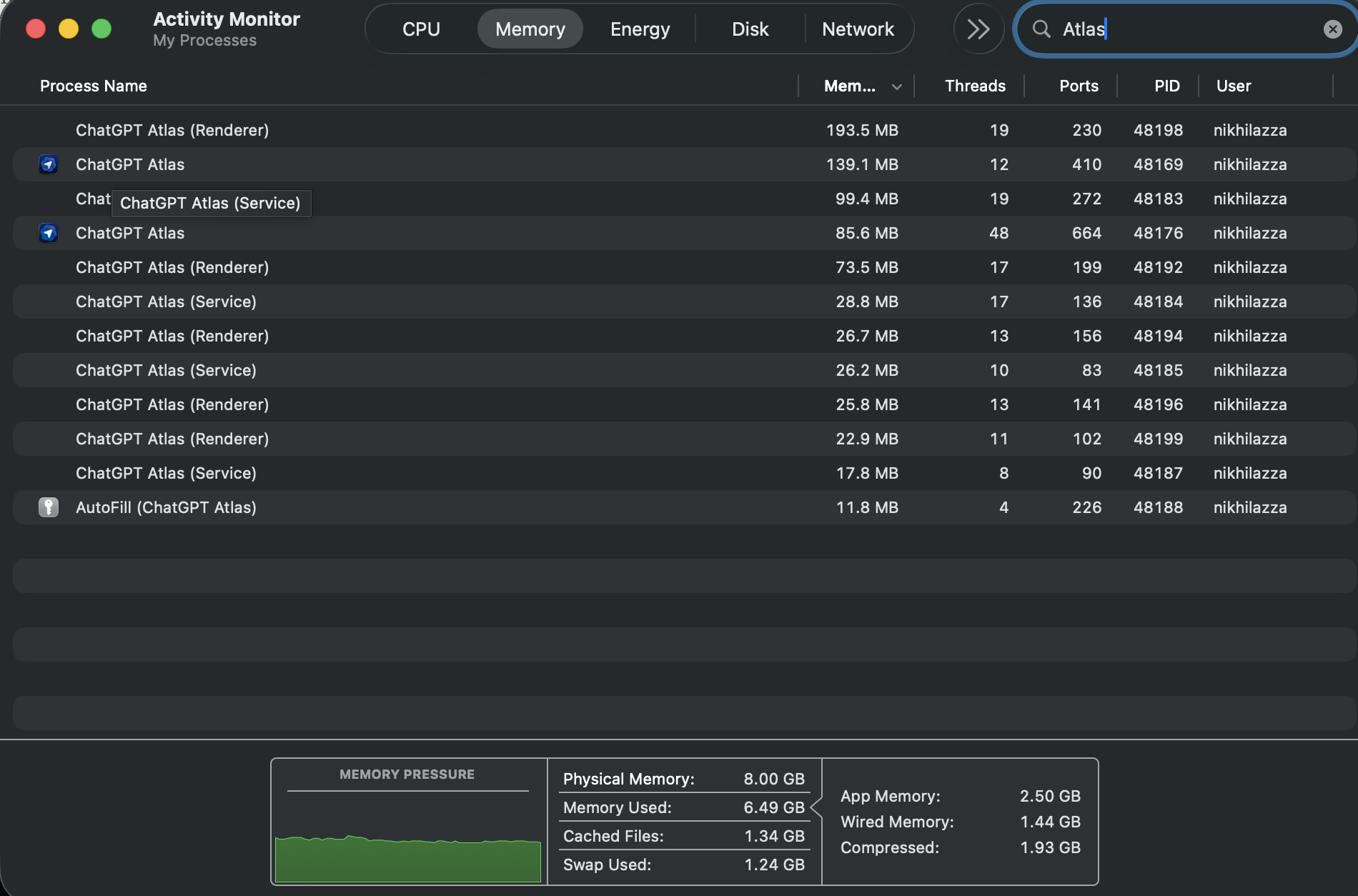
Chrome spreads across more processes, with several renderer helpers individually pushing past 100 MB. Atlas keeps a flatter, more even spread.
The gap matters more under load. At five to ten tabs, the difference is barely noticeable. Push past twenty and Chrome’s per-tab overhead compounds in a way Atlas handles more cleanly. Atlas is not lighter by default, but it is more controlled as sessions grow.
Where Atlas Still Has Rough Edges
Context management is patchy in busy sessions. The sidebar reads the current page well. But once you have ten or more tabs open, it does not always maintain a clear picture of what you have been doing. I found myself re-explaining tasks Atlas should have remembered from minutes earlier.
Agent Mode has the same gap between demo and reality. Simple tasks complete fine. Multi-step workflows involving forms or cross-page navigation stall more often than they finish. You end up supervising tasks that were supposed to run on their own.
The availability problem is the sharpest limit. Atlas runs only on Apple Silicon Macs. Windows machines, Android phones, and older Intel Macs are all excluded. A browser that cannot follow you across your devices is hard to treat as a daily driver.
If you want AI inside Chrome without switching browsers, the AI agents available for Chrome cover most of the same ground with fewer constraints. For alternatives that run on Windows, the Comet browser comparison with Chrome breaks down where each browser actually makes sense.
The built-in search works like a traditional search engine, with tabs for Search, Images, Videos, and News, pulling results largely from Google under the hood. What does not work is a consistent scroll bug: run a new query and the results load, but the viewport stays fixed at the top.
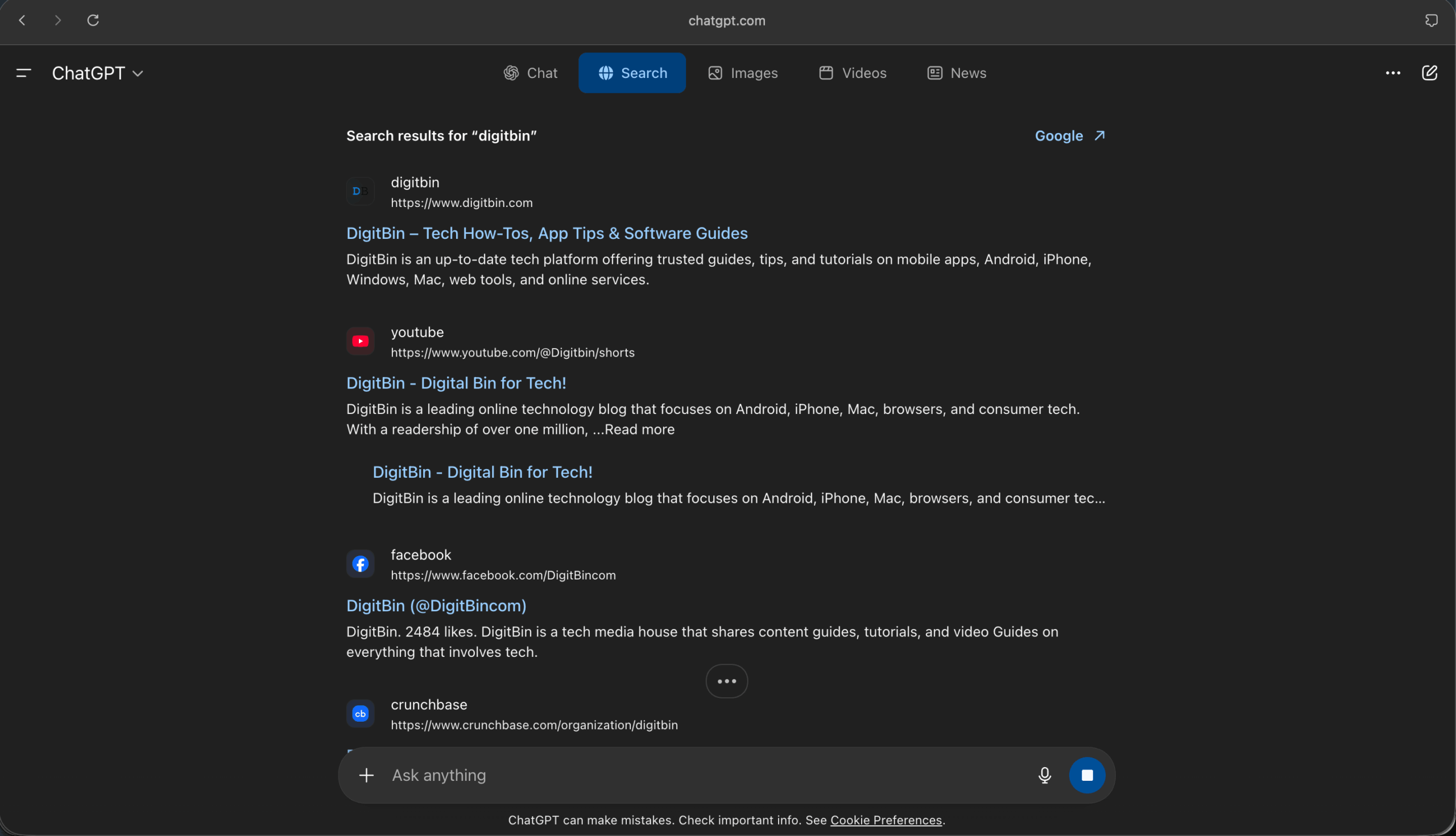
You have to scroll down manually to find them. I reproduced this repeatedly. For a next-generation browser, a broken scroll state on the core search function is hard to overlook.
Chrome is Not Standing Still
This is the part most Atlas coverage misses.
Chrome has Gemini in the sidebar now. It has AI Overviews in search. It has Help Me Write in form fields. It has ten years of extension support, a mature sync layer, and availability on every platform that matters. Google is not watching Atlas from the sidelines.
The Ask Gemini sidebar in Chrome is not as capable as Atlas’s ChatGPT integration for deep research work. But for the majority of what most people do in a browser each day, it is close enough, and it comes without the cost of rebuilding your browsing setup from scratch.
If Gemini in Chrome has been quietly running in the background and you are not sure whether you want it there at all, it is worth knowing that disabling Gemini in Chrome is straightforward through the AI settings panel.
What Atlas Actually is, Honestly
30 days in, I moved back to Chrome as my main browser. Not because Atlas is bad. Because Chrome is more finished, more available, and more reliable across the full range of what I need a browser to do each day.
Atlas is a convincing proof of concept for what AI-native browsing could look like. The sidebar works. The research workflow is genuinely better for certain tasks.
The vision of a browser that understands what you are trying to do, not just where you are pointing it, is the right direction.
Right now, Atlas is a version-one product limited to a single platform and chip family. Its memory usage is broadly comparable to Chrome, but it still has rough edges in its most ambitious features and asks you to give up the comfort of Chrome without offering enough in return to make that trade feel obvious.
Come back to it when Windows support lands and Agent Mode stops requiring supervision. That version will be a much harder call.
| Feature | ChatGPT Atlas | Google Chrome |
|---|---|---|
| Primary AI | ChatGPT (sidebar, inline) | Google Gemini (Ask Gemini) |
| Platform | macOS, Apple Silicon only | Windows, macOS, Linux, iOS, Android |
| Page Summaries | Strong, context-aware | Good, faster for single pages |
| Multi-source Research | Better, tracks across tabs | Limited, manual tab switching |
| Agent / Task Automation | Yes, paid (Plus $20/mo+) | Help Me Write, basic only |
| Extensions | Most Chrome extensions work | Full Chrome Web Store support |
| Memory Usage | Comparable, more even distribution | Comparable, higher per-tab overhead at scale |
| Search | Hybrid: AI answers plus Google results | Google Search with AI Overviews |
| Pricing | Free; Agent Mode from $20/mo | Free |
Frequently Asked Questions
Is ChatGPT Atlas available on Windows?
No. As of April 2026, Atlas runs only on macOS with Apple Silicon chips (M1 or newer). Windows, iOS, and Android versions were announced in October 2025 but have not been released.
Does Chrome have a built-in ChatGPT feature?
No. Chrome’s native AI sidebar uses Google Gemini, called Ask Gemini. ChatGPT access in Chrome requires a third-party extension from the Chrome Web Store.
Does Atlas use less RAM than Chrome?
Atlas and Chrome use broadly comparable memory overall, but Atlas distributes it more evenly across processes due to its integrated ChatGPT layer.
Is ChatGPT Atlas free?
The browser is free to download and use. Agent Mode, which lets ChatGPT complete multi-step tasks on websites, requires a paid ChatGPT plan: Plus at $20 per month or Pro at $200 per month.
What is Auto mode in Atlas?
Auto mode, added in January 2026, switches between ChatGPT-generated answers and traditional Google Search results based on the type of query. It aims to blend conversational AI responses with current web results depending on what the question needs.
Can I use my Chrome extensions in Atlas?
Most Chrome extensions work in Atlas because it is built on the same Chromium engine. Compatibility is not guaranteed for all extensions, and some may need to be reinstalled during setup.