Android 17 on a Pixel fixed two small irritations I had stopped noticing: a forced dark mode that turned some apps into gray soup, and a home screen where every icon carried a caption I no longer read. Neither change is dramatic, which is partly why they stuck.
The Android 17 dark theme now lets you switch Expanded dark mode off for individual apps, and you can hide icon names from the home screen. Here is how both work, what the September update added around them, and what is still not here.
TL;DR: On a Pixel running Android 17, open Settings, Display and touch, Dark theme, then tap the gear next to Expanded to exclude single apps from forced dark mode. Long-press the home screen, open Wallpaper and style, Icons, Names, and turn off Show app names. The home screen organizer people keep mentioning has only been spotted in code, so do not wait for it.
How to set up Android 17 dark theme per app
Expanded dark theme darkens apps that have no dark mode of their own. It arrived in Android 16 QPR2, and the per-app switch is the Android 17 addition, first seen in Beta 3 according to 9to5Google.
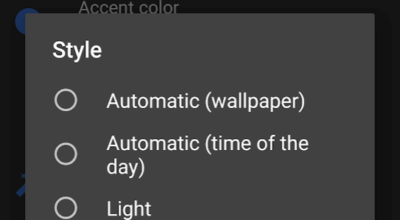
Go to Settings > Display and touch > Dark theme. Make sure Expanded is selected, then tap the gear icon beside it. You get a list of apps, each with its own switch.
| Setting | Where to find it | What it does | Catch |
|---|---|---|---|
| Expanded dark theme | Settings, Display and touch, Dark theme | Darkens apps that lack a dark mode | Can hurt readability |
| Per-app exclusion | Gear icon next to Expanded | Turns forced dark off for one app | Android 17 only |
| Hide app names | Home screen, Wallpaper and style, Icons, Names | Removes captions under icons | Home screen only |
I did not expect the gear icon to matter that much. It is small, and it sits at the edge of the row. I only found it because the forced dark mode annoyed me first.
Where I think forced dark mode goes wrong?
Forcing a dark theme on an app never designed for it is a color inversion with good intentions. The usual casualties are anything with photos, charts, or light gray text on a pale card. Forced mode can cause readability problems.
I always open an app, squint at it, and blame the app. After a few days, I excluded the offenders one by one, and I stopped making that small mental adjustment when using them. Apps that already ship a real dark theme do not need this at all. They quietly follow the system setting.
Hiding app names for a cleaner home screen
To view apps without names for a cleaner home screen experience, do this.
- Long-press an empty spot on the home screen,
- Tap Wallpaper and style > Icons > Names tab.
- Turn off Show app names
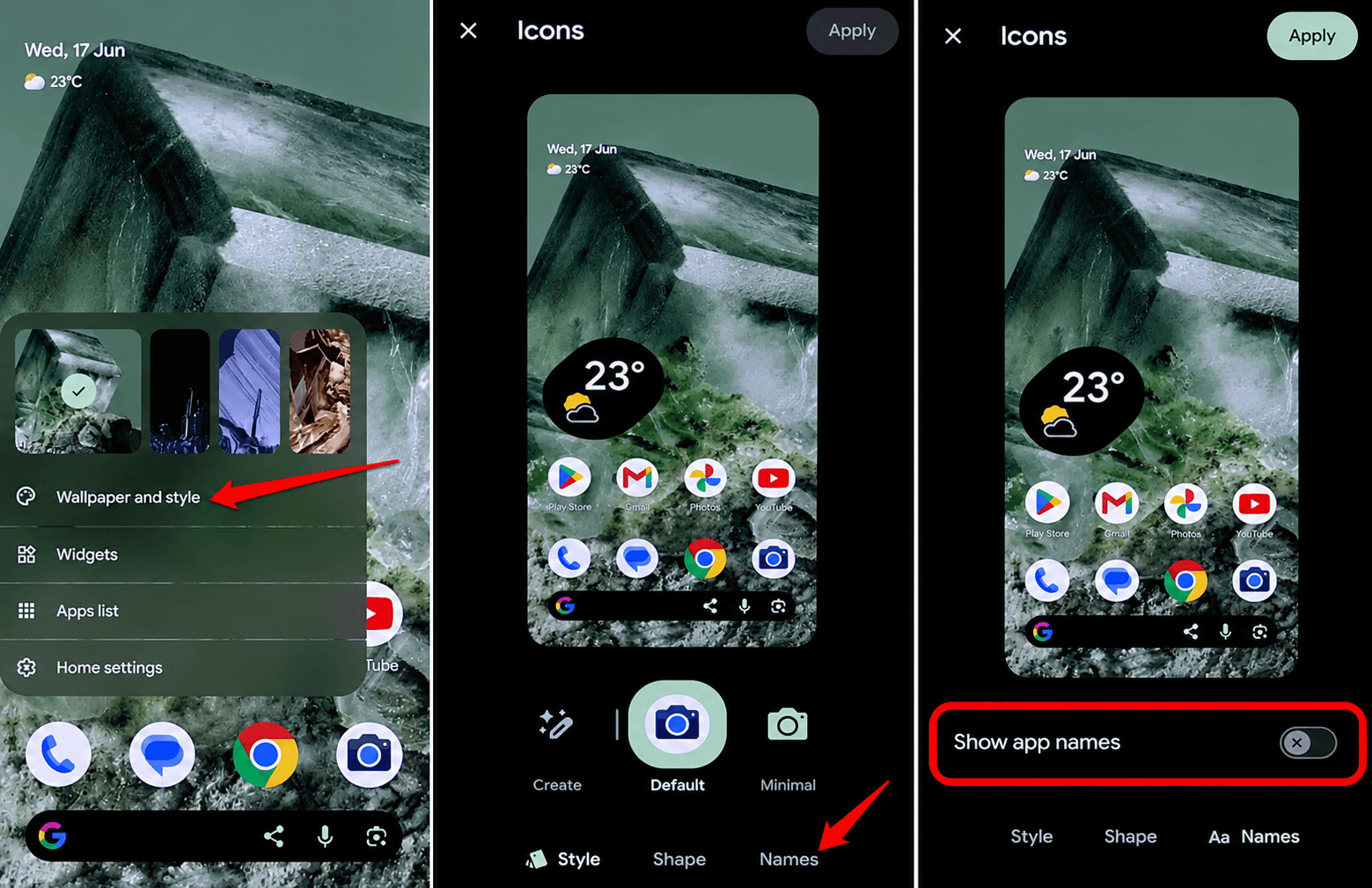

Watch the preview change before you apply anything. App names will still appear in the app drawer. The change only affects the app view on the home screen.
After turning off app names on the home screen, out of habit, for about a day I kept looking for the labels. I soon got used to the experience. I won’t say I did not like it. The app drawer is where I do search for apps. So, losing the app names there would have bothered me far more.
What the September Pixel update added
Android 17 QPR1 began rolling out in September 2026 for Pixel 6 through Pixel 11, according to Android Headlines. It added translucent blur to areas like app folders and home screen context menus, plus a redesigned wallpaper switcher.
Coverage I found does not mention any change to dark theme in that update, so the per-app option remains what it was at launch.
The home screen organizer is not here yet
Android Authority found a home screen organizer in Pixel Launcher code. It lets you create and rearrange home screens and can fill a new page with apps from categories such as Social or Productivity.
It has not been announced, and the September rollout coverage I read does not mention it. Treat it as a possible future feature and do not plan your layout around it.
One more gap worth knowing about: third-party icon pack support was still described as missing at launch.

Frequently Asked Questions
How do I turn off dark mode for one app on Android 17?
Open Settings, Display and touch, Dark theme, then tap the gear icon next to Expanded and switch the app off. This only applies to apps that rely on Expanded dark theme.
Does Android 17 dark theme work on every phone?
The steps here are for Pixel phones, and other brands may name or place the setting differently. Android 17 is listed for Pixel 6 and newer.
Will hiding app names remove them from the app drawer?
No, hiding app names affects the home screen only. The app drawer still shows them.
Can I organize my Pixel home screen automatically?
Not officially yet. A home screen organizer has been found in code but has not been announced.
Small changes that quietly stuck
None of this will make a feature list. It just removes a few daily frictions, and I noticed them mostly when I used a different phone. If you only change one thing, open the gear icon next to Expanded and turn off the app that always looks wrong.