Most AI image tools greet you with a signup wall before you have generated a single image. You came to see what the tool does, and instead you are filling out a form. The no-signup category has grown noticeably in 2025 and 2026, but it is messier than it looks. Some tools are genuinely account-free.
Others require a free account that takes under two minutes to create. A few advertise no-signup while quietly requiring it for anything useful.
This guide covers the AI image generator no signup options worth knowing in 2026, explains exactly what you get on each free tier, and tells you which one to actually reach for depending on your use case.
TL;DR: Bing Image Creator gives you DALL-E 3 and GPT-4o quality with just a free Microsoft account. Craiyon and Perchance work with zero account but trade quality for convenience. Ideogram stands out for images with readable text baked in. Adobe Firefly requires an account but offers the cleanest copyright-safe output. Each has a real use case and a real ceiling.
The two tools that truly require no account
| Tool | Account required | Daily limit | Output quality | Watermark |
|---|---|---|---|---|
| Craiyon | No | Unlimited | Low (256px) | Yes (free tier) |
| Perchance | No | Unlimited | Medium (768×1024) | No |
| Bing Image Creator | Free Microsoft account | 15 fast + unlimited slow | High (DALL-E 3 / GPT-4o) | No |
| Ideogram | Free account | 10 slow credits/day | High (text rendering) | No |
| Adobe Firefly | Free Adobe account | Limited monthly credits | High (commercial-safe) | No |
| Google ImageFX | Free Google account | Not publicly specified | High (Imagen 3) | No |
Craiyon, formerly called DALL-E Mini before OpenAI asked it to rebrand in 2022, lets you type a prompt and hit Draw with no email, no OAuth, no credit card. You get nine image variations per batch in a 3×3 grid, useful when exploring a concept rather than chasing a specific shot.
The trade-off is clear: resolution caps at 256 pixels, the free tier adds a visible watermark, and generation takes 45 to 90 seconds per batch. For quick ideation with zero commitment it remains the most friction-free option available.
Perchance works differently. It runs Stable Diffusion models in-browser via WebGL, meaning no server logs your session. Generations take around 5 to 10 seconds because processing happens locally rather than in a cloud queue.
Output resolution caps around 768×1024 pixels and the visual style leans illustrated and anime-adjacent depending on which community-maintained preset you use. Not the tool for photorealistic product photography, but fast, private, and requires absolutely nothing from you.
Bing Image Creator: best quality for free, needs a Microsoft account
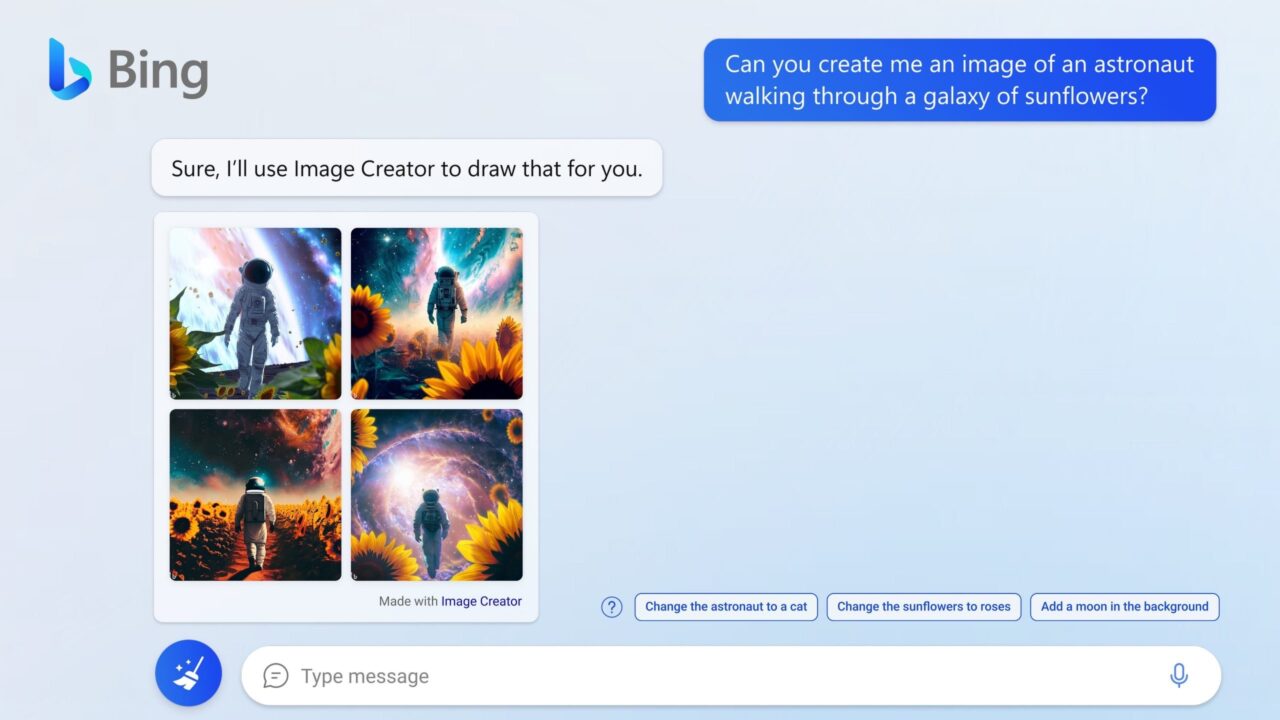
Bing Image Creator runs DALL-E 3 alongside GPT-4o, the same models behind a $20 per month ChatGPT Plus subscription. On Chrome, Firefox, or Safari you need a free Microsoft account to generate. On Windows with Edge, the browser can inherit your Windows session and some users report generating images without actively signing in.
A free Microsoft account takes under two minutes if you have ever had an Outlook, Xbox, or Hotmail address. Many people already have one without realizing it.
Once in, you get 15 fast-generation boosts per day and unlimited slower generations after that. Four variations come back per prompt. The output handles detailed scene descriptions and multiple subjects well. It sits in a grey zone for this article: it requires an account, but a free one most people already have.
Ideogram: the only free option that handles readable text in images

Ideogram 3.0, launched March 26, 2025 by former Google Brain researchers, renders text inside images with roughly 90 to 95 percent accuracy. That is a capability no other free tool matches reliably. Every other free AI image generator scrambles the letters in posters and social graphics. Ideogram usually does not.
The free tier gives 10 slow credits per day. Everything generated on the free plan lands in Ideogram’s public gallery, visible to other users.
Private generation requires the Basic plan at $8 per month. An account is required even for free use.
First time generating a poster with readable text in Ideogram is one of those small moments where the absence of a problem becomes the feature. Text that would have come out garbled in any other tool just reads. It feels almost unremarkable until you go back to a different tool and the letters fall apart again.
Adobe Firefly and Google ImageFX: strong quality, account required
Adobe Firefly was trained on licensed Adobe Stock images, openly licensed content, and public domain material. That matters for commercial work where AI copyright exposure is still legally murky. Free users get a limited monthly credit allocation after creating a free Adobe account, and output carries no visible watermark.
Google ImageFX, available at labs.google, runs on Imagen 3 and produces some of the cleanest free output available. It requires a Google account but no separate waitlist as of mid-2025.
If you already have Gmail you already have access. Localized editing controls let you modify specific areas of an image after generation without rewriting the full prompt.
Both tools sit in the same grey zone as Bing. They require free accounts that most people already have, not new paid subscriptions. For users already inside Google or Adobe ecosystems, the access is essentially already there.
What the quality gap feels like in practice
The difference between a free-account tool like Bing or ImageFX and a truly no-account tool like Craiyon becomes obvious after about ten minutes. Craiyon produces images that look like 2022-era AI art. Bing produces images that could pass for stock photography. That gap matters for anything that will actually be seen.
For a quick concept sketch or mood board, Craiyon or Perchance is fine. For a blog header or social post that someone will see at full size, the quality difference is large enough to justify the two-minute Microsoft account creation.
Frequently Asked Questions
Which AI image generator works with no account at all?
Craiyon and Perchance are the two tools that require no account, no email, and no login. Craiyon gives nine image variations per prompt; Perchance runs in-browser and generates in about 5 to 10 seconds.
Does Bing Image Creator work without signing in?
On Chrome, Firefox, and Safari it requires a free Microsoft account. On Windows with Edge, the browser can inherit your Windows session, so some users get access without actively signing in.
Which free tool is best for text in images?
Ideogram 3.0 is the clear pick. It renders text with roughly 90 to 95 percent accuracy, a standard no other free AI image generator meets.
Is Craiyon the same as DALL-E?
No. Craiyon was originally called DALL-E Mini, an independent project not made by OpenAI. It rebranded after OpenAI asked it to and does not use OpenAI’s models.
Can I use images from these tools commercially?
Adobe Firefly is the safest option because it was trained on licensed material. Bing allows broad personal use but commercial terms are less defined. Check each tool’s terms before using generated images for business purposes.
Picking the right tool for the right moment
No-signup is not one thing. It ranges from genuinely zero friction to slightly-less-friction-than-paid. If you need text that reads correctly, use Ideogram. For the highest output quality with only a free account, Bing or ImageFX depending on which ecosystem you already use. For copyright-safe commercial work, Firefly. And if you want zero account interaction for a quick sketch, Craiyon and Perchance are the honest choices, quality trade-off included.
Knowing which one to reach for matters more than having a single favourite. They serve different situations and none of them serves all of them.