Quick Summary
Meta AI may be reading your WhatsApp messages covertly. Enable ‘Advanced chat privacy’ in WhatsApp to prevent AI from scanning your messages.
If WhatsApp can read your messages, then that poses serious privacy issues. WhatsApp is one of the most used and popular messaging apps. After Meta took over, many new features were added to it over the years. Most recently, after AI became mainstream, Meta integrated its Meta AI in WhatsApp to offer better information exchange availability for its users.
However, when it comes to data privacy, Meta has a notorious past for leaking users’ details shared with it. Back in 2021, a massive information leak resurfaced, which originated two years prior, leading to hackers obtaining the personal details of millions of Facebook users, including those of Mark Zuckerberg, the CEO of Meta.
As a result of this fiasco leading to violation of the EU’s General Data Protection Regulation, Meta had to cough up a hefty penalty of $276 million, which was imposed by the Irish Data Protection Committee.
This was not the only incident of data leak that Meta was subjected to. Here is a complete list of data breaches that Meta/Facebook users have encountered over the last decade.
| Meta Data breach Incidents | Year |
| A bug in the system allowed downloading the contact info of Facebook users, along with unauthorized data | 2013 |
| Cambridge Analytica got access to 50 million Facebook users’ data and, without authorization, provided it to a US presidential election candidate. | 2014
|
| Security experts found that Facebook was storing over 600 million passwords on its server through plain text files, making them easily available to hackers. Facebook admitted the fault and fixed it at the earliest. | 2019 |
| Repeat incidents of millions of Facebook users’ data openly being available on public servers. | April-Sept 2019 |
| Facebook user data exposed on the dark web | December 2019 |
In case you use Facebook or any of the Meta products, check if your account information has been compromised by using a service such as haveibeenpwned.
Can Meta AI Read the WhatsApp Chats?
After all these Facebook data leak incidents, users, particularly on WhatsApp, have always worried whether their chats are being accessed by Meta.
WhatsApp uses end-to-end encryption to limit the chat’s visibility only to the parties involved in the communication.
Meta has time and again maintained its statement that, apart from the individuals involved in a chat, no other entity can view the chat contents, thus ensuring the required data privacy as per its policy.
You may wonder how to know if your WhatsApp account has been hacked. Well, your WhatsApp may be accessed on other devices, or any AI agent may be monitoring your conversations.
Most recently, it was widely speculated in online discussions that Meta AI may be reading the WhatsApp messages, especially the conversations in a WhatsApp group.
However, Meta clarified that only if you tag or chat with Meta AI and share information with it via the chat in textual/image/video format, then the following information can be seen by the AI agent, as it was shared voluntarily by the users. Apart from that, AI cannot access any other one-to-one or group chats on WhatsApp.
Now, given the history of careless handling of data by Meta, we can never be sure enough that the contents of a chat may not be accessed by third parties, especially its own AI agent.
How to stop Meta AI from Reading WhatsApp Chats?
With their native AI getting integrated into all the products owned by Meta, it may look like every piece of data on the app is vulnerable to AI agents, and they can see the messages on WhatsApp.
You can stop Meta AI or other AI tools from getting tagged in your WhatsApp message, stopping them from reading your conversations.
For that, you can enable the Advanced Chat Privacy feature introduced by Meta. Make sure you are using the latest public build of WhatsApp.
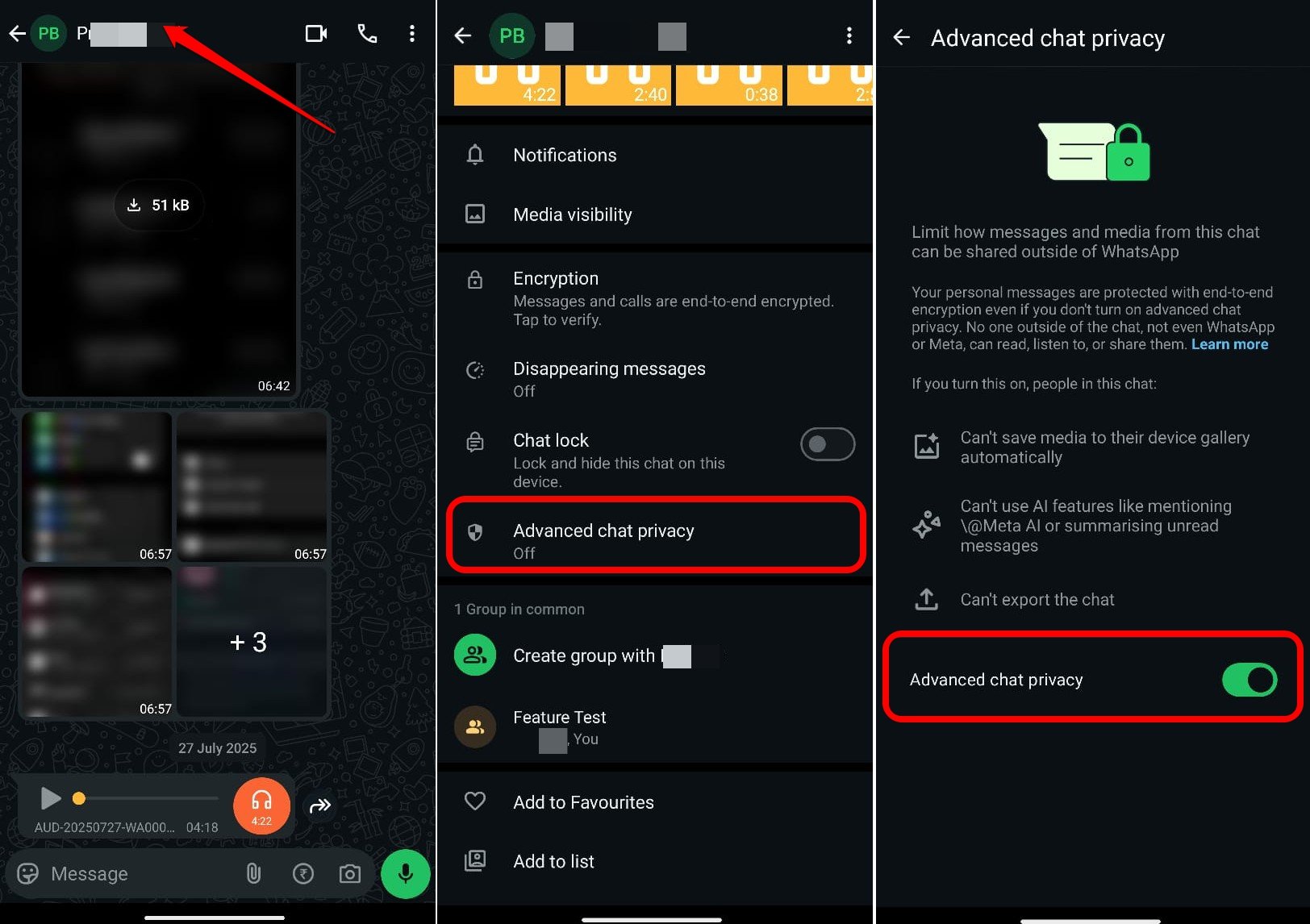
The advanced chat privacy setting can be managed for individual chats. Follow these steps to enable the feature on your WhatsApp account.
- Launch WhatsApp.
- Open the chat in which you want to enable advanced chat privacy.
- Tap the contact name/group name at the top.
- Go to Advanced Chat Privacy and tap on it.
- Press the toggle to enable the feature.

Don’t Let AI Spy on your WhatsApp Messages
Given Meta’s history of serious data breaches, it is wise to avoid sharing sensitive data via chats with AI agents. While Meta AI may make your work easier, hackers still have the potential to misuse it to scrape user data and chats. To ensure a secure messaging experience on WhatsApp, enable Advanced Chat Privacy.
If you've any thoughts on AI maybe reading your WhatsApp messages: Here’s how to stop it, then feel free to drop in below comment box. Also, please subscribe to our DigitBin YouTube channel for videos tutorials. Cheers!