YouTube is renaming its Subscriptions tab to Subs and moving it to the top bar of the Home tab in the mobile app. The same announcement, posted by TeamYouTube on the YouTube Community forum, introduces custom feeds that you build by describing what you want to watch.
If you open YouTube mainly to catch up with the creators you follow, that first tap now lands somewhere different. The YouTube Subs tab lives at the top of Home, and custom feeds start with signed-in viewers in the US.
TL;DR: YouTube’s Subscriptions tab is now called Subs and moves to the top bar of Home, next to new Live, Music and Movies & TV feeds. Custom feeds let you describe what you want to watch, with 3 saved feeds for free users and 8 for Premium. They are rolling out in English to signed-in US viewers aged 13 and older with search history on. YouTube calls this the first of several Home updates.
What the YouTube Subs tab change looks like
YouTube says Subs, formerly Subscriptions, is moving to the top bar on the Home tab. It sits among new dedicated feeds for Live, Music and Movies & TV, and the Movies & TV feed only appears if you have an active paid subscription such as a Primetime Channel.
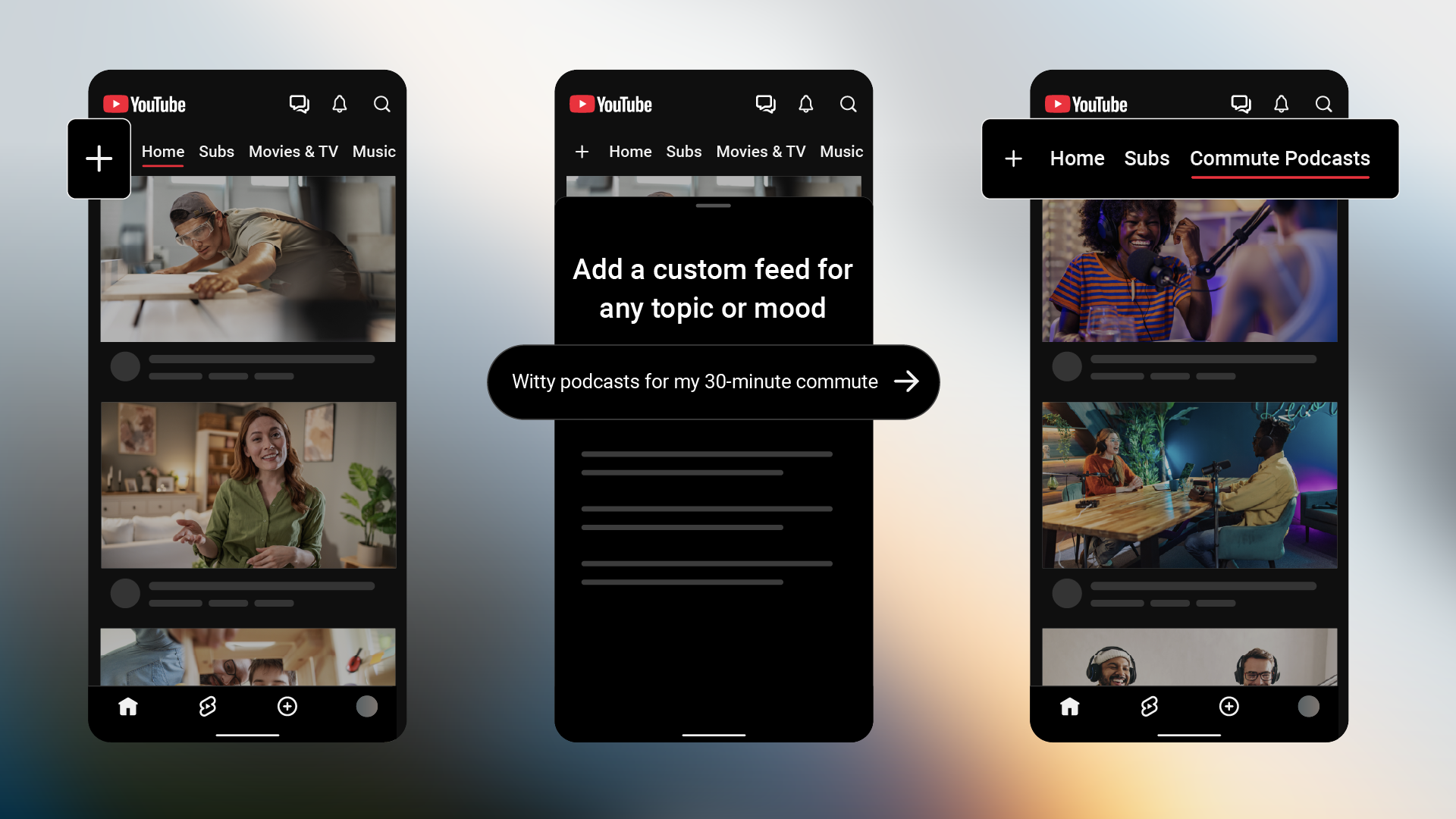
In YouTube’s own before and after graphic, the bottom bar goes from five icons to four, and the top bar reads Home, Subs, Movies & TV and Music.
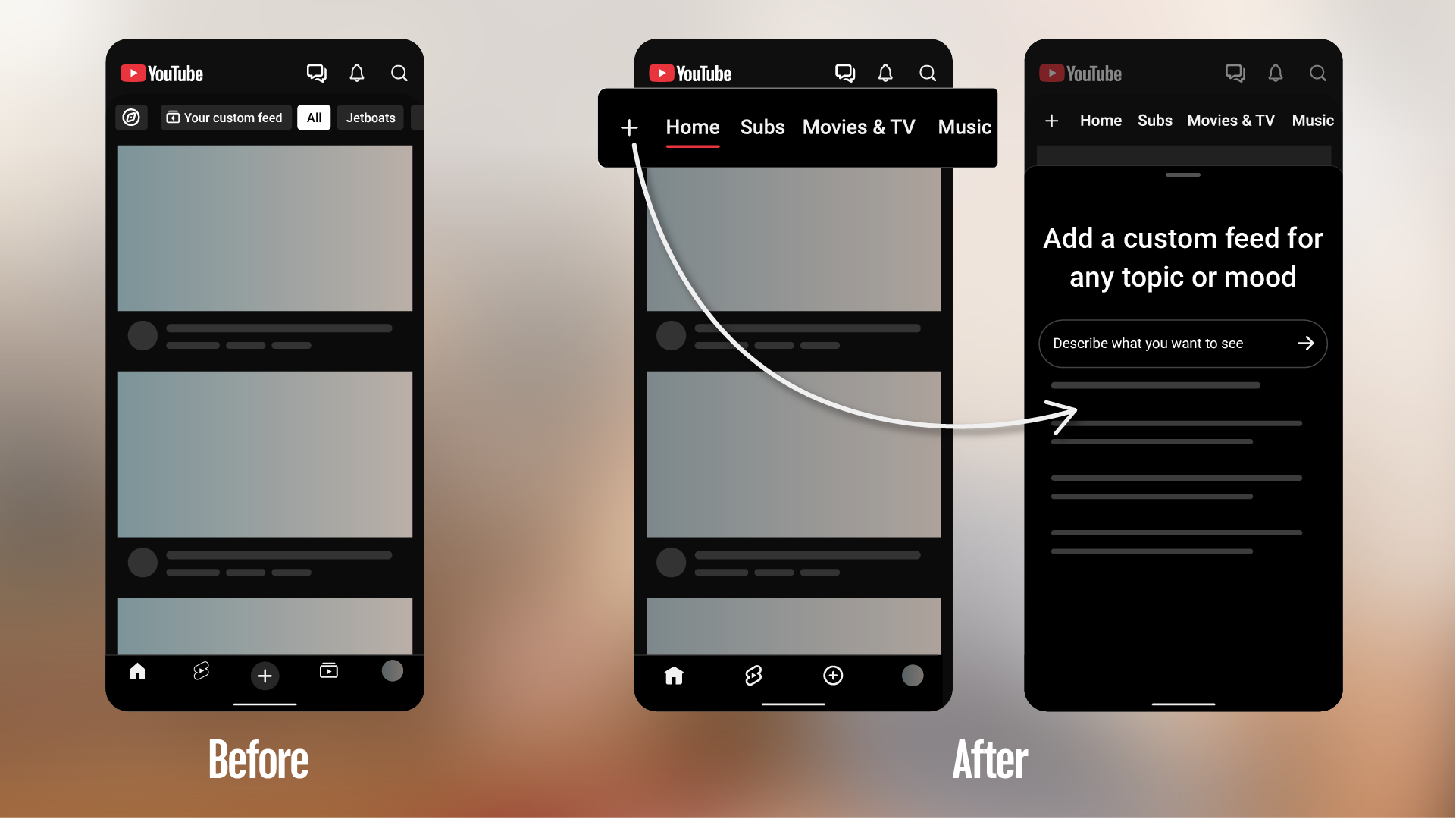
YouTube does not say when everyone will see the new layout. The second half of its announcement, the part it spends more words on, is the new feature.
How YouTube custom feeds work
Tap the plus sign at the top of your Home feed and describe the topic, channels or vibe you want. YouTube’s own example is “help me unwind after work with guided meditations under 10 minutes.”
The sheet that opens is titled “Add a custom feed for any topic or mood.”
The feed is saved as a tab at the top of your screen, and tapping its prompt box lets you rewrite the request later. Feeds you create on mobile sync to desktop when you use the same Google account.
It is the same idea behind ChatGPT’s Intelligent UI, where the response takes the shape the request needs. How many feeds you get depends on a few conditions.
Who gets YouTube custom feeds first
Free users can save up to 3 active custom feeds. YouTube Premium members can save up to 8.
Custom feeds are rolling out on mobile and desktop in English, to signed-in viewers in the US who are 13 or older and have search history turned on. YouTube says more users and regions are coming, with no timeline.
The search history condition is the one to notice. Viewers who keep it off do not meet the requirement YouTube lists, so they should not assume the feature will reach them.
The post attaches those limits to custom feeds. It does not say whether the Subs change is restricted the same way, so the first thing to check is your own app.
What to check when your app updates
Open Home and look at the top bar. If Subs is there, your followed creators are one tap away, and Live and Music have their own feeds.
A tab people open without looking is the hardest kind to move, and the cost shows up in the first few days of mistaken taps.
The custom feeds are worth testing on purpose, especially if your Home feed has drifted toward things you no longer watch. Google is leaning the same way elsewhere on Android, where Google Play vibe coded apps now install straight to your own phone.
YouTube calls this the first in a series of Home updates and has not said what comes next.