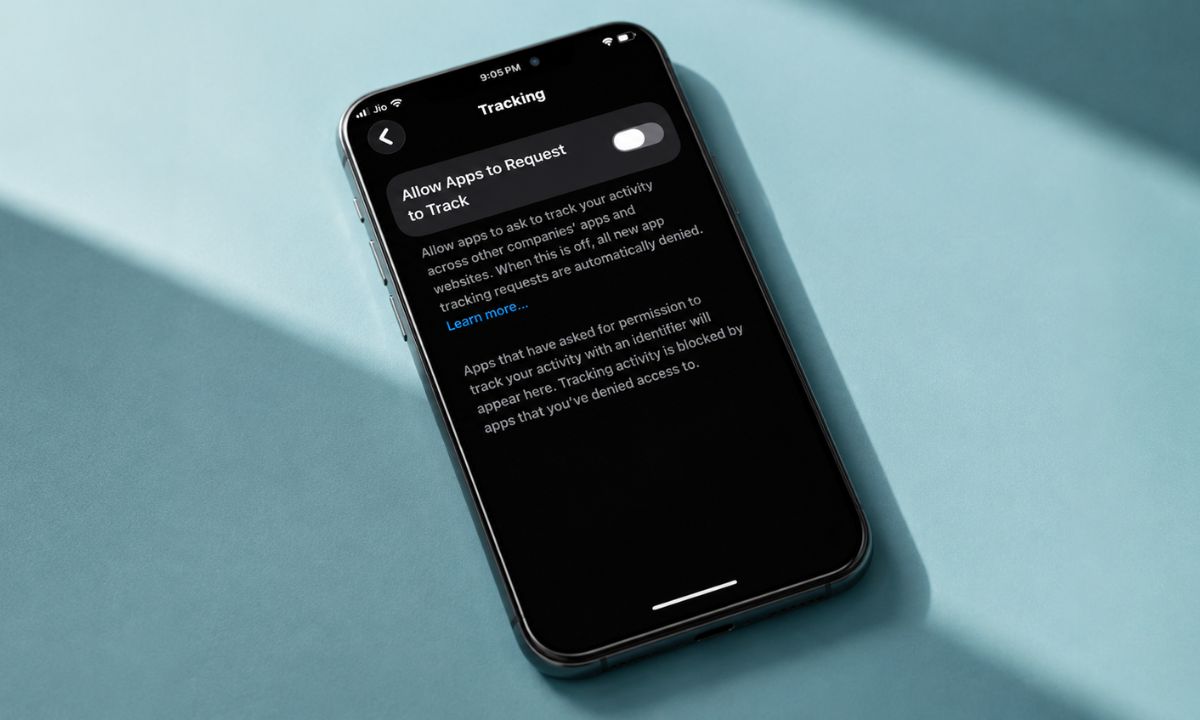
The App Tracking Transparency prompt has been showing up on my iPhone since 2021, and for most of that time I tapped through it the same way I tap through cookie banners. Ask App Not to Track. This process is repeated for almost every app.
Two weeks ago I actually started paying attention to the tracking business on my iPhone. It was not the setting itself, which is a single toggle, but what changed in the apps I use every day, once I stopped granting tracking permission.
Nothing broke. That was pretty much expected. The primary change was slower to notice, and more interesting.
TL;DR: App Tracking Transparency stops apps from linking your activity across other apps and websites through your device’s IDFA. Denying it does not stop ads; it stops personalized ones, and the practical effect is uneven across apps. Instagram barely changed. A shopping app went generic within days. A mobile game kept showing me the same three ads on loop, which turned out to be a sign the tracking denial was working as intended.
What actually happens when you deny the prompt?
App Tracking Transparency, or ATT, is the system Apple built into iOS 14.5 back in April 2021. Every app that wants to link your activity to your device for advertising has to ask first, with the standardized prompt: allow apps to request to track your activity across other companies’ apps and websites.
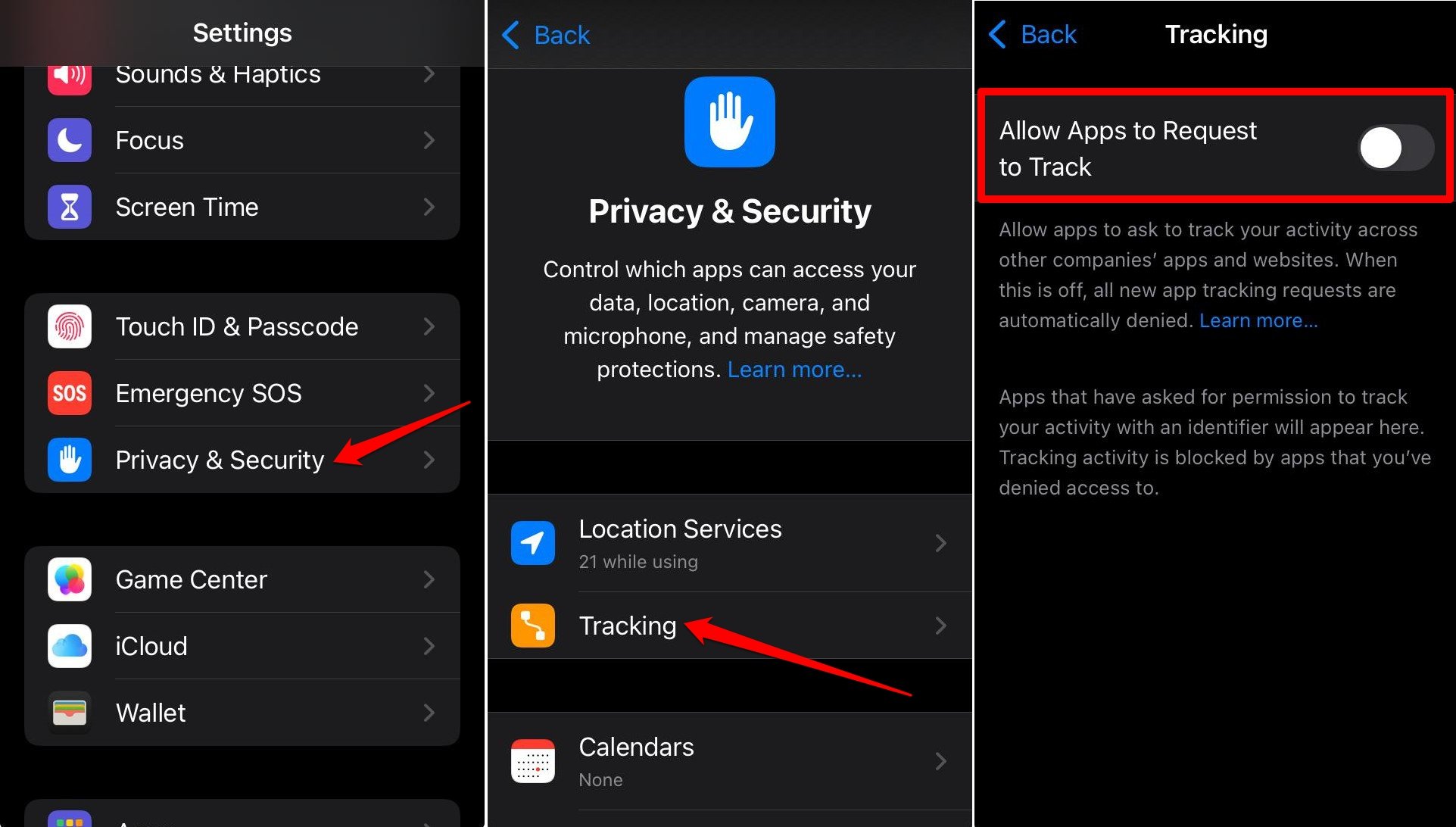
- Go to Settings > Privacy and Security > Tracking
- Disable the toggle next to Allow Apps to Request to track
Say no, and the app cannot read your device’s IDFA, the identifier that lets an advertiser connect what you did in one app to what you did in another. Say yes, and it can. Simple, right?
What ATT does not do is stop ads outright. Apps still show you advertising based on what you do inside that one app, or based on the general category the app itself sits in.
A running app can still guess you might like running shoes without ever touching your IDFA. The distinction sounds abstract until you watch it happen app by app over two weeks. It is very random. Also goes unnoticed unless you are very attentive or get curious about how ad management works on your iPhone.
Instagram barely noticed I said no to tracking
I expected Instagram to be the app that changed the most. It was the one that changed the least.
For the first four or five days, the ads looked identical to what I remembered from before. They were oddly specific. Still the same brand of protein supplement I had looked at on a browser three weeks earlier, which should not have been possible if IDFA tracking was actually off.
Instagram does not need cross-app tracking the way a smaller app does. Meta already has your on-platform behavior, a linked Facebook account, its own in-app browser, and years of interaction history. Denying ATT closes one specific door. It does not touch the ones Meta built themselves.
That was the first lived lesson. Turning off tracking felt like flipping a master switch. It is closer to locking one window while several others stay open.
The same logic applies to iPhone security features Android still lacks, several of which work the same way, closing one specific door without touching the others.
The shopping app that got generic fast
A clothing retailer app I use maybe twice a month told a completely different story. By day three, the product recommendations on the home screen had shifted from things resembling what I had actually browsed/purchased in the past to a rotating set of the same six bestsellers everyone probably sees.
I noticed because I opened the app looking for a specific t-shirt I had viewed the week before, and it was gone from the recommendations entirely. Not out of stock, just no longer surfaced as an ad, because whatever cross-session profile had been building on me now had a gap where the tracking used to fill in the blanks.
This is the part nobody explains well in advance. Denying tracking does not just stop future data collection. It seems to degrade how well an app can act on the behavioral profile it already has, at least for apps smaller than Meta or Google that rely more heavily on third-party attribution tools to stitch sessions together.
The game that kept showing me the same three ads
The most annoying change, and the most revealing one, showed up in a mobile puzzle game I use during commutes.
Before denying tracking, the ads between levels rotated through a wide, almost random assortment. After, I started seeing the same three ads on a loop. A car insurance ad, a different mobile game, and an ad for a dating app I have never once looked at anywhere.
At first I assumed something was broken. It turned out to be the opposite. Without IDFA access, the game’s ad network cannot personalize based on my actual interests, so it falls back to a small rotation of generic, high-budget campaigns aimed at the widest possible audience.
The repetition was not a glitch. It was what non-personalized advertising at scale actually looks like when the algorithm has nothing specific to work with.
I noticed the sameness before I understood why, and that gap between annoyance and understanding is where most people give up and tap Allow out of pure irritation. The same car insurance ad fifteen times in one week is genuinely tedious.
The prompts themselves became the real friction
The setting itself was a one-time toggle. What actually wore on me was the repetition of individual app prompts, since Allow Apps to Request to Track being off system-wide does not stop every app from asking. It just returns a denied status automatically without showing Apple’s prompt.
Some apps interpreted that as an invitation to build their own pre-prompt screen instead, a custom explainer asking me to reconsider before the real system dialog would have appeared anyway.
A food delivery app did this three separate times across the two weeks, each with a slightly different pitch about how allowing tracking would improve my recommendations.
That pattern is worth naming because it is deliberate. Apple’s own prompt is neutral by design. The custom pre-prompt screens apps build in front of it are not, and after the third one from the same app I started closing out of it faster than I was actually reading it, which is its own small failure of the system’s original intent.
| App type | Effect of denying ATT | Why |
|---|---|---|
| Meta-scale apps (Instagram) | Minimal change | Relies on first-party data, not just IDFA |
| Mid-size retail apps | Recommendations went generic within days | Depends more heavily on third-party tracking to build a profile |
| Ad-network-dependent games | Same handful of ads on loop | Falls back to broad, non-personalized campaigns |
| Apps with custom pre-prompts | Repeated in-app asks despite system denial off | Apps can still show their own explainer before Apple’s prompt |
What this actually tells you about the iOS tracking setting
Two weeks of paying attention to something I used to ignore taught me that App Tracking Transparency does real, measurable work, but its effect is not widespread.
Meta-scale apps barely feel the restriction. Mid-size apps degrade fast and visibly. Ad-network-dependent apps like games go generic and repetitive almost immediately, which paradoxically is the clearest evidence that the setting is functioning exactly as intended.
Apple has also closed a few of the workarounds developers used to route around ATT. iOS 26 added Advanced Fingerprinting Protection across Safari by default, blocking the device signal collection some ad networks leaned on once IDFA access disappeared.
That does not mean cross-app tracking is fully solved. According to CNBC’s coverage of the ruling, regulators in France fined Apple 150 million euros in March 2025 over how ATT was rolled out for competitors versus Apple’s own advertising, and Italy issued a separate fine in December 2025 on similar grounds. So, the tool itself remains contested even as it does what it says on the label.
For me, the honest takeaway is smaller than a verdict on privacy policy. It is that the one setting most people tap through without reading changes what your phone shows you in ways that are genuinely uneven, occasionally annoying, and worth actually watching happen at least once.
Pairing this with an iPhone battery audit is a reasonable next step too, since apps that lean hardest on tracking workarounds tend to run more in the background regardless.