Are you worried someone may discover how often you’ve viewed their profile? Rest assured, as of mid-2026 Instagram still doesn’t offer a feature that names specific visitors.
There is only one place on Instagram that has always named names, and that is a story you post yourself.
Anyone viewing your story within 24 hours of posting will appear under it as a viewer.
In this guide, we will look at what Instagram actually shows you in 2026, walk through the account level metrics that come closest, and debunk the shady apps that still claim to reveal who is stalking your account.
I went looking for a personal visitor count on my own account while updating this piece, since a few smaller sites claim Instagram is now testing exactly that. I could not find it anywhere in my settings, and neither Meta nor any major tech outlet has confirmed such a feature exists. That gap between the rumor and what is actually verifiable turned into the more useful story.
TL;DR: Instagram does not show you the names of people who viewed your profile, and that has not changed in 2026. Meta has confirmed a shift from Impressions to Views as its main content metric, which affects how profile level numbers are counted for professional accounts, but this is not a personal visitor list and never reveals identities. Story viewers remain the one place Instagram shows real names, and only for 24 to 48 hours. Any app promising a viewer list is either lying or trying to steal your login.
How to Check who visits your Instagram account?
You cannot exactly know the names of the Instagram users who visited your account or viewed your posts. However, there are various methods to determine engagement with your Instagram content.
1. Check the Instagram Account Insights
Here is how you can check your engagement with a professional account on Instagram.
- Launch the Instagram app on your phone.
- Tap on the profile icon at the bottom right corner to access your Instagram profile.
- Press the menu button at the top-right corner to reveal a menu.
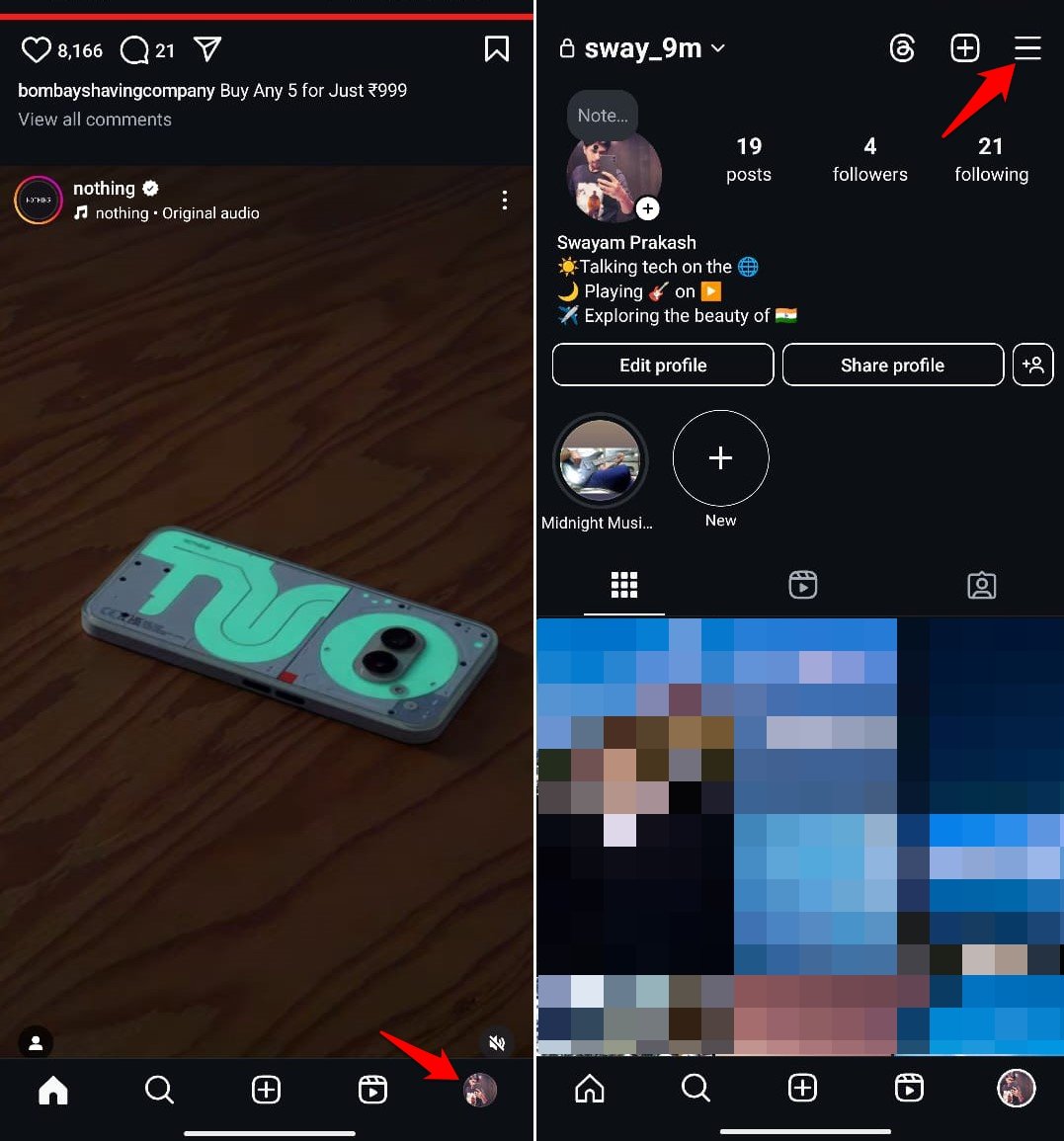

- Tap on Insights. The Insights option is exclusively available on a professional account.
Check your Instagram profile hits. You’ll find a page of metrics under the “Overview” section, along with the content you have posted on your account.
Profile visits are listed under the “Interactions” heading. The first time I looked at this, I expected some kind of breakdown by day. It is just a running total for the period, nothing more granular.
2. Switch to Instagram Business Account
Instagram provides business account owners with valuable insights about visitors to their page, though it doesn’t disclose specific usernames.
If you want to access this information, follow the steps explained below to convert your basic Instagram account to a business account.
- Open Instagram and hit the profile icon in the bottom right corner.
- On your profile page, tap the hamburger menu in the top right corner.
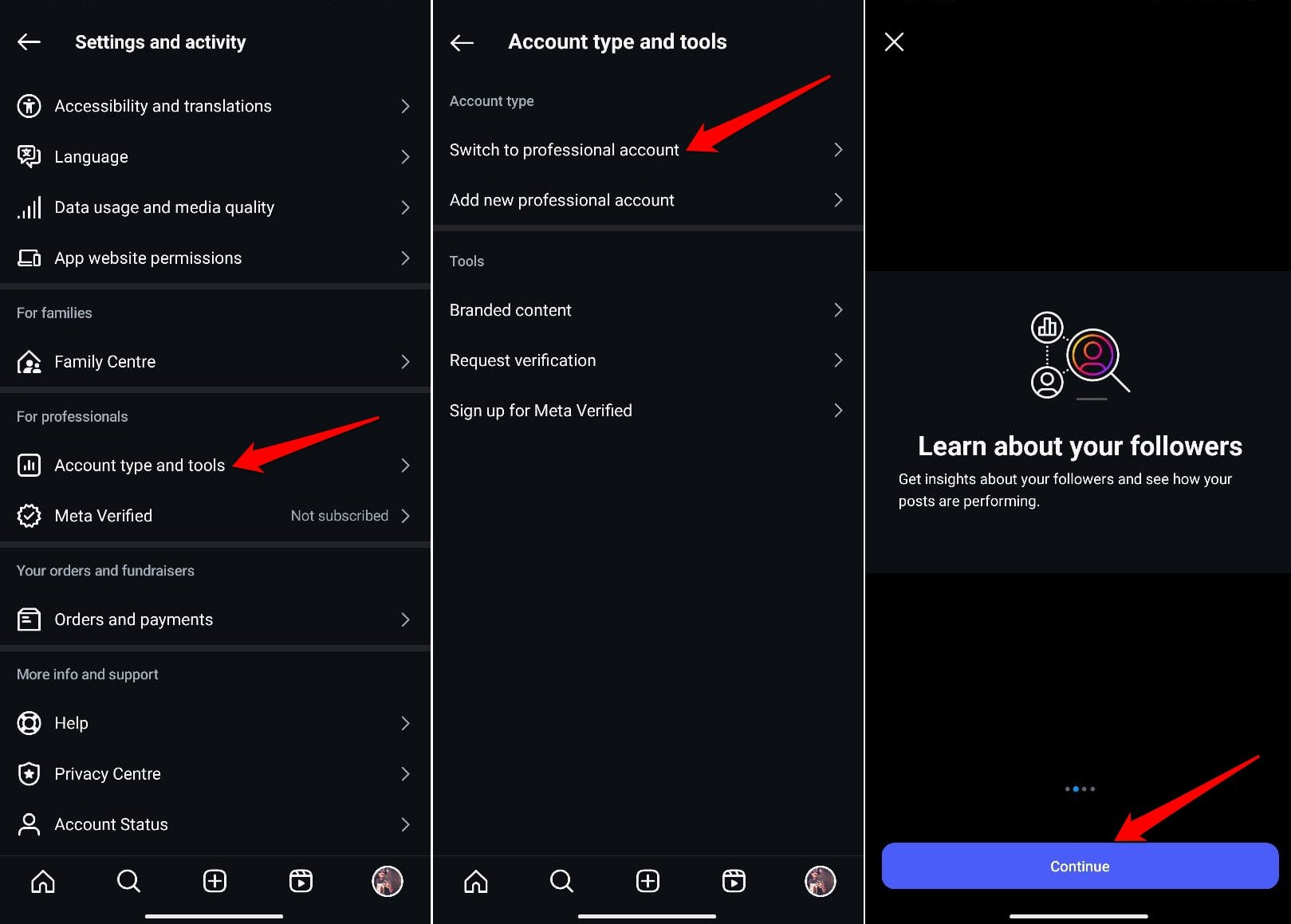
- Under Settings and Activity scroll down to Account Type and Tools and tap on it.
- Select Switch to a Professional Account.
- Tap Continue on the next screen to proceed with the account type change.

- Choose your business type and tap Done. If this is a temporary change, you can select any option.
- On the following page, select Business and press Next.
- Enter any of your contact information, such as your phone number. Then tap Next again.
- If you do not wish to connect your account to Facebook, press the button Skip.
Now, your account has been converted to a business account. To check how many users have engaged with your profile, perform the steps below.
- Go to your profile page on Instagram and tap the menu button in the top right corner.
- Select Insights.
- In the Accounts Engaged section, you can view the number of users who have visited your account.
All you will get is a figure and not the exact name of the users who have visited your account or viewed your content.
If someone comments on your posts or story, or likes your content, you will be notified through push or email notifications. That is one way to see if a particular Instagram account is interacting with your posts, even if it never tells you who merely scrolled past.
What actually changed with Instagram’s view counts in 2026
Meta has confirmed one real change here. In early 2025, Instagram began replacing Impressions and Reel plays with a single Views metric across posts, reels, stories, and profiles, and that transition was fully in effect by April 2025.
For professional accounts, this means the old profile impressions number now shows up as part of the broader Views metric inside Insights. It counts every instance your profile content was seen, including repeat views from the same account, which can make the number look larger than the old impressions figure did.
That is a real, sourced update. What it is not is a personal visitor counter. It still reports a volume, not a list of accounts, and it remains locked behind Professional or Business account status the same way profile visit insights always have been.
You will find a handful of sites this year claiming Instagram is separately testing a private 14-day visitor count for personal accounts, sometimes with a specific settings path attached. I looked for this directly and could not find it, and I could not find it confirmed by Meta or by any major tech outlet either. Until that changes, treat it as an unverified claim rather than a feature you should expect to see.
If a screenshot or a settings path for something like this ever does show up on your own account, that is worth revisiting. Until then, the closest thing Instagram gives any account to a visitor count remains the professional account Insights described above, and it has never shown usernames.
How to Know Who Checked Your Instagram Story?
Instagram Stories remain the one part of the platform that names names, so they are still the closest thing to a real stalker check.
- Post a public story on Instagram. Your account must be set as public for this to work as described.
- Open your Story by tapping your profile icon in the top left corner.
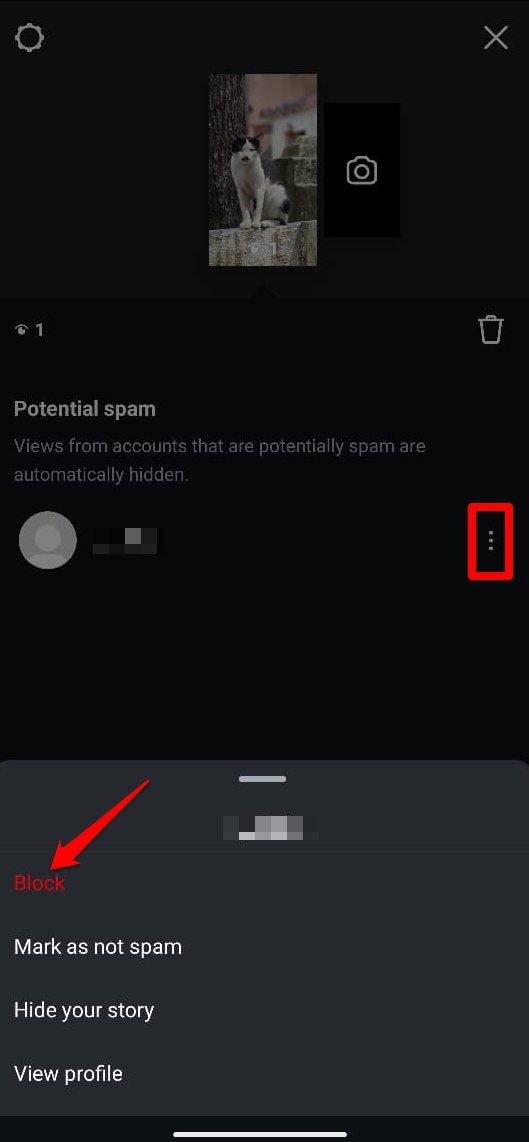
- Swipe up on the story to view the list of users who have viewed your Story.
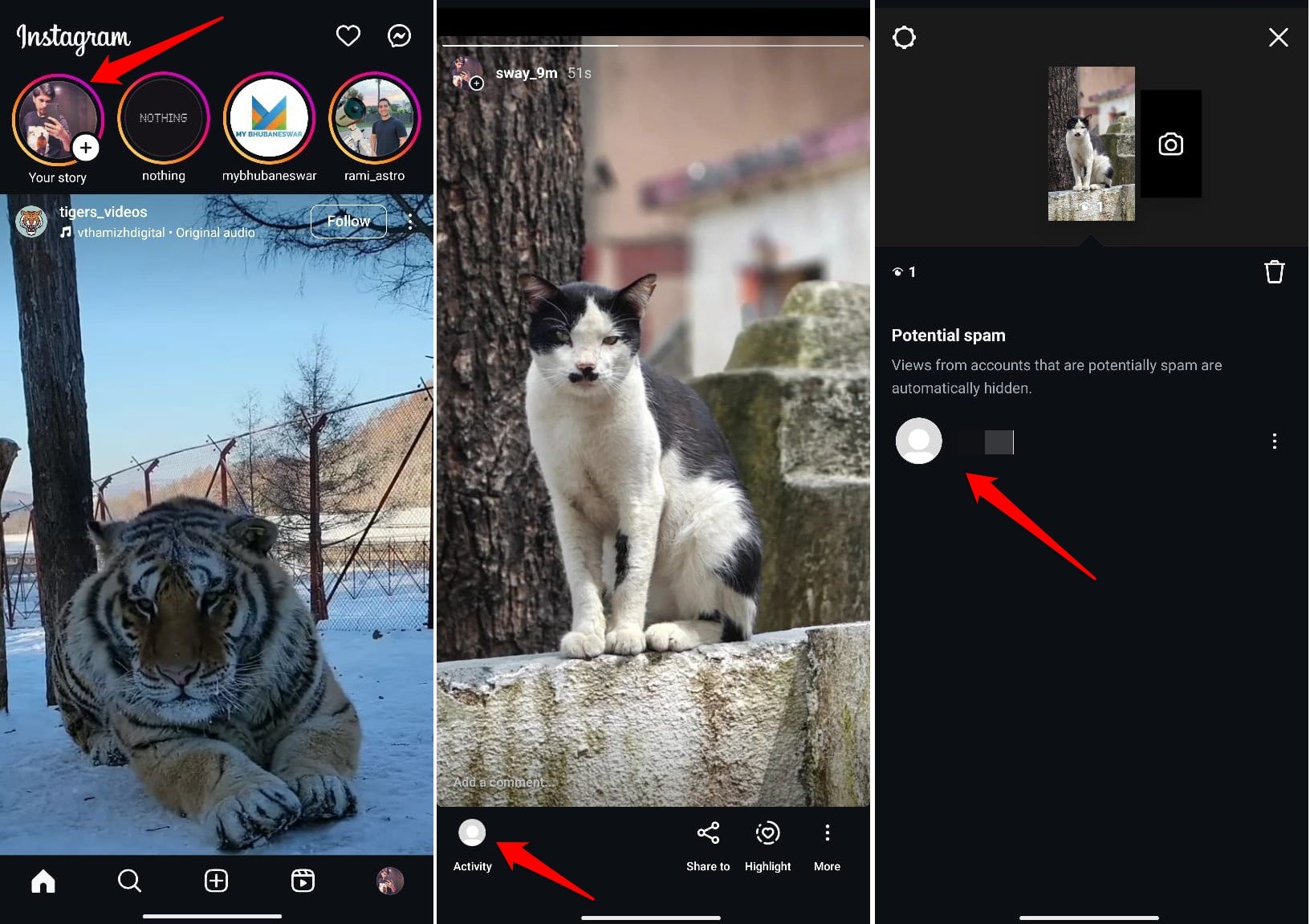

- If you suspect someone of stalking, tap the three dots next to their username in the list, and select the “Block” option.

View the Story Highlights
Since Instagram Stories will disappear after 24 hours, you need to check the viewer list daily if you post frequently.
To see who checked your Instagram Story within 48 hours, create a “Story Highlight.” Here’s how to do it.
- Open your Instagram story and click on the three dots at the bottom.
- Select the Highlight option.
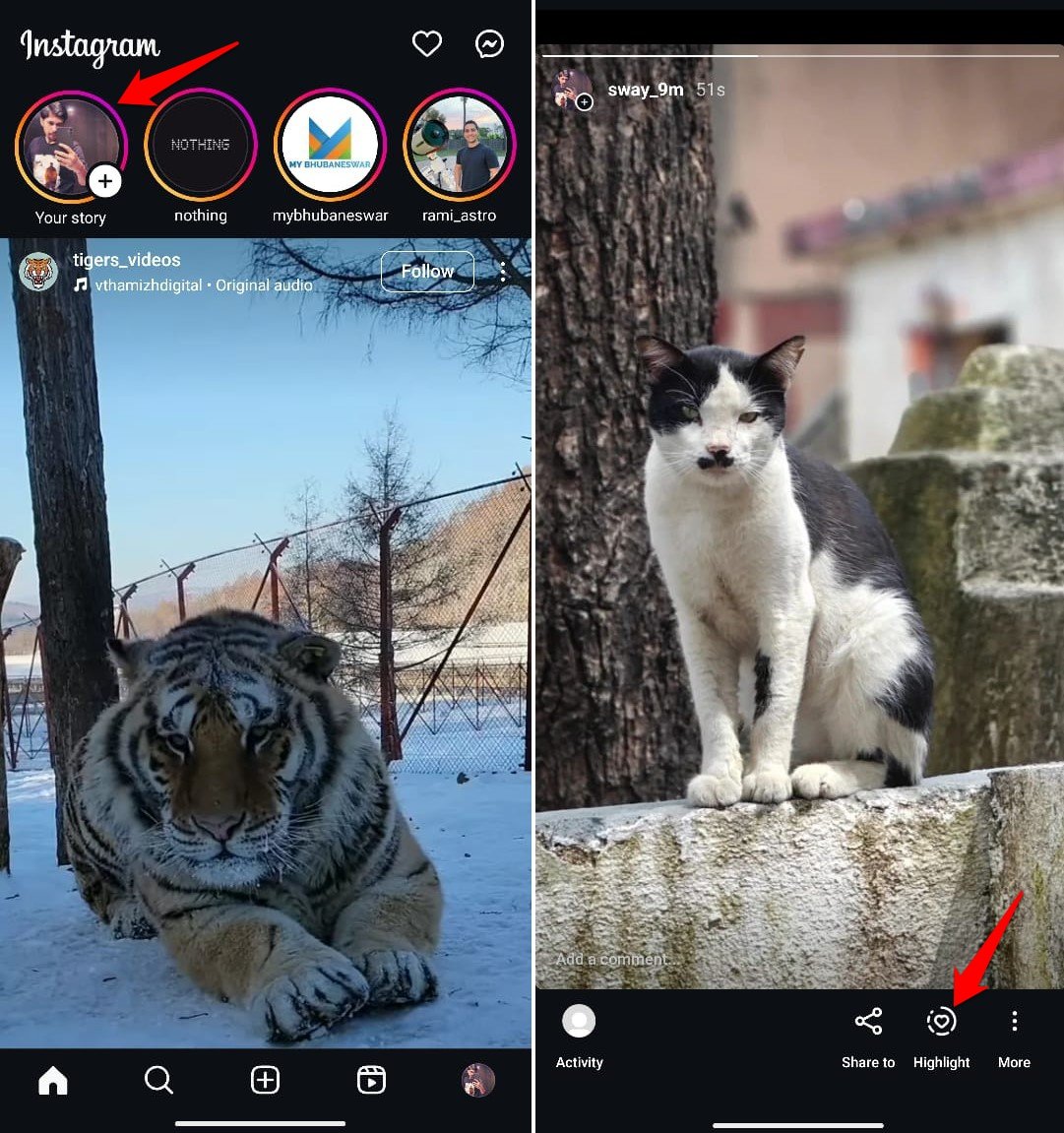

- Tap on New, name the highlight, and then tap Add.
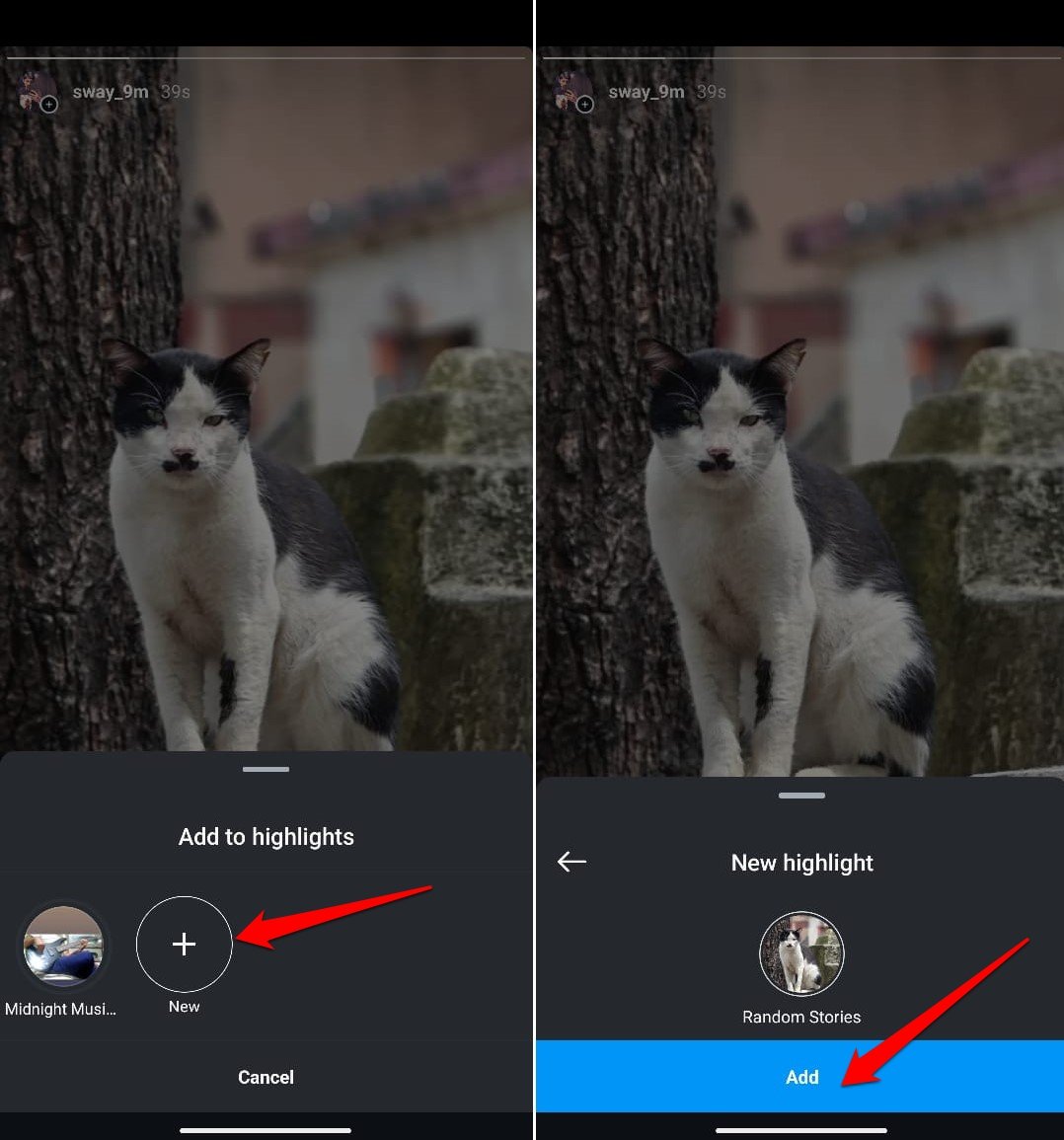

- To view activity on the Story highlight, go to your profile and tap the recent highlight.
- Tap on the Activity option at the bottom to see the list of viewers.
Once 48 hours have passed after posting a story or even adding it to highlights, the list of users who viewed the story won’t be available anymore. I have missed that window more than once by a matter of hours, and there is no getting it back once it closes.
Instagram’s Unbreakable Wall of Privacy
Meta sticks to its privacy stance strictly. Switching to a professional profile gets you a number of visits, now folded into the broader Views metric, but never a visitor’s Insta username.
Some third-party apps claim they can reveal who viewed your profile. That’s impossible due to strict user privacy and Instagram’s terms of service.
A third-party app cannot interfere with or modify the functioning of Instagram, and no outside app can pull data Instagram itself does not expose through its API.
To make matters worse, these bogus apps can compromise your account security by asking permission to your login credentials.
This can even lead to a permanent ban on your profile. It’s best to avoid any third-party applications that require your login details.
While you can’t see who has visited your profile, you can still see who has viewed your Stories.
How to Make an Instagram Account Private?
Want to prevent unwanted users from accessing your profile? The solution is straightforward: make your Instagram profile private. Here’s how to do it.
- Launch the Instagram app and go to your profile.
- Tap the hamburger menu located at the top right corner.
- Scroll to Account Privacy and tap on it.
- Under the Account privacy tab, press the toggle next to Private Account and enable it.
- In the confirmation pop-up, tap on Switch to private.
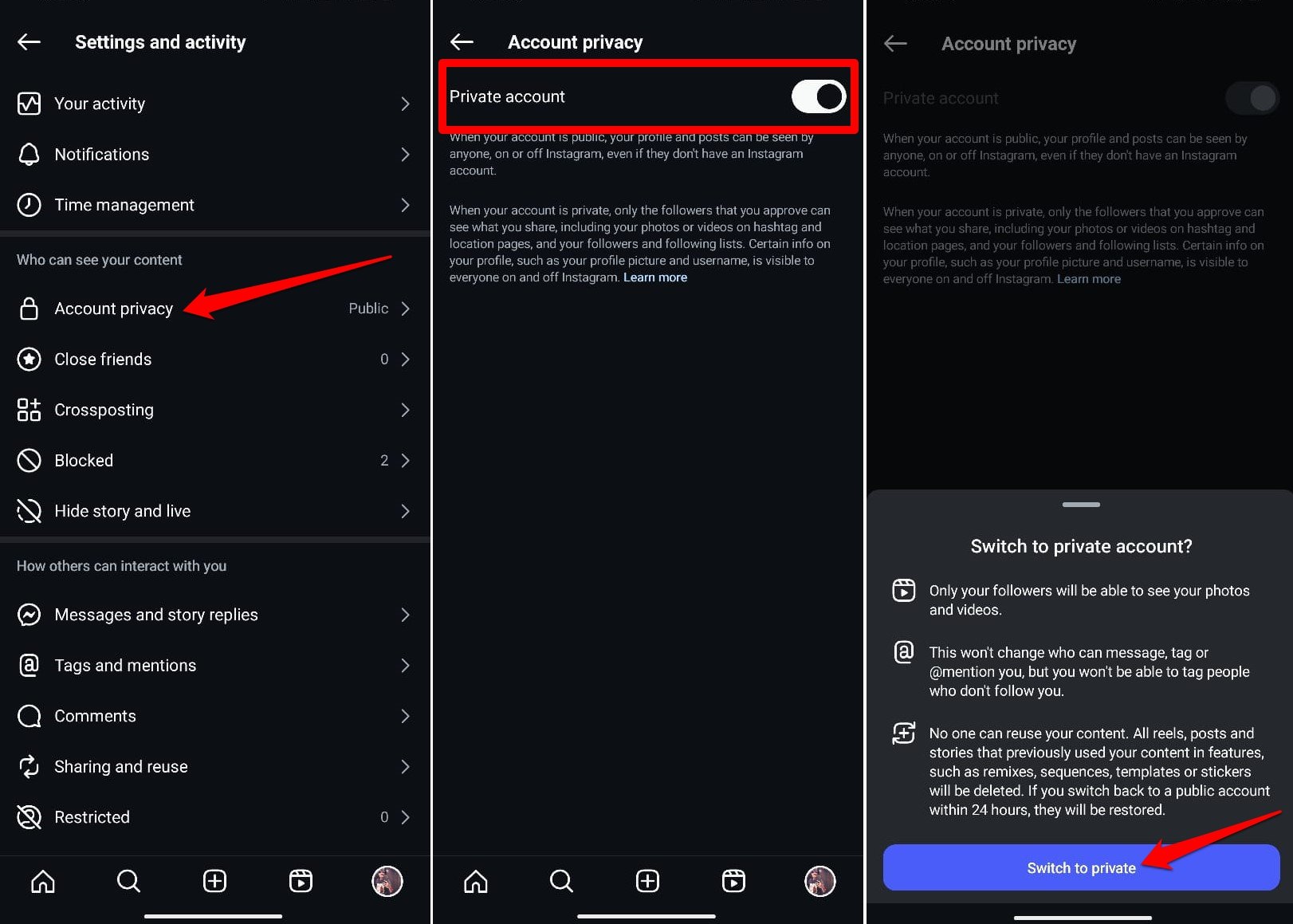

Once your account is set to private, all your activity will remain hidden from other users unless they send you a follow request on Instagram and you approve the same.
Can Third-Party Apps Reveal who Stalks your Instagram Profile?
Many third-party apps and websites claim to reveal who views your Instagram profile. However, this is technically impossible.
Instagram’s API limits access to personal user data, including profile viewers, to safeguard user privacy.
Consequently, these apps are unreliable and offer fake credibility. There are high chances of jeopardizing your account security by linking your account to such apps or providing them with your login credentials.
Focus on Content Engagement Metrics
Rather than obsessing over who views your profile, concentrate on creating meaningful connections and engaging content that attracts your audience organically.
Monitor metrics such as likes, comments, and shares to analyze the effectiveness of your posts and identify areas for growth. On a professional account, the Views metric under Insights is worth watching too, since it now folds in profile level activity, even without names attached to it.
Understand the Instagram Terms of Service
It’s important to understand the limitations of Instagram’s platform and respect user privacy.
While curiosity about profile visitors is natural, Instagram prioritizes user privacy and security, and tracking profile visitors violates its terms of service.
Protect Your Instagram Account
Be careful when granting access to third-party apps or websites claiming to reveal profile viewers. Avoid sharing sensitive details, such as login information or personal data, and regularly review your account’s security settings to ensure maximum protection against unauthorized access.
Frequently Asked Questions (FAQs)
Can I See who Viewed my Instagram Stories?
Yes. If you post more stories than regular posts, you’ll have better luck tracking who’s engaging with your content. The list of viewers is available for 24 hours, but if you save your stories, you can still see who viewed them (up to 48 hours) and how many people did so. You need to be logged in to access this information.
Can I See who Viewed my Instagram Video?
Videos on your Instagram story follow the same rules as photos: you can see the list of viewers for 24 hours after the story goes live. You can only see the total number of views for videos posted as regular posts or Instagram reels. You won’t know exactly who viewed it. Instagram reels track the number of plays rather than individual viewers, prohibiting you from knowing exactly who watched it.
Can someone see the number of times you have viewed their Instagram profile?
No. Instagram does not permit users to see how many times someone has viewed their profile. The platform prioritizes user privacy and does not provide this information to anyone, whether you have a personal, creator, or business account.
Is there a Specific App that can Check who Views your Instagram Account?
No app, whether third-party or Instagram itself, can reveal who has viewed your Insta account. Therefore, it’s advisable not to spend money on any app or service that claims to offer this feature.
Did Instagram add a way to see personal profile visitors in 2026?
Not as far as Meta or any major tech outlet has confirmed. Some smaller sites describe a private visitor count for personal accounts, but there is no official announcement or verified rollout to point to. What did change is that Instagram folded profile impressions into a broader Views metric for professional accounts, which is a volume number, not a visitor list.
Bottom Line
While Instagram offers some insights into who engages with your content, it maintains strict privacy measures that prevent users from seeing who views their profile or how many times a profile is visited by a particular account.
The main real change this year is Instagram folding profile impressions into its broader Views metric for professional accounts, which adds volume to that picture without opening the door to names.
Converting your regular account to a business account can still provide you with valuable engagement metrics, which can help you understand your audience better.
It’s crucial to avoid third-party apps claiming to reveal profile viewers, to keep your Instagram account access secure.
Stick to Instagram’s built-in tools to monitor your account’s performance. Ultimately, respecting privacy guidelines and protecting your account should be the priorities while using Instagram.