
I cleared my cookies religiously for years, treated incognito mode like a reset button, and assumed that combination meant sites had no idea who I was between visits. Then I read how browser fingerprinting actually works, and realized none of that had ever mattered for this particular kind of tracking.
Browser fingerprinting identifies you by combining ordinary details your browser already shares with every page you visit. This includes observing your screen resolution, installed fonts, timezone, and graphics hardware, into a profile unique enough to recognize you during repeated sessions. No file gets stored on your device. There is nothing to clear.
TL;DR: Browser fingerprinting tracks you by combining device and browser details into a unique profile, without storing anything on your device. Clearing cookies, using incognito mode, and running most VPNs do nothing to stop it. Firefox in strict mode and Safari offer meaningful reduction, while Chrome does not.
Why does browser fingerprinting exist now?
This is a separate concern from Chrome extension privacy policies, though the two often get confused. Third-party cookies have been declining for years across major browsers, and advertisers needed a replacement that survives the exact privacy habits people had picked up to fight cookies.
Fingerprinting fills that gap because it works from information your browser exposes automatically just to render a page correctly. A script embedded on a page queries your browser through JavaScript, pulling dozens of small attributes.
No single detail identifies you specifically. The combination usually does. That combined signature gets hashed into one value and matched against a database the next time you visit, even from a completely different site running the same tracking script.
What actually goes into a browser fingerprint?
Canvas fingerprinting is one of the more common techniques, exploiting the browser’s Canvas API to draw an invisible image that renders very slightly differently depending on your specific combination of GPU, driver, operating system, and browser version.
You(or any user) never see this image. It happens in the background in a fraction of a second.
Beyond canvas rendering, sites also read your user agent string, screen resolution and color depth, installed fonts detected through CSS probing, timezone, language settings, and increasingly, behavioral signals like typing rhythm, scroll speed, and pause duration between clicks.
That last category is newer and harder to spoof than hardware details alone, since it is based on how you physically interact with a page rather than what your device reports about itself.
| Tracking method | Stored on device | Cleared by cookie deletion | Blocked by incognito |
|---|---|---|---|
| Cookies | Yes | Yes | Yes, within the session |
| Browser fingerprinting | No | No | No |
| Canvas fingerprinting | No | No | No |
| Behavioral fingerprinting | No | No | No |
Why do the tools you already use not help?
Clearing cookies removes stored files, which fingerprinting never used in the first place. Incognito mode prevents your browser from saving local history and cookies for a specific session. But every attribute a fingerprinting script reads, such as your screen size, fonts, and graphics hardware, stays exactly the same whether you are in a normal window or a private one.
Most VPNs mask your IP address, which is genuinely useful for hiding your location and network identity, but does nothing about the dozens of other signals a fingerprint is built from.
I had assumed for a long time that a VPN plus incognito mode was close to invisible browsing. It handles exactly one variable out of many. Still, VPNs are absolutely useful, and below is a guide that helps you choose the suitable one for your Windows PC.

What actually reduces your exposure?
Browser choice matters more than any setting toggle. Firefox running in strict tracking protection mode and Safari both take deliberate steps to normalize the data they expose, making individual users blend in with larger groups rather than standing out as unique.
Chrome, by contrast, does not meaningfully reduce fingerprint uniqueness on its own, according to Techloy’s analysis of the shift away from cookies.
Browser extensions built specifically for fingerprint spoofing work differently again, substituting randomized or normalized values for your real screen dimensions, canvas output, and hardware details.
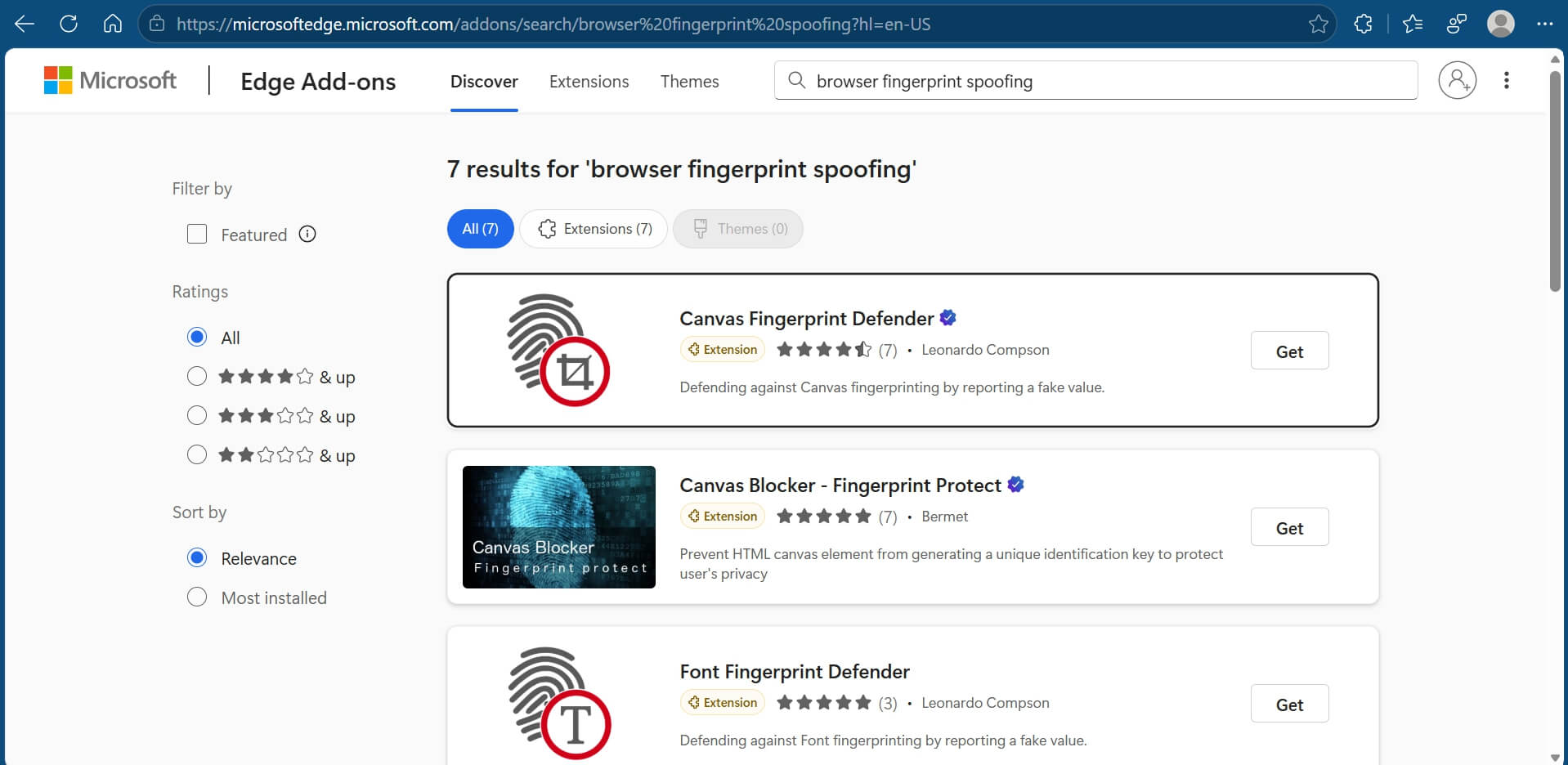
The goal with a good extension is a believable fingerprint that does not match your actual hardware but also does not look obviously fake, since an implausible configuration can itself become a distinguishing signal.
If you are also comparing browsers generally, our browser comparison for Mac covers overlapping ground.
The part that surprised me most about Browser Fingerprinting
None of this requires you to have done anything wrong or careless. Fingerprinting works on the exact information your browser needs to share just to display a webpage properly.
You cannot browse without a screen resolution or a font list. The tracking rides on top of functionality that has to exist for the internet to work at all, which is part of why it is so difficult to eliminate rather than just reduce.
I did not come away from learning this feeling like there was a clean fix. There is not one. What changed was smaller than that: I stopped assuming clearing my history meant I had done anything meaningful about being tracked, and started treating browser choice as the actual lever rather than a settings menu I clear out of habit.
Frequently Asked Questions
Does a VPN stop browser fingerprinting?
No. A VPN hides your IP address and location, but fingerprinting relies on separate signals like screen resolution and fonts that a VPN does not touch.
Does incognito mode stop fingerprinting?
No. Incognito mode prevents local history and cookie storage, but every attribute a fingerprinting script reads stays the same in a private window.
Which browser is best against fingerprinting?
Firefox in strict tracking protection mode and Safari both reduce fingerprint uniqueness. Chrome does not meaningfully reduce it on its own.
Can I fully block browser fingerprinting?
No single tool eliminates it entirely. Extensions that spoof fingerprint values can reduce your uniqueness but do not guarantee complete anonymity.
Is fingerprinting illegal?
It depends on the jurisdiction. Some privacy regulations require disclosure or consent for fingerprinting, though enforcement varies widely by region.
What this means if you are choosing a browser for privacy
The telltale privacy checklist of clearing cookies, incognito mode, active VPN does not map onto how fingerprinting actually works. Fingerprinting is a passive tracking method that reads what your setup already reveals rather than something you actively invite by browsing normally.
That does not mean you can’t minimize browser fingerprinting. It means the fix sits at a different layer than the one most people reach for first. Switching from your default browser is a bigger decision, which is probably why so few people actually do it, even after learning how limited cookie clearing or using a VPN really is against browser fingerprinting.