You tap on a friend’s profile and notice a gold badge. Hold it down and suddenly you are watching a little solar system animation with your Bitmoji orbiting a sun. It is one of those Snapchat features that looks confusing at first glance but makes complete sense the moment it clicks.
That is Snapchat Planets, also called the Friend Solar System. It is a visual way to see exactly where you stand in someone’s closest circle, and it is built into Snapchat Plus. Once you understand the logic behind it, the planet you land on tells you quite a lot.
TL;DR: Snapchat Planets is a Snapchat Plus feature that ranks your top 8 friends as planets in a solar system, with you as the Sun. Mercury is your closest friend and Neptune is your eighth. The ranking is based on snaps sent, chat frequency, streaks, and story reactions. The feature is off by default and must be enabled manually in Snapchat Plus settings. It costs $3.99 per month to subscribe.
What is the Snapchat Friend Solar System?
The Friend Solar System is a Snapchat Plus exclusive feature that turns your Best Friends list into a mini solar system. You are the Sun. Your top 8 most-interacted friends become the 8 planets, ranked in the same order as the real solar system, from Mercury all the way out to Neptune.
The closer a planet sits to the Sun in real life, the closer that friend is to you on Snapchat. Mercury means you snap this person constantly. Neptune means they made your top 8 but they are the least active among those 8.
It is worth noting that your position is not mutual. You could be someone’s Mercury while they are your Earth. Each person’s solar system is built from their own interaction data, not a shared score.
The feature is disabled by default when you first subscribe. You have to go into your Snapchat Plus settings and manually turn on the Solar System option before it starts showing on friend profiles.
Snapchat Planets order: all 8 planets explained
The planet order mirrors the real solar system exactly. Here is what each one means and what it looks like in the app.
| Planet | Friend Rank | Visual Colour | Hearts |
|---|---|---|---|
| Mercury | #1 | Red | 5 red hearts |
| Venus | #2 | Light beige/yellow | Pink, blue, and yellow hearts |
| Earth | #3 | Blue and green | Red hearts, yellow stars |
| Mars | #4 | Red | Purple and blue hearts |
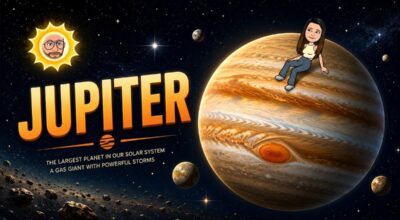
| Jupiter | #5 | Orange | No hearts, stars only |
| Saturn | #6 | Orange with ring | No hearts, stars only |
| Uranus | #7 | Green | No hearts |
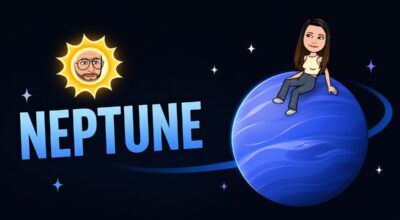
| Neptune | #8 | Deep blue | No hearts |
Mercury (1st)

Your number one best friend. This is the person you snap the most, reply to fastest, and keep the longest streaks with. In the app, Mercury appears as a red planet surrounded by five red hearts. If someone sees you on their Mercury, that is about as close as it gets on Snapchat.
Venus (2nd)

Your second closest friend. Still very active in your daily snaps and chats. Venus appears as a light beige or yellowish planet with a ring of colourful hearts in pink, blue, and yellow around it. The interaction here is regular, just not quite at the same level as Mercury.
Earth (3rd)

Solid, steady, reliable. Earth represents your third best friend, someone you snap often and probably exchange stories with regularly too. The planet looks like the actual Earth, blue and green, with red hearts and small yellow stars, plus a small moon nearby. It is a good place to be.
Mars (4th)

Still in your top four, which is still meaningful. Mars means you and this friend are in contact regularly, just not with the same intensity as the first three. It shows as a reddish planet with stars and purple and blue hearts circling a Bitmoji sitting on top of it.
Jupiter (5th)

The friendship is comfortable but low-maintenance. You might catch up every few days or react to a story occasionally, but it is not a constant back-and-forth. Jupiter is a large orange planet with orange swirl patterns and stars. No hearts here, which reflects the slightly more casual tone of this friendship level.
Saturn (6th)

Sixth position. The interactions exist but are not frequent. Saturn is easy to identify because of its iconic ring, shown as an orange planet with a visible orbital ring and surrounding stars. It is the kind of friendship where you are still connected but not actively prioritising each other on the app.
Uranus (7th)

Your seventh closest friend. Things are pretty quiet here. Uranus is shown as a green planet with no hearts around it, just a Bitmoji sitting on it. The absence of hearts in the design is a deliberate visual signal that the interaction at this level is minimal compared to the inner planets.
Neptune (8th)

The outer edge. Neptune means this person made your top 8 but they are the least active among them. It appears as a deep blue planet with no hearts, and a Bitmoji sitting on top. Occasional story reactions or a message here and there, but not much more.
How does Snapchat calculate your planet ranking?
There is no manual control here. Snapchat’s algorithm does the ranking automatically based on how actively you interact with each person relative to everyone else on your list.
Snapchat appears to consider factors like snaps exchanged, chat activity, streaks, story reactions, and overall interaction frequency when building your solar system.
The exact weighting is not publicly disclosed, but the pattern is consistent: more genuine back-and-forth with someone moves them closer to Mercury, while a drop in activity pushes them outward.
The rankings are dynamic, not fixed. If you stop snapping someone for a week while another friend becomes more active, that quieter friend can drift from Venus to Earth within days.
I noticed this after a busy travel stretch where I was barely opening the app. Coming back, two people had shifted positions, and one friend I had considered close had slipped from third to fifth. It was not dramatic, but it was accurate.
One thing that surprised me early on is that the ranking is relative, not absolute. If you are a low-activity Snapchat user overall, even a friend you snap a couple of times a week can end up as your Mercury, simply because no one else is interacting with you more. The system is always comparing your friends against each other, not against some universal threshold.
How to see your planet in someone’s solar system
You need a Snapchat Plus subscription to access this feature. According to Snapchat’s support documentation, the Friend Solar System is off by default and must be enabled from the Snapchat Plus feature management page in your profile settings.
- Go to the Chats section and open any friend’s chat.
- Tap on their Bitmoji icon to access their Profile.
- Tap on the ‘Best Friend‘ or ‘Friend’ badge to view the planets.
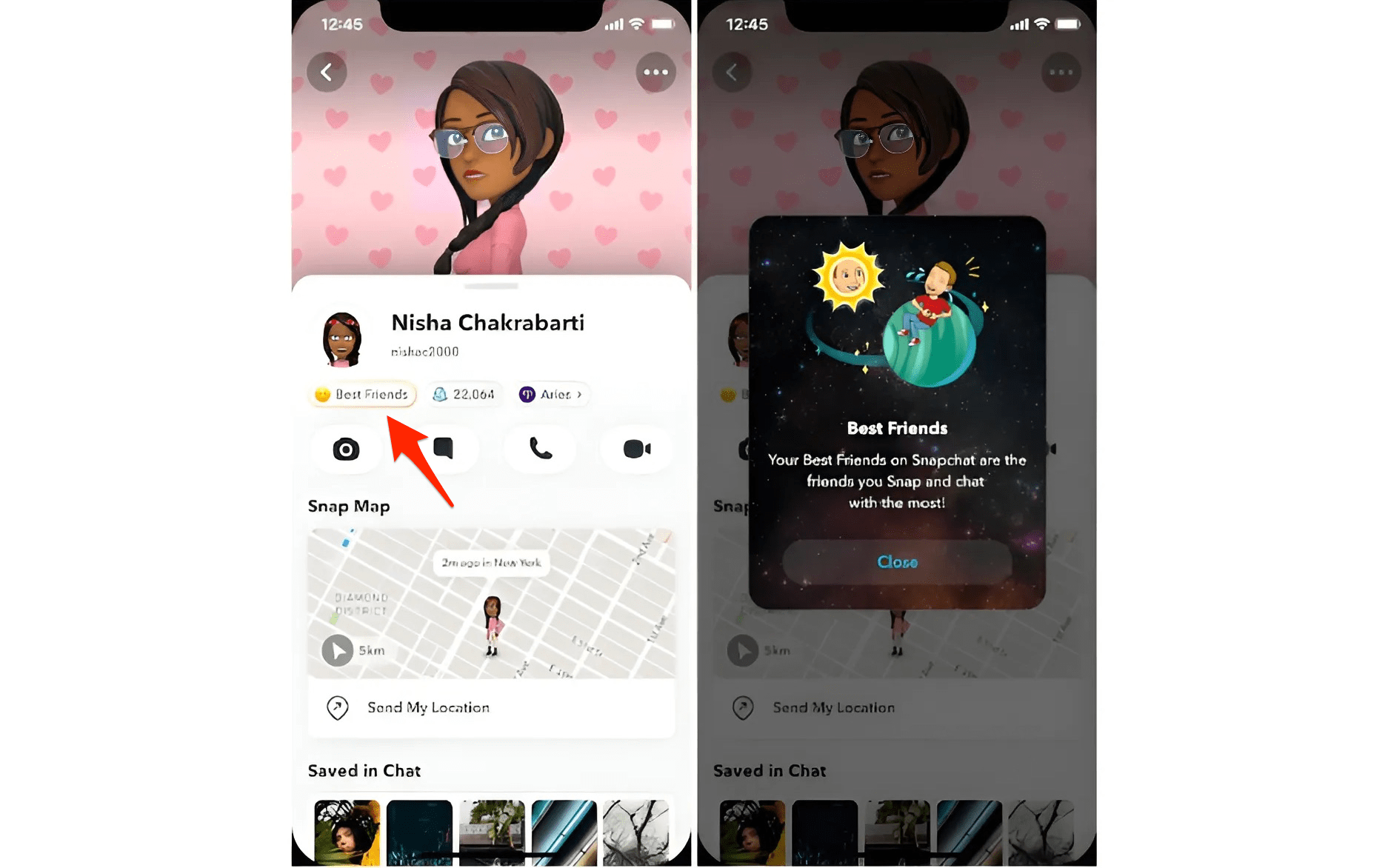

Once it is on, open a friend’s profile. If you are in each other’s top 8, you will see a gold-outlined Best Friends badge at the top of their profile. Tap and hold that badge and the solar system animation appears, showing which planet you are in their universe.
If you only see a Friends badge instead of Best Friends, it means you are in their top 8 but they are not in yours, or the reverse. The planet is still visible in this case, but the relationship is not mutual at that level.
You can also check your own Snapchat activity indicator settings while you are in there, since the two features sit near each other in the app’s profile menu. Both affect how visible your presence is to others.
What Snapchat Plus costs and what you get
The Friend Solar System is locked behind a paid subscription. Snapchat Plus costs $3.99 per month in the US, $21.99 for a six-month plan, or $39.99 annually, which works out to roughly $3.33 a month. Pricing varies by region.
The subscription also includes other features beyond planets, such as story rewatch indicators, custom app icons, priority story replies, and access to Snapchat My AI capabilities. Snapchat has also introduced additional tiers including Lens+ at $8.99 per month for exclusive AR lenses, and Snapchat Platinum at $15.99 per month for an ad-light experience.
The subscription has grown fast. According to Snap’s official newsroom, Snapchat+ surpassed 25 million subscribers in February 2026, making it one of the fastest-growing consumer subscription services globally. The Friend Solar System has been one of the most consistently cited reasons people subscribe.
Frequently Asked Questions
Do I need Snapchat Plus to see the planets?
Yes. The Friend Solar System is exclusively available to Snapchat Plus subscribers, which costs $3.99 per month in the US.
What does it mean if I am someone’s Mercury?
Mercury means you are their number one best friend on Snapchat. You are the person they snap, chat, and keep streaks with the most.
Can my planet ranking change over time?
Yes. Planet rankings update dynamically based on recent activity. A drop in snaps or chats with someone can shift your position within days.
Why can I not see the planets on my friend’s profile?
The Friend Solar System is off by default. Both you and your friend need Snapchat Plus, and the feature must be manually enabled from the Snapchat Plus settings page.
Is my planet position the same in everyone’s solar system?
No. Your position is calculated separately in each friend’s solar system based on how often you interact with that specific person.
What the planets do not actually measure
The Friend Solar System measures behaviour, not the depth of a relationship. That distinction matters more than it sounds.
A sibling you call every day but rarely snap could end up on Saturn while an acquaintance you trade memes with constantly sits on Mercury. The algorithm only sees what happens inside Snapchat. It has no awareness of phone calls, in-person time, or any other platform.
Snapchat itself has acknowledged the emotional sensitivity of this kind of ranking, which is part of why the feature defaults to off. You can disable it at any time from your Snapchat Plus settings without losing your subscription’s other features.
Used with that context in mind, the planets are a genuinely interesting mirror of your Snapchat habits. They do not define your friendships, but they do reflect exactly how you have been spending your attention on the app.