In the age of ultra-thin laptops, compact docks, and one-cable ecosystems, you’ve likely seen ports labeled USB-C 40 Gbps or Thunderbolt. But what exactly do those labels mean? More importantly, how do USB4 and Thunderbolt 4 differ or overlap? And what should you care about as a user, creator, or buyer? These are the questions we’ll untangle.
USB4 emerged in 2019 and is built on top of the tech originally pioneered by Intel’s Thunderbolt. Thunderbolt 4 arrived later as a stricter-certified implementation of USB4 capabilities. The result: ports that look the same (USB-C), but with big differences under the hood. Let me tell how how different these are from one another.
What is USB4
USB4 is the latest major revision of the USB standard (Universal Serial Bus) and uses the USB-C connector exclusively. Here are its key attributes:
- Supports data transfer speeds up to 40 Gbps in its full form.
- Allows for the dynamic sharing of the link’s bandwidth between data, display, and PCIe tunneling.
- Backward-compatible with previous USB versions (USB 3.x, USB 2.0) via USB-C physical connector
What is Thunderbolt 4
Thunderbolt 4 is essentially an implementation standard by Intel (and its ecosystem) that guarantees certain minimum capabilities using the USB-C connector
- Minimum data transfer rate of 40 Gbps (certified)
- Mandatory support for PCIe tunneling and docking, external GPUs, and dual 4K or single 8K display output.
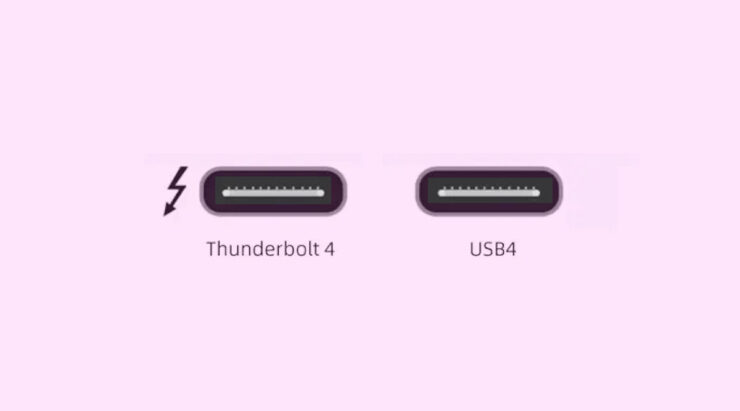
- USB-C connector with the lightning bolt logo that helps identify certified TB4 ports/cables.
Note: a Thunderbolt 4 port gives you predictable high performance and broad compatibility with docks/hubs.
USB4 vs Thunderbolt 4: Key Differences
While they share many traits, here are some of the practical differences you should keep in mind:
| Feature | USB4 | Thunderbolt 4 |
| Max theoretical speed | Up to ~40 Gbps (but can ship at lower) | Guarantee of 40 Gbps |
| Minimum speed | Could be 20 Gbps or less (depends on device) | Certified to full spec |
| PCIe tunneling | Optional | Mandatory |
| Display support | May support one display | Dual 4K or single 8K |
| Certification | NA | Certified program ensures compliance |
| I/O port | USB-C connector, but capabilities vary | USB-C connector, full capabilities assured |
So don’t just look at the rounded USB-C port and dig into what the port is certified to do.
Conclusion
USB4 and Thunderbolt 4 signal a real convergence of high-speed connectivity under the USB-C connector. For everyday users, this means fewer cables, fewer ports, and more power in one port. For pros and creators, it means you can confidently rely on one connector for storage, display, GPU, and charging.
If you've any thoughts on What is USB 4 Thunderbolt, then feel free to drop in below comment box. Also, please subscribe to our DigitBin YouTube channel for videos tutorials. Cheers!