A left swipe on the lock screen allows me to access the iOS camera instantly to click photos or videos without having to visit the App Library or scroll through the home screen to find the app.
It surely makes it convenient for me to use the camera app, but this can be problematic at times.
Recently, while taking out the iPhone from my pocket to answer a call, I saw that the camera app was open. Probably, an unintentional swipe on the screen had launched the camera.
Accidentally swiping on the iPhone lock screen and opening the camera is one of the undesirable experiences everyone often encounters on iOS.
I have experienced incidents where the iPhone camera turns on inside my pocket due to friction against the trouser fabric caused by movement. This leads to a significant battery loss on the iPhone.
I have found that people reported about pocket iPhone videos or photos happening due to the camera switching on automatically.
Also, if anyone has my iPhone, they can easily access the camera with a simple swipe. They won’t even need to enter a passcode or Face ID to unlock your device to use the camera.
I’m quite relieved that after all these years, iOS 26 offers an option to disable the lock screen swipe to launch the camera.
I turned off the swipe-to-open camera feature on iPhone
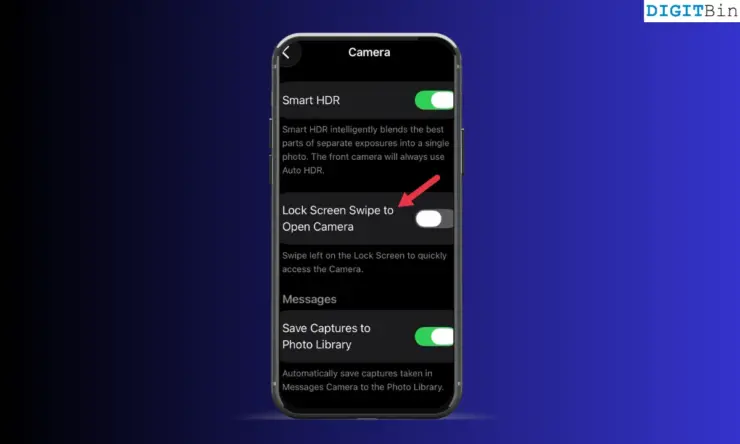
An iPhone must be on the latest iOS 26.1 or later build to offer the option in the iPhone camera settings to disable the camera access from the lock screen.
- Open the iPhone Settings app.
- Access the Camera settings.
- Turn off the Lock Screen Swipe to Open Camera.
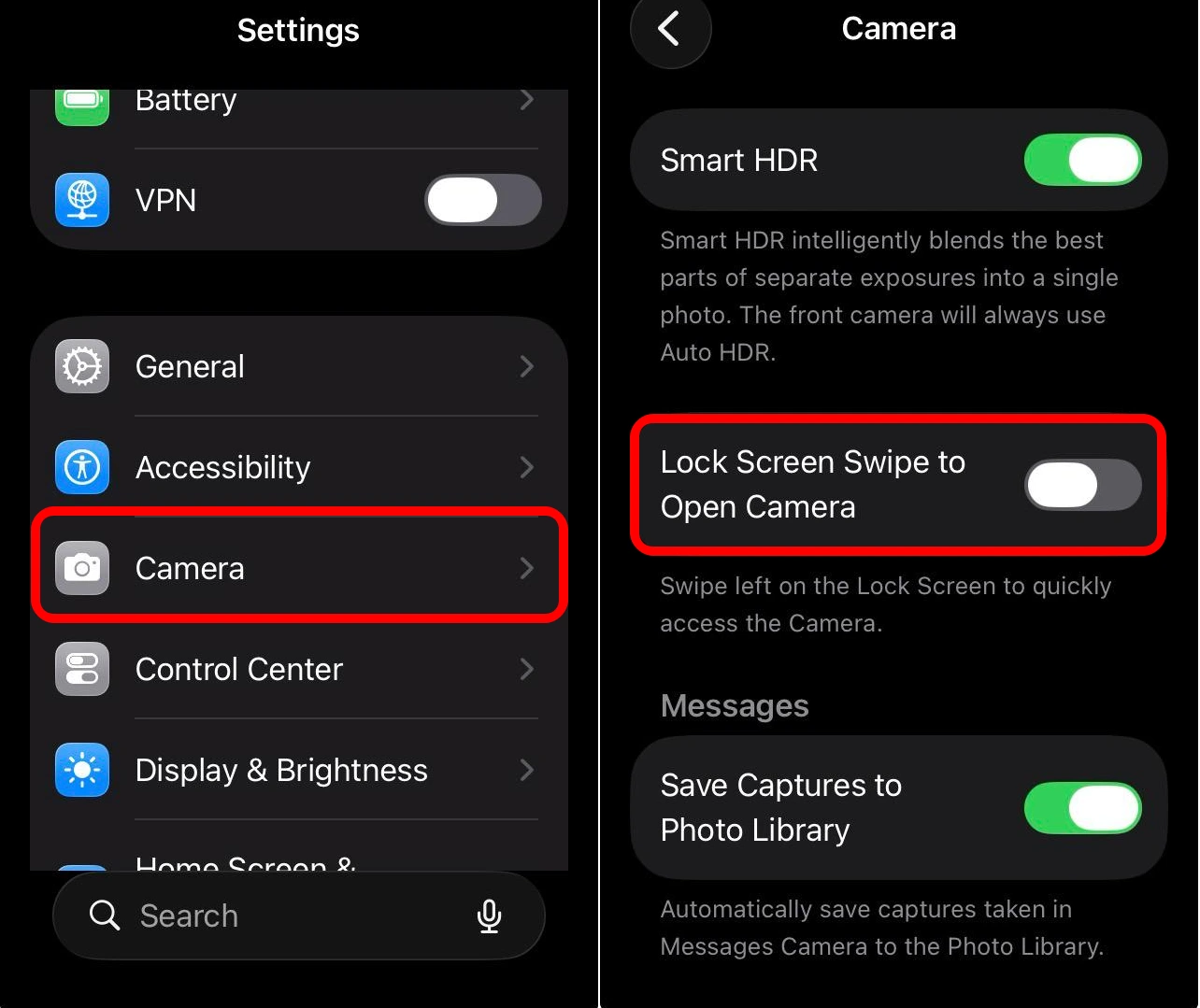

Now, accidental swiping on the lock screen won’t trigger the camera on your iPhone.
NOTE: This option is also available on iPadOS running on the latest iPadOS 26 to turn off the swipe-to-open camera on the lock screen.
I noticed that even though my iPhone was running iOS 26.1, the option “Lock Screen Swipe to Open Camera” was not showing up in the settings until I updated the build by installing the latest version of iOS 26.
The problem was not over yet. I was wondering if I could still accidentally launch the camera app from the iPhone lock screen widgets.
I remembered that the camera icon on the lock screen is paired with the flashlight icon. These shortcuts are placed by default on the iPhone lock screen. Unintentionally, if I tap the camera icon on the lock screen, it will launch the app even with the swipe action now turned off.
There is a neat little fix to this as well. I can remove the camera icon shortcut from the lock screen.
I also removed the camera icon shortcut from the iPhone lock screen
I don’t need the flashlight and the camera icon on my lockscreen. Also, I have accidentally tapped the camera icon on the lock screen on many occasions and turned it on. This makes the feature unhelpful for me. So, I have removed these iPhone shortcuts.
Even if I want to turn on the camera or the flashlight, I can command iOS virtual assistant Siri to launch either of the apps. If you cannot get the Apple virtual assistant to respond to your voice commands, reset Siri on the iPhone.
All the newer iPhone models come with the action button on the side to launch the camera.
So, I think it doesn’t make sense to have the camera shortcut on the lock screen, which may launch the app when I do not need it. I undoubtedly find it annoying.
To remove the camera shortcut icon from the iPhone lock screen,
- Press on the lock screen and unlock the iPhone to access the customization panel.
- Tap Customize.
- Press the – button over the camera icon to remove it from the lock screen.
- Tap Done to save the changes.
It is also possible to replace the camera shortcut with other apps by pressing the + icon on the lock screen customization panel to substitute the camera icon with other apps of my choice.
No more pocket iPhone videos
I prefer to launch the iPhone camera using Siri or the action button. I, along with many iPhone users, was wondering why Apple was so late to implement such a simple option in the iOS that allows removing the camera shortcut from the lock screen. Well, better late than never. With iOS 26, an unintended touch or swipe won’t trigger the camera anymore.
If you've any thoughts on I removed the camera from iPhone lock screen in iOS 26 – Now no more strange pocket photos, then feel free to drop in below comment box. Also, please subscribe to our DigitBin YouTube channel for videos tutorials. Cheers!