Searching Netflix has always been a small frustration hidden inside a bigger one.
You open the app, scroll past the same rows you saw yesterday, type something vague into the search bar, and end up watching nothing for twenty minutes before picking whatever was already on your home screen. This causes you to miss out on good titles.
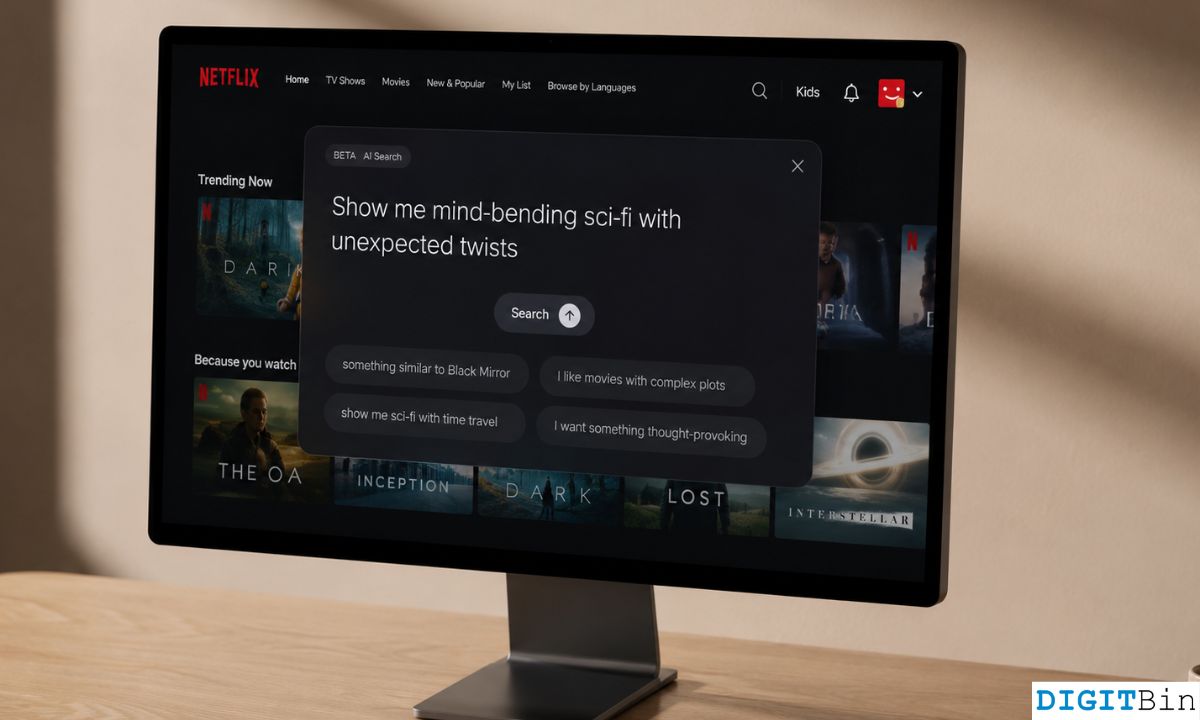
Netflix is now testing a new feature that tries to fix that. The streaming platform is running a limited beta test of an AI-powered search that offers mood-based prompts in the search panel. Clicking one of the prompts will lead you to a carousel of TV shows and movies.
You can even describe how you are feeling through text or voice query. All through the search panel. This reduces the friction of searching around for titles among the huge repository of content hosted on Netflix.
TL;DR: Netflix is running a limited beta of an AI voice search feature that understands mood-based prompts like “movies after a long, tiring day” or “something for background noise.” It is currently available to select users on Chromecast with Google TV and TCL Google TV devices in the US. The feature responds with text suggestions, not spoken replies. Personalisation based on your viewing history is not yet included.
What Netflix AI Search actually does?
The feature works through a new search bar labelled as “What are you in the mood for” on the Netflix home screen. Tapping it opens a set of pre-loaded mood prompts alongside a free-text input.
The prompts themselves are deliberately loose: “90s nostalgia,” “K-dramas for beginners,” “a drama that will keep me up.”
You can also ignore the suggestions and type or speak something more specific.
Behind the feature is a large language model that processes semantic intent rather than keyword matching. When you say “fun kids’ shows about death,” it does not return a blank result or route you to a documentary about war.
Early testers report it pulled up A Series of Unfortunate Events and Raising Dion for that exact query, which is the kind of contextual leap a keyword system cannot make.
One detail that catches people off guard: the AI does not talk back. Responses appear as text on the screen, not spoken audio. It is voice-in, text-out for now.
To opt for the new feature on Netflix,
- Open the Netflix app.
- Tap the search icon on the home screen or navigate to the row titled Try a new way to search, then tap Learn More.
- Tap on Try Now.
Which devices support Netflix AI search?
The beta is currently limited to Chromecast with Google TV and select TCL Google TV models in the United States.
Roku and Amazon Fire TV are not included at this stage.
iOS and Android app users are also outside this particular test, though a separate, earlier round of testing was reported on iOS in Australia and New Zealand using typed natural language queries. Whether those two tests converge into a single unified rollout is not yet confirmed.
Netflix has not announced a public release date for this feature.
Experts following the rollout suggest a broader launch could happen before the end of 2026, once Netflix adds personalisation layers to the system. That part matters more than it might seem.
The missing piece: No personalisation yet
As of May 2026, the AI search results are universal. They are based entirely on your prompt and the content metadata Netflix holds for each title, not on your actual watch history.
That means two people who type “something feel-good that I haven’t seen” get the same results.
The search does not yet know you have already watched Schitt’s Creek twice or that you always abandon thrillers halfway through.
Netflix has indicated the next phase of testing will connect the LLM-driven search to its personalisation engine.
Once that happens, a prompt like “a feel-good movie I haven’t finished” could theoretically surface something specific to your account. Until then, the mood matching is broad rather than tailored.
It is a real limitation for regular users, though the novelty of the search itself is enough to make browsing feel noticeably less tedious even without it.
How to use Netflix AI search?
If you are in the beta on a supported device,
- Open the Netflix app
- Tap the search bar at the top labelled as “What are you in the mood for?”
- Select one of the pre-loaded mood-based prompt suggestions or type your own query in natural language.
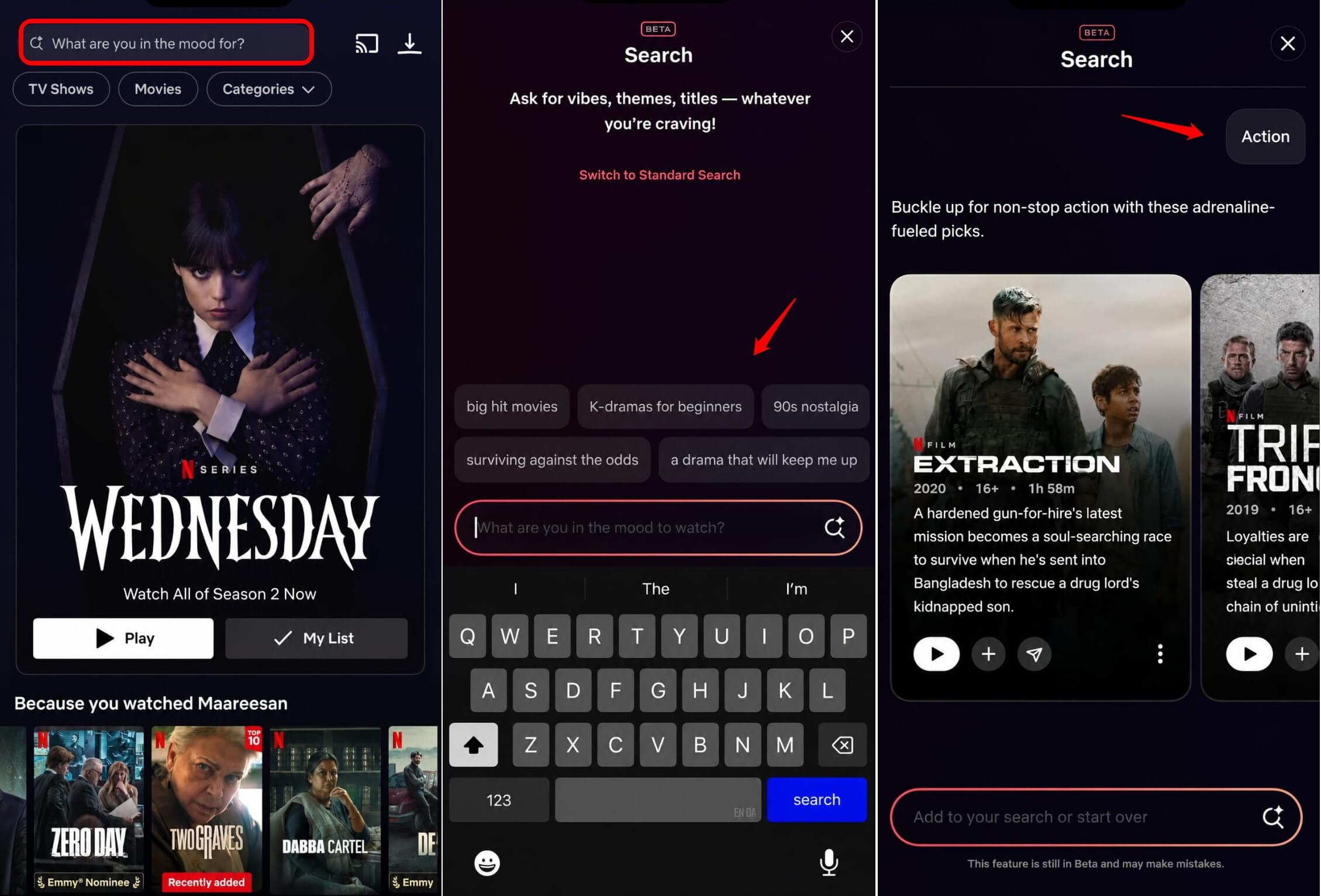

You may also speak out your query as a voice command.
The more specific your description, the more useful the results tend to be. “Something slow and quiet for a Sunday evening” works. So does “a documentary that isn’t depressing.”
You can even type a word such as “action”, and the most sought-after action movies in the Netflix catalogues will appear in the results.
Results display as a text-based list of titles. You can tap any result to go straight to the movie or TV series’ info page.
Netflix is rolling this feature out to a limited group of subscribers, and there is no opt-in available publicly at this stage.
If Netflix AI search is not available, you can instead use the Netflix secret codes to search content based on genres and unlock various content that you did not know existed on the streaming platform.
Why Netflix is doing this now?
Netflix has over 260 million subscribers worldwide, and its catalogue has grown large enough that finding something to watch has become its own problem.
The platform has long used machine learning to personalise its home screen rows, but those recommendations rely on viewing history and are passive. They surface content; they do not respond to how you feel on a given evening.
The shift toward intent-based search reflects a broader pattern across tech products right now. Voice assistants on smart TVs have existed for years, but most of them route through Google Assistant or Alexa and match keywords.
Netflix’s native AI search bypasses those assistants entirely, activating via the Netflix button on compatible remotes and operating directly within the app.
Whether it actually changes how people find content depends on how well the personalisation layer works once it arrives. The mood matching in isolation is a reasonable improvement. Connected to your actual viewing habits, it could be meaningfully better than the scroll.
As mentioned previously, Netflix has a huge content database, and choice paralysis could happen to anyone. It does get confusing at a point. “What should I watch?” thought followed by endless doom scrolling through the info pages of a dozen titles.
You want to relax by watching a title, but not sure how to go about it. You think of more options and alternatives. If that’s the case with you, check out some free Netflix alternatives that offer you more choices in terms of shows across the genres.
Frequently asked questions
Which devices support Netflix AI search?
The beta is currently available on Chromecast with Google TV and select TCL Google TV models in the US. Roku and Fire TV are not included in this test.
Does Netflix AI search use my watch history?
Not yet. As of May 2026, results are based on your prompt and content metadata only. Netflix plans to add personalisation in a future phase.
Does the AI reply with spoken audio?
No. You speak or type a query, and the results appear as text on screen. There is no voice output from the feature in its current form.
Can I use this on my phone?
The current beta is for Google TV devices only. A separate earlier test was run on iOS in Australia and New Zealand, but a unified mobile rollout has not been announced.
When will Netflix AI search be available to everyone?
Netflix has not given a public release date. Based on current reporting, a wider rollout is possible before the end of 2026, pending integration of personalisation features.