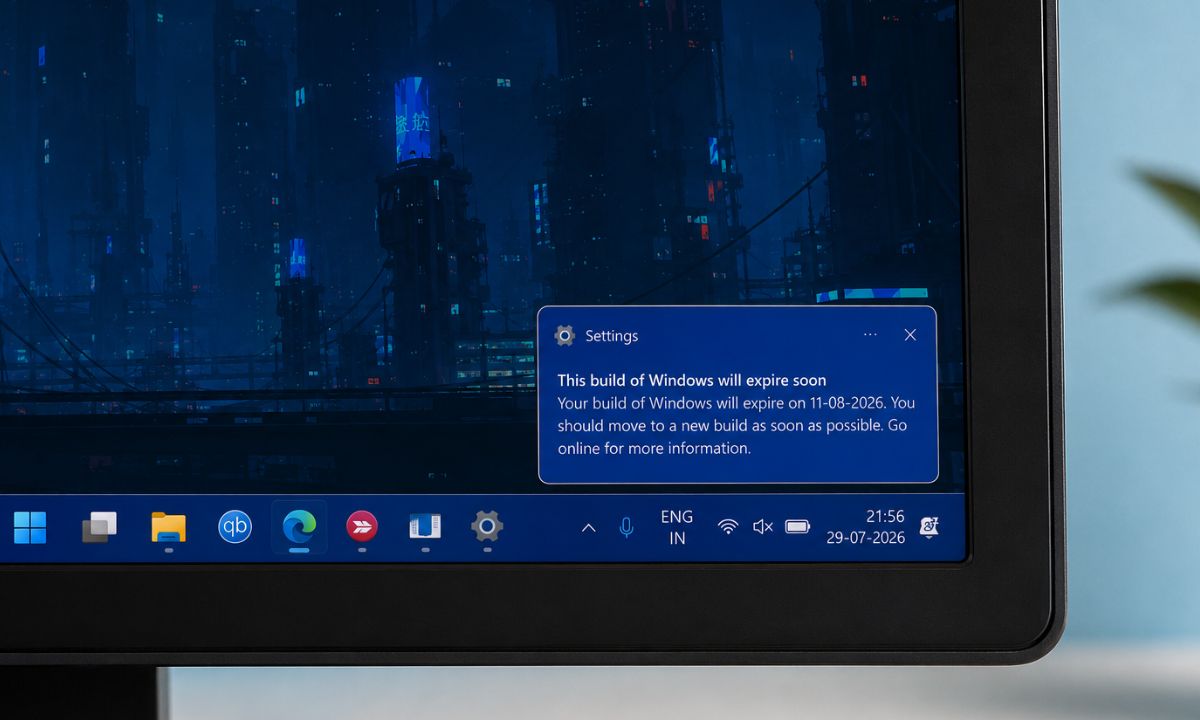
If you run a Windows Insider build and Settings just told you this build of Windows will expire soon, you have not done anything wrong.
I got the same notification on one of my laptops enrolled in the 25H2 Beta channel. It sat in the corner of the screen every time I opened my laptop for two days straight before I bothered clicking on the notification.
The short version: it is not a bug, and it is not your PC falling apart. It is a call for upgrading to a new version of the Insider build with a freshly issued license from Microsoft.
TL;DR: The warning appears because the certificate Microsoft uses to sign Windows Insider Preview builds expires on August 11, 2026. You fix it by installing a new build that carries the renewed certificate before that date, through Settings, then Windows Update, then Check for updates. It affects Experimental and Beta channel devices this year, not just Canary like in past renewals, and it does not touch your files, apps, or activation.
What does the expiring build warning actually mean?
The notification is tied to a routine certificate renewal, not a security problem. Also, it does not indicate any underlying issue with your device.
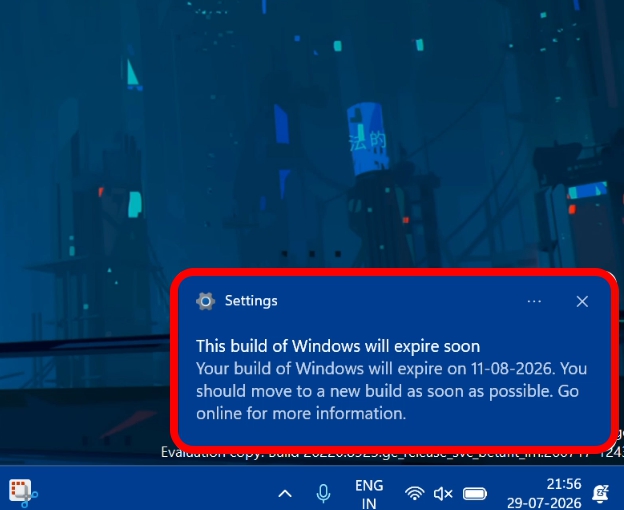
Windows Insider Preview builds are code-signed with flight certificates. Microsoft uses these certificates to verify that a build genuinely came from its own Insider pipeline before your PC installs it.
Those certificates carry an expiration date, and the current batch expires on August 11, 2026. Once a certificate expires, devices still running builds signed with it stop being offered new Insider updates.
So, your PC is not going to receive new software updates. Hence, the warning notification appears on your PC desktop to install a newer Insider/Experimental build as and when they roll out.
Microsoft has been explicit that this is planned maintenance. It is not a response to a security incident, and it will not affect your Windows license or activation status.
What is different this year is the reach. In previous renewal cycles, this mainly hit the Canary channel. For 2026, the renewal spans Experimental and Beta as well, because of a change in what the certificate actually signs.
| Channel | Affected by this renewal | Deadline | How to fix |
|---|---|---|---|
| Experimental | Yes | August 11, 2026 | Check for updates in Windows Update |
| Beta | Yes | August 11, 2026 | Check for updates in Windows Update |
| Release Preview | No | — | No action needed |
| Canary | Yes (as in past renewals) | August 11, 2026 | Check for updates in Windows Update |
How to check if your build is affected?
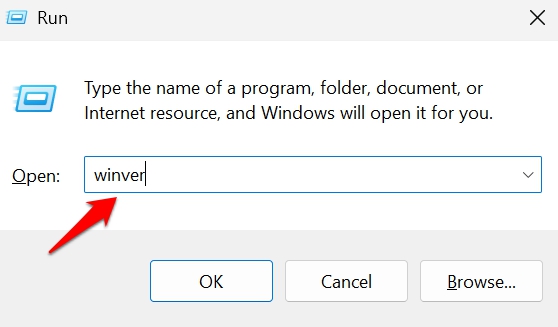
Press Windows key + R, type winver, and hit Enter.
The dialog that opens shows your current build number and an expiration date.
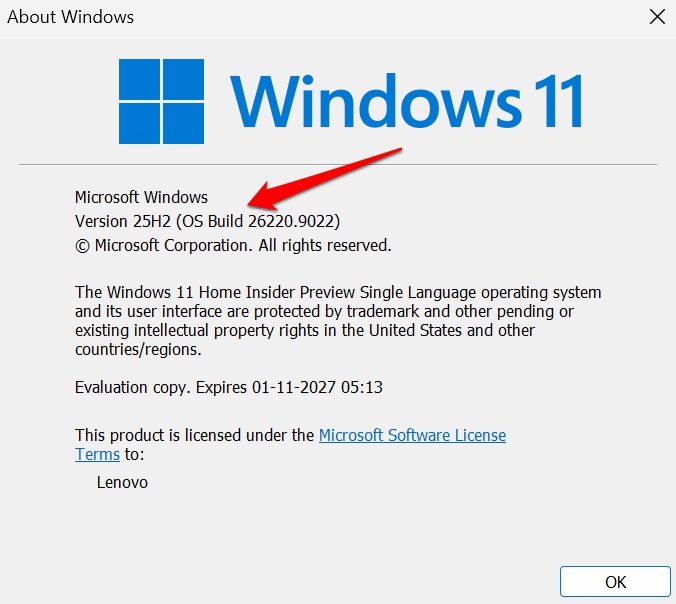
I ran this on the same laptop that had been nagging me and saw the build sitting well below the renewed minimum for its channel.
Your channel matters here, and it is easy to forget which one you picked months ago. Go to Settings, then Windows Update, then Windows Insider Program to confirm whether you are on Experimental, Beta, or Release Preview.
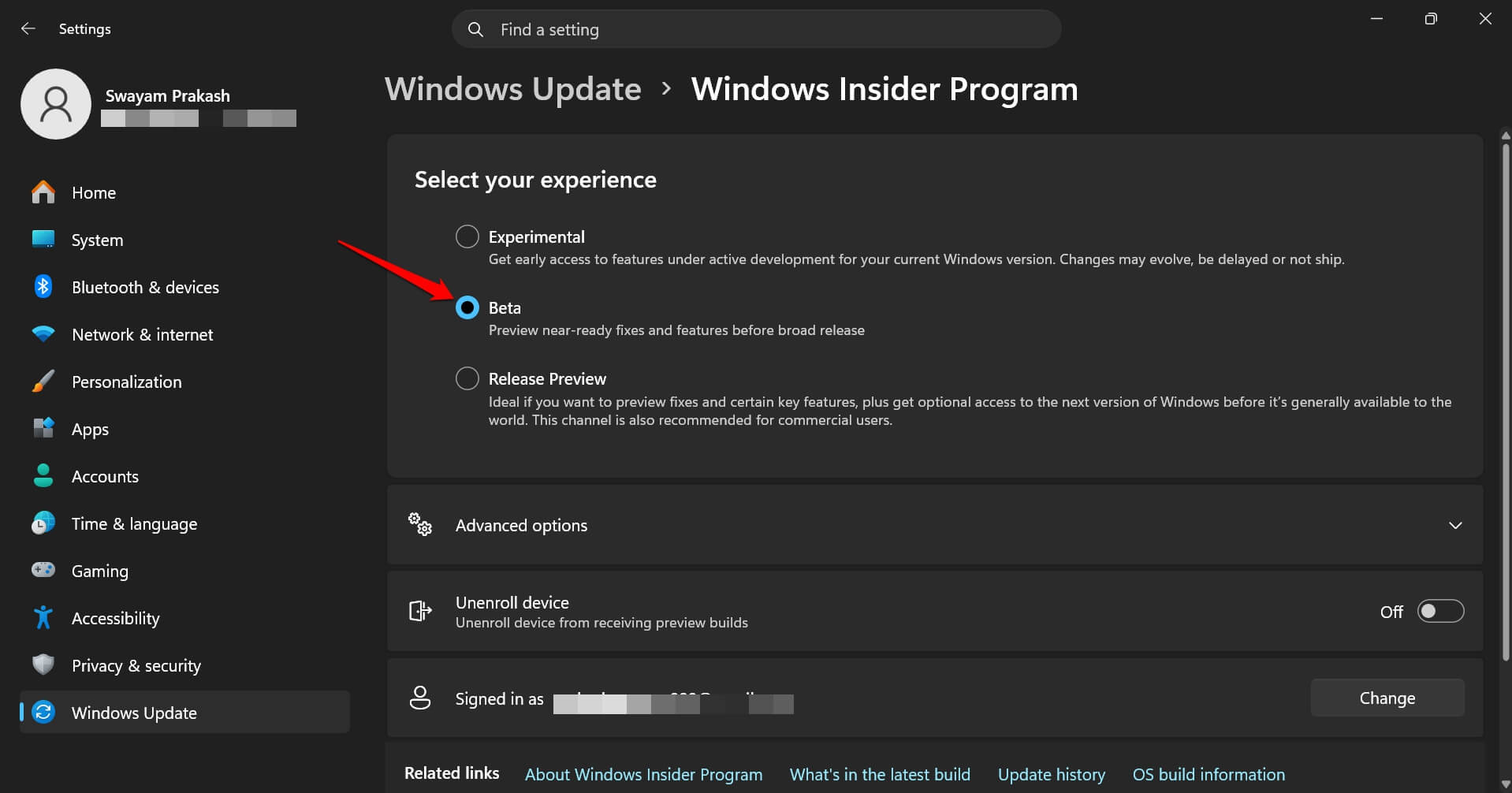
Release Preview is not part of this particular renewal. If that is your channel, the warning should not apply to you at all, and if you are seeing it anyway, something else is going on with that install.
One odd wrinkle worth knowing about before you panic. Some devices are showing a 2027 expiration date in winver even though they should be affected by the August 2026 deadline.
Microsoft has acknowledged this as a false positive tied to certain older builds and says the safest move is to just keep taking updates rather than trust that date at face value.
Fix it through a Windows Update
The fix does not involve reinstalling Windows or touching your Insider enrollment settings. There is no rocket science involved.
Open Settings, then Windows Update, then select Check for updates. Most likely, if your PC is connected to the internet, your PC will automatically download the newly rolled-out build version. All you have to do is install whatever build is offered and restart when it asks you to.
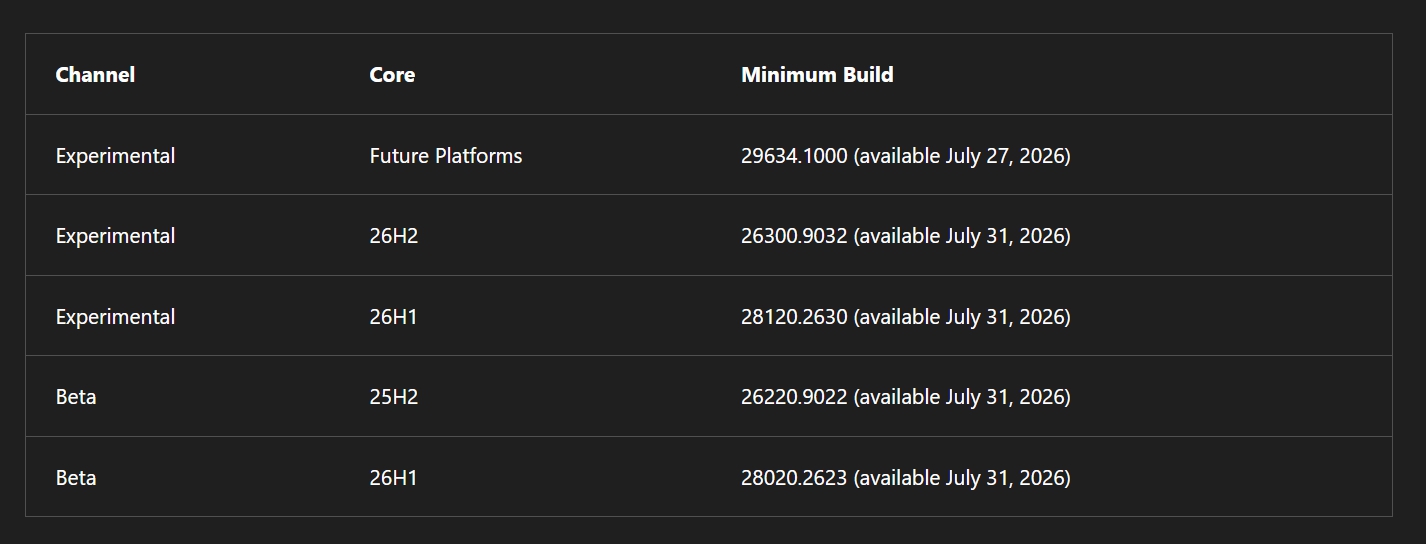
Depending on the channel your device is on, you can check the following table to expect the corresponding new build mentioned under Minimum build.
My laptop was on the 25H2 Beta channel, and I received the new 26220.9022 build as an upgrade from the previous version, which was set to expire on August 11.
That single restart was less dramatic than I expected. No new sign-in screen, no reconfigured taskbar, no missing desktop icons. The apps I had open before were still pinned exactly where I left them.
This is described as a one-time larger update. So, once the installation process starts, your PC will restart a couple of times. I suggest setting the computer on charging before you install the Windows update.
Once the renewed OS build lands, the device goes back to receiving regular Insider updates through the normal path, and you should not need to repeat this specific fix again until the next certificate cycle.
If your device supports multiple Insider installs, each one needs to be updated on its own. The certificate check runs per device, not per Microsoft account, so clearing it on your desktop does nothing for a laptop still sitting on an old build.
What happens if you miss the August 11 deadline?
Missing the date does not brick the PC or force a factory reset. Your PC will work normally as it is doing right now.
Devices still on the old certificate after August 11 will keep showing expiration warnings, and Windows Update will stop offering them new Insider Preview builds until they are brought current.
Your existing installation keeps working in the meantime. You lose the forward path to new preview builds, not the operating system itself.
To recover, the process is the same one you would have run before the deadline. Check for updates and install whatever applicable renewed build Windows Update offers. It is that simple.
Why this is separate from the Secure Boot certificate story
If you have seen headlines about Windows build and expiring certificates lately, there are actually two different things going on, and mixing them up leads to the wrong fix.
Microsoft has spent 2026 rolling out replacement Secure Boot certificates because the ones baked into most PCs since around 2011 are aging out. That work concerns firmware and the boot trust chain on essentially all Windows 11 devices, not just Insiders.
The Insider flight certificate covered in this article is unrelated. It only governs the signing and delivery of Insider Preview builds themselves, and it only matters if you are actually enrolled in the program.
A green Secure Boot status in Windows Security tells you nothing about whether your Insider install is on the renewed flight certificate. They are checked in different places and fixed through different updates, even though both show up as certificate deadlines in the same general timeframe.
Frequently Asked Questions
Does this affect my Windows license?
No. The certificate only governs how Insider Preview builds are signed and delivered, not activation or licensing.
Will I lose my files or apps if I install the new Windows build?
No. It installs like a normal Windows Update and should not require a clean install in most cases.
What if I am on the Release Preview channel?
Release Preview is not part of this certificate renewal, so the warning should not apply to that channel.
Is this the same as the Secure Boot certificate issue?
No. The Insider flight certificate only affects Preview build signing, while the Secure Boot renewal is a separate firmware-level change.
What happens if I miss the August 11 deadline?
Your PC keeps working normally, but Windows Update stops offering new Insider Preview builds until you install a renewed build.
It is simply a new Windows Build you must install
This kind of warning tends to read scarier than it is because “expire” sounds terminal.
In practice, it is closer to a subscription renewal notice than a countdown to a bricked laptop. Install the offered update before August 11, restart once, and the notification stops showing up on its own.
If you are running Insider builds on a machine you actually rely on day to day, this is also a reasonable prompt to double-check your default Windows settings are still what you expect, since preview builds occasionally reset a toggle or two during larger servicing updates like this one.