Chrome Canary on Android updates every day. Most builds add nothing you would notice. But over the past few weeks, a handful of AI features have moved from placeholder chips to things that actually respond when you tap them.
I installed Chrome Canary alongside stable Chrome on an Android phone and used it as my secondary browser for a week.
This is a separation of what I could test firsthand, what Google has announced is coming, and one feature that runs in the background without announcing itself.
TL;DR: Two AI features are testable in Chrome Canary on Android right now: Nano Banana image generation from the address bar, and a flag that routes searches to AI Mode by default (which Google says was added in error). Auto browse is coming to Android in late June 2026 but is not in Canary yet. Gemini Nano scam detection runs on-device in Chrome’s Enhanced Protection mode on desktop, with Android support planned. These are different things and the article treats them separately.
What Chrome Canary on Android actually does
Chrome Canary is Google’s most experimental public release channel. It installs as a separate app from the Google Play Store and does not replace stable Chrome. Both run independently with their own data and settings.
Canary receives builds daily with no QA pipeline between the commit and your phone. Features appear, disappear, and change between builds without notice. Some flags I enabled one day were gone the next.
That is normal for this channel, not a bug. The canary build is exclusively meant for testing and re-testing of Chrome features before it is deployed on the stable channel.
The AI experiments in Canary right now fall into three distinct categories, and mixing them up is where most coverage of Chrome’s AI features goes wrong.
I tested two of them directly. The third is announced, but I could not find it yet in the Chrome Canary build on Android.
What I actually tested: Nano Banana and AI Mode
Nano Banana is Google’s internal codename for its AI image generation tool, powered by Gemini 2.5 Flash.
Android Authority confirmed it was working in Chrome Canary on Android in late November 2025, citing screenshots from Windows Report.
I found it present in current Canary builds on Android as well.
The entry point is a small plus icon that appears when you tap the address bar. Tapping it opens a short menu with Camera, Gallery, Files, AI Mode, and Create image (with a banana icon beside it).
Selecting Create image adds a chip below the address bar and opens a prompt box. You describe what you want, and the image generates inline without leaving the current tab.
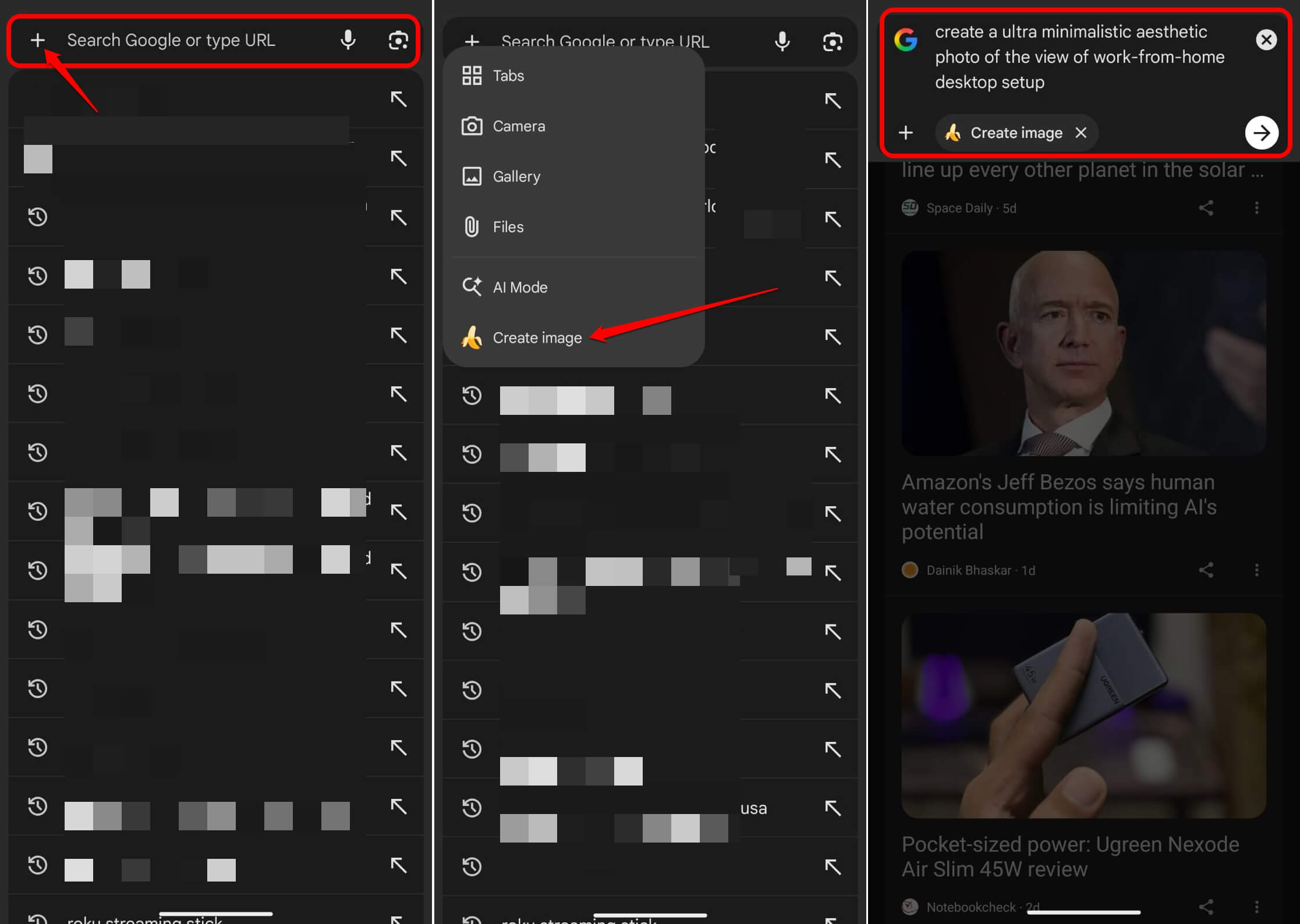
In practice, it works. The first image I generated took about eight seconds. Subsequent ones were faster.
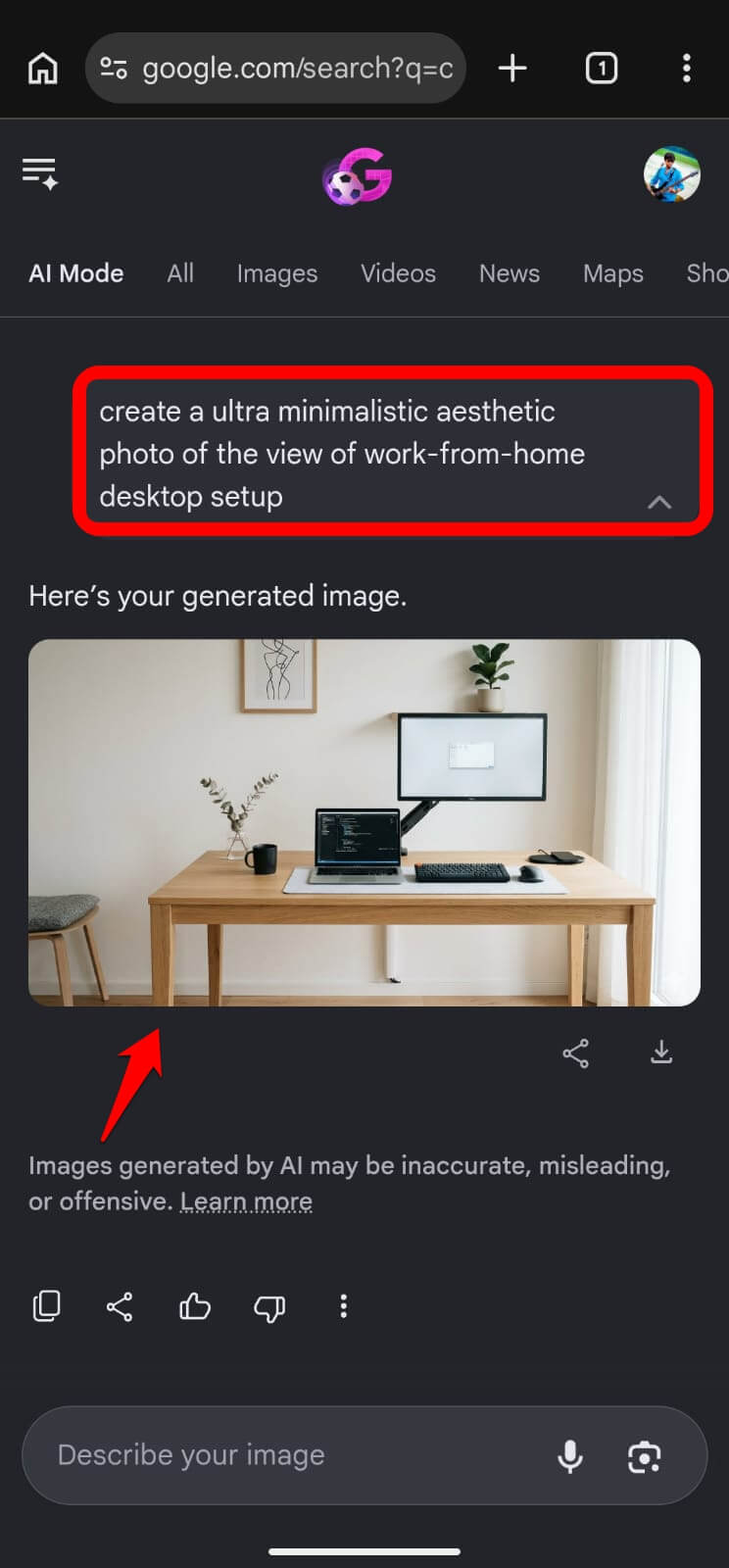
The output quality is roughly what you would expect from a mid-tier image generator. What makes it interesting is the location. Having it in the address bar means you never break whatever you are doing to open a separate tool.
The AI Mode default flag is the other feature I tested directly.
The flag appeared in early June Canary builds and was quickly reported by Gadget Hacks and others. Google VP Rajan Patel responded on X, saying it was an error and that making AI Mode the default is not planned.
The flag’s internal description reads: AI mode will remove verbatim suggestions from the suggestion list.
I enabled it at chrome://flags, searched for AI Mode, set it to Enabled, and relaunched.
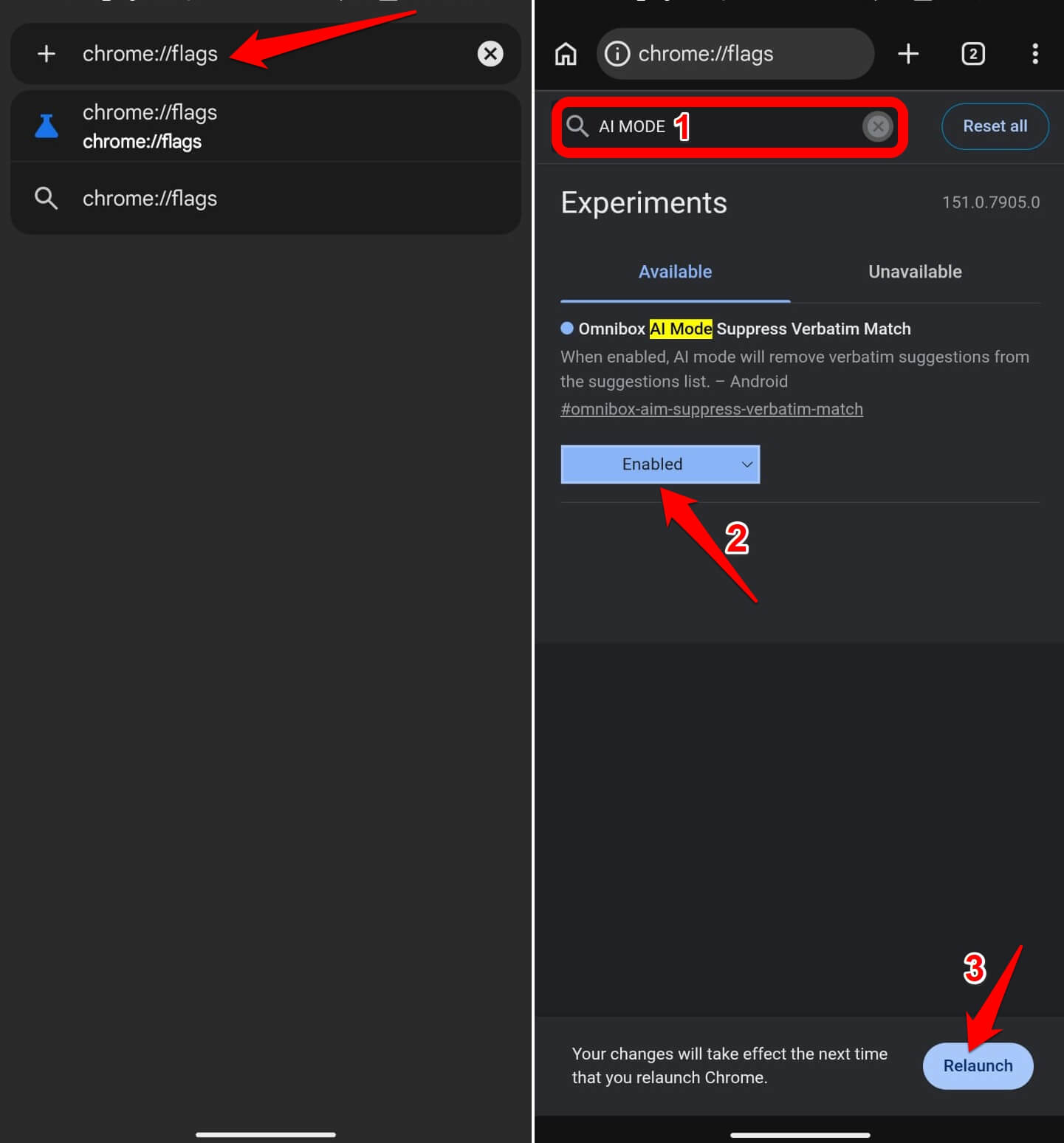 Address bar searches stopped producing a results page and started opening a conversational panel instead.
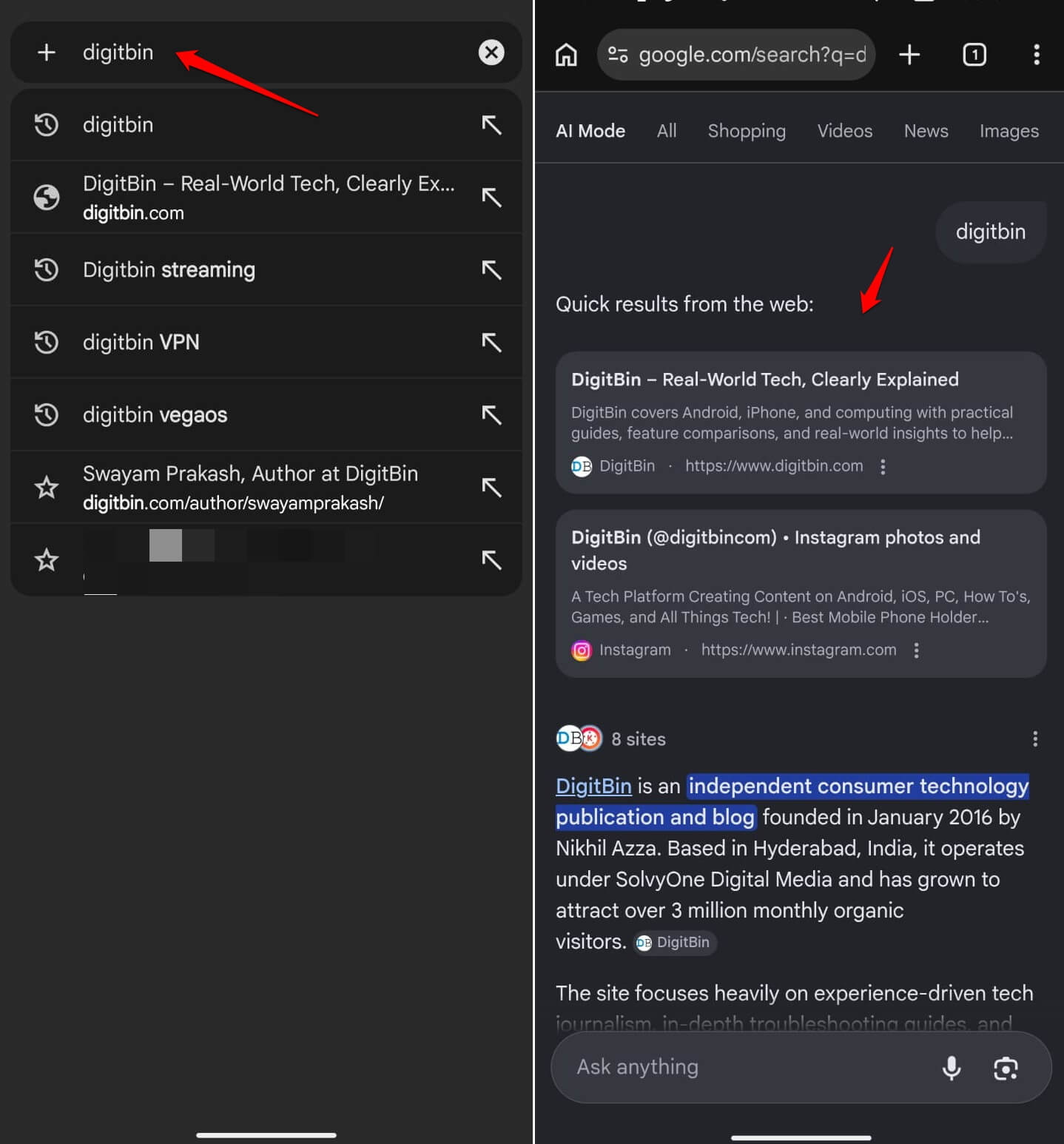
The first day, the experience with this Chrome AI feature felt genuinely different. Research queries worked well in the chatbot format. Quick lookups felt slower because I had to read rather than skim.
By day two, I kept reaching for the back button expecting a results page that was no longer there.
Turning it off felt immediately correct. The habit conflict was more disruptive than I expected, and that probably explains why Google says it is not planning to make this default.
What Google has announced but I could not test
Auto browse is the most substantive AI feature coming to Chrome on Android.
Google confirmed at I/O 2026 that auto browse is launching on Android in late June 2026, initially on devices with 4GB of RAM or more with the device language set to English.
This feature lets Chrome handle tasks like booking parking or finding in-stock items by navigating autonomously, with a confirmation step required before any sensitive action. It requires a Google AI Pro or AI Ultra subscription.
Auto browse is not in Chrome Canary on Android as of this writing. I could not test it. Everything written about it here comes from Google’s own I/O 2026 announcement, not from the Canary build on my phone.
The full Gemini sidebar integration, which lets you ask questions about your open tabs and connect to Calendar, Keep, and Gmail from a web page, is also announced for Android in late June alongside auto browse. It has been available on desktop Canary for several months.
| Feature | Testable in Android Canary now | Source | Notes |
|---|---|---|---|
| Nano Banana image generation | Yes | Android Authority, Windows Report | Plus icon in address bar |
| AI Mode default search flag | Yes, via chrome://flags | Gadget Hacks, 9to5Google | Google says it was added in error |
| Auto browse | No | Google I/O 2026 announcement | Coming late June, AI Pro/Ultra only |
| Gemini sidebar with tab access | No | Google I/O 2026 announcement | Desktop Canary only currently |
| Gemini Nano scam detection | Partial | Google, Infosecurity Magazine | Desktop Chrome 137+ with Enhanced Protection |
The background feature worth knowing about
Gemini Nano scam detection is the one AI feature in Chrome that does not announce itself. It runs inside Chrome’s Enhanced Protection mode, which is the highest tier of Safe Browsing and requires opting in through Chrome settings.
When Enhanced Protection is on and you visit a page Chrome’s on-device model flags as suspicious, Chrome surfaces a warning before you interact with anything.
The model evaluates page content locally, which means nothing is sent to Google’s servers during the analysis.
Gemini Nano scam detection shipped in Chrome 137 on desktop. Android support is planned, but Google has not confirmed a specific timeline.
To check whether it is active on your device,
- Go to Chrome://settings, search for Safe Browsing.
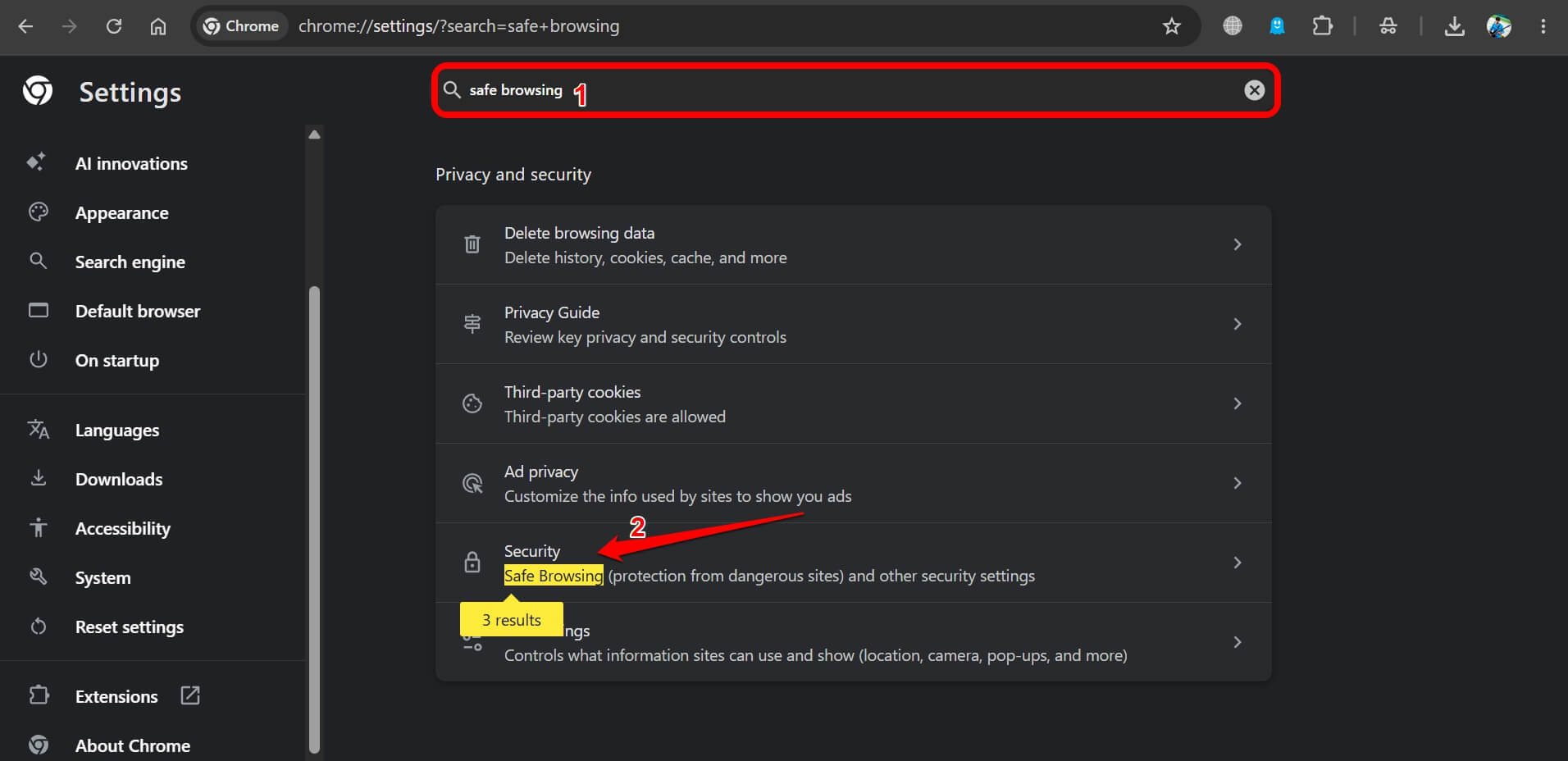

- Confirm Enhanced Protection is selected.
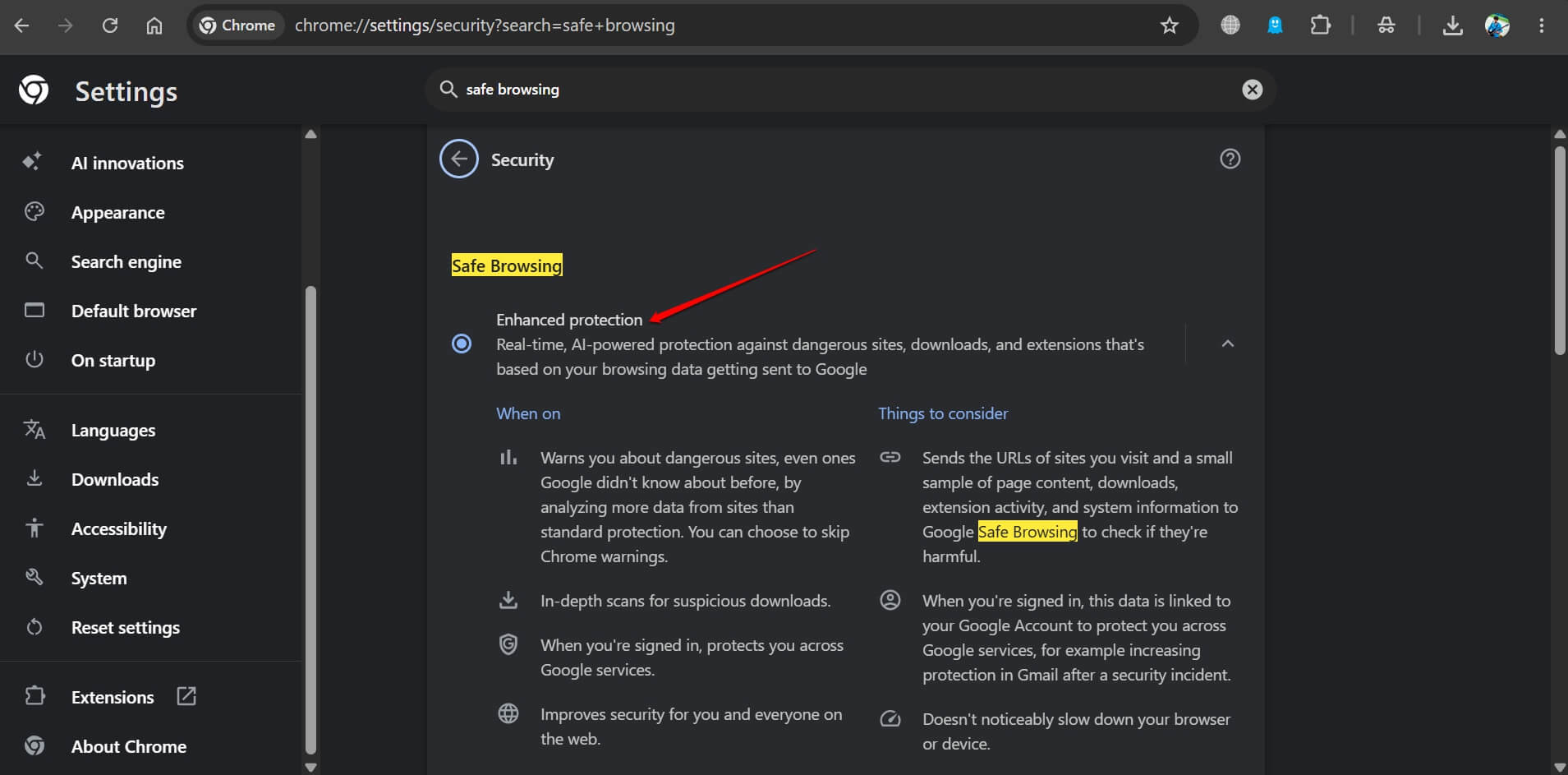

Standard Protection on Chrome does not include the Gemini Nano layer.
Frequently asked questions
Is Nano Banana available in Chrome Canary on Android?
Yes. Nano Banana image generation works in current Chrome Canary builds on Android. Tap the plus icon in the address bar and select Create image.
How do I enable the AI Mode default flag in Chrome Canary?
Go to chrome://flags in Chrome Canary, search for AI Mode, and set it to Enabled, then relaunch. Note that Google has publicly said this flag was added in error and is not planned to ship.
When is auto browse coming to Android?
Google confirmed at I/O 2026 that auto browse is coming to Android in late June 2026, starting with devices with 4GB of RAM or more running English. It requires a Google AI Pro or AI Ultra subscription.
Does Gemini Nano scam detection work on Android?
Gemini Nano scam detection currently runs on Chrome 137 and later on desktop with Enhanced Protection mode enabled. Android support is planned, but Google has not confirmed a timeline.
Should I use Chrome Canary as my main browser on Android?
No. Chrome Canary is unstable by design and updates daily without testing. Features come and go randomly. Install it alongside the stable Chrome build for experimentation only.
The line between testing and announcing
Most coverage of Chrome’s AI features blends Canary observations, Google announcements, and roadmap speculation without separating them. That makes it hard to know what you can actually try today.
What you can try today in Chrome Canary on Android: Nano Banana from the address bar, and the AI Mode default flag if you want to understand what Google briefly considered before walking it back.
What is coming in late June but is not testable yet: auto-browse, the full Gemini sidebar, and tab-aware AI assistance. Those are real features with confirmed timelines. They are just not here yet. We will test them and share with you right when they become available.