
Skip to content
  • Home
  • Android
  • iPhone
  • Browser & Internet
  • Streaming
  • Computing
  • AI

DigitBin

Tagged: Encrypt

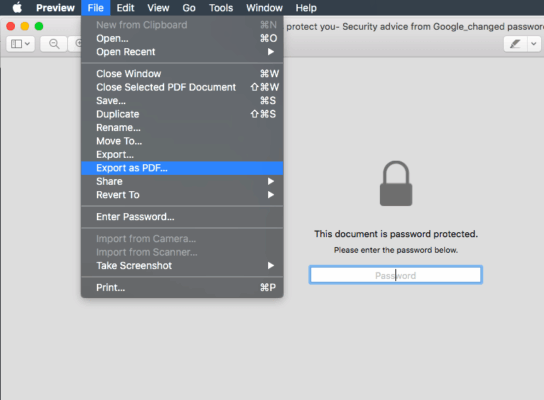
  • Preview File Export as PDF and Menubar to Change PDF Password
    Computing

    Change or encrypt PDF file in Mac OS without software, but how?

    You can easily change or encrypt PDF password in Mac OS without using any password removal software using built-in MAC preview, just go to the File menu and Export with different encryption password.
    Kushal Azza · Apr 8, 2026

Recent Posts

  • why I use HBO Max streaming service

    I cancelled Netflix, Max, and Hulu then came back to just one

  • google gemini honest review

    Gemini is on everything now and here’s what I actually use it for

  • Samsung Galaxy Z Fold 8 and ‘Wide’ model could reshape foldables: What we know 1

    Samsung Galaxy Z Fold 8 and ‘Wide’ model could reshape foldables: What we know

  • Gemini Powered Siri Concept

    Siri is getting Gemini, but It’s not the upgrade you think

  • windows defender vs Malwarebytes comparison

    I stopped using Windows Defender and switched to Malwarebytes and here’s why

You may Also Like

  • How to Use Bard to Search a YouTube Video

  • How to Fix Microsoft Store is Not Updating the Apps?

  • How To Create Your Own Snapchat Filters?

  • iMessage on Windows 11: Here’s How to use it

  • Learn Coding | Best Apps for Programing Courses

Site Safety

DigitBin Verified Site Safety Logo

✓ Site Safety Verified by VirusTotal


DigitBin Categories

  • AI (8)
  • Android (273)
  • Browser & Internet (175)
  • Computing (621)
  • iPhone (415)
  • Social Media (304)
  • Software (402)
  • Streaming (79)
  • Tech Tips (677)

DigitBin Pages

  • About Us
  • Meet Our Team
  • Contact Us
  • Privacy Policy
  • Sitemap

DigitBin © 2026. All Rights Reserved.