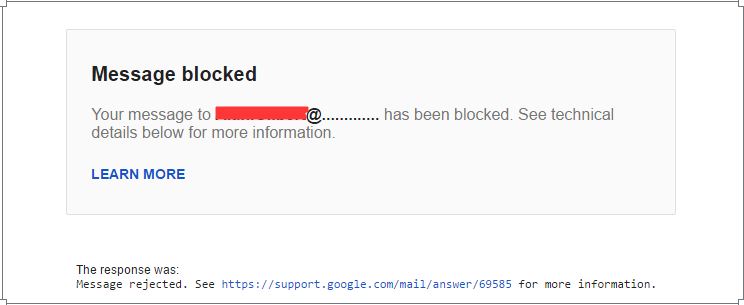
Recently, a lot of Gmail users have filed the complaint about Message Blocked error in Gmail community forum. However, the forum pro user (or Guru’s) aren’t unable to answer the exact reason behind this block. While navigating through a couple of thread I came to know the reason why exactly the message is being rejected and how to avoid such situations.
Basically, the Gmail response is message rejected. That means, the Google mail itself aborted the message sending actions to avoid uncertain situations.
Why Gmail Message Blocked?
I’ve outlined the possible reason why the Google Mail message is being blocked. The most common mistakes are basically while entering the email address of the recipient.
- Incorrect Email Address.
- Dot or period at end of email ID.
- Spelling mistake or error.
- Spacing the email addresses.
This errors would generally bounce back your sent email, however, continuously sending this mailer to these unavailable mail address could possibly result to message rejection and blocking.
The other factors that are also being considered are to avoid spammers and the Google started blocking those emails as well.
- Sending bulk mailer in Cc and Bcc – strict indication of spam.
- Too many suspicious links that are being continuously marked as spam by recipients.
- Cascading forms and other links to collect the user’s personal data.
- Recipients are marking your email as spam.
How to avoid Message Blocked error?
There are few ways that would help in avoid this situation:
- Very first thing is to check the recipient email address are correct without any error or mistakes as mentioned above. If you receive any no email ID exist bounce back, then its better to remove the email address form contact list to avoid re-sending the email again.
- It not advisable to send bulk emails to Cc or Bcc, rather create a Google group or Yahoo group including all the email addresses and send the email in one shot.
- It’s strictly prohibited to collect any personal information using email in any mode (forms, website links, etc.). Google algorithm is smart enough to catch the spammers and block them permanently.
- Lastly, if the email is continually blocked, then wait for at least 24 to 48 hours. Also, precheck if there is an issue with mailing server that might be also causing the blocker. If you feel that something isn’t working intended, then reporting the error to Gmail team would be the best bet.
Hope this help with the smooth function of Gmail, you can read more about rejected mail here. Cheers!
This post was last modified on May 29, 2018 1:55 pm

View Comments
I am also having this problem, as is my boss. We have found it to happen primarily with other companies. Our bank, our CPA, the county sheriff's office and a couple of our customers. I do not have any links in my signature or in emails I send out. Our bank and CPA got it fixed on their end, but there is still a problem with others. It happens out of the blue and randomly. I just can't help but think it is simply a conflict with something in gmail and various security software. I do with they would figure it out. Oh and just to note: I do not know exactly what the bank and CPA did to correct problem, but I do know that we weren't blacklisted or in any way purposefully blocked.
I registered a new gmail account to send emails to 450 members. Each time I tried to send BCCs to all members, all emails were blocked. These same emails weren't blocked on a second gmail account. I tried sending (up to) 90 at a time and that worked!